
Contact Form Testing
Contact Form Test Cases That Verify the Lead Actually Arrives
A contact form is not working merely because the browser displays "Thank you."
A complete contact form test should verify four separate outcomes: the browser accepts valid input and rejects invalid input, the server processes exactly one submission, the submitted data reaches the correct inbox, CRM, database, or admin panel, and the user receives an accurate result and can recover when submission fails.
This guide contains 32 contact form test cases covering validation, submission reliability, delivery, accessibility, abuse protection, and production behavior.

The Minimum Contact Form Smoke Test
When time is limited, start with these eight cases:
| ID | Test | Failure it can reveal |
|---|---|---|
| CF-01 | Submit all required fields with valid data | The primary contact flow is broken |
| CF-03 | Submit with all required fields empty | Required-field validation is missing |
| CF-05 | Enter an invalid email address | Email validation accepts unusable data |
| CF-14 | Click Submit twice quickly | Duplicate leads or duplicate notifications are created |
| CF-17 | Submit while the server returns an error | The form displays a false success state or loses user data |
| CF-20 | Inspect the saved submission | The browser succeeds but no record is stored |
| CF-23 | Confirm the internal notification arrives | The request is stored but never reaches the team |
| CF-32 | Repeat the flow in production | Environment-specific routing or credentials are broken |
These cases do not replace the full set. They identify whether the form's primary business path is operational.
Define the Delivery Path Before Writing Test Cases
Before testing, establish where a valid submission is supposed to go. A typical contact flow is:
Visitor -> browser validation -> form request -> application server -> database or form storage -> email, CRM, help desk, or admin panel -> assigned recipientSome forms use only part of this chain. Others send the same submission to several destinations.
Document required and optional fields, validation rules, expected success state, storage destination, notification recipients, CRM or help-desk routing, confirmation email behavior, analytics events, spam protection, and expected behavior when a downstream system is unavailable.
A test case cannot have a reliable expected result when the delivery path itself is undefined.
Contact Form Input and Validation Test Cases
| ID | Scenario | Expected result | Evidence |
|---|---|---|---|
| CF-01 | Submit all required fields with valid realistic data | The form is accepted and the configured success state appears | Screenshot, response status, submission identifier |
| CF-02 | Leave every optional field empty | The form submits without errors for optional data | Successful submission and stored record |
| CF-03 | Submit with all required fields empty | Submission is blocked and every missing required field is identified | Visible validation messages |
| CF-04 | Omit one required field at a time | Only the relevant field is reported as invalid | Field-level error and focus position |
| CF-05 | Enter malformed email values such as user, user@, or @example.com | Invalid values are rejected with a useful instruction | Error message and absence of a submitted record |
| CF-06 | Use valid but less common email formats, including subdomains and plus addressing | Supported valid addresses are accepted | Successful submission |
| CF-07 | Add leading and trailing spaces to text and email fields | Values are trimmed or handled according to the specification | Stored value and delivered notification |
| CF-08 | Enter the minimum permitted message length | The exact lower boundary is accepted | Successful submission |
| CF-09 | Test the maximum permitted length and one character above it | The maximum is accepted; the over-limit value is blocked or handled explicitly | Validation result and stored value |
| CF-10 | Enter apostrophes, hyphens, accented characters, non-Latin text, line breaks, and emoji | Legitimate text remains readable and does not break submission | Stored and delivered content |
| CF-11 | Change a value that controls conditional fields | Dependent fields appear, disappear, and become required only under the correct conditions | UI state and stored field set |
| CF-12 | Bypass or disable client-side validation and submit malformed data directly | Server-side validation rejects invalid input and does not create a usable record | Network response and storage check |

Do not reject normal names such as O'Connor, Anne-Marie, or names written outside the Latin alphabet simply because a restrictive validation rule is easier to implement.
Validation should protect the workflow without inventing unnecessary restrictions on legitimate users.
Submission and Recovery Test Cases
| ID | Scenario | Expected result | Evidence |
|---|---|---|---|
| CF-13 | Click Submit once with valid data | The button enters a clear processing state and the request is sent once | Network request and button state |
| CF-14 | Double-click or repeatedly press Submit | Only one actionable submission is created | One stored record and one notification |
| CF-15 | Keep the request pending for several seconds | The user sees progress and cannot accidentally create duplicates | Loading state and request count |
| CF-16 | Interrupt the network during submission | The form shows a failure state rather than a false success message | Error state and absence of delivery |
| CF-17 | Return a server-side 4xx or 5xx response | The user receives an accurate error and no success state is shown | Response, UI state, and storage check |
| CF-18 | Correct the problem and retry after a failed submission | Entered data remains available where appropriate and the retry succeeds once | Preserved values and successful retry |
| CF-19 | Refresh the success page or navigate Back and forward again | The previous request is not silently submitted a second time | Record count and notification count |
A contact form should distinguish three states clearly: validation failed before submission; submission was attempted but failed; submission completed successfully.
Using the same generic message for all three states makes both testing and user recovery harder.
Storage, Notification, and Routing Test Cases
| ID | Scenario | Expected result | Evidence |
|---|---|---|---|
| CF-20 | Submit one valid request and inspect storage | Exactly one record exists with the correct timestamp and status | Database, admin panel, or form-entry record |
| CF-21 | Compare every submitted field with the stored record | Field names and values are mapped correctly without truncation or swapping | Submitted payload versus stored data |
| CF-22 | Select different inquiry types, products, locations, or departments | Each submission reaches the configured destination or owner | Recipient, queue, team, or assignment |
| CF-23 | Check the internal notification email | The message reaches the intended inbox and is not silently discarded | Inbox, spam folder, mail logs, or provider status |
| CF-24 | Inspect the notification sender, subject, body, and Reply-To | The team can identify the request and reply to the visitor correctly | Email headers and reply behavior |
| CF-25 | Verify the user confirmation email, when enabled | It is sent only after a successful submission and contains accurate expectations | User inbox and message content |
| CF-26 | Inspect the CRM or help-desk record | Source, owner, campaign, consent, tags, and deduplication follow the configured rules | CRM or help-desk record |
| CF-27 | Inspect analytics and conversion tracking | The success event fires once after real success and not after validation or server failure | Analytics debug view or event log |
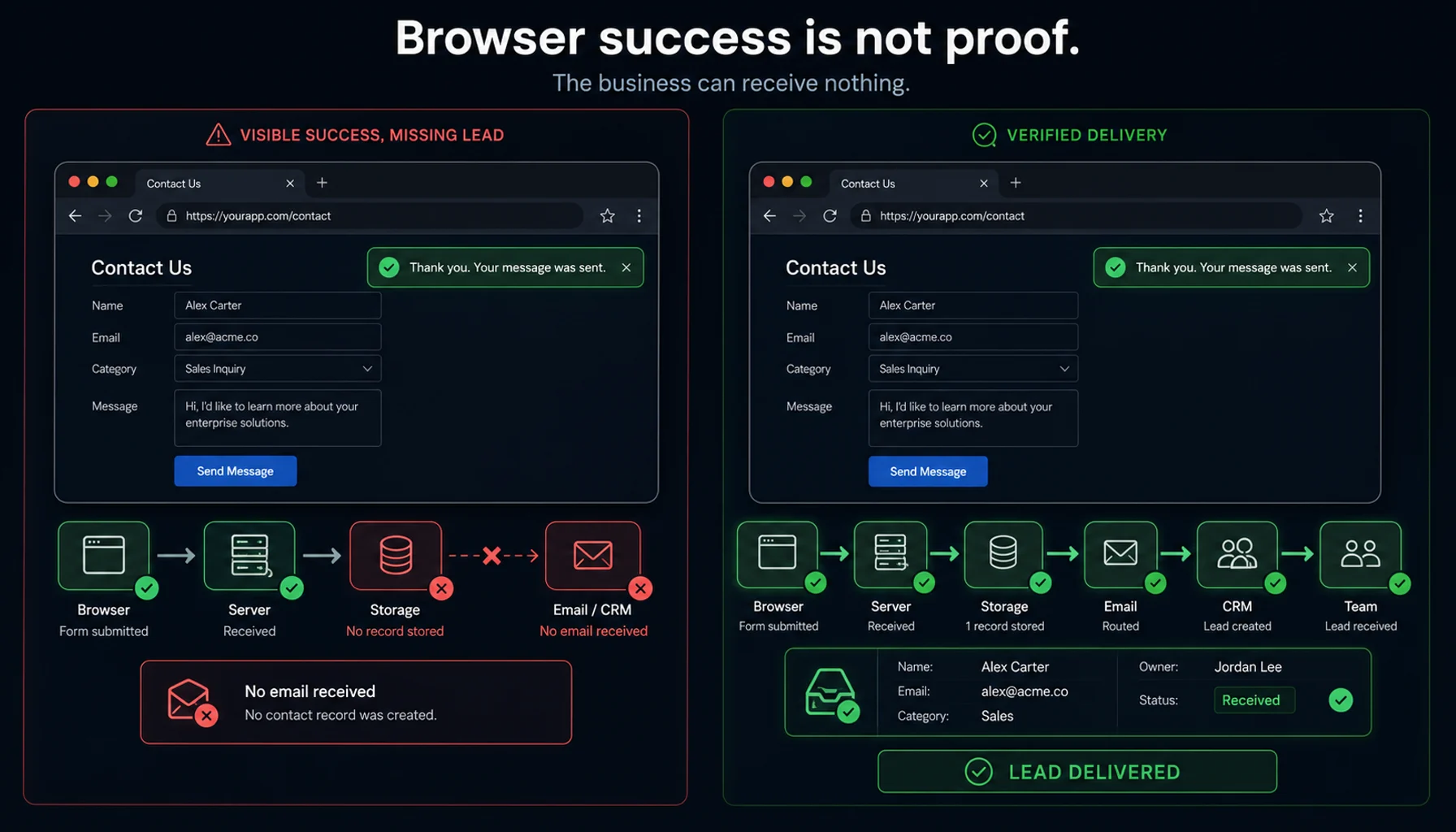
A browser success message proves only that the front end reached a success state. It does not independently prove that the record was stored, routed, delivered, or assigned correctly.
Accessibility, Mobile, Abuse, and Production Test Cases
| ID | Scenario | Expected result | Evidence |
|---|---|---|---|
| CF-28 | Complete the form using only the keyboard | Focus order is logical, all controls are reachable, and Submit works without a mouse | Keyboard walkthrough |
| CF-29 | Trigger validation errors with assistive technology enabled | Fields have meaningful labels, errors are announced, and focus reaches a useful location | Accessibility inspection and assistive-technology check |
| CF-30 | Complete and submit the form at supported mobile viewports | Inputs, keyboard, validation, CAPTCHA, and Submit remain usable without horizontal clipping | Mobile screenshots and completed run |
| CF-31 | Exercise CAPTCHA, honeypot, throttling, and repeated requests | Obvious abuse is limited without blocking normal users or losing legitimate submissions | Accepted legitimate request and rejected abuse attempt |
| CF-32 | Run a controlled submission in production | Production credentials, recipient rules, domains, email settings, CRM routing, and analytics work together | End-to-end production evidence |
Automated accessibility checks can detect some problems, but they do not prove that the form is understandable and usable with every assistive technology.
Likewise, functional test cases do not replace a dedicated security assessment for injection vulnerabilities, data exposure, denial of service, or abuse of the form endpoint.
What Each Testing Layer Can Prove
| Testing layer | What it can verify | What it cannot prove alone |
|---|---|---|
| Browser test | Fields, validation, conditional UI, Submit behavior, visible errors, success state and redirects | Database persistence, inbox delivery or CRM assignment |
| API or integration test | Request validation, response contracts, downstream calls and error handling | Real browser usability or accessible feedback |
| Database or admin check | Record creation, field mapping, status and deduplication | Notification delivery |
| Inbox or mail-provider check | Internal and user-facing email delivery, headers and spam placement | CRM storage unless connected separately |
| CRM or help-desk check | Lead creation, ownership, routing, source and tags | Browser-visible success state |
| Security test | Injection resistance, endpoint abuse, rate limits and data exposure | General usability |
| Accessibility evaluation | Labels, keyboard interaction, error announcements and assistive-technology behavior | Backend delivery |

Use more than one layer when the business outcome crosses more than one system.
How to Select Cases Instead of Running Everything
Not every contact form needs all 32 cases on every deployment. Select cases according to what changed:
| Change | Minimum regression scope |
|---|---|
| Field or validation rule | Relevant boundary, invalid-input and recovery cases |
| Form layout or frontend component | Valid submission, keyboard, errors and mobile |
| Submit handler | Valid submission, duplicate submit, slow response and server error |
| Email provider or SMTP configuration | Internal notification, Reply-To and confirmation email |
| CRM mapping or routing | Stored fields, assignment, source and deduplication |
| CAPTCHA or anti-spam rule | Valid user, rejected abuse and production smoke test |
| Deployment or environment configuration | Full minimum smoke set |
A large checklist is not useful when every case is treated as equally important.
Automating Contact Form Test Cases
The browser-visible cases can share one reusable flow:
Open the contact page
Fill {{NAME}}
Fill {{EMAIL}}
Select {{INQUIRY_TYPE}}
Fill {{MESSAGE}}
Click "Send message"
Assert {{EXPECTED_RESULT}}
Named data cases can then change only the input and expected outcome:
Valid inquiry
Empty required field
Invalid email
Maximum-length message
Conditional inquiry type
This avoids maintaining a separate browser script for every validation value. For a deeper field-rule matrix, use the Form Validation Test Cases: Align UI and API Rules guide.
The browser run should retain the selected data case, step results, screenshots, errors, and trace so a failed scenario can be diagnosed independently.
However, do not treat the visible browser assertion as proof of delivery. Add a second verification layer for the database, admin panel, CRM, help desk, or mailbox when those outcomes matter.

For a broader explanation of reusable browser flows and named datasets, see the Web Form Testing guide.
Safe Production Monitoring
A scheduled contact form check can detect failures caused by deployments, expired credentials, email configuration, CRM changes, or spam rules. It can also pollute the systems it is supposed to protect.
Use a dedicated synthetic sender address, an identifiable marker such as AUTOMATED CONTACT CHECK, a dedicated CRM label or test pipeline, a controlled recipient mailbox, a low execution frequency, automatic cleanup where possible, and no real personal or confidential information.
Ensure that synthetic submissions do not reach active sales representatives as real leads, trigger customer campaigns, affect conversion reporting, create support SLA violations, send repeated confirmation emails, or train spam filters on unrealistic traffic.
Production monitoring should prove that the delivery path works without creating a second operational problem.
Additional Cases for More Complex Contact Forms
File attachments
Test supported and unsupported file types, empty files, maximum size, interrupted upload, duplicate filenames, filename characters, storage, download permissions, and malware-scanning behavior.
Phone numbers
Test country codes, local formats, spaces, brackets, extensions, leading zeroes, copy and paste, and whether strict formatting rejects legitimate international numbers.
Consent fields
Verify that required consent is enforced, optional marketing consent remains optional, the stored consent matches the selected state, and the correct policy text is associated with the submission.
Multi-step forms
Test progress, Back navigation, data preservation, conditional steps, direct navigation, session expiry, refresh, and duplicate submission on the final step.
Multiple languages
Verify translated labels, validation messages, confirmation content, notification templates, right-to-left layouts where supported, and correct routing by language.
Contact Form Testing Checklist
Before approving a contact form, confirm that valid users can submit, invalid users receive actionable feedback, one action creates one submission, failures do not display success, retry does not require re-entering everything, stored data matches submitted data, the correct team receives the request, Reply-To works, user confirmation is accurate, analytics records only successful outcomes, accessibility and mobile behavior are usable, spam controls do not block legitimate users, and production configuration has been checked safely.
Automate the Repeatable Browser Layer
WrightTest lets teams record one contact form flow, replace fixed values with named test-case variables, run each case separately, and inspect screenshots, errors, step results, and Playwright traces.
The browser checks remain portable and can be exported to native Playwright tests when they need to move into an existing codebase or CI workflow.
Use WrightTest for the repeatable browser layer, then connect the appropriate integration or delivery checks for the rest of the contact form journey.