

The Minimum Form Validation Smoke Test
When release time is limited, start with these ten cases.
| ID | Test | Failure it can reveal |
|---|---|---|
| FV-01 | Submit the form with one complete valid dataset | Valid users are incorrectly blocked |
| FV-03 | Submit all required fields empty | Presence validation is missing |
| FV-05 | Submit whitespace in a required text field | Blank values are treated as meaningful data |
| FV-09 | Enter one value below the minimum length | Lower boundary is enforced incorrectly |
| FV-12 | Enter one value above the maximum length | Upper boundary is enforced incorrectly |
| FV-20 | Submit an invalid structured format | Format validation is missing |
| FV-30 | Violate a cross-field relationship | Individual fields pass while the complete form is invalid |
| FV-37 | Bypass browser validation and send an invalid request | The server trusts the browser |
| FV-41 | Compare the same value through UI and API | Validation rules contradict each other |
| FV-48 | Correct one invalid field and resubmit | Data is lost or the form cannot recover |
The smoke set checks the central validation contract. It does not replace field-specific security, accessibility, localization or business-rule coverage.
Define the Validation Contract Before Writing Cases
A form field should not be described only as "valid" or "invalid." For each field or field relationship, define the rule that every layer should enforce.
| Contract element | Question |
|---|---|
| Presence | Is the value required, optional or conditionally required? |
| Type | Is it text, number, date, identifier, selection, file or structured object? |
| Format | Which syntactic forms are accepted? |
| Length or range | What are the exact inclusive and exclusive limits? |
| Normalization | Are spaces, case, separators or Unicode forms transformed? |
| Semantic rule | Is the value meaningful in the current business context? |
| Cross-field rule | Does validity depend on another field? |
| Server rule | What must still be enforced when the browser is bypassed? |
| Error behavior | What message, focus and preserved state should the user receive? |
| Stored value | Which exact representation should reach the backend? |
Example validation contract
| Field | Client rule | Server rule | Normalization | Expected error |
|---|---|---|---|---|
| Display name | Required; 2-80 characters | Same length and permitted-character policy | Trim outer spaces | Enter a name between 2 and 80 characters |
| Required; supported email syntax | Same syntax plus application identity policy | Trim outer spaces; defined case policy | Enter a valid email address | |
| Quantity | Integer from 1 to 100 | Integer from 1 to 100 | No silent decimal rounding | Enter a whole number from 1 to 100 |
| Start and end date | Both are valid dates | Start must not be after end | Use defined timezone and calendar | End date must be on or after start date |
| VAT number | Required only for business accounts | Country-specific semantic rule | Remove allowed separators only if documented | Enter a valid VAT number for the selected country |

Separate Validation from Normalization
Validation answers whether a value is allowed. Normalization answers which equivalent representation should be stored or compared.
"  Maria  " -> "Maria"
"+31 20 123 4567" -> normalized phone representation
"[email protected]" -> identity-policy representation
Unicode composed form -> selected canonical form
For every normalized field, test that the application accepts the supported input representation, stores the documented representation and does not change the user's intended meaning.
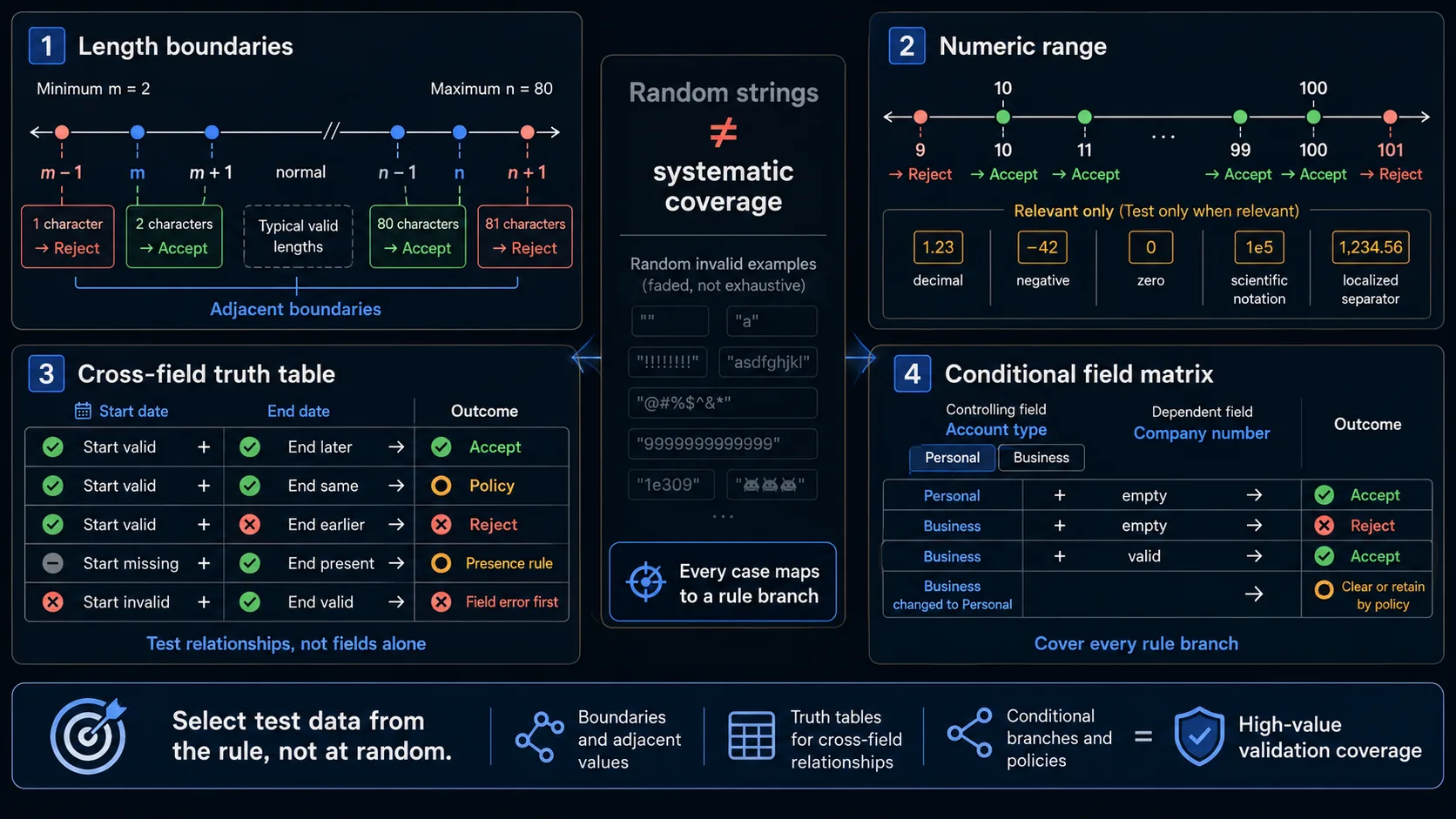
Use Systematic Data Selection Instead of Random Invalid Values
A strong validation suite needs small datasets selected from the rule, not hundreds of arbitrary strings.
Length boundary template
m - 1 -> rejected
m     -> accepted
n     -> accepted
n + 1 -> rejected
Numeric boundary template
9
10
11
99
100
101
Cross-field truth table
| Start date | End date | Expected |
|---|---|---|
| Valid | Later | Accept |
| Valid | Same | Accept if equality is allowed |
| Valid | Earlier | Reject |
| Missing | Present | Apply presence policy |
| Present | Missing | Apply presence policy |
| Invalid | Valid | Report the invalid field before the relationship |
Conditional-field table
| Account type | Company number | Expected |
|---|---|---|
| Personal | Empty | Accept |
| Personal | Present | Ignore, accept or reject according to policy |
| Business | Empty | Reject |
| Business | Valid | Accept |
| Business | Invalid | Reject with field-specific guidance |
| Business changed to Personal | Previous value remains | Clear or retain according to documented behavior |
Required and Optional Field Test Cases
| ID | Scenario | Expected result | Evidence |
|---|---|---|---|
| FV-01 | Submit all required fields with a valid dataset | Validation passes and the form reaches the intended submission step | Browser result and request |
| FV-02 | Leave every optional field empty | The form remains valid and no optional field produces an error | Browser result and payload |
| FV-03 | Submit with all required fields empty | Submission is blocked and every missing requirement is identified | Error summary, field errors and absence of request |
| FV-04 | Omit one required field at a time | Only the relevant missing-field rule fails | Field state and error message |
| FV-05 | Enter spaces, tabs or line breaks into a required text field | The documented blank and trimming policy is applied; meaningless whitespace is not stored as valid content | Visible result and server response |
| FV-06 | Leave a required checkbox, radio group or select option unchosen | Submission is blocked and the complete group is identified correctly | Group error and focus behavior |
| FV-07 | Submit a field that is optional in the UI but required by the API | The mismatch is exposed; the user does not receive an unexplained generic failure | UI state, request and server response |
| FV-08 | Interact with a required field without entering data | Validation appears at the intended event without showing an error before the user has a reasonable chance to respond | Event sequence and visual state |
A required indicator must be visible and programmatically associated with the field. Do not rely only on color or an unexplained asterisk.
Length, Range, Number and Date Test Cases
| ID | Scenario | Expected result | Evidence |
|---|---|---|---|
| FV-09 | Enter a value one unit below the minimum length | The value is rejected with exact lower-bound guidance | Field state and server response |
| FV-10 | Enter a value exactly at the minimum length | The value is accepted | Browser and API result |
| FV-11 | Enter a value exactly at the maximum length | The value is accepted without truncation | Payload and stored value |
| FV-12 | Enter or paste a value one unit above the maximum length | The application rejects or prevents the extra input according to policy; it does not silently store a different value | UI, payload and stored value |
| FV-13 | Enter a number immediately below the minimum | The value is rejected | Validation state and response |
| FV-14 | Enter a number exactly at both supported boundaries | Inclusive boundaries are accepted | Request and response |
| FV-15 | Enter a number immediately above the maximum | The value is rejected | Validation state and response |
| FV-16 | Enter a decimal, excessive precision or value that violates step | The exact numeric contract is applied; the value is not silently rounded unless documented | Payload and stored value |
| FV-17 | Enter an impossible calendar value or unsupported date | The value is rejected consistently across input methods and direct server requests | Browser and API result |
| FV-18 | Enter dates exactly at and immediately outside the allowed range | Date boundaries use the documented timezone and inclusivity rules | Request, server result and stored date |
Native constraints such as required, minlength, maxlength, min, max, step, type and pattern improve browser feedback but do not replace server enforcement.
Format, Whitespace and Unicode Test Cases
| ID | Scenario | Expected result | Evidence |
|---|---|---|---|
| FV-19 | Submit a valid value in every officially supported format | Every supported representation is accepted | Browser and API results |
| FV-20 | Submit a value with invalid syntax | The field is rejected with guidance describing the required format | Error message and server response |
| FV-21 | Enter leading and trailing spaces around an otherwise valid value | Outer whitespace follows the normalization contract consistently in UI and API | Payload and stored value |
| FV-22 | Enter internal spaces or separators | The application preserves, removes or rejects them according to the field-specific rule | UI result and stored representation |
| FV-23 | Enter valid non-Latin characters | The value is accepted where the business rule permits international text | Browser, API and stored value |
| FV-24 | Enter a valid name containing an apostrophe, hyphen or diacritic | Legitimate punctuation and letters are not rejected by a simplistic character filter | Browser and server result |
| FV-25 | Enter visually equivalent Unicode sequences in composed and decomposed forms | Comparison, uniqueness and storage follow the documented Unicode normalization policy | API response and stored representation |
| FV-26 | Enter emoji or symbols into free-form text | The value follows the documented policy without corrupting length calculations or storage | Character count and stored value |
| FV-27 | Enter a line break, tab or non-breaking space | Invisible characters are handled predictably and do not create a misleading valid value | Payload inspection and server response |
| FV-28 | Submit a very long value through a direct request | The server rejects it gracefully without excessive processing, truncation or an unhandled error | Response, logs and unchanged data |
Do Not Mistake Strictness for Correctness
The values O'Connor, Anne-Marie, [email protected], 020 1234 5678 and localized numbers are not automatically invalid. Their validity depends on field purpose, supported locales, identity policy, normalization rules and downstream system requirements.
Treating names as ASCII letters only
Human names are not reliable identifiers and do not follow one global character pattern.
Treating phone numbers as numeric values
Phone numbers can contain leading zeros, country prefixes, spaces and separators. They are normally identifiers represented as text.
Rejecting plus-addressed email without a product rule
An application can define an identity policy, but it should not reject a supported address merely because a simplistic pattern does not anticipate it.
Removing punctuation from free-form text
Filtering punctuation is not a primary defence against injection. Output encoding, parameterized queries and context-specific controls are still required.
Parsing localized numbers without an explicit locale
1,500 and 1.500 can mean different values. The displayed format, parser and stored representation must agree.
Cross-Field, Conditional and Dynamic Validation Test Cases
| ID | Scenario | Expected result | Evidence |
|---|---|---|---|
| FV-29 | Enter valid individual values that violate a relationship such as password confirmation | The relationship error is shown and submission is blocked | Form state and server response |
| FV-30 | Enter a start value that exceeds the end value | Semantic validation rejects the complete form even though both fields are syntactically valid | Relationship error and API result |
| FV-31 | Change a controlling value such as country after entering a dependent value such as postal code | The dependent field is revalidated using the new rule | Field state and submission result |
| FV-32 | Trigger a condition that makes another field required | The field becomes visibly and programmatically required before submission | DOM state and error behavior |
| FV-33 | Hide a previously required conditional field | The hidden field no longer blocks submission unless the business rule deliberately retains it | Form validity and payload |
| FV-34 | Enter data in a conditional field and then disable its condition | The value is cleared, retained or excluded according to the documented data policy | UI state and request payload |
| FV-35 | Move through a multi-step form with valid fields on one step and an invalid cross-step relationship | Validation occurs at the correct point and returns the user to the relevant field without losing completed steps | Navigation, errors and preserved data |
| FV-36 | Submit syntactically valid data that violates a server-known business rule | The server rejects it and the UI maps the response to a useful field or form-level error | Server response and rendered error |
Cross-field validation is different from validating two fields separately. Every individual value can satisfy its format while the combined state remains invalid.
Client, Server and API Parity Test Cases
Client-side validation provides immediate feedback, but every untrusted request must still be validated by the server.
| ID | Scenario | Expected result | Evidence |
|---|---|---|---|
| FV-37 | Remove required, pattern, min, max or related constraints and submit | Server-side validation rejects the invalid request | Server response and unchanged data |
| FV-38 | Disable or bypass JavaScript validation | Invalid data still cannot enter the workflow | Request and server response |
| FV-39 | Send invalid data directly to the API | The API applies the documented validation contract | Status, error body and stored-data check |
| FV-40 | Send unexpected, missing or extra fields | The server applies the request schema instead of trusting arbitrary properties | Response and stored object |
| FV-41 | Send the same boundary value through browser and API | Both layers reach the same acceptance decision | UI result and API result |
| FV-42 | Submit a value accepted by the UI but rejected by the server | The mismatch is visible, mapped to the correct field and recorded as a contract defect | Client state and response |
| FV-43 | Submit a value rejected by the UI but accepted by the server | The false-negative client rule is identified; valid users are not permanently blocked by stale browser logic | Direct API result and UI result |
| FV-44 | Deploy client and server validation changes separately | Version differences fail safely and produce useful errors rather than silent corruption or an unrecoverable form | Results before, during and after deployment |
Validation parity matrix
| Rule | UI result | API result | Expected |
|---|---|---|---|
| Required field missing | Reject | Reject | Match |
| Minimum boundary | Accept | Accept | Match |
| Below minimum | Reject | Reject | Match |
| Supported Unicode name | Accept | Accept | Match |
| Invalid cross-field relationship | Reject | Reject | Match |
| Server-only business conflict | May submit request | Reject and map error | Deliberate difference |
| Stale reference data | May pass local check | Reject with recoverable response | Deliberate difference |
Client and server do not need identical timing or identical code. They need a compatible acceptance contract, with the server making the authoritative decision.
Error Message, Accessibility and Recovery Test Cases
| ID | Scenario | Expected result | Evidence |
|---|---|---|---|
| FV-45 | Submit several invalid fields together | Every relevant error is available without one error hiding another | Error summary and field messages |
| FV-46 | Submit an invalid form using the keyboard | Focus moves according to the documented pattern and every problem remains reachable | Focus sequence and keyboard walkthrough |
| FV-47 | Inspect error relationships with assistive technology | Errors are associated with their controls and dynamic status changes are announced appropriately | Accessibility tree and screen-reader check |
| FV-48 | Correct one invalid field | That field error clears at the intended event without clearing unrelated unresolved errors | Field and summary state |
| FV-49 | Receive a server-side validation response | Valid non-sensitive values remain populated; sensitive values follow the documented retention policy | Redisplayed form state |
| FV-50 | Receive a form-level business-rule error | The user receives actionable guidance and can edit the relevant fields without restarting the entire flow | Visible error and preserved state |
| FV-51 | Correct all errors and resubmit | One successful request is processed; failed attempts do not create duplicate records | Request and record counts |
| FV-52 | Use mobile input, paste, autofill, password manager or localized input | Validation reacts consistently to supported input methods and does not depend only on keyboard events | Mobile/browser runs and final payload |
Errors should identify the affected control, explain the problem in text, remain discoverable without relying only on color and preserve non-sensitive valid data after server-side redisplay.
The Most Important Form Validation Failure Patterns

The browser rejects a value that the API accepts
An outdated pattern, duplicated rule or simplified frontend check blocks legitimate data even though the server contract permits it.
The browser accepts a value that the API rejects
The rejection must map back to a useful field or form-level error without losing data.
One layer trims the value while another validates the raw value
Define whether normalization occurs before validation, after validation, only for storage or only for comparison, then apply that order consistently.
A hidden field continues blocking submission
Check visibility, disabled state, required state, custom validity, request inclusion and retained value when conditions change.
Correcting an error destroys valid data
Users should not need to reconstruct the entire form or re-enter all non-sensitive values after one validation error.
The server returns an error the UI cannot locate
Nested server error paths must map to visible controls or an understandable form-level summary.
{
  "errors": {
    "billing.address.postal_code": [
      "The postal code does not match the selected country."
    ]
  }
}
Validation is treated as the security control
Input validation is one layer. It does not replace output encoding, parameterized queries, authorization or context-specific security controls.
When Client and Server Rules May Differ Deliberately
| Rule | Client behavior | Server behavior |
|---|---|---|
| Required field | Block immediately | Enforce again |
| Simple format | Give immediate feedback | Enforce again |
| Current inventory | May show cached guidance | Use authoritative availability |
| Unique username | May run an availability check | Enforce uniqueness transactionally |
| Discount eligibility | May preview | Make final decision |
| Fraud or abuse rule | Usually hidden | Enforce without exposing sensitive logic |
| Authorization | Adjust visible controls | Enforce every request |
| File safety | Check extension and size for UX | Inspect content, type, storage and scanning |
The goal is not duplicated code for its own sake. The goal is one acceptance contract with appropriate enforcement at every boundary.
What Each Testing Layer Can Prove
| Testing layer | What it can verify | What it cannot prove alone |
|---|---|---|
| Browser test | Required fields, input events, visible formats, conditional controls, error rendering and recovery | Server enforcement or stored representation |
| Constraint API inspection | ValidityState, native constraints and custom browser validity | Handcrafted-request handling |
| Form API test | Request schema, field rules, cross-field rules and structured error responses | Accessible presentation in the browser |
| Server integration test | Authoritative semantic rules and downstream validation | Real user correction flow |
| Storage check | Normalized and persisted representation | Browser instructions or accessible errors |
| Accessibility evaluation | Labels, required state, focus, announcements and error discovery | Server data integrity |
| Security review | Validation bypass, payload limits, regex risk and interaction with other controls | General usability |
| Localization test | Dates, numbers, messages, direction and input methods | Complete server protection |
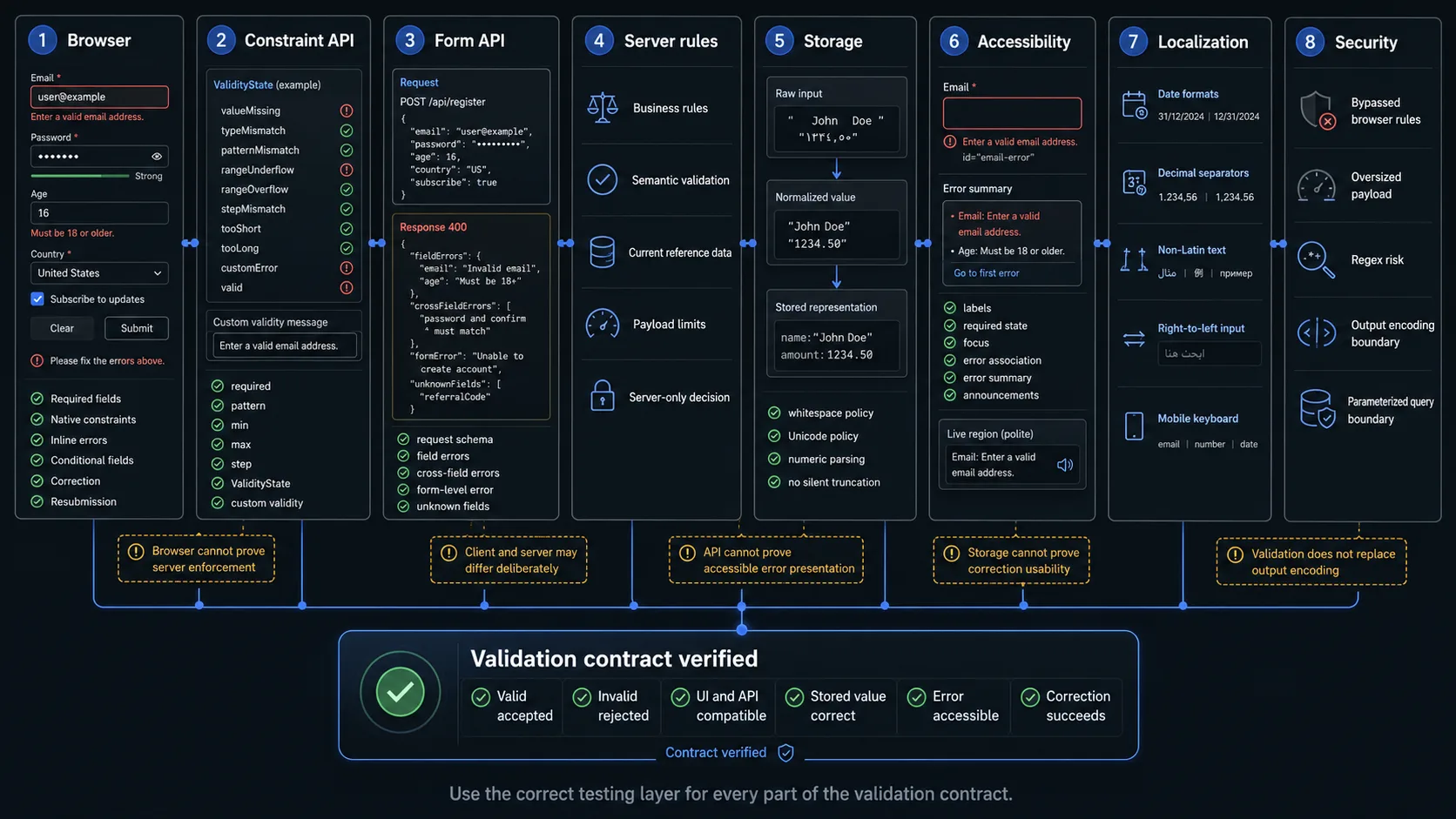
A browser can show "Enter a valid email address." It cannot prove that the server rejects the same request after browser validation has been removed.
How to Select Validation Cases After a Change
| Changed component | Minimum regression scope |
|---|---|
| Required or optional status | Empty, valid, whitespace, group control and server bypass |
| String length | min-1, min, max, max+1, paste and direct API |
| Numeric range | Below, boundary, above, precision, step and locale |
| Format pattern | Supported formats, malformed values, Unicode and server parity |
| Normalization | Raw value, normalized value, equality and storage |
| Conditional field | Condition on, condition off, previous value and request inclusion |
| Cross-field rule | Valid combinations, invalid relationship, missing dependency and correction |
| API error schema | Field mapping, form-level mapping, preserved data and retry |
| Client validation library | Native input, paste, autofill, mobile and JavaScript bypass |
| Server validation library | Direct API, unknown fields, payload limits and downstream storage |
| Deployment or feature flag | Old client/new server and new client/old server combinations |
| Localization | Display format, parser, browser locale, server locale and stored representation |
Do not execute every negative string after every change. Run the cases that cross the changed rule, its boundaries and the layers enforcing it.
Automating Form Validation Test Cases
Many validation scenarios can reuse one browser flow:
Open the form
Fill fields from {{DATASET}}
Submit the form
Assert {{EXPECTED_FIELD_ERRORS}}
Assert {{EXPECTED_FORM_RESULT}}
A positive dataset can describe both inputs and expected results:
{
  "name": "minimum valid name",
  "values": {
    "displayName": "Li",
    "email": "[email protected]",
    "quantity": 10
  },
  "expected": {
    "accepted": true,
    "fieldErrors": {}
  }
}
A negative boundary case can reuse the same flow:
{
  "name": "name below minimum length",
  "values": {
    "displayName": "L",
    "email": "[email protected]",
    "quantity": 10
  },
  "expected": {
    "accepted": false,
    "fieldErrors": {
      "displayName": "Enter at least 2 characters"
    }
  }
}
Separate browser and API assertions
The browser flow should verify visible errors, focus, retained values, correction and successful resubmission. The API or integration layer should verify status codes, structured error bodies, server enforcement, normalization and the absence of invalid stored data.
Keep rule data centralized where practical
A stable validation schema may provide required, minimum, maximum, pattern, allowed values and dependencies. Generated cases still need review because schemas do not automatically describe useful error wording, legitimate Unicode, normalization order, semantic business rules, recovery behavior or accessibility.
What Browser Automation Should Not Claim
Browser automation should not be presented as proof of complete server-side enforcement, protection against SQL injection or XSS, safe database queries, absence of regex denial-of-service risk, secure file inspection, every Unicode normalization edge case, every locale-specific parsing rule, authorization, or safe handling of every oversized payload.
Browser automation remains valuable because it proves that real users can see, understand, correct and resubmit invalid form data.
Frequently Asked Questions
Should validation happen on blur or only on submit?
Use the interaction pattern defined for the product. Test the selected event sequence, correction behavior and accessibility instead of assuming one universal trigger.
Should the UI and API use exactly the same code?
Not necessarily. They need a compatible acceptance contract. Shared schemas can reduce drift but do not replace integration tests.
Should all special characters be rejected?
No. Permitted characters depend on the field. Apostrophes, hyphens, diacritics and non-Latin letters can be legitimate.
Is an invalid email address a security problem?
Usually it is first a data-quality and workflow problem. Email-format validation does not replace unrelated security controls.
Should server errors clear the form?
Usually no. Preserve valid non-sensitive data so the user can correct the problem. Sensitive fields may require a separate retention policy.
Form Validation Testing Checklist
Before approving form validation, confirm that one valid complete dataset is accepted, optional fields can be omitted, required fields reject empty and whitespace-only values, field groups expose one understandable required-state error, minimum and maximum boundaries use the intended inclusivity, numbers enforce type and range, dates use the intended calendar and timezone, every documented format has positive and negative cases, whitespace handling is explicit, supported Unicode is accepted, normalization occurs in a defined order, cross-field relationships use the complete form state, conditional fields update required and validity states, hidden fields do not block unexpectedly, browser constraints can be bypassed without bypassing the server, UI and API reach compatible acceptance decisions, server-only rejections map to useful visible errors, errors remain discoverable, valid non-sensitive data survives unsuccessful submission, successful retry creates one result, and mobile, paste, autofill and localized input are covered.
Final acceptance criterion. The final acceptance criterion is not: "Invalid values displayed a red error message." It is: "The same documented business rule accepted legitimate data and rejected invalid data at every relevant boundary, while preserving the user's valid input and providing a clear path to correction."
Automate the Repeatable Browser Layer
WrightTest lets teams record one reusable form flow, replace fixed values with named datasets, run each validation case independently and inspect screenshots, step results, errors and Playwright traces.
The browser checks can be exported to native Playwright .spec.ts files when they need to move into an existing repository or CI pipeline.
Use WrightTest to prove the visible validation and correction journey. Combine it with API, server, storage, accessibility and security checks to verify the complete validation contract.