
File Upload Security
File Upload Security Test Cases: Verify Every Boundary
Verify file upload security across authorization, type validation, filenames, scanning, storage isolation, delivery policy, archives, quotas, audit trails and cleanup.
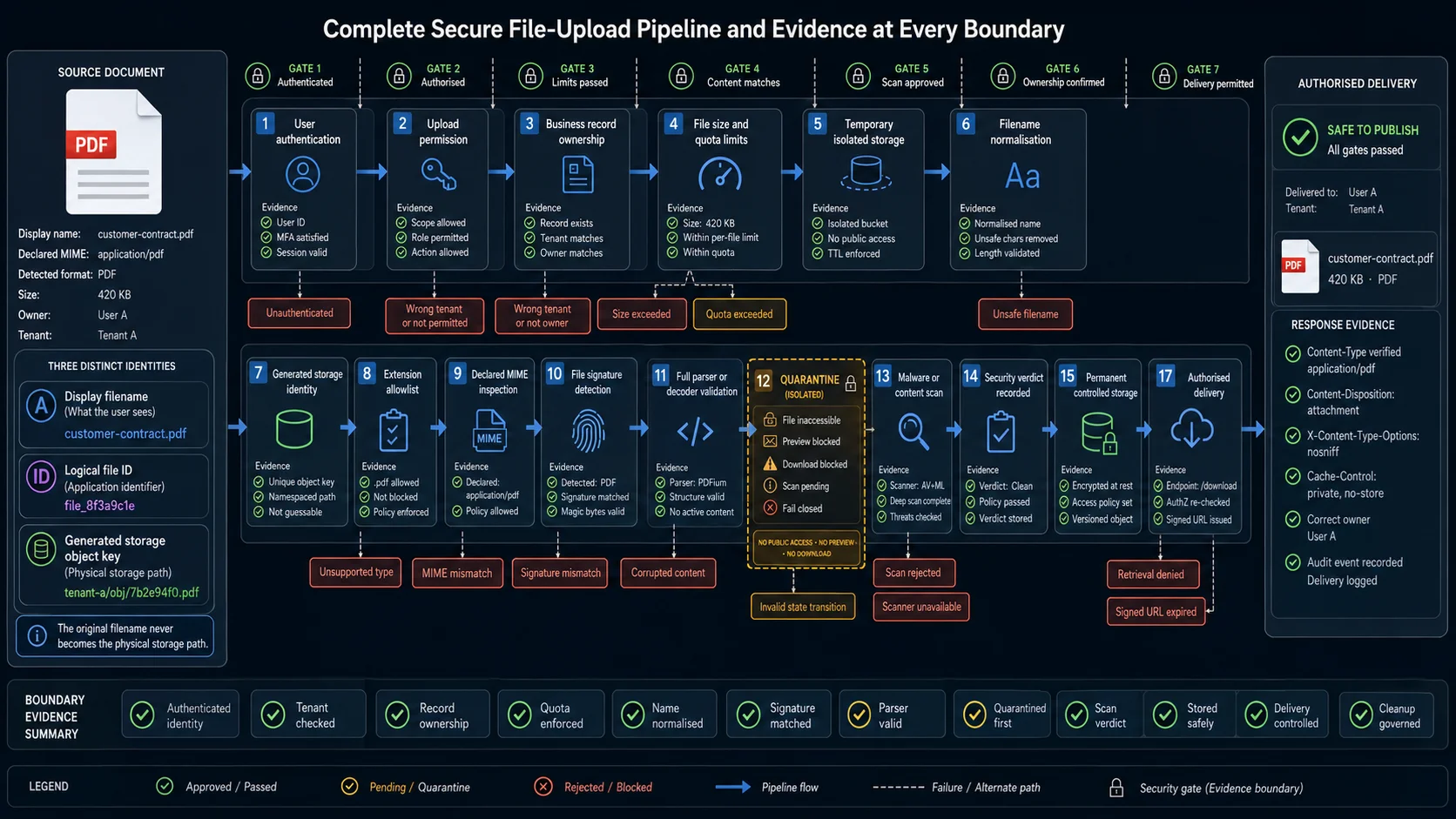
A file upload can reject .exe files and still be insecure.
The server may trust a forged MIME type, preserve a user-controlled path, expose temporary objects before scanning completes, attach a file to the wrong tenant, or serve untrusted content from the application’s own origin.
In practice, the dangerous gap is often not the allowlist itself. It is the interval between accepting the bytes and deciding that the file may be processed, published, or retrieved.
A secure upload therefore needs more than one validation rule:
User authorised
→ request limits checked
→ source content validated
→ safe storage identity assigned
→ file isolated
→ security checks completed
→ ownership confirmed
→ controlled delivery enabled
→ retention policy enforced
The test should follow that complete path.
This guide covers the security controls that QA engineers can verify safely with controlled fixtures, browser automation, API tests, and authorised test environments. It does not provide weaponised payloads or instructions for exploiting parsers, web servers, antivirus products, or storage infrastructure.
For general behaviour such as progress, retry, cancellation, multiple files, and business-level processing, see File Upload Test Cases.
For image decoding, EXIF orientation, cropping, responsive variants, transparency, and metadata, see Image Upload Test Cases.
Start with the Security Contract
A secure upload policy must describe more than the permitted extensions.
Before building the test matrix, document why the product accepts each format, which components process it, where the file waits before approval, and who can retrieve it after publication.
| Security area | Questions to answer |
|---|---|
| Upload permission | Which users, roles, tenants, and account states may upload? |
| Business purpose | Why does the application need each accepted format? |
| Accepted content | Which extensions and detected formats are allowed? |
| Type detection | Does the server inspect extension, MIME type, signature, full decoding, or parser output? |
| Filename handling | Is the original name used only for display, or does it influence a storage path? |
| Storage identity | Does the application generate a separate object key or identifier? |
| Temporary storage | Where does the file exist before security checks finish? |
| Processing | Which decoders, parsers, converters, preview generators, and extractors consume it? |
| Scanning | Must antivirus, content analysis, moderation, or content disarm and reconstruction succeed? |
| Publication | Can the file be retrieved before every mandatory check passes? |
| Delivery | Is it rendered inline, downloaded, proxied, signed, or served through a separate origin? |
| Ownership | Which user, tenant, project, order, message, or case owns the file? |
| Limits | What are the per-file, batch, account, tenant, and rate limits? |
| Archives | Are compressed files accepted, inspected, or extracted? |
| Retention | What happens to rejected, quarantined, replaced, expired, and deleted objects? |
| Audit | Which decisions are logged, and which events should trigger an alert? |
A practical security completion rule is:
A file becomes publishable only after the uploader is authorised, the detected content matches an allowed business format, every mandatory security check has passed, the application has assigned a safe storage identity, and each retrieval path enforces the intended access and delivery policy.
Do not represent all intermediate states as Uploaded.
Use explicit states such as:
Rejected
Pending validation
Quarantined
Pending scan
Safe
Ready for processing
Published
Expired
Deleted
The distinction matters. A file may exist in temporary storage without being safe, publishable, or retrievable.
What QA Can Test Safely
A QA suite should prove that the documented controls work. It should not quietly turn a shared CI runner into an exploit laboratory.
Routine functional and integration tests can safely verify:
- server-side type validation;
- extension, MIME, and content mismatches;
- generated storage identities;
- filename normalisation;
- authentication and authorisation;
- tenant isolation;
- quarantine states;
- scanner success, rejection, timeout, and unavailability;
- blocked retrieval before approval;
- response content types and download headers;
- signed URL expiration;
- file, batch, quota, and archive limits;
- direct API calls that bypass the browser;
- retries, replacement, deletion, and cleanup;
- audit events.
A dedicated security assessment is more appropriate for:
- real malware;
- executable server-side payloads;
- weaponised office documents;
- parser exploitation;
- antivirus evasion;
- malicious polyglot research;
- decompression bombs;
- sandbox escape attempts;
- infrastructure-level bucket or container misconfiguration;
- race-condition exploitation against production-like infrastructure.
Not every case belongs in CI.
Filename, content-validation, ownership, quarantine, and delivery-policy checks should run regularly. Destructive archive and parser scenarios belong in an isolated environment owned jointly with the security team.
For routine automation, use inert fixtures that reproduce the required property without executing code.
Model the Secure Upload Pipeline
A secure upload is a gated state machine, not a direct path from the browser to public storage.
Unauthenticated
  └── Reject

Authenticated
  ↓
Authorised for the target record
  ├── Reject role, ownership, or tenant
  ↓
Request and quota limits checked
  ├── Reject size, count, rate, or storage limit
  ↓
Temporary isolated storage
  ↓
Filename normalised
  ↓
Safe storage identity assigned
  ↓
Extension policy checked
  ↓
Declared MIME evaluated
  ↓
Signature and content detected
  ↓
Full parser or decoder validation
  ├── Reject unexpected or corrupted content
  ↓
Quarantine
  ↓
Scanner or content analysis
  ├── Reject or hold suspicious content
  ├── Remain pending if the scanner is unavailable
  ↓
Ownership confirmed again
  ↓
Permanent storage or controlled processing
  ↓
Authorised delivery
  ↓
Expired, replaced, or deleted
The order is part of the security contract.
A scanner integration can be technically healthy and still provide little protection if a temporary URL is already public. Likewise, a safe generated object key does not help if the original filename later reappears inside an unvalidated download path.
The release-gating test should ask a narrow question:
Can untrusted bytes cross any boundary before the product has made and recorded its security decision?
Core File Upload Security Test Cases
Validate the Source and Assign a Safe Identity
Extension, browser-declared MIME type, file signature, and actual content are separate signals.
The browser controls the multipart filename and request content type. A signature may identify the beginning of a format, but it does not prove that the complete file is valid. Some formats require full decoding or specialised parsing before the application can trust them.
The original filename is also untrusted. Keep it for display when needed, but do not use it as the physical object key.
| ID | Test case | Expected security result |
|---|---|---|
| SU-001 | Upload every documented allowed format | Only formats required by the business contract are accepted |
| SU-002 | Upload a clearly unsupported format | The server rejects it before publication or trusted processing |
| SU-003 | Rename unsupported content with an allowed extension | Detected content prevents acceptance |
| SU-004 | Send an allowed file with a forged request MIME type | The client header does not determine trust |
| SU-005 | Send invalid content with an allowed extension and MIME type | Full parsing or decoding rejects it |
| SU-006 | Upload a valid allowed file with the wrong extension | The documented detected-content policy is applied consistently |
| SU-007 | Vary extension case, including uppercase and mixed case | Case changes do not bypass the allowlist |
| SU-008 | Use double extensions, trailing dots, or trailing spaces | Normalisation occurs before the final security decision |
| SU-009 | Upload a valid file without an extension | The server follows its documented detected-content rule |
| SU-010 | Upload truncated content with a valid signature prefix | Full parsing fails, and the file never becomes safe |
| SU-011 | Upload a corrupted allowed file | The application returns a controlled failure instead of leaving it pending |
| SU-012 | Remove a format from the server allowlist while the UI still permits it | The server remains authoritative |
| SU-013 | Call the endpoint directly without using the browser picker | The same validation rules apply |
| SU-014 | Upload a mixed batch containing one prohibited type | Each item receives an explicit security result |
| SU-015 | Upload two different files with the same display name | Neither object silently overwrites the other |
| SU-016 | Reuse the same display name across two users or tenants | Storage identity and ownership remain separate |
| SU-017 | Include path separators or relative path segments in the filename | Directory components are removed or rejected |
| SU-018 | Use an excessively long, Unicode, hidden-style, or reserved filename | The application normalises or rejects it without creating collisions |
| SU-019 | Include control characters or line breaks in the filename | Headers, logs, and interface output remain structurally valid |
| SU-020 | Replace an existing file while keeping its display name | The application creates a controlled version or independent object identity |
A safe model separates three values:
Display name:
customer-contract.pdf

Logical file ID:
file_7f23d91c

Storage object key:
tenant-a/2026/07/2de91d1e-6a7b-4bfd-a85e
This allows the product to preserve a friendly name without trusting it as a path.
For boundary variants such as extension case, double extensions, missing extensions, and trailing characters, a data-driven test is better than several nearly identical browser flows.
| Input variation | Expected decision |
|---|---|
| Uppercase extension | Same allowlist result |
| Double extension | Evaluated using the documented final-name policy |
| Trailing dots or spaces | Normalised before validation |
| Missing extension | Decided through detected content |
| Similar Unicode characters | No storage collision or ownership confusion |
Authorise Every Upload and State Transition
Upload permission and file retrieval are separate authorisation decisions.
A user may be able to upload to one project but not another. A support agent may view an attachment without permission to replace it. A tenant administrator should not gain access to objects owned by another tenant, even if the identifier is predictable.
The browser UI is not the security boundary. Every relevant check must also run when the endpoint is called directly.
| ID | Test case | Expected security result |
|---|---|---|
| SU-021 | Upload without authentication | The request is rejected |
| SU-022 | Upload with an expired or revoked session | The request is rejected without creating a publishable object |
| SU-023 | Upload as a role without file permission | Access is denied |
| SU-024 | Upload to another user’s record | Ownership validation rejects the request |
| SU-025 | Upload to another tenant’s record | Tenant isolation is enforced |
| SU-026 | Modify a valid business-record identifier | The server checks current ownership instead of trusting the page route |
| SU-027 | Replace a file owned by another user | The operation is rejected |
| SU-028 | Delete a file owned by another user | The operation is rejected |
| SU-029 | Retrieve a private file without authentication | Access is denied |
| SU-030 | Retrieve another user’s private file | Access is denied even when the identifier is known |
| SU-031 | Retrieve another tenant’s file | Tenant isolation is enforced at delivery |
| SU-032 | Reuse an upload token issued to another account | The token is rejected or remains bound to its original subject |
| SU-033 | Reuse an upload token for another business record | Token scope prevents reassignment |
| SU-034 | Complete a long-running upload after the user loses permission | The final attachment step checks current authorisation |
| SU-035 | Submit a browser-session upload without the required CSRF protection | The request is rejected according to the application’s CSRF policy |
| SU-036 | Modify a client-generated safe, scanned, or validated flag | The server ignores the untrusted verdict |
| SU-037 | Attach an upload ID owned by another user | Ownership validation rejects the transition |
| SU-038 | Reorder create, upload, scan, complete, and attach requests | The state machine rejects invalid transitions |
Direct-to-storage designs need special attention.
The storage provider may accept the bytes, while the application separately controls object creation, scan status, ownership, and final attachment. A test that proves only that the signed upload succeeded does not prove that the application accepted the file securely.
Validate again when the client reports completion:
Signed upload issued
→ object uploaded
→ object metadata inspected
→ size and ownership confirmed
→ scan requested
→ safe verdict recorded
→ attachment allowed
A pre-signed instruction should bind at least the intended object key, expiration, uploader context, and relevant size or policy constraints.
Quarantine and Release
The security property is not “the scanner was called.”
It is:
Untrusted object
→ isolated
→ analysed
→ decision recorded
→ only an approved result released
The file should remain inaccessible while any mandatory scanner or content-analysis result is pending.
| ID | Test case | Expected security result |
|---|---|---|
| SU-039 | Upload a normal clean fixture | The object moves from quarantine to the approved state |
| SU-040 | Upload a security-team-approved scanner test fixture | The scanner returns the expected non-production verdict |
| SU-041 | Request the file while scanning is pending | The file cannot be retrieved or processed as trusted |
| SU-042 | Simulate a scanner rejection | The object stays quarantined or is removed |
| SU-043 | Make the scanner unavailable | The system fails closed according to policy |
| SU-044 | Let the scanner time out | The file remains pending or rejected instead of becoming safe by default |
| SU-045 | Retry scanning after a temporary failure | One controlled transition occurs without duplicate publication |
| SU-046 | Return conflicting results from mandatory scanners | The documented conservative decision is applied |
| SU-047 | Replace a previously safe file | The replacement returns to quarantine |
| SU-048 | Change file bytes in an authorised integration harness after approval | The previous verdict no longer applies |
| SU-049 | Generate a preview while the verdict is pending | Untrusted content is not exposed through the preview path |
| SU-050 | Attach a pending file to a business record | The record distinguishes pending from ready and blocks use where required |
| SU-051 | Inspect scan metadata through an authorised endpoint | Verdict, timestamp, scanner version, and object identity match |
| SU-052 | Replay a clean verdict for another object | The system rejects a verdict that is not bound to the same content identity |
A scanner result should be bound to immutable evidence such as the object ID, version, checksum, or another content identity used by the processing pipeline.
Otherwise, replacement and retry flows can accidentally inherit an old verdict.
The same rule applies to generated previews and derivatives. If the product creates a thumbnail before final approval, that thumbnail must remain isolated too.
Control Storage and Delivery
An allowed file can become dangerous when served incorrectly.
Risk changes depending on whether the browser renders the response inline, whether the object comes from the application origin, whether the content type is accurate, and whether caches can store a private response.
| ID | Test case | Expected security result |
|---|---|---|
| SU-053 | Retrieve an approved file | The response uses the correct detected content type |
| SU-054 | Retrieve a file intended only for download | Content-Disposition prevents unintended inline rendering |
| SU-055 | Retrieve a browser-active format | Delivery follows the explicit isolation, sanitisation, or rejection policy |
| SU-056 | Inspect X-Content-Type-Options | The response uses nosniff where required |
| SU-057 | Upload markup disguised as plain data | The browser does not reinterpret it as active content |
| SU-058 | Access a quarantined storage URL directly | The object remains inaccessible |
| SU-059 | Guess another logical file identifier | Predictability does not bypass authorisation |
| SU-060 | Attempt to list a storage prefix or directory | Ordinary users cannot enumerate stored objects |
| SU-061 | Request uploaded content through the application origin | The response cannot become unintended same-origin active content |
| SU-062 | Request the same content through a dedicated file origin | The intended isolation and headers remain intact |
| SU-063 | Reuse an expired signed URL | Access is denied |
| SU-064 | Modify a signed URL path, object key, or relevant parameter | Signature scope prevents retrieval of another object |
| SU-065 | Share a private URL with an unauthorised session | Access behaves according to the documented signed or server-side policy |
| SU-066 | Replace a file while retaining its display name | Delivery returns the new controlled version rather than stale bytes |
| SU-067 | Delete a file and request its former URL | The object becomes unavailable after the documented retention period |
| SU-068 | Inspect cache directives on private content | Shared caches cannot expose private responses |
| SU-069 | Request a rejected object through a known temporary path | Temporary storage is not web-accessible |
| SU-070 | Download the same private file as its owner and another user | Only the authorised context succeeds |
| SU-071 | Retrieve a transformed preview or derivative | The derivative enforces the same ownership and verdict policy as the source |
X-Content-Type-Options: nosniff is useful, but it is only one delivery control.
It does not replace:
- correct type detection;
- rejection of dangerous formats;
- storage isolation;
- authorisation;
- suitable
Content-Disposition; - safe preview generation;
- a separate delivery origin where needed.
Private responses also need an explicit cache policy. Hiding a URL in the interface does not make the object private.
Limit Files, Batches, Archives, and Processing
File size is only one resource boundary.
A small compressed image may expand into a large bitmap. An archive may contain thousands of entries. A valid document can trigger expensive preview generation. Many individually acceptable files can exceed a tenant quota when submitted together.
| ID | Test case | Expected security result |
|---|---|---|
| SU-072 | Upload below, at, and above the maximum byte size | The documented boundary is enforced against actual bytes received |
| SU-073 | Omit or forge the request content length | Streaming limits still enforce the real upload size |
| SU-074 | Submit many small files in one request | Count and aggregate-size limits apply |
| SU-075 | Exceed the permitted batch item count | The batch or excess items are rejected according to policy |
| SU-076 | Exhaust the account or tenant storage quota | Further uploads are blocked without affecting other tenants |
| SU-077 | Repeat rejected oversized uploads | Rate and resource controls prevent repeated expensive work |
| SU-078 | Upload a small image with excessive pixel dimensions | Decoder limits prevent uncontrolled expansion |
| SU-079 | Upload a file that triggers many generated derivatives | Processing and storage limits remain controlled |
| SU-080 | Upload an allowed archive containing a prohibited type | Every extracted entry is validated independently |
| SU-081 | Include nested directories in an archive | Extraction stays inside the controlled destination |
| SU-082 | Include duplicate archive entry names | Extraction cannot overwrite another entry unexpectedly |
| SU-083 | Use a controlled high-compression test archive in an isolated environment | Expansion limits stop processing safely |
| SU-084 | Exceed the permitted archive nesting depth | Processing stops at the documented limit |
| SU-085 | Exceed the permitted archive entry count | The archive is rejected before uncontrolled extraction |
| SU-086 | Submit a batch where one file exceeds security limits | Per-item and batch states follow the documented atomicity rule |
| SU-087 | Cancel processing after temporary extraction begins | Temporary extracted objects are removed |
| SU-088 | Download large files repeatedly | Delivery rate or usage limits protect availability where required |
Use a compact boundary matrix for size and count rules:
| Constraint | Below limit | Exact limit | Above limit |
|---|---|---|---|
| File bytes | Accept if otherwise valid | Follow documented inclusivity | Reject before expensive processing |
| Batch count | Accept | Accept | Reject excess or whole batch |
| Aggregate batch bytes | Accept | Accept | Reject according to batch policy |
| Tenant quota | Accept | Accept or reserve final bytes | Block without cross-tenant impact |
| Archive entries | Accept | Accept | Stop before extraction exceeds the limit |
| Archive depth | Accept | Accept | Reject or stop extraction |
Destructive archive testing should not run on a shared CI worker.
Use low-impact synthetic fixtures, service doubles, or a security-owned environment where CPU, memory, storage, and cleanup are controlled.
Retention, Audit, and Cleanup
A rejected file is still a stored object until the system removes it.
Security defects often appear after the visible workflow has ended: an orphan survives a failed attachment, a deleted object remains reachable through a CDN, or a late scanner event republishes a file whose business record no longer exists.
| ID | Test case | Expected security result |
|---|---|---|
| SU-089 | Reject a file during validation | Temporary bytes are removed within the documented period |
| SU-090 | Quarantine a file for manual review | Retention and review rules are applied |
| SU-091 | Replace an approved file | The replacement passes every mandatory security control again |
| SU-092 | Delete an approved file | Business record, retrieval, and storage states become consistent |
| SU-093 | Delete a file with previews or derivatives | Every dependent artifact follows the deletion policy |
| SU-094 | Expire a temporary upload | It cannot later be attached or retrieved |
| SU-095 | Delete the business record while scanning is pending | A late event cannot reattach or publish the file |
| SU-096 | Skip the final completion step after direct storage upload | The orphan remains unavailable and is eventually cleaned |
| SU-097 | Call the completion endpoint without a corresponding object | The application does not create a ready record |
| SU-098 | Inspect audit events for accepted and rejected uploads | Events include actor, object, decision, reason, and correlation ID |
| SU-099 | Submit unusual filenames and metadata | Logging remains safe and structurally valid |
| SU-100 | Trigger repeated rejected uploads | Monitoring records the pattern without retaining prohibited content indefinitely |
| SU-101 | Change a file’s security verdict | The transition is attributable and auditable |
| SU-102 | Retry cleanup after a storage failure | Cleanup remains idempotent and targets only the intended object |
Logs should identify the decision without becoming another uncontrolled copy of user data.
Avoid logging:
- complete file contents;
- credentials;
- active signed URLs;
- unnecessary personal metadata;
- raw secrets included in document content.
A useful audit event may include:
{
  "event": "file_upload_rejected",
  "fileId": "file_7f23d91c",
  "actorId": "user_1042",
  "tenantId": "tenant_a",
  "decision": "reject",
  "reason": "content_type_mismatch",
  "detectedType": "text/plain",
  "declaredType": "application/pdf",
  "correlationId": "req_92f814",
  "occurredAt": "2026-07-29T15:12:33Z"
}
Evidence That the Controls Worked
A red validation message is not enough.
The test should prove that the rejected or pending file did not cross another boundary behind the interface.
| Layer | Security evidence |
|---|---|
| Browser | Correct state appears, and prohibited content is not rendered |
| Upload API | Authentication, authorisation, size, type, and state decisions |
| Temporary storage | Object is isolated and inaccessible |
| Type detector | Extension, declared MIME, signature, and detected format |
| Parser or decoder | Full content matches the allowed contract |
| Scanner | Verdict is bound to the correct object version or checksum |
| State machine | Only valid transitions can reach Safe or Published |
| Permanent storage | Generated identity, correct ownership, least-privilege access |
| Business record | File attaches only to the authorised entity |
| Delivery | Correct content type, disposition, origin, caching, and authorisation |
| Audit trail | Actor, decision, reason, object, and correlation identity |
| Cleanup | Rejected, expired, replaced, and deleted objects follow retention rules |
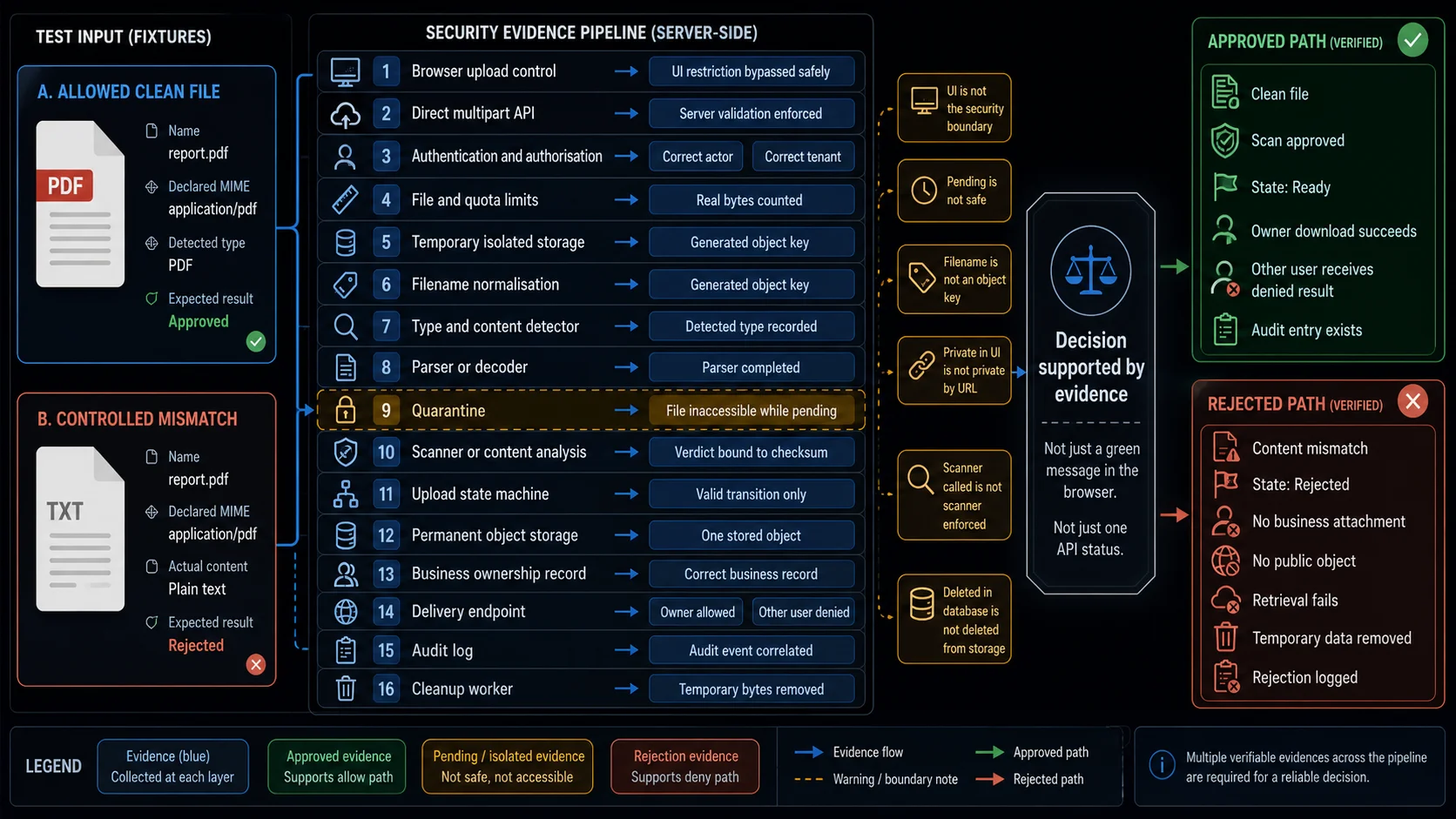
A strong rejection test may look like this:
Upload inert mismatched content
→ server rejects the mismatch
→ no safe object is created
→ no business attachment exists
→ direct retrieval fails
→ the rejection is logged
→ temporary bytes are removed
A strong successful test proves the opposite path:
Upload controlled clean fixture
→ isolate it
→ validate the source
→ record a successful scan
→ confirm ownership
→ publish one object
→ permit the owner
→ reject another user
→ delete and revoke access
Security Failures That Look Safe
| Failure that appears protected | What actually happened | Evidence required |
|---|---|---|
| Browser rejected the file | Direct API request still accepts it | Send the same inert fixture through multipart API |
| Extension was blocked | Forged MIME type bypasses the backend rule | Vary extension, MIME, and content independently |
| Scanner rejected the file | Temporary URL was already public | Attempt retrieval during every pending state |
| Filename was sanitised | Original name still became the storage key | Inspect generated object identity |
| File is private in the UI | Direct URL works without authorisation | Cross-user and unauthenticated retrieval |
| Download button works | Response renders active content inline | Inspect content type, disposition, origin, and nosniff |
Replacement inherited Safe | New bytes reused the old verdict | Bind verdict to immutable content identity |
| Database row was deleted | Old object or CDN response remains accessible | Retrieve after deletion and retention expiry |
| Each file meets the limit | Batch exhausts memory, processing, or quota | Test aggregate count, bytes, and concurrency |
| Signed URL expired | Modified path still accesses another object | Change object-related signed parameters |
| Quarantine exists | Preview generator exposes unapproved content | Retrieve every derivative before approval |
| Audit event exists | It cannot identify the actor or file version | Verify object, actor, reason, and correlation fields |
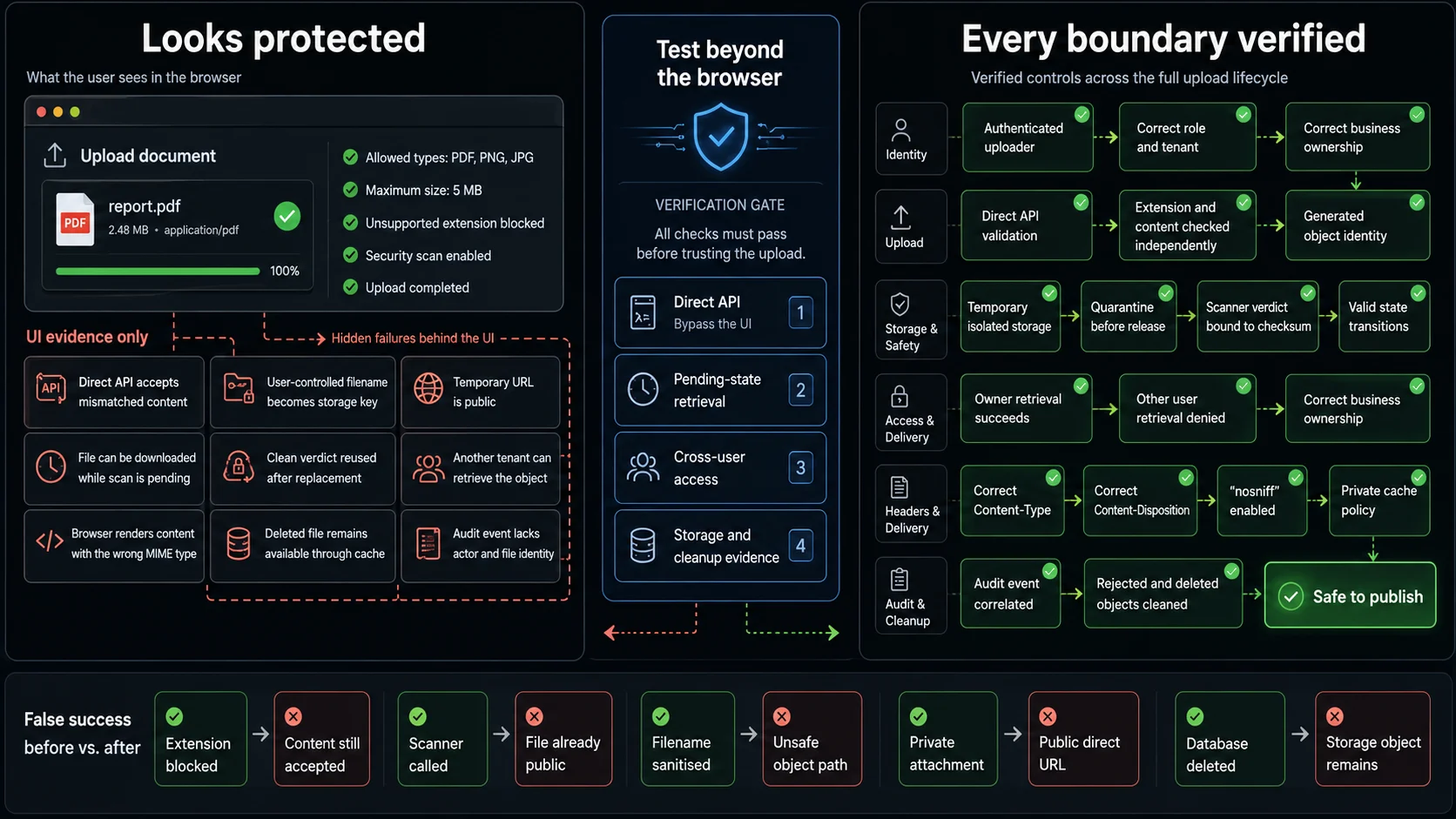
These patterns are valuable because they target false confidence.
The visible control may work exactly as designed while another storage, processing, or delivery path remains open.
Automate the Boundaries with Playwright
Playwright can test both sides of the feature:
locator.setInputFiles()covers the visible upload journey;APIRequestContextcalls the server directly and bypasses client-side validation.
Use controlled inert content. The goal is to verify the boundary, not execute a payload.
Reject Mismatched Content at the API Boundary
The following fixture claims to be a PDF through its name and MIME type but contains plain text.
import { test, expect } from '@playwright/test';

test('rejects content that does not match the declared PDF type', async ({
  page,
}) => {
  await page.goto('/documents');

  await page.getByLabel('Upload document').setInputFiles({
    name: 'quarterly-report.pdf',
    mimeType: 'application/pdf',
    buffer: Buffer.from(
      'Controlled inert fixture. This is not a valid PDF document.',
    ),
  });

  const [response] = await Promise.all([
    page.waitForResponse(
      candidate =>
        candidate.url().includes('/api/uploads') &&
        candidate.request().method() === 'POST',
    ),
    page.getByRole('button', { name: 'Upload' }).click(),
  ]);

  expect([400, 415, 422]).toContain(response.status());

  await expect(page.getByRole('alert')).toContainText(
    /invalid|unsupported|content|format/i,
  );

  await expect(page.getByTestId('uploaded-file')).toHaveCount(0);
});
Now bypass the browser:
import { test, expect } from '@playwright/test';

test('enforces type validation on direct multipart requests', async ({
  request,
}) => {
  const response = await request.post('/api/uploads', {
    multipart: {
      file: {
        name: 'quarterly-report.pdf',
        mimeType: 'application/pdf',
        buffer: Buffer.from(
          'Controlled inert fixture. This is not a PDF.',
        ),
      },
      businessRecordId: 'case-123',
    },
  });

  expect([400, 415, 422]).toContain(response.status());

  const body = await response.json();

  expect(body.code).toMatch(
    /INVALID_FILE|UNSUPPORTED_TYPE|CONTENT_MISMATCH/,
  );
});
The exact status and error code are application-specific.
The stable assertion is that browser metadata cannot make invalid content trusted.
Safe storage identity can be verified in the same API journey:
expect(upload.originalName).toBe('customer-contract.pdf');
expect(upload.storageKey).not.toContain('..');
expect(upload.storageKey).not.toContain('customer-contract.pdf');
expect(upload.storageKey).toMatch(/^[a-zA-Z0-9/_-]+$/);
Keep Pending Files Inaccessible
A clean response from the upload endpoint may create only a pending object.
import { test, expect } from '@playwright/test';

test('does not expose a file while security checks are pending', async ({
  request,
}) => {
  const uploadResponse = await request.post('/api/uploads', {
    multipart: {
      file: {
        name: 'document.pdf',
        mimeType: 'application/pdf',
        buffer: Buffer.from(
          '%PDF-1.4\n% controlled non-sensitive fixture\n',
        ),
      },
      businessRecordId: 'case-123',
    },
  });

  expect(uploadResponse.ok()).toBeTruthy();

  const upload = await uploadResponse.json();

  expect(upload.status).toMatch(
    /pending_validation|pending_scan|quarantined/,
  );

  const contentResponse = await request.get(
    `/api/files/${upload.id}/content`,
  );

  expect([403, 404, 409, 423]).toContain(contentResponse.status());
});
The endpoint may return 403, 404, 409, or 423. The precise status is less important than the security property: pending bytes cannot be retrieved as approved content.
For the successful path, poll the trusted source of truth rather than sleeping for a fixed duration:
await expect
  .poll(
    async () => {
      const response = await request.get(`/api/files/${upload.id}`);

      if (!response.ok()) {
        return `http-${response.status()}`;
      }

      return (await response.json()).status;
    },
    {
      message: 'file should reach the approved state',
      timeout: 30_000,
    },
  )
  .toBe('ready');
Scanner timeout and unavailability should be tested through a service stub, controlled test mode, or isolated integration environment. Do not attempt to break a shared scanner in CI.
Verify Ownership and Delivery Policy
Use separate authenticated API contexts to prove that ownership is enforced at retrieval.
import { test, expect, request as apiRequest } from '@playwright/test';

test('permits the owner and rejects another user', async () => {
  const ownerApi = await apiRequest.newContext({
    baseURL: 'https://test.example.com',
    extraHTTPHeaders: {
      Authorization: `Bearer ${process.env.OWNER_TEST_TOKEN}`,
    },
  });

  const otherUserApi = await apiRequest.newContext({
    baseURL: 'https://test.example.com',
    extraHTTPHeaders: {
      Authorization: `Bearer ${process.env.OTHER_USER_TEST_TOKEN}`,
    },
  });

  try {
    const uploadResponse = await ownerApi.post('/api/uploads', {
      multipart: {
        file: {
          name: 'private-note.txt',
          mimeType: 'text/plain',
          buffer: Buffer.from('Controlled private test content'),
        },
        businessRecordId: 'case-123',
      },
    });

    expect(uploadResponse.ok()).toBeTruthy();

    const upload = await uploadResponse.json();

    await expect
      .poll(async () => {
        const response = await ownerApi.get(`/api/files/${upload.id}`);

        if (!response.ok()) {
          return `http-${response.status()}`;
        }

        return (await response.json()).status;
      })
      .toBe('ready');

    const ownerDownload = await ownerApi.get(
      `/api/files/${upload.id}/content`,
    );

    expect(ownerDownload.ok()).toBeTruthy();

    const headers = ownerDownload.headers();

    expect(headers['content-type']).toBe('text/plain');
    expect(headers['content-disposition']).toMatch(
      /^attachment;\s*filename=/i,
    );
    expect(headers['x-content-type-options']).toBe('nosniff');

    const otherUserDownload = await otherUserApi.get(
      `/api/files/${upload.id}/content`,
    );

    expect([403, 404]).toContain(otherUserDownload.status());
  } finally {
    await ownerApi.dispose();
    await otherUserApi.dispose();
  }
});
Only require attachment when the product is supposed to download the file. Images, videos, and PDFs may intentionally render inline, but they still need the correct content type, ownership policy, cache policy, and origin strategy.
Use dedicated test accounts. Keep tokens in the CI secret store, and never hard-code real user credentials.
Build a Controlled Security Fixture Set
Random files from tester laptops do not create a reliable security suite.
Each fixture should represent one explicit property and have a documented expected decision.
tests/
└── fixtures/
    └── upload-security/
        ├── allowed/
        │   ├── valid-small.pdf
        │   ├── valid-text.txt
        │   └── valid-image.png
        ├── mismatches/
        │   ├── text-named-as-pdf.pdf
        │   ├── png-with-text-mime.png
        │   └── truncated-pdf.pdf
        ├── filenames/
        │   ├── duplicate-name.txt
        │   ├── unicode-name.txt
        │   ├── very-long-name.txt
        │   └── reserved-name.txt
        ├── boundaries/
        │   ├── exact-max.bin
        │   ├── max-plus-one.bin
        │   └── many-small-files/
        ├── archives/
        │   ├── allowed-small.zip
        │   ├── nested-directories.zip
        │   └── mixed-allowed-and-rejected.zip
        └── scanner/
            ├── approved-clean-fixture.bin
            └── approved-scanner-test-fixture.bin
Keep expectations in a manifest:
{
  "text-named-as-pdf.pdf": {
    "declaredMimeType": "application/pdf",
    "detectedType": "text/plain",
    "expectedDecision": "reject",
    "reason": "content_type_mismatch",
    "safeForSharedCi": true
  },
  "approved-scanner-test-fixture.bin": {
    "expectedDecision": "quarantine",
    "environment": "isolated-security-test",
    "owner": "security-team",
    "safeForSharedCi": false
  }
}
Fixture rules:
- use inert content in routine CI;
- version fixtures with the policy they test;
- never use customer uploads;
- keep security-team fixtures in controlled storage;
- document whether a fixture is safe for shared runners;
- remove temporary artifacts after execution;
- use separate owner, other-user, and other-tenant accounts;
- record the expected detected type, verdict, and terminal state;
- generate large boundary buffers when committing binaries is unnecessary.
For example:
const maximumBytes = 5 * 1024 * 1024;

const exactMaximum = Buffer.alloc(maximumBytes, 0x61);
const oneByteOver = Buffer.alloc(maximumBytes + 1, 0x61);
Avoid generating many large buffers concurrently across test workers.
The Release-Gating Security Journey
Do not begin by automating all 102 checks as separate browser scripts.
Start with one clean fixture and one controlled mismatch. Prove the critical boundaries first.
The release-gating path should demonstrate that:
- an authorised user can upload a permitted clean fixture;
- an unauthorised user cannot upload to the same business record;
- an extension or MIME mismatch does not bypass server validation;
- the application generates an independent storage identity;
- the file remains inaccessible while validation or scanning is pending;
- only an approved verdict permits publication;
- the owner can retrieve the ready file;
- another user and another tenant cannot retrieve it;
- delivery headers match the intended inline or attachment policy;
- retry creates one logical file rather than a duplicate;
- replacement returns to quarantine;
- deletion removes retrieval access;
- rejected and expired temporary objects are cleaned;
- the audit trail records the security decision.
Once that path is reliable, vary the data:
- role;
- tenant;
- extension;
- declared MIME type;
- detected content;
- filename;
- file size;
- batch count;
- quota state;
- scan result;
- scanner availability;
- object version;
- delivery origin;
- signed URL lifetime;
- retention state.
With WrightTest, the visible upload flow can remain stable while the account, fixture, request metadata, security result, and expected terminal state change.
The goal is not to build an automated exploit library. It is to prove that each documented boundary continues to reject, quarantine, isolate, or authorise a file exactly where the product says it should.
Sources
- OWASP File Upload Cheat Sheet
- OWASP Input Validation Cheat Sheet
- OWASP Web Security Testing Guide: Test Upload of Unexpected File Types
- OWASP Web Security Testing Guide: Test Upload of Malicious Files
- OWASP ASVS 5.0: File Upload and Content
- MITRE CWE-434: Unrestricted Upload of File with Dangerous Type
- PortSwigger Web Security Academy: File Upload Vulnerabilities
- MDN: X-Content-Type-Options
- MDN: Content-Disposition
- Playwright: Locator.setInputFiles
- Playwright: APIRequestContext