
File Upload Testing
File Upload Test Cases: From Selection to Retrieval
Test the complete upload lifecycle from file selection through validation, transfer, processing, storage, retrieval, access control and cleanup.
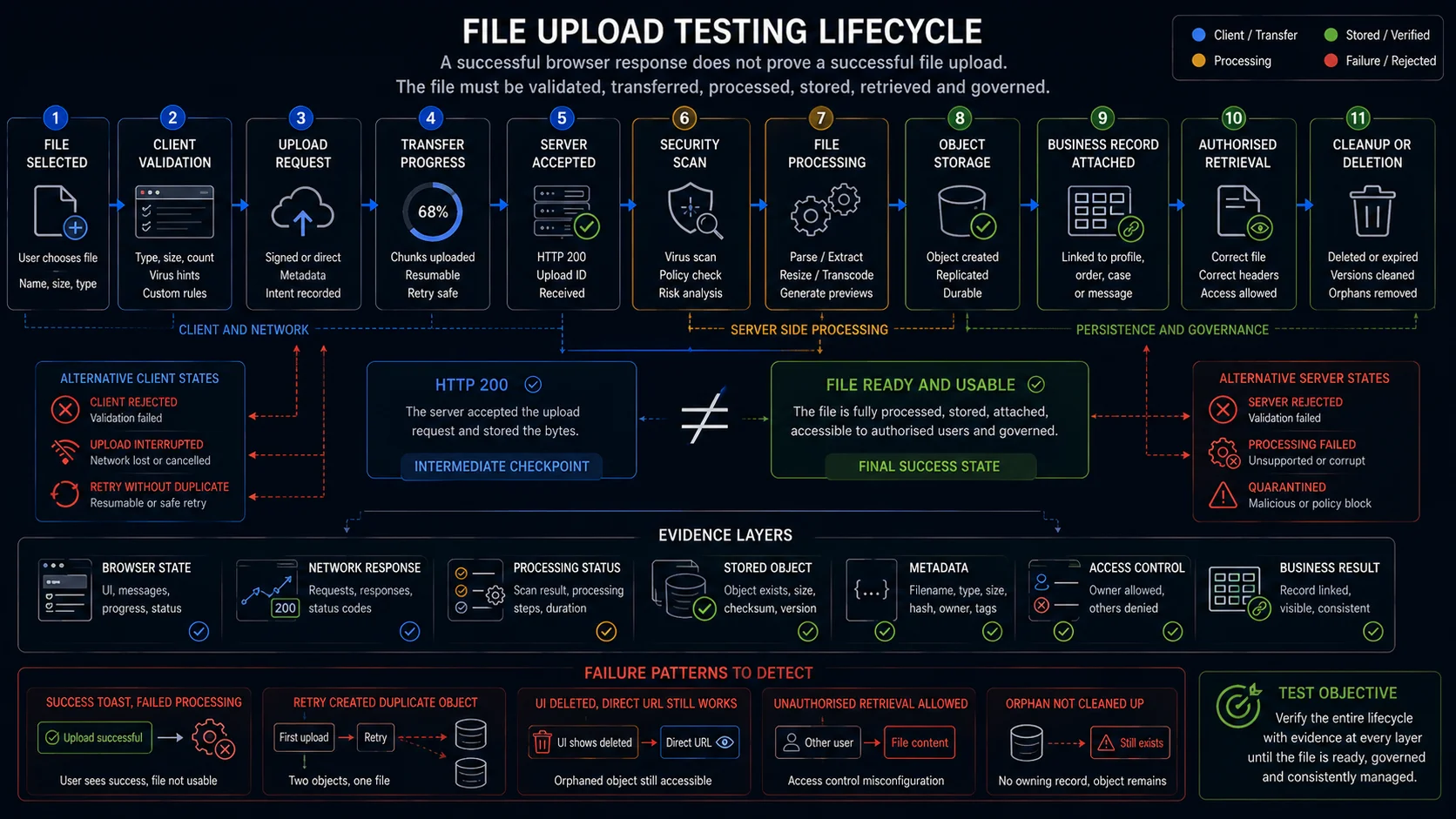
Most file-upload checklists stop too early. The file picker closes, the request returns a successful response, and the interface shows a green message. Five seconds later, the scanner quarantines the file or the parser fails—but the test has already passed.
A reliable file upload test follows the file further: through validation, transfer, processing, storage, retrieval, access control, retry, and cleanup. The feature passes only when the file reaches the state the product actually promises, whether that means ready to view, download, import, or attach.
For a release-gating test, prove that the expected bytes were accepted once, reached a terminal processing state, were attached to the correct business record, remained accessible only to the intended user, and left no duplicate or orphaned artifacts behind.
This guide provides functional file upload test cases for the complete lifecycle rather than treating the upload button as the end of the feature.
Start with the File Upload Contract
The first question is not “Which test cases should we add?” It is:
What does this product call complete?
A profile photo may be ready only after resizing and thumbnail generation. A CV may remain pending until a malware scanner clears it. A CSV file can transfer successfully and still fail when the application parses its rows.
Write the terminal state down before building the test matrix.
| Contract area | Questions to answer |
|---|---|
| Accepted files | Which extensions, MIME types, and actual content formats are supported? |
| Size limits | What are the minimum, maximum, per-file, and total batch limits? |
| File count | Is the component single-file or multiple-file? |
| Filename rules | Are Unicode, spaces, long names, and duplicate names supported? |
| Processing | Is the file scanned, parsed, resized, transcoded, or indexed? |
| Completion | Does complete mean transferred, processed, or attached to a business record? |
| Storage | Where is the file stored, and which metadata must be preserved? |
| Access | Who may view, download, replace, or delete the file? |
| Recovery | What happens after cancellation, timeout, refresh, or interrupted transfer? |
| Retention | When are temporary, failed, replaced, and deleted files removed? |
A useful completion rule fits in one sentence:
The upload is complete when the expected file has reached
[terminal state], is attached to[business entity], and can be retrieved by[authorised actor].
That sentence becomes the final assertion of the main automated journey.
The HTML accept attribute may guide users towards supported file types, but it is not a validation or security boundary. Browsers can still allow another type to be selected, and direct API requests bypass the file picker completely. The server must enforce the actual upload contract.
Model the File Upload Lifecycle
State names vary between products. The distinction should not:
Bytes transferred is not the same state as file usable.
Use the following model as a starting point, then replace its labels with the states exposed by your UI, API, events, or processing service.
Empty
  ↓
Selected
  ├── Client rejected
  ↓
Ready to upload
  ↓
Uploading
  ├── Cancelled
  ├── Interrupted
  └── Timed out
  ↓
Server accepted
  ├── Server rejected
  ↓
Scanning or processing
  ├── Quarantined
  ├── Processing failed
  ↓
Ready
  ↓
Retrieved, replaced, expired, or deleted
Every transition needs an observable result, but not every result needs to appear in the browser.
For example, Server accepted and Ready are different states. A 202 Accepted response usually means that the server accepted the request for processing. It does not prove that scanning, parsing, resizing, indexing, or storage completed.
The test should follow the upload until the system exposes a terminal result.
Core File Upload Test Cases
File Selection and Component Behaviour
These cases verify the browser-facing component before transfer begins.
| ID | Test case | Expected result |
|---|---|---|
| FU-001 | Open a page containing the upload component | The control is visible, enabled, and labelled according to its purpose |
| FU-002 | Submit a required form without selecting a file | Submission is blocked, and a specific error identifies the missing file |
| FU-003 | Select one supported file | The correct filename, size, and selected state are displayed |
| FU-004 | Close the file chooser without selecting anything | The previous state remains unchanged, and no upload starts |
| FU-005 | Replace a selected file before uploading | The old selection is removed, and only the replacement is submitted |
| FU-006 | Remove a selected file | The component returns to its empty state |
| FU-007 | Select the same file again after removing it | The component recognises the new selection and allows another upload |
| FU-008 | Select a file whose name contains spaces and Unicode characters | The name is displayed safely without corruption or layout failure |
| FU-009 | Select a filename longer than the visible component width | The name is truncated visually without changing the actual filename |
| FU-010 | Attempt multiple selection in a single-file component | Only one file is accepted, or a clear validation message is shown |
| FU-011 | Use drag-and-drop instead of the file picker | The same validation and resulting state are applied |
| FU-012 | Drop a file outside the designated zone | The browser does not navigate away, open the file, or start an upload |
| FU-013 | Operate the component using the keyboard | The trigger, remove action, and upload action are keyboard accessible |
| FU-014 | Trigger validation, progress, and completion messages with a screen reader | Important state changes are announced programmatically |
A native file input can accept one or multiple files depending on its multiple attribute. The selected File objects expose values such as the filename, byte size, and browser-declared MIME type.
These values are useful for browser assertions, but they are not proof that the server accepted or stored the correct file.
File Type, Content, and Size Validation
Do not treat the filename extension, browser-declared MIME type, and actual file content as the same value. They are separate inputs that may agree—or contradict one another.
| ID | Test case | Expected result |
|---|---|---|
| FU-015 | Upload every documented supported format | Each format is accepted and processed according to its contract |
| FU-016 | Use uppercase and mixed-case extensions | Behaviour follows the documented case-sensitivity rule |
| FU-017 | Upload a clearly unsupported format | The file is rejected with an actionable message |
| FU-018 | Rename an unsupported file to an allowed extension | Server-side validation rejects the content mismatch |
| FU-019 | Send an allowed file with an incorrect declared MIME type | The server follows its documented content-validation rule |
| FU-020 | Send the expected MIME type with content belonging to another format | The file is rejected or quarantined |
| FU-021 | Upload a valid file one byte below the maximum | The file is accepted |
| FU-022 | Upload a valid file exactly at the maximum | The documented boundary behaviour is applied |
| FU-023 | Upload a file one byte above the maximum | The file is rejected without unnecessary processing |
| FU-024 | Upload a zero-byte file | The system rejects it or handles it according to the business contract |
| FU-025 | Upload a truncated or corrupted supported file | The file does not become ready if downstream processing cannot read it |
| FU-026 | Upload a password-protected document | The system follows the documented accept, reject, or password-request behaviour |
| FU-027 | Upload a file with excessive internal dimensions but a small byte size | Processing limits prevent uncontrolled resource use and return a controlled result |
| FU-028 | Upload a filename containing leading or trailing spaces | The stored and displayed name follows the documented normalisation rule |
| FU-029 | Upload two different files with the same original filename | Neither file is silently overwritten |
| FU-030 | Upload a file with reserved or unsupported filename characters | The name is rejected or safely normalised without changing the file content |
The file picker can suggest expected types through the accept attribute, but that value is a hint rather than an enforcement boundary.
Treat the following as separate checks:
- extension;
- declared MIME type;
- file signature;
- actual parsable content;
- filename;
- byte size;
- authorisation;
- storage policy.
The server must enforce the real contract. A test that only confirms that the UI blocks a .exe selection says nothing about a direct request to the upload endpoint.
OWASP recommends layered validation rather than trusting one signal. Extension, content type, signature, filename, size, authorisation, storage, and content scanning cover different failure modes.
Transfer, Cancellation, and Recovery
A file can be valid and still fail during transmission.
| ID | Test case | Expected result |
|---|---|---|
| FU-031 | Upload under a normal connection | Progress reaches transfer completion once, and the file advances to processing |
| FU-032 | Upload under a slow connection | Progress remains responsive and does not falsely report final completion |
| FU-033 | Interrupt the connection during transfer | The state changes to failed, paused, or interrupted according to the contract |
| FU-034 | Restore the connection after interruption | The system retries or resumes without creating a second logical file |
| FU-035 | Cancel an active upload | Transfer stops, and temporary data is eventually removed |
| FU-036 | Retry a failed upload | One final file and one business attachment are created |
| FU-037 | Double-click the upload or submit action | Duplicate requests do not create duplicate records |
| FU-038 | Refresh or navigate away during transfer | Warning and recovery behaviour match the requirements |
| FU-039 | Let an upload exceed the request timeout | The UI leaves the loading state and presents a recoverable failure |
| FU-040 | Return an application error after transfer completes | The browser does not show a false success state |
| FU-041 | Retry after an unknown outcome | The operation is idempotent or identifies the existing upload |
| FU-042 | Use a pre-signed upload URL after it expires | The expired operation fails safely, and a new valid upload can be requested |
Treat 100% transferred as a transport event, not as a business-success label.
If scanning or parsing continues after the request body arrives, expose a separate state such as Processing. The test should then wait for Ready, Failed, Quarantined, or another documented terminal state.
This distinction catches a common false positive: the browser reports completion while the file remains unusable.
Avoid fixed delays such as “wait five seconds and check again.” A timeout does not prove that processing finished. Poll an observable state or wait for a relevant event.
Processing, Storage, and Retrieval
This is the layer that most general file-upload checklists omit.
| ID | Test case | Expected result |
|---|---|---|
| FU-043 | Upload a file that requires asynchronous processing | The state moves from accepted to processing and then to ready |
| FU-044 | Force the parser or processor to fail | A controlled failure is shown, and the file is not presented as usable |
| FU-045 | Trigger quarantine in an authorised test environment | The file remains unavailable, and the user receives the expected status |
| FU-046 | Generate a preview, thumbnail, or transformed file | The generated artifact corresponds to the uploaded source |
| FU-047 | Compare stored metadata with the source | Original name, content type, byte size, owner, and timestamps are correct |
| FU-048 | Simulate object-storage failure after request acceptance | The business record does not claim that the file is ready |
| FU-049 | Retrieve the completed file | The returned bytes and metadata correspond to the uploaded file |
| FU-050 | Open the file through its application link | Content-Disposition and browser behaviour match the intended inline or download mode |
| FU-051 | Request another user’s file | Access is denied even when the direct identifier or URL is known |
| FU-052 | Replace an existing attachment | The active version changes according to the versioning rule |
| FU-053 | Delete an uploaded file | UI state, business record, retrieval endpoint, and storage are updated consistently |
| FU-054 | Inspect a failed or cancelled upload after the cleanup period | No orphaned file or active attachment remains |
| FU-055 | Expire a temporary upload | The file becomes unavailable at the documented time |
| FU-056 | Reopen the page in a new browser session | The persisted file state matches the backend state |
Uploaded files may pass through several independent services:
Browser
→ Upload endpoint
→ Temporary storage
→ Malware scanner
→ Parser or media processor
→ Permanent storage
→ Business record
→ Retrieval endpoint
Each boundary can fail after the previous one succeeds.
An upload test does not need direct database access in every scenario. It does need at least one downstream source of truth beyond the browser for the release-gating path.
That source may be:
- a public API;
- an authorised test endpoint;
- an admin interface;
- an emitted event;
- the final business record;
- retrieval of the stored file.
Multiple File Uploads
Multiple upload is not simply the single-file flow repeated several times. It introduces batch-level rules and per-file states.
| ID | Test case | Expected result |
|---|---|---|
| FU-057 | Select the maximum permitted number of files | All files are accepted |
| FU-058 | Select one file above the count limit | The documented whole-batch or excess-file rule is applied |
| FU-059 | Exceed the total batch size while every individual file remains valid | The batch is rejected or trimmed according to the contract |
| FU-060 | Upload a mixture of valid and invalid files | Every file receives an explicit result |
| FU-061 | Fail one file during transfer | Successful files are not incorrectly marked as failed |
| FU-062 | Fail one file during processing | Per-file processing states remain independent |
| FU-063 | Retry only the failed file | Completed files are not uploaded again |
| FU-064 | Cancel one active item | Other files continue or stop according to the batch policy |
| FU-065 | Upload several files with the same name | Every accepted file receives a distinct identity |
| FU-066 | Reorder files before submission | The stored order follows the documented rule |
| FU-067 | Submit the same batch twice | Duplicate prevention or versioning behaves consistently |
| FU-068 | Remove one selected file before starting | Only the remaining files are transferred |
Define whether the batch operation is:
- Atomic: one failure rejects the entire batch.
- Partially successful: valid files continue independently.
- Transactional later: files upload independently, but the business action attaches or commits them together.
Without this rule, the expected result for a mixed batch remains ambiguous.
Drag-and-Drop Uploads
Drag-and-drop should be treated as an alternative file-selection method, not as a separate upload contract.
After the browser produces the selected FileList, validation, transfer, processing, and storage should follow the same rules as selection through the native file input.
Verify:
- the active state appears on
dragenter; - the active state disappears on
dragleave; - a valid file can be dropped on the intended target;
- dropping outside the target does not trigger an upload;
- the browser does not navigate to or open the dropped file;
- unsupported files follow the same validation path;
- multiple files follow the batch rules;
- duplicate files follow the duplicate policy;
- folders are rejected or handled according to the contract;
- nested elements do not break the drop target;
- overlays do not intercept the interaction incorrectly;
- a keyboard-accessible file picker remains available;
- the same post-upload assertions run after selection.
Do not create a separate automated flow that only checks the visual drop animation. Reuse the same validation and terminal-state assertions as the file-input journey.
Make Upload Progress and Status Accessible
A visible progress bar does not necessarily tell assistive technology that its value changed.
Expose the following states programmatically:
- file selected;
- validation failed;
- upload started;
- transfer progress changed;
- upload cancelled;
- processing started;
- processing failed;
- file ready;
- file removed.
Test the component with a screen reader and verify that status updates are announced without moving focus away from the user’s current control.
The upload must also remain operable through the keyboard when drag-and-drop is available. Drag-and-drop may be a useful enhancement, but it cannot be the only way to choose a file.
Do not communicate success or failure through colour alone. Pair colour and icons with text that identifies the file and its current state.
What Evidence Proves the Upload Worked?
A strong upload test combines evidence from several layers.
| Layer | Evidence to collect |
|---|---|
| Browser | Selected filename, validation message, progress, and final visible state |
| Network | Request count, response status, upload identifier, and retry behaviour |
| Upload service | Accepted or rejected state and validation reason |
| Scanner | Pending, clean, rejected, or quarantined result |
| Processor | Parsed, resized, transcoded, indexed, or failed state |
| Storage | Object exists once with the correct byte size, checksum, and metadata |
| Retrieval | The intended user can retrieve the correct bytes |
| Authorisation | Other users and expired sessions are denied |
| Business record | The file is attached to the intended profile, order, case, or message |
| Cleanup | Cancelled, replaced, failed, and deleted artifacts are removed |
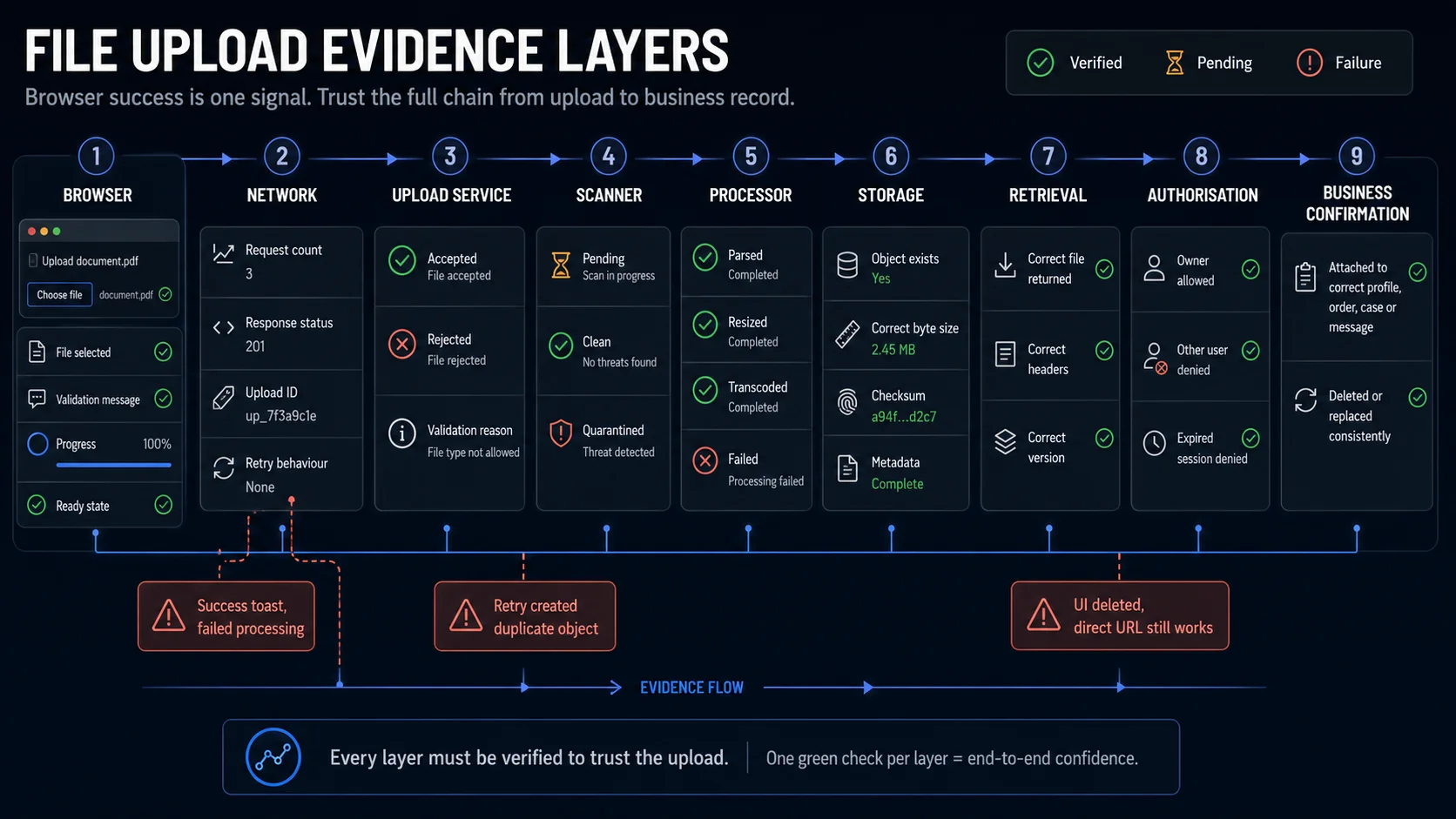
Not every test needs to query every layer.
A practical division is:
- Component tests: file picker, validation messages, removal, accessibility.
- API or integration tests: validation, upload identity, processing transitions, metadata.
- End-to-end release tests: one representative file reaches the business-ready state and can be retrieved.
- Security tests: adversarial content, bypass attempts, parser risks, storage exposure.
The release-gating end-to-end test should verify at least one downstream source of truth beyond the success message.
Where File Uploads Produce False Success
Success Message, Failed Processing
The browser shows “Uploaded successfully” immediately after request acceptance, but a background processor later rejects the file.
Required proof: wait for the terminal processing state and confirm that the resulting artifact is usable.
Local Preview Mistaken for a Stored File
The page displays an image preview generated directly from the selected local file.
Required proof: reload the page or retrieve the server-hosted artifact. A local preview proves file selection, not upload completion.
Duplicate Submit Creates Two Attachments
A slow response causes the user or automation to click twice.
Required proof: inspect the request count and final business record. There should be one logical attachment unless duplicates are explicitly supported.
Retry Leaves an Orphaned Object
The first request stores an object but fails before creating the database record. The retry then creates a second object.
Required proof: verify both the visible attachment and storage cleanup after retry.
Deletion Updates Only the Interface
The attachment disappears from the page but remains retrievable through its old URL.
Required proof: reload the record, request the previous retrieval URL, and verify the documented retention or deletion state.
Progress Reaches 100% Too Early
The transfer completes, but scanning, parsing, or transcoding is still running.
Required proof: distinguish byte-transfer completion from business-ready completion.
Direct URL Bypasses Access Rules
The application interface hides another user’s file, but its storage or download URL remains publicly accessible.
Required proof: request the artifact using another authenticated user and without authentication.
Replacement Creates Two Active Versions
The interface displays only the latest attachment, while the previous version remains active or downloadable.
Required proof: verify the current business record, previous retrieval URL, version history, and retention rule.
Where Functional Testing Stops
Functional QA should verify that documented security controls are enforced. It should not pretend that browser automation replaces a dedicated security assessment.
The functional suite can verify:
- allowed extensions;
- server-side rejection of type mismatches;
- file-size limits;
- safe filename handling;
- authorisation;
- duplicate and overwrite behaviour;
- storage visibility;
- retrieval headers;
- scanning or quarantine status;
- controlled failures when a parser rejects a file.
A separate security-testing scope may be needed for:
- executable content;
- parser exploitation;
- polyglot files;
- archive extraction;
- path traversal;
- decompression bombs;
- antivirus bypass;
- infrastructure isolation;
- web-server execution rules;
- storage bucket configuration.
A renamed extension is suitable for routine functional coverage. A weaponised parser exploit is not.
See the dedicated File Upload Security Test Cases guide for the security-focused scope.
For image-specific decoding, EXIF, dimensions, transparency, thumbnail, and transformation scenarios, see Image Upload Test Cases.
Automate the Lifecycle with Playwright
Playwright can assign file paths, multiple files, directories, or in-memory buffers through locator.setInputFiles().
The browser interaction is the easy part. The useful assertion is the one that proves the uploaded bytes reached the expected terminal state.
import { test, expect } from '@playwright/test';

test('uploaded file becomes ready and can be retrieved', async ({ page }) => {
  const expectedBody = Buffer.from('upload lifecycle evidence');
  const api = page.context().request;

  await page.goto('/files');

  await page.getByLabel('Upload file').setInputFiles({
    name: 'evidence.txt',
    mimeType: 'text/plain',
    buffer: expectedBody,
  });

  const [uploadResponse] = await Promise.all([
    page.waitForResponse(
      response =>
        response.url().includes('/api/uploads') &&
        response.request().method() === 'POST',
    ),
    page.getByRole('button', { name: 'Upload' }).click(),
  ]);

  expect(uploadResponse.ok()).toBeTruthy();

  const { id } = await uploadResponse.json();

  // A fast system may pass through "processing" before the UI assertion runs.
  // Poll the source of truth instead of adding a fixed timeout.
  await expect
    .poll(
      async () => {
        const response = await api.get(`/api/files/${id}`);

        if (!response.ok()) {
          return `http-${response.status()}`;
        }

        const file = await response.json();
        return file.status;
      },
      {
        message: 'uploaded file should reach the ready state',
        timeout: 30_000,
      },
    )
    .toBe('ready');

  const fileRow = page.getByTestId(`uploaded-file-${id}`);

  await expect(fileRow).toContainText('evidence.txt');

  const downloadResponse = await api.get(`/api/files/${id}/content`);

  expect(downloadResponse.ok()).toBeTruthy();
  expect(await downloadResponse.body()).toEqual(expectedBody);
});
The endpoint paths and response fields are application-specific.
The weak test pattern is:
Select file
→ receive 2xx
→ pass
A stronger pattern is:
Select file
→ capture upload identity
→ observe processing
→ wait for the terminal state
→ retrieve the stored bytes
→ verify the business attachment
Avoid fixed sleeps such as:
await page.waitForTimeout(5000);A fixed timeout makes the test slower without proving that processing finished.
Use:
- an API state;
- a visible terminal status;
- an event;
- a WebSocket message;
- an authorised backend endpoint;
- a retrievable artifact.
Automating Validation Cases
Use in-memory buffers when the test only needs controlled bytes and metadata.
import { test, expect } from '@playwright/test';

test('rejects a file whose content does not match its extension', async ({
  page,
}) => {
  await page.goto('/files');

  await page.getByLabel('Upload file').setInputFiles({
    name: 'document.pdf',
    mimeType: 'application/pdf',
    buffer: Buffer.from('this is not a valid PDF'),
  });

  const [response] = await Promise.all([
    page.waitForResponse(
      value =>
        value.url().includes('/api/uploads') &&
        value.request().method() === 'POST',
    ),
    page.getByRole('button', { name: 'Upload' }).click(),
  ]);

  expect(response.status()).toBe(422);

  await expect(page.getByRole('alert')).toContainText(
    /invalid|unsupported|corrupted/i,
  );
});
Do not assume that every application returns 422. Some return 400, 415, or a domain-specific error response.
Assert the product contract, not a generic status code copied from another system.
Automating Duplicate-Request Protection
The easiest way to miss duplicate uploads is to assert only the final UI row.
Observe the request count as well.
import { test, expect } from '@playwright/test';

test('double submit creates one attachment', async ({ page }) => {
  let uploadRequests = 0;

  page.on('request', request => {
    if (
      request.url().includes('/api/uploads') &&
      request.method() === 'POST'
    ) {
      uploadRequests += 1;
    }
  });

  await page.goto('/files');

  await page.getByLabel('Upload file').setInputFiles({
    name: 'contract.txt',
    mimeType: 'text/plain',
    buffer: Buffer.from('single logical upload'),
  });

  const uploadButton = page.getByRole('button', { name: 'Upload' });

  await uploadButton.dblclick();

  await expect(page.getByTestId('uploaded-file')).toHaveCount(1);

  expect(uploadRequests).toBeLessThanOrEqual(1);
});
Some applications may send more than one transport request as part of chunking or resumable upload. In that case, count logical upload identities or final attachments rather than raw HTTP calls.
Build a Deterministic Fixture Set
Do not collect random files from local machines. Build a small fixture library whose purpose is explicit.
| Dimension | Suggested fixtures |
|---|---|
| Format | One valid fixture for every supported type and one unsupported type |
| Size | Zero bytes, normal, maximum minus one, exact maximum, maximum plus one |
| Filename | Short, long, spaces, Unicode, duplicate, leading or trailing spaces |
| Content | Valid, truncated, corrupted, and type mismatch |
| Processing | Ready, parser failure, and approved quarantine test fixture |
| Access | Owner, another user, unauthenticated user, and expired session |
| Transfer | Normal, interrupted, cancelled, and retried |
| Batch | All valid, one invalid, one failed, duplicates, and count limit |
Fixtures should be:
- deterministic;
- version-controlled;
- safe to run repeatedly;
- small enough for CI;
- named by their purpose;
- independent of production data.
A useful fixture directory might look like this:
tests/
└── fixtures/
    └── uploads/
        ├── valid/
        │   ├── document-small.pdf
        │   ├── image-landscape.jpg
        │   └── plain-text.txt
        ├── boundaries/
        │   ├── empty.txt
        │   ├── max-minus-one.bin
        │   ├── exact-max.bin
        │   └── max-plus-one.bin
        ├── invalid/
        │   ├── corrupted.pdf
        │   ├── extension-mismatch.pdf
        │   └── unsupported.xyz
        └── filenames/
            ├── spaces in name.txt
            ├── résumé-данные.txt
            └── very-long-file-name.txt
Large boundary fixtures do not always need to be committed as binary files. Generate deterministic byte buffers during the test when practical.
const maxFileSize = 5 * 1024 * 1024;

const exactMaximum = Buffer.alloc(maxFileSize, 0x61);
const oneByteOver = Buffer.alloc(maxFileSize + 1, 0x61);
Keep generated fixtures within memory limits and avoid creating unnecessarily large buffers in parallel test workers.
Build the Release-Gating Path First
The highest-value automated path is not the longest test matrix. It is the path that catches false success.
Start with one controlled fixture and prove that the system can:
- accept it once;
- expose an upload identifier;
- move through any intermediate processing state;
- reach the expected terminal state;
- return the same stored content;
- attach the file to the correct business record;
- reject retrieval by the wrong user;
- survive one retry without creating a duplicate;
- remove access after deletion;
- clean temporary and failed artifacts.
Once that journey is reliable, add file formats, byte boundaries, network failures, batches, roles, and accessibility states as data variations.
With WrightTest, the visible browser journey can stay stable while the fixture, account, interruption point, and expected terminal state change. Record the user flow once, then vary the data and assertions that prove what happened after the browser sent the request.
Sources
- Playwright: Actions and file input
- Playwright API: Locator.setInputFiles
- MDN: The file input element
- MDN: Using files from web applications
- OWASP File Upload Cheat Sheet
- OWASP Web Security Testing Guide: Test Upload of Unexpected File Types
- OWASP Web Security Testing Guide: Test Upload of Malicious Files
- PortSwigger Web Security Academy: File upload vulnerabilities
- W3C Technique ARIA25: Using role=status for status messages