
Image Upload Testing
Image Upload Test Cases: Verify the Rendered Result
Verify image uploads beyond HTTP success by testing decoding, EXIF orientation, crop output, generated variants, metadata privacy, cache behavior, accessibility and final browser rendering.
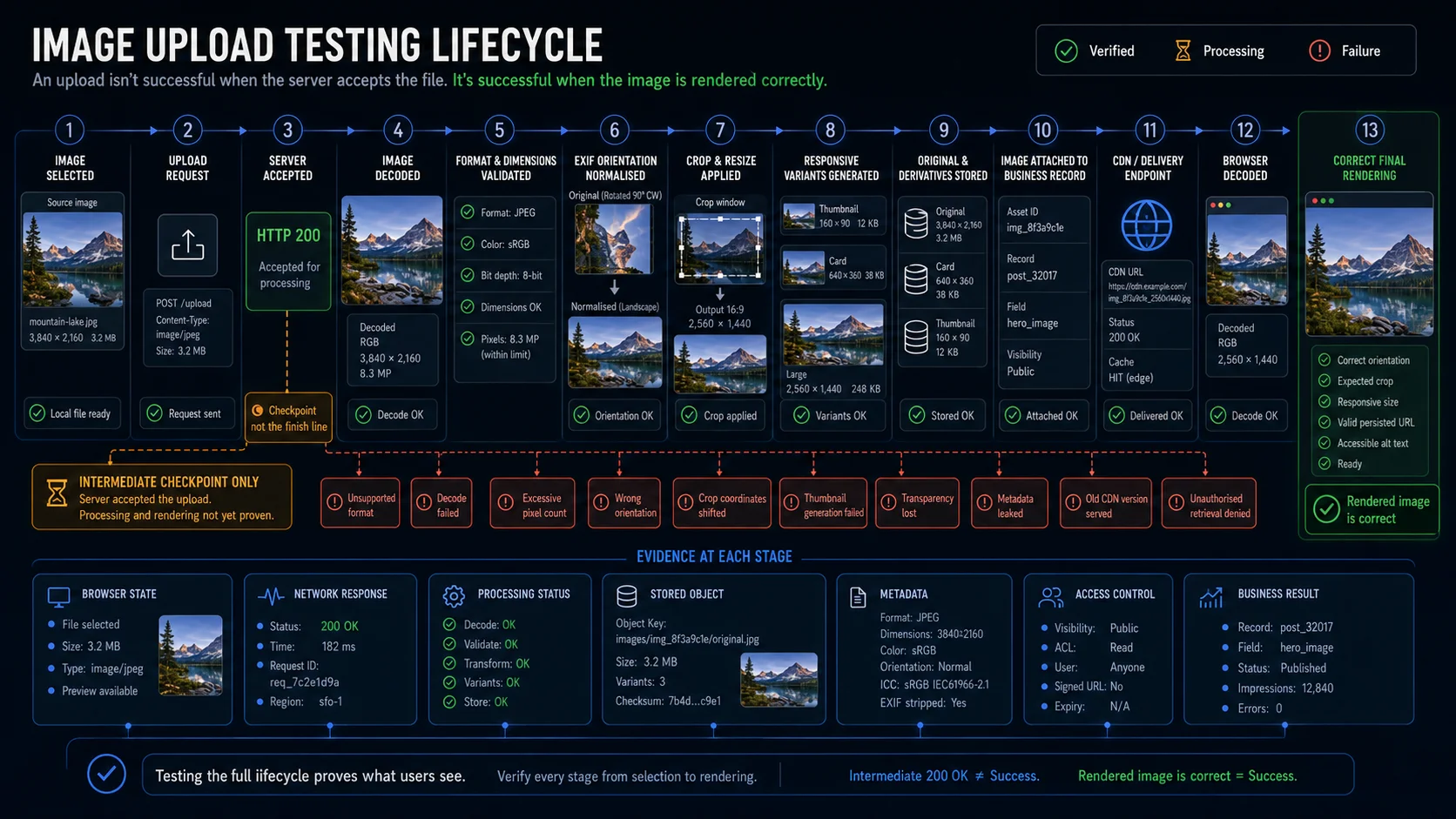
The file picker is rarely where the most expensive image-upload defects appear.
A request may succeed while the published image is rotated, cropped around the wrong subject, flattened onto a black background, served from an old cache, or missing one of the responsive variants used on mobile.
That is why an image upload should not pass at HTTP 200, or even when the original object reaches storage. The useful result is the image that the user finally sees.
File selected
→ uploaded
→ decoded
→ validated
→ orientation normalised
→ transformed
→ variants generated
→ stored
→ delivered
→ rendered correctly
This guide covers the image-specific parts of that lifecycle: real image decoding, pixel dimensions, EXIF orientation, crop coordinates, transparency, responsive variants, visual quality, metadata privacy, delivery, caching, accessibility, and browser rendering.
General upload behaviour—network interruption, cancellation, retry, duplicate requests, batch processing, and orphan cleanup—belongs to the parent guide, File Upload Test Cases, at /file-upload-test-cases/.
Define What “Image Ready” Means
Different products promise different image results.
An avatar workflow may generate one square thumbnail. A marketplace listing may preserve the original and create several responsive derivatives. A CMS may apply a focal point differently for hero, card, and mobile layouts.
Before writing test cases, define the final artifact.
| Contract area | Questions to answer |
|---|---|
| Accepted formats | Are JPEG, PNG, WebP, AVIF, GIF, SVG, HEIC, or other formats supported? |
| Detection | Does the server inspect the real image content or trust extension and MIME type? |
| File size | What are the minimum and maximum byte limits? |
| Pixel dimensions | What are the minimum and maximum width, height, and total pixel count? |
| Aspect ratio | Is any ratio accepted, or must the image be square, portrait, or landscape? |
| Orientation | Should EXIF orientation be applied, preserved, or stripped? |
| Transformation | Is the image cropped, resized, rotated, compressed, or re-encoded? |
| Variants | Which thumbnails and responsive sizes must be generated? |
| Transparency | Is the alpha channel preserved or flattened onto a background? |
| Animation | Are multiple frames preserved, flattened, or rejected? |
| Metadata | Which EXIF, GPS, device, author, and colour-profile fields are retained? |
| Storage | Is the original preserved together with derivatives? |
| Delivery | Is the image public, private, signed, proxied, or delivered through a CDN? |
| Accessibility | Is alternative text required, optional, or generated elsewhere? |
| Moderation | Must the image pass scanning or review before publication? |
A practical completion rule looks like this:
The image is ready when the source has been decoded, every mandatory variant has been generated, the correct artifact is attached to the intended record, and the delivered result renders with the expected orientation, crop, dimensions, and access rules.
This definition matters because image formats do not share one behaviour. JPEG has no alpha channel, PNG supports transparency, and formats such as GIF, WebP, AVIF, and APNG may contain animation or multiple frames. SVG is vector-based and requires a different security policy from ordinary raster images.
Model the Image Processing Lifecycle
The exact state names will vary, but transfer and visual readiness should remain separate.
Empty
  ↓
Selected
  ├── Client rejected
  ↓
Uploading
  ├── Interrupted
  ├── Cancelled
  ↓
Server accepted
  ├── Server rejected
  ↓
Decode pending
  ├── Decode failed
  ↓
Source validated
  ├── Dimension rejected
  ├── Format rejected
  ↓
Orientation normalised
  ↓
Transforming
  ├── Crop failed
  ├── Resize failed
  ├── Re-encode failed
  ↓
Generating variants
  ├── Mandatory variant failed
  ↓
Ready
  ↓
Published, replaced, moderated, expired, or deleted
A 201 Created response may mean that the upload record exists. A 202 Accepted response may mean that processing was queued. Neither proves that the browser can decode the final image or that all required derivatives exist.
The main automated journey should therefore wait for a terminal image state, not a transport response.
Core Image Upload Test Cases
Source Image Validation
Source validation has four separate dimensions:
- Is the file allowed?
- Can the processing library decode it completely?
- Do its dimensions meet the product contract?
- Is its shape suitable for the intended use?
Extension, MIME type, signature, and decodable content may disagree. The server should not trust a browser-provided value as its only validation signal. OWASP recommends allowlisting permitted types, validating content, limiting size, controlling filenames and storage, and applying several safeguards rather than relying on one check.
| ID | Test case | Expected result |
|---|---|---|
| IU-001 | Select a supported image | The component shows the correct filename and selected state |
| IU-002 | Upload each documented image format | Every supported format reaches the expected terminal state |
| IU-003 | Upload a non-image file renamed with an allowed image extension | Server-side validation rejects the content mismatch |
| IU-004 | Upload a valid image with an incorrect extension | The system follows its documented content-detection rule |
| IU-005 | Send a valid image with the wrong declared MIME type | The server validates the content instead of trusting the request header |
| IU-006 | Send non-image content with an allowed image MIME type | The server rejects it before publication |
| IU-007 | Upload a truncated JPEG | Full decoding fails safely, and the image never becomes ready |
| IU-008 | Upload a corrupted PNG | Processing returns a controlled failure rather than remaining pending |
| IU-009 | Upload a zero-byte file | The file is rejected |
| IU-010 | Upload an image without a filename extension | The documented detection rule is applied |
| IU-011 | Upload a valid image with an uppercase extension | Extension case does not change the documented result |
| IU-012 | Upload a progressive JPEG | The final persisted image decodes and renders correctly |
| IU-013 | Upload a grayscale image | The image remains valid and retains the expected appearance |
| IU-014 | Upload a CMYK JPEG | The image is converted, accepted, or rejected according to the contract |
| IU-015 | Upload a supported WebP or AVIF image | All mandatory outputs are generated successfully |
| IU-016 | Upload an unsupported HEIC image | The user receives a format-specific, actionable error |
| IU-017 | Upload an image below, at, and above the minimum width | Each boundary follows the documented inclusive or exclusive rule |
| IU-018 | Upload an image below, at, and above the minimum height | Each boundary follows the documented rule |
| IU-019 | Upload an image below, at, and above the maximum width or height | Oversized images are rejected or resized according to the contract |
| IU-020 | Upload a highly compressed image with an excessive total pixel count | The system prevents uncontrolled decoding or transformation |
Byte size and pixel count solve different problems. A small compressed file can still expand into a large in-memory bitmap.
Use a compact boundary matrix rather than duplicating one test for every individual measurement:
| Constraint | Below boundary | Exact boundary | Above boundary |
|---|---|---|---|
| Width | Reject or crop | Accept | Reject or resize |
| Height | Reject or crop | Accept | Reject or resize |
| Total pixel count | Accept | Accept | Reject before expensive processing |
| Byte size | Accept | Accept | Reject before upload or processing |
| Aspect-ratio tolerance | Reject or open editor | Accept | Reject or open editor |
For the rendered artifact, naturalWidth and naturalHeight expose the image’s intrinsic, density-corrected dimensions in CSS pixels. They are useful browser assertions, although source pixel dimensions may still need verification through processing metadata.
Orientation, Crop, and Editor Output
Phone cameras often store pixels in one orientation and describe the intended display orientation through EXIF metadata. That creates a classic mismatch: the browser preview looks upright while the server-produced derivative appears sideways.
Crop editors add another coordinate system. The displayed image may be scaled by CSS, browser zoom, device pixel ratio, or a responsive container before crop coordinates reach the processing service.
Test the saved pixels, not only the editor overlay.
| ID | Test case | Expected result |
|---|---|---|
| IU-021 | Upload an image with normal orientation | The result is not rotated |
| IU-022 | Upload an image requiring a 90-degree rotation | The persisted image appears upright |
| IU-023 | Upload an image requiring a 180-degree rotation | The final orientation is correct |
| IU-024 | Upload an image with mirrored orientation | Mirroring and rotation follow the product contract |
| IU-025 | Compare local preview orientation with the stored result | Both show the same intended orientation |
| IU-026 | Strip EXIF after applying orientation | The processed image remains upright without depending on the removed metadata |
| IU-027 | Manually rotate an image after automatic orientation correction | Rotation is applied once rather than twice |
| IU-028 | Replace one oriented image with another | Preview, metadata, and generated variants update consistently |
| IU-029 | Open a landscape image in a square crop editor | The initial crop is valid and visible |
| IU-030 | Move the crop to each source edge | The crop stays within valid image bounds |
| IU-031 | Change zoom from minimum to maximum | The selected output region remains valid |
| IU-032 | Rotate and crop in the same edit session | The saved result reflects the final operation order |
| IU-033 | Save a crop while the editor is displayed responsively | Stored crop coordinates map to the intended source region |
| IU-034 | Reopen an existing crop | The editor reconstructs the saved position accurately |
| IU-035 | Cancel or discard crop changes | The previous persisted image remains unchanged |
| IU-036 | Apply the same crop twice | Reprocessing is stable and does not accumulate transformations |
One automated case does not need to publish every EXIF orientation value as a separate table row. Keep representative groups in the article—normal, rotated, mirrored, and rotated plus mirrored—while covering all supported values in the data-driven fixture set.
The highest-risk crop cases usually place the subject near an edge. A centred stock photo is a poor fixture for detecting coordinate and focal-point defects.
Generated Variants and Visual Fidelity
A single source upload may create several artifacts:
Original
├── Avatar 64×64
├── Avatar 256×256
├── Card 640×360
├── Content 1280×720
└── Full 1920×1080
Each derivative has its own state, dimensions, format, crop rule, and delivery URL.
In practice, “the original works” is not enough. A broken card thumbnail may affect every listing page even though the full-resolution image remains valid.
| ID | Test case | Expected result |
|---|---|---|
| IU-037 | Generate every mandatory derivative | All required variants reach Ready |
| IU-038 | Verify the width and height of each variant | Dimensions match the transformation contract |
| IU-039 | Resize while preserving aspect ratio | The output is not stretched |
| IU-040 | Produce a fixed-size variant from a different source ratio | The documented crop or letterbox rule is applied |
| IU-041 | Request a variant larger than the source | Upscaling follows the documented rule |
| IU-042 | Downscale a very large source | Processing completes within controlled resource limits |
| IU-043 | Generate variants from an EXIF-oriented source | Every output uses the correct orientation |
| IU-044 | Fail one mandatory derivative | The parent image does not become fully ready |
| IU-045 | Retry one failed derivative | Successful variants are not duplicated or re-compressed unnecessarily |
| IU-046 | Replace the source image | All dependent variants are regenerated or versioned correctly |
| IU-047 | Preserve PNG or WebP transparency | Alpha remains intact where the output format supports it |
| IU-048 | Convert an image with alpha to JPEG | The configured background is applied instead of an accidental black fill |
| IU-049 | Crop through a semi-transparent edge | The result does not introduce dark or coloured halos |
| IU-050 | Upload an image with an embedded colour profile | The profile is preserved, converted, or removed according to the contract |
| IU-051 | Re-encode a detailed JPEG | Compression stays within the accepted visual-quality range |
| IU-052 | Resize an image containing fine text or line art | Important content remains legible at the supported size |
| IU-053 | Reprocess the same image | Output remains stable within the defined tolerance |
| IU-054 | Render variants at different viewport widths | The browser receives and displays a valid candidate for each layout |
Pixel-perfect comparison is tempting, but it is often the wrong oracle for a pipeline that intentionally re-encodes images. A valid output may differ at the byte and pixel level because of compression, colour conversion, metadata removal, or encoder versions.
Prefer assertions against the actual contract:
- output format;
- dimensions;
- aspect ratio;
- crop region;
- orientation;
- alpha behaviour;
- required variants;
- file-size range;
- expected subject visibility;
- browser decoding;
- business attachment.
Responsive images add another detail: srcset defines candidate resources, while currentSrc reports the URL the browser selected. The selected URL alone does not prove successful decoding, but it lets a test identify which derivative was used at a given viewport.
Formats That Need a Separate Policy
Animated images and SVG should not inherit an accidental policy from ordinary JPEG and PNG uploads.
An animated file may contain hundreds of frames. SVG may reference external resources or contain active content. Products that do not need these capabilities are usually easier to test and secure when they reject them explicitly.
| ID | Test case | Expected result |
|---|---|---|
| IU-055 | Upload a supported animated image | Animation is preserved and fully decodable |
| IU-056 | Upload animation where only still images are allowed | The image is rejected or flattened according to the contract |
| IU-057 | Flatten an animated image | The documented representative frame is used |
| IU-058 | Generate a thumbnail from an animated source | The selected frame and output dimensions are correct |
| IU-059 | Upload an animation with excessive frames or duration | Processing remains within documented limits |
| IU-060 | Replace an animated image with a still image | Published and cached variants update correctly |
| IU-061 | Upload a basic SVG when SVG is supported | The image is sanitised, rasterised, or stored according to policy |
| IU-062 | Upload SVG when vector uploads are not supported | The server rejects it |
| IU-063 | Upload SVG containing external references | References are removed, blocked, or rejected |
| IU-064 | Upload SVG containing active content | The file is sanitised or rejected |
| IU-065 | Generate a raster derivative from SVG | Dimensions, transparency, and background are correct |
| IU-066 | Deliver the resulting SVG or raster image | Response content type and access rules match the contract |
Deep SVG bypasses, parser exploitation, decompression bombs, and malicious polyglot files belong to the security-focused guide at /file-upload-security-test-cases/.
The functional suite should still prove the product’s declared policy: preserve, flatten, sanitise, rasterise, or reject.
Metadata and Privacy
Image metadata is easy to miss because it does not usually affect the visible preview.
A camera image may contain GPS coordinates, capture time, device model, author information, editing history, orientation, copyright fields, and colour-profile data. Removing metadata from the thumbnail does not prove that the downloadable original is clean.
| ID | Test case | Expected result |
|---|---|---|
| IU-067 | Upload an image containing standard EXIF metadata | Only permitted fields remain |
| IU-068 | Upload an image containing GPS coordinates | Location data follows the privacy policy |
| IU-069 | Upload an image containing camera and device information | Device metadata is retained or removed as documented |
| IU-070 | Upload author or copyright metadata | The platform follows its preservation policy |
| IU-071 | Generate derivatives from an image containing sensitive metadata | Public derivatives do not retain prohibited fields |
| IU-072 | Download the processed image | Its metadata matches the published contract |
| IU-073 | Preserve the original but strip derivatives | Each artifact follows its separate policy |
| IU-074 | Replace an image containing sensitive metadata | Old artifacts follow the retention and deletion rules |
| IU-075 | Display metadata values in the interface | Values belong to the correct image and are safely encoded |
| IU-076 | Upload malformed metadata with otherwise valid image pixels | Metadata parsing fails safely without leaving processing stuck |
Privacy should be verified against every artifact that users can retrieve:
Original
→ full-size processed image
→ responsive variants
→ thumbnails
→ exported or downloaded copy
A clean thumbnail cannot compensate for an original file that still exposes location data.
Storage, Delivery, and Cache Behaviour
Image replacement defects often live at the cache layer rather than in upload processing.
The database may reference the new object while an old CDN response remains valid. Adding a random cache-busting query to the test can hide the defect instead of detecting it.
| ID | Test case | Expected result |
|---|---|---|
| IU-077 | Retrieve the ready image | The response returns an expected image content type |
| IU-078 | Retrieve every mandatory variant | Each URL returns the intended artifact |
| IU-079 | Request the image before processing completes | A controlled pending result or placeholder is returned |
| IU-080 | Reload after upload | The page uses a persisted URL rather than a local blob: or data: preview |
| IU-081 | Replace the image | The application and delivery layer return the new version |
| IU-082 | Request the previous URL after replacement | Old content follows the documented versioning or invalidation rule |
| IU-083 | Delete the image | Application and delivery endpoints stop serving it according to retention policy |
| IU-084 | Request a deleted image from a new browser session | Cached client state does not restore access |
| IU-085 | Change only the crop or focal point | Cache keys or versioned URLs update consistently |
| IU-086 | Retrieve the image through different delivery regions | The new version propagates within the documented window |
| IU-087 | Simulate an image-service transformation failure | The UI shows a controlled fallback rather than a permanent broken image |
| IU-088 | Request a missing derivative | The service returns a controlled response or documented fallback |
| IU-089 | Inspect cache headers | They match the replacement and versioning strategy |
| IU-090 | Request a private image without authentication | Access is denied |
| IU-091 | Request one user’s private image as another user | Access is denied even when the URL is known |
| IU-092 | Let a signed image URL expire | The expired URL stops working while a newly issued URL succeeds |
Check the browser-selected derivative through currentSrc, then call decode() to verify that the selected image can actually be decoded. currentSrc identifies the chosen candidate; it does not by itself prove successful loading.
Published Image Accessibility
Image accessibility depends on purpose, not file format.
A meaningful image needs a text alternative that conveys its information or function. A decorative image should normally use an empty alternative. Images containing important text require that text to be available in an equivalent form.
| ID | Test case | Expected result |
|---|---|---|
| IU-093 | Publish a meaningful image without required alternative text | Publication is blocked or a clear warning appears |
| IU-094 | Enter alternative text and publish | The rendered image exposes the expected alt value |
| IU-095 | Edit alternative text after publication | The updated value appears on the published image |
| IU-096 | Mark an image as decorative | The rendered image uses the documented empty-alt behaviour |
| IU-097 | Upload an image containing meaningful text | Equivalent text is available through alt text or nearby content |
| IU-098 | Use the crop and edit workflow with a keyboard | Required editor controls remain operable |
| IU-099 | Display a processing or validation error | The error is associated with the image-upload control |
| IU-100 | Render a missing or broken image | The text alternative or fallback still communicates the intended meaning |
A filename is rarely good alternative text. IMG_8421.jpg and summer-banner-final-v3.png describe storage history, not the image’s purpose on the page.
For complex diagrams, a short alt value may be insufficient. A longer description can be associated with visible page content where needed.
Evidence That the Rendered Image Is Correct
A strong test connects the selected source to the artifact users finally see.
| Layer | Evidence to collect |
|---|---|
| Browser selection | Source filename, file size, and selected state |
| Upload API | Upload identity and accepted or rejected result |
| Decoder | Full source content can be decoded |
| Metadata service | Detected format, dimensions, orientation, frames, and metadata |
| Transformer | Crop, resize, rotation, background, and re-encoding result |
| Variant generator | Every mandatory derivative reaches a terminal state |
| Storage | Original and derivatives exist once with correct ownership |
| Delivery | Correct content type, cache policy, access rule, and version |
| Browser rendering | Selected resource decodes and displays with the expected ratio |
| Business record | Correct image is attached to the intended user, product, post, or document |
| Accessibility | Alternative text and editor behaviour follow the content policy |
| Cleanup | Replaced, failed, expired, and deleted artifacts follow retention rules |
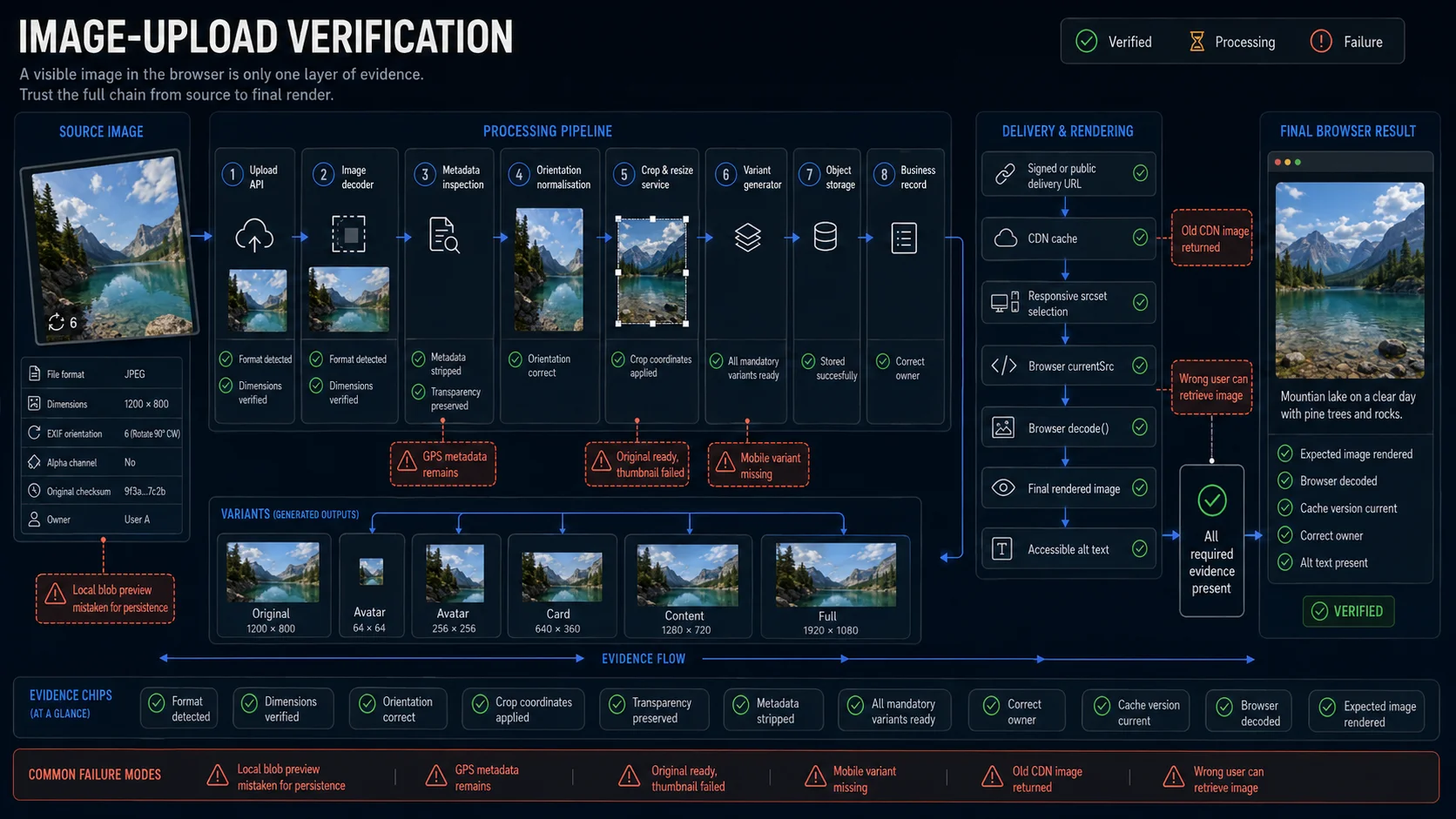
An assertion such as image is visible proves only a small part of this chain.
It does not identify:
- whether the image came from a local preview or server storage;
- which responsive variant the browser selected;
- whether the crop matches the saved coordinates;
- whether the original still exposes sensitive metadata;
- whether an old cache supplied the bytes;
- whether private delivery rules were enforced;
- whether every required derivative succeeded.
Use different evidence for different risks. Screenshots are valuable for crop, orientation, transparency, overlays, and layout. APIs and metadata are stronger for dimensions, variant completeness, access, storage identity, and processing state.
Image Upload Failures That Look Like Success
The Preview Never Left the Browser
The selected image appears immediately because the page created a local object URL. The upload later fails, but the preview remains visible.
Proof to collect: reload the page and confirm that the rendered image uses a persisted application or delivery URL rather than blob: or data:.
The Original Succeeded but the Card Image Failed
The full-resolution image exists, while a mandatory card or mobile derivative failed during processing.
Proof to collect: wait for every required variant, not only the parent image record.
The Browser Corrected Orientation but the Server Did Not
The local preview honours EXIF orientation. The server strips metadata without rotating the pixels, leaving the persisted image sideways.
Proof to collect: reload and inspect the processed artifact.
The Crop Overlay and Saved Pixels Disagree
CSS scaling or browser zoom changes how editor coordinates map back to the source image.
Proof to collect: verify the generated crop itself. A screenshot of the editor before saving is not enough.
Transparency Was Flattened onto the Wrong Background
A transparent logo looks correct on white but gains dark edges or a black fill after JPEG conversion.
Proof to collect: render the actual derivative against every supported page background.
The New Image Is Stored but the Old One Is Served
Replacement updates the database, but a CDN or browser cache continues returning stale bytes.
Proof to collect: verify the current versioned URL, the old URL’s documented behaviour, and cache headers.
The Public Thumbnail Is Clean but the Original Leaks GPS
Metadata removal runs only during thumbnail generation.
Proof to collect: inspect every publicly downloadable artifact, not just the on-page preview.
A Re-encoded Image Fails a Byte Comparison
The test expects the downloaded bytes to equal the original upload even though the product intentionally compresses or converts the image.
Proof to collect: compare the promised output properties. Byte equality is appropriate only when the original must be preserved unchanged.
Automate the Rendered Result with Playwright
Playwright’s locator-based setInputFiles() can assign one file, multiple files, a directory where supported, clear an input, or provide an in-memory file payload with a name, MIME type, and buffer.
The browser interaction is straightforward. The important part begins after the upload response.
import path from 'node:path';
import { test, expect } from '@playwright/test';

test('uploaded image reaches ready and renders after reload', async ({
  page,
}) => {
  const api = page.context().request;

  await page.goto('/profile');

  await page
    .getByLabel('Profile image')
    .setInputFiles(
      path.join(
        __dirname,
        'fixtures',
        'images',
        'landscape-1200x800.jpg',
      ),
    );

  const [uploadResponse] = await Promise.all([
    page.waitForResponse(
      response =>
        response.url().includes('/api/images') &&
        response.request().method() === 'POST',
    ),
    page.getByRole('button', { name: 'Upload image' }).click(),
  ]);

  expect(uploadResponse.ok()).toBeTruthy();

  const { id } = await uploadResponse.json();

  await expect
    .poll(
      async () => {
        const response = await api.get(`/api/images/${id}`);

        if (!response.ok()) {
          return `http-${response.status()}`;
        }

        const image = await response.json();
        return image.status;
      },
      {
        message: 'image should reach the ready state',
        timeout: 30_000,
      },
    )
    .toBe('ready');

  await page.reload();

  const image = page.getByRole('img', { name: 'Profile image' });

  await expect(image).toBeVisible();

  const result = await image.evaluate(async element => {
    if (!(element instanceof HTMLImageElement)) {
      throw new Error('Expected an HTMLImageElement');
    }

    await element.decode();

    const rect = element.getBoundingClientRect();

    return {
      src: element.currentSrc,
      alt: element.alt,
      naturalWidth: element.naturalWidth,
      naturalHeight: element.naturalHeight,
      renderedWidth: rect.width,
      renderedHeight: rect.height,
    };
  });

  expect(result.src).not.toMatch(/^(blob:|data:)/);
  expect(result.naturalWidth).toBe(1200);
  expect(result.naturalHeight).toBe(800);
  expect(result.renderedWidth / result.renderedHeight).toBeCloseTo(
    1200 / 800,
    2,
  );
});
HTMLImageElement.decode() returns a promise that resolves after the browser has decoded the image and it is safe to render. This makes it a stronger signal than checking that an <img> element merely exists.
The endpoint names and output dimensions in the example are application-specific. If the product intentionally crops or resizes the source, assert the expected derivative rather than the original dimensions.
Verify Orientation Through the Final Artifact
A good orientation assertion describes the business result rather than a particular image library.
import path from 'node:path';
import { test, expect } from '@playwright/test';

test('normalises a portrait image stored with EXIF rotation', async ({
  page,
}) => {
  await page.goto('/profile');

  await page
    .getByLabel('Profile image')
    .setInputFiles(
      path.join(
        __dirname,
        'fixtures',
        'images',
        'exif-orientation-6.jpg',
      ),
    );

  await page.getByRole('button', { name: 'Upload image' }).click();

  await expect(page.getByRole('status')).toContainText(/ready/i);

  await page.reload();

  const image = page.getByRole('img', { name: 'Profile image' });

  const dimensions = await image.evaluate(async element => {
    if (!(element instanceof HTMLImageElement)) {
      throw new Error('Expected an HTMLImageElement');
    }

    await element.decode();

    return {
      width: element.naturalWidth,
      height: element.naturalHeight,
    };
  });

  expect(dimensions.height).toBeGreaterThan(dimensions.width);
});
This test proves that the delivered artifact is portrait-oriented. A processing API can add a stricter assertion against exact dimensions or normalised metadata.
Verify Responsive Candidate Selection
When the page uses srcset, test the resource the browser actually selected.
import { test, expect } from '@playwright/test';

test('uses a valid responsive image on a narrow viewport', async ({
  page,
}) => {
  await page.setViewportSize({
    width: 390,
    height: 844,
  });

  await page.goto('/products/example');

  const image = page.getByRole('img', {
    name: 'Product image',
  });

  const result = await image.evaluate(async element => {
    if (!(element instanceof HTMLImageElement)) {
      throw new Error('Expected an HTMLImageElement');
    }

    await element.decode();

    return {
      currentSrc: element.currentSrc,
      naturalWidth: element.naturalWidth,
      naturalHeight: element.naturalHeight,
    };
  });

  expect(result.currentSrc).toContain('/mobile/');
  expect(result.naturalWidth).toBeGreaterThan(0);
  expect(result.naturalHeight).toBeGreaterThan(0);
});
The exact URL convention is product-specific. Some systems encode width in a path, others use query parameters, immutable asset names, or an image transformation service.
Avoid asserting implementation details that the product does not promise. The stable contract may simply be: a valid candidate was selected, decoded successfully, and is large enough for the rendered slot.
Do Not Turn Every Image Test into a Screenshot Test
Use screenshots where visual judgment is part of the contract:
- crop boundaries;
- orientation;
- transparency;
- overlays;
- editor layout;
- visible compression defects;
- focal-point placement.
Use structured assertions for:
- detected format;
- exact dimensions;
- metadata removal;
- processing state;
- variant completeness;
- ownership;
- content type;
- cache version;
- signed URL expiration;
- storage identity.
A small visual suite plus broad metadata and state coverage is usually more stable than hundreds of pixel comparisons.
Build a Controlled Image Fixture Set
Random files from a tester’s laptop create weak, irreproducible coverage.
A useful fixture library records why each file exists and what the test should expect from it.
tests/
└── fixtures/
    └── images/
        ├── formats/
        │   ├── valid-jpeg.jpg
        │   ├── valid-png.png
        │   ├── valid-webp.webp
        │   ├── valid-avif.avif
        │   └── valid-animated.gif
        ├── dimensions/
        │   ├── 1x1.png
        │   ├── square-1000x1000.jpg
        │   ├── landscape-1200x800.jpg
        │   ├── portrait-800x1200.jpg
        │   └── panorama-5000x500.jpg
        ├── orientation/
        │   ├── exif-orientation-1.jpg
        │   ├── exif-orientation-3.jpg
        │   ├── exif-orientation-6.jpg
        │   └── exif-orientation-8.jpg
        ├── transparency/
        │   ├── alpha-full.png
        │   ├── alpha-partial.png
        │   └── transparent-only.png
        ├── metadata/
        │   ├── gps-location.jpg
        │   ├── camera-metadata.jpg
        │   └── icc-profile.jpg
        ├── invalid/
        │   ├── corrupted.jpg
        │   ├── truncated.png
        │   ├── text-renamed-as-image.jpg
        │   └── unsupported.heic
        └── crop/
            ├── subject-centre.jpg
            ├── subject-left-edge.jpg
            └── face-near-top.jpg
Keep expected properties in a manifest rather than encoding every assumption into the filename.
{
  "landscape-1200x800.jpg": {
    "format": "jpeg",
    "width": 1200,
    "height": 800,
    "orientation": 1,
    "animated": false,
    "hasAlpha": false
  },
  "exif-orientation-6.jpg": {
    "format": "jpeg",
    "encodedWidth": 1200,
    "encodedHeight": 800,
    "expectedDisplayWidth": 800,
    "expectedDisplayHeight": 1200,
    "orientation": 6,
    "animated": false,
    "hasAlpha": false
  }
}
The manifest can support browser tests, API tests, processing-service tests, and manual investigation without duplicating the fixture contract.
Useful fixture rules:
- keep the files deterministic;
- version them with the tests;
- avoid production images;
- use small files where size is irrelevant;
- generate boundary buffers when committing large binaries is unnecessary;
- record licensing and source where applicable;
- include visibly asymmetric subjects for crop and orientation cases.
A solid orientation fixture should make failure obvious. A symmetrical landscape or a plain colour square will not.
The Release-Gating Image Journey
Do not begin by automating all 100 cases independently.
Start with one representative image and prove the complete path:
- the browser selects the expected source;
- the server accepts it once;
- the decoder reads the full content;
- orientation is normalised;
- the required crop or resize is applied;
- every mandatory derivative reaches
Ready; - the correct image is attached to the intended record;
- the page uses a persisted URL after reload;
- the browser decodes the delivered artifact;
- the displayed ratio and orientation are correct;
- another user cannot retrieve a private image;
- replacement delivers the new version;
- deletion removes access according to the retention policy.
Once that path is reliable, vary the data rather than duplicating the entire journey:
- format;
- dimensions;
- aspect ratio;
- orientation;
- transparency;
- animation;
- crop coordinates;
- colour profile;
- metadata policy;
- user role;
- transformation rules;
- expected variants.
With WrightTest, the visible browser flow can remain stable while the fixture, account, transformation policy, and terminal assertions change. The value is not a longer collection of scripts. It is one reusable image journey that connects the user’s selection to the artifact the application ultimately publishes.
Sources
- MDN — Image file type and format guide: browser image formats, transparency, animation, compression, and format capabilities.
- **MDN —
HTMLImageElement.decode():** browser decoding as an observable promise. - **MDN —
naturalWidth:** intrinsic density-corrected rendered dimensions. - **MDN —
currentSrcandsrcset:** responsive candidate selection. - Playwright — Locator API: uploading paths, multiple files, directories, clearing inputs, and in-memory file payloads.
- OWASP — File Upload and Input Validation Cheat Sheets: layered server-side validation, size, content, storage, and safe delivery.
- W3C WAI — Images Tutorial and H37/H67: informative, decorative, functional, and text-containing image alternatives.