

The Minimum Password Reset Smoke Test
When release time is limited, begin with these ten scenarios.
| ID | Test | Failure it can reveal |
|---|---|---|
| PR-01 | Request a reset for an existing local-password account | The primary recovery entry point is broken |
| PR-02 | Request a reset for an unknown address | The response reveals account existence |
| PR-09 | Confirm that the recovery email or code arrives | The form succeeds but recovery cannot continue |
| PR-11 | Open the link from the delivered message | The URL points to the wrong host, environment or page |
| PR-16 | Use a valid unused reset challenge | The intended recovery path cannot authorize a password change |
| PR-17 | Use an expired challenge | Expiration is not enforced |
| PR-18 | Reuse a consumed challenge | A one-time token remains usable |
| PR-26 | Set a valid new password | Password persistence is broken |
| PR-32 | Attempt login with the old password | The old credential remains valid |
| PR-33 | Log in with the new password | The reset confirmation is false or authentication is disconnected |
The smoke set proves whether the primary recovery loop works. It does not independently prove token unpredictability, secure password storage, complete session revocation or resistance to account takeover.
Define the Recovery State Model First
Password recovery is not one form. It is a sequence of state transitions across the browser, messaging provider, reset-token service, identity store and authentication system.
A common recovery lifecycle is:
No active challenge
-> reset requested
-> challenge issued
-> message delivered
-> proof presented
-> challenge accepted
-> password updated
-> challenge consumed
-> session policy applied
-> normal login restored
Alternative states may include unknown identity, delivery failed, challenge expired, challenge superseded, challenge consumed, challenge blocked, SSO-managed identity, support-assisted recovery and MFA step-up required.
The exact names are implementation-specific. What matters is that each state has a defined trigger, expected account effect, observable result, permitted next action and evidence showing that the transition occurred.
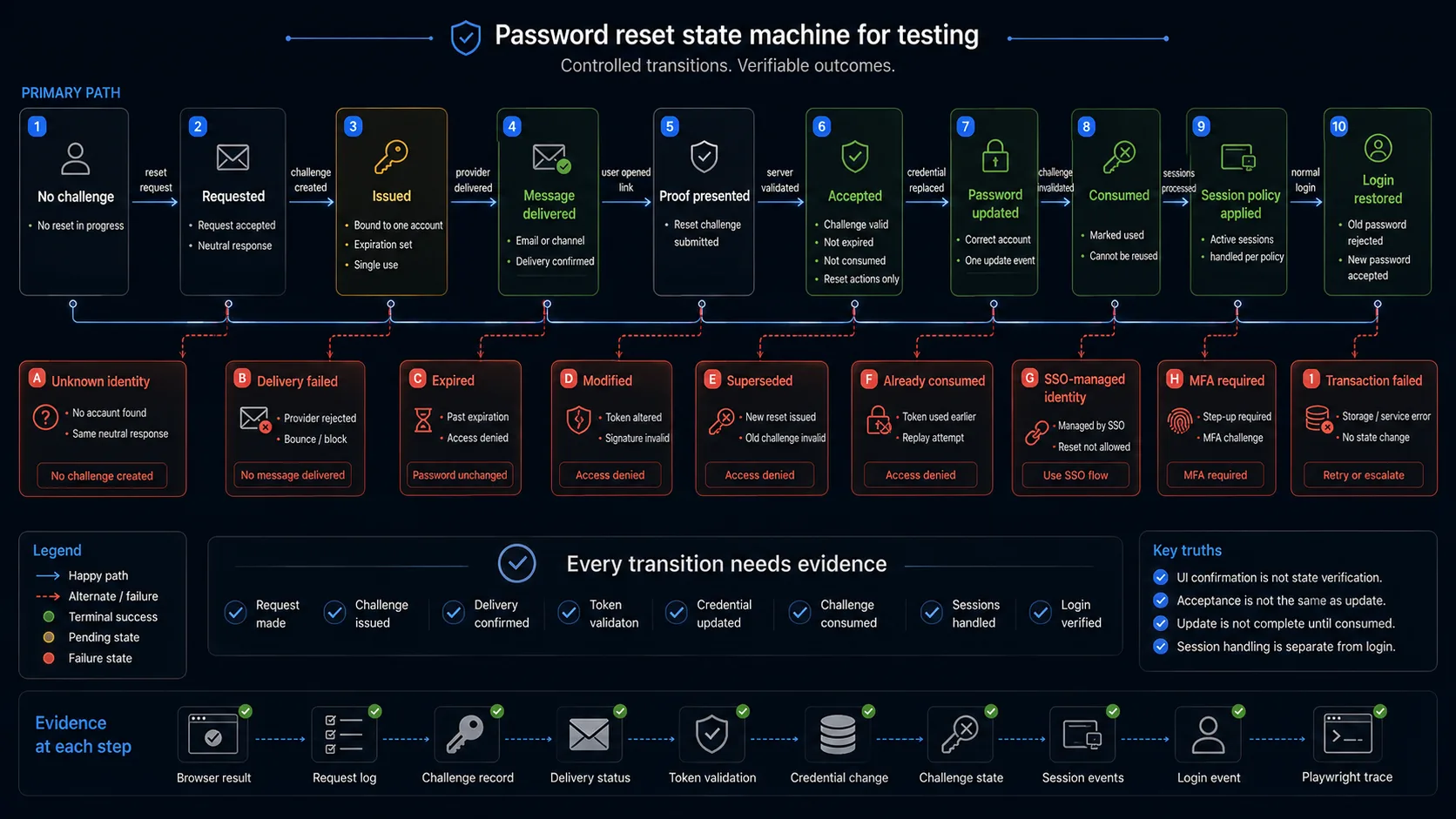
Recovery-state acceptance matrix
| Event | Challenge state | Password state | Access result |
|---|---|---|---|
| Unknown identity submitted | No usable challenge | Unchanged | External response follows the anti-enumeration policy |
| Valid identity submitted | Issued | Unchanged | User waits for the recovery channel |
| Message delivered | Issued | Unchanged | No authenticated access yet |
| Expired challenge presented | Expired | Unchanged | Password change rejected |
| Modified challenge presented | Invalid | Unchanged | Password change rejected |
| Valid challenge presented | Accepted or restricted recovery session | Unchanged | Only password-reset actions are permitted |
| Valid new password submitted | Consumed | Updated | Normal login becomes available |
| Used challenge presented again | Consumed | Updated | Further reset rejected |
| Reset transaction fails | Defined by retry policy | Unchanged | No false completion state |
| Successful reset completed | Consumed | Updated | Session policy and security notification applied |
Reset Request and Account-Privacy Test Cases
The externally visible response should not become an account directory. Controls should limit excessive recovery requests without changing or locking the account before valid proof is presented.
| ID | Scenario | Expected result | Evidence |
|---|---|---|---|
| PR-01 | Submit the registered email of an active local-password account | The request is accepted and a neutral confirmation state appears | Browser result, response and challenge record |
| PR-02 | Submit an email that has no account | The visible response does not confirm that the account is absent | Response body, status and redirect |
| PR-03 | Compare known and unknown identities | Meaningful differences in message, status, redirect and response timing do not reveal existence | Captured responses and timing sample |
| PR-04 | Submit an empty or malformed identifier | Form validation follows the documented rules and creates no usable challenge | Validation result and challenge count |
| PR-05 | Submit an identifier belonging to a suspended, inactive or deleted account | Recovery follows the defined account-state policy without exposing sensitive status externally | External response and internal account state |
| PR-06 | Request recovery for an SSO-managed account | The system does not pretend that a local password can be reset; the user receives the defined SSO or support path | Browser result and identity-provider configuration |
| PR-07 | Submit repeated requests rapidly | Request and delivery limits apply without locking the account or breaking legitimate login | Request count, delivery count and login result |
| PR-08 | Inspect the account before any valid challenge is used | Password, account status, roles and sessions remain unchanged | Identity-store and session records |
Recovery Email and Delivery Test Cases
| ID | Scenario | Expected result | Evidence |
|---|---|---|---|
| PR-09 | Request recovery for a controlled test account | One expected email, SMS or recovery message reaches the registered channel | Inbox, provider status or delivery log |
| PR-10 | Inspect the message content | Recipient, subject, sender, instructions and branding are correct; no current or new password is included | Message body and headers |
| PR-11 | Inspect and open the recovery URL | The URL uses the correct HTTPS origin, environment, route and challenge value | Message URL and final browser location |
| PR-12 | Open the link through supported email clients and redirect services | Encoding, tracking and HTML rendering do not truncate or corrupt the challenge | Final URL and reset-page result |
| PR-13 | Delay or fail the messaging queue or provider | Operational monitoring detects the delivery failure; the account remains unchanged | Queue state, provider error and account record |
| PR-14 | Request another recovery message | Resend timing, message count and token replacement follow the documented policy | Challenge records and delivered messages |
| PR-15 | Complete the reset successfully | A security notification is sent after the credential changes, not merely after the request | Notification message and password-update timestamp |
A browser confirmation such as "Check your inbox" proves only that the request screen reached its expected state. It does not prove that a provider accepted the message or that the user received it.
Reset Token and Code Test Cases
| ID | Scenario | Expected result | Evidence |
|---|---|---|---|
| PR-16 | Open a valid, unused challenge | The user reaches the permitted password-reset step for the intended account | Browser state, challenge record and account identifier |
| PR-17 | Open a challenge after its expiration | The server rejects it and the password remains unchanged | Server response and challenge state |
| PR-18 | Reopen a challenge after a successful reset | The challenge cannot authorize another password change | Response, challenge state and password history |
| PR-19 | Modify, truncate or replace part of the challenge | The request is rejected without revealing internal token details | Response and unchanged account |
| PR-20 | Attempt to combine user A challenge with user B identifier or session | Only the account originally bound to the challenge can be affected | Both account records |
| PR-21 | Request two reset messages and test the older challenge | Behavior follows the documented multiple-request policy | Both challenge records and reset results |
| PR-22 | Redeem the same challenge concurrently in two sessions | At most one password update succeeds | Concurrent responses and update count |
| PR-23 | Open the challenge on another supported browser or device | The flow follows the defined binding policy without switching identity | Browser results and challenge record |
| PR-24 | Submit repeated guesses against a PIN or code endpoint | Rate limiting or equivalent protection constrains guessing without changing the account password | Attempt results and account state |
| PR-25 | Inspect the recovery page and surrounding requests | The full challenge is not unintentionally exposed to analytics, third-party resources, logs or referrer destinations | Network trace, page source and security review |
Decide What Multiple Reset Requests Mean
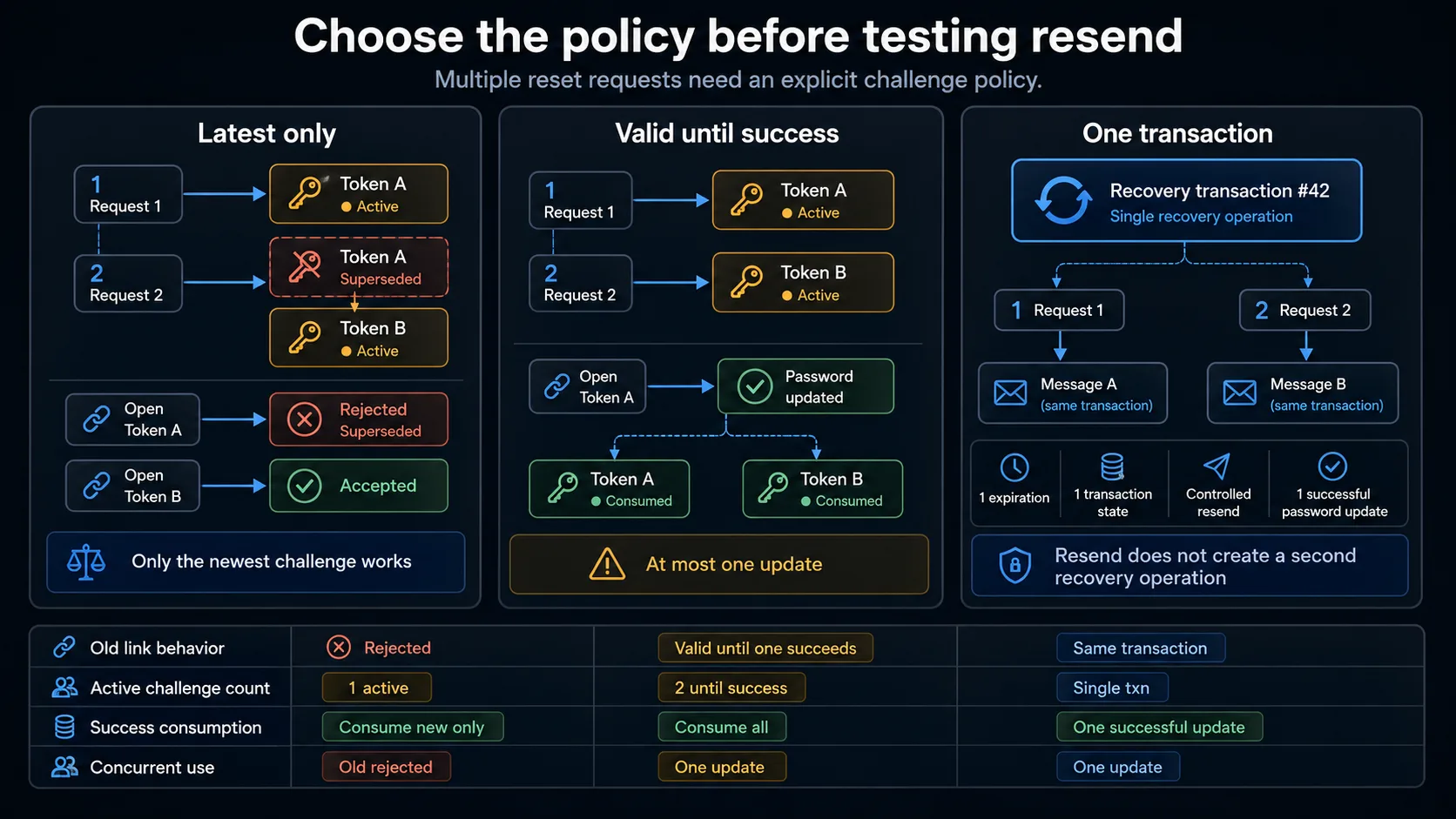
A resend button is not a policy. When two reset requests exist, the application must define which challenges remain valid.
Policy A - latest challenge only
Request 1 -> Token A active
Request 2 -> Token A superseded, Token B active
Token A stops working immediately after Request 2. Token B remains valid. Using Token A does not consume Token B, and the older link receives a useful expired or superseded state.
Policy B - all unexpired challenges until one succeeds
Request 1 -> Token A active
Request 2 -> Token A active, Token B active
Successful use of either -> both consumed
Both tokens initially follow the documented validity window. Only one password update can succeed, and successful redemption invalidates every remaining reset challenge.
Policy C - one active recovery transaction
A new request may resend or rotate the delivery mechanism while preserving one underlying transaction. Verify the message count, underlying challenge count, expiration behavior, resend limits and whether the original URL remains valid.
New-Password and Credential-Persistence Test Cases
This section covers only the password rules required to prove recovery. The broader field and boundary matrix belongs in the Form Validation Test Cases: Align UI and API Rules guide.
| ID | Scenario | Expected result | Evidence |
|---|---|---|---|
| PR-26 | Submit matching values that satisfy the current password policy | The intended account receives the new credential and a truthful success state appears | UI result and authorized identity-store evidence |
| PR-27 | Submit different New password and Confirm password values | The update is blocked without consuming the challenge prematurely unless explicitly designed otherwise | Validation and challenge state |
| PR-28 | Test exact password-policy boundaries | Valid boundaries are accepted and invalid values receive actionable guidance | Validation results |
| PR-29 | Reuse the current or a recent password | Behavior follows the documented password-history policy | Response and authorized password-history result |
| PR-30 | Make the password-update transaction fail after challenge acceptance | No false success appears; the old password remains valid and retry behavior follows policy | Response, challenge state and login checks |
| PR-31 | Refresh, revisit or use browser Back after completion | The update is not repeated and the consumed challenge does not reopen the form | Update count and page state |
| PR-32 | Attempt normal login using the old password | Authentication rejects the old credential | Login result |
| PR-33 | Attempt normal login using the new password | Authentication accepts the new credential for the correct identity | Authenticated account and session |
| PR-34 | Inspect password-update events and user notification | Exactly one credential update, audit event and completion notification are associated with the reset | Audit record and notification |
old password -> rejected
new password -> accepted
A success screen is not proof that the credential was persisted. The decisive functional check is the old/new login pair above.
Session, MFA and Account-Integrity Test Cases
| ID | Scenario | Expected result | Evidence |
|---|---|---|---|
| PR-35 | Complete the password update | The next authentication step follows the documented policy; no unintended fully authenticated session is created | Cookies, redirect and authenticated state |
| PR-36 | Inspect existing web sessions after reset | They are revoked, preserved or offered for revocation exactly as documented | Session-store records and browser checks |
| PR-37 | Inspect remembered-login or trusted-device sessions | Persistent authentication follows the same explicit security policy | Remember-me cookies and device-session records |
| PR-38 | Inspect API tokens, mobile sessions and connected applications | Credential reset affects other access tokens according to documented scope | API calls and token records |
| PR-39 | Reset the password of an MFA-enabled account | MFA enrollment is not silently removed, bypassed or replaced | MFA configuration and next login |
| PR-40 | Complete recovery for a high-risk or privileged account | Required step-up or stronger recovery controls are applied according to the product threat model | Recovery steps and account policy |
| PR-41 | Inspect the recovered identity | Account status, role, tenant, plan, recovery contacts and ownership remain unchanged unless explicitly part of recovery | Before-and-after account record |
| PR-42 | Attempt local-password recovery for a federated or SSO-only identity | The flow does not create an unexpected local credential or bypass the identity provider | Identity methods and login result |
Account recovery is an alternate authentication path. It should not silently become weaker than the controls protecting the account.
Choose and Verify the Session Policy
Password reset can occur because a user forgot a password or because the credential may have been compromised. Session handling therefore requires an explicit decision.
| Policy | Expected behavior | Essential test |
|---|---|---|
| Revoke all sessions automatically | Every existing web and remembered session becomes invalid | Open an existing authenticated browser after reset |
| Ask the user | The reset form provides a clear revocation choice and applies it correctly | Run both choices and inspect session records |
| Revoke selected session classes | Web sessions, remembered devices and API tokens follow separate documented rules | Verify every credential class independently |
| Preserve sessions | Existing sessions remain active by deliberate product decision | Confirm the risk is understood and behavior is consistent |
Do not infer session policy merely from whether one browser was redirected to login. Verify server-side session or token state.
Accessibility, Mobile and Operational Test Cases
| ID | Scenario | Expected result | Evidence |
|---|---|---|---|
| PR-43 | Inspect the recovery audit trail and security notification | Request, challenge use, credential update and relevant session action are traceable without storing secrets | Audit record and notification |
| PR-44 | Complete recovery using only the keyboard and supported assistive technology | Labels, focus order, error announcements and completion status remain understandable | Keyboard walkthrough and accessibility inspection |
| PR-45 | Open the recovery message and link on supported mobile devices | Email-client handoff, deep link, viewport, virtual keyboard and final login remain usable | Mobile screenshots and completed flow |
| PR-46 | Use password-manager generation, paste and autofill | The form accepts supported password-manager workflows without corrupting the value or exposing it unexpectedly | Browser result and password-manager check |
| PR-47 | Run a controlled recovery smoke test in production | Production mail, trusted origin, token, credential update and login work together | End-to-end production evidence |
| PR-48 | Inspect synthetic identities and generated recovery data after execution | Test accounts, messages and challenges are traceable and cleaned according to policy | Cleanup report and remaining records |
The Most Important Password Reset Failure Patterns
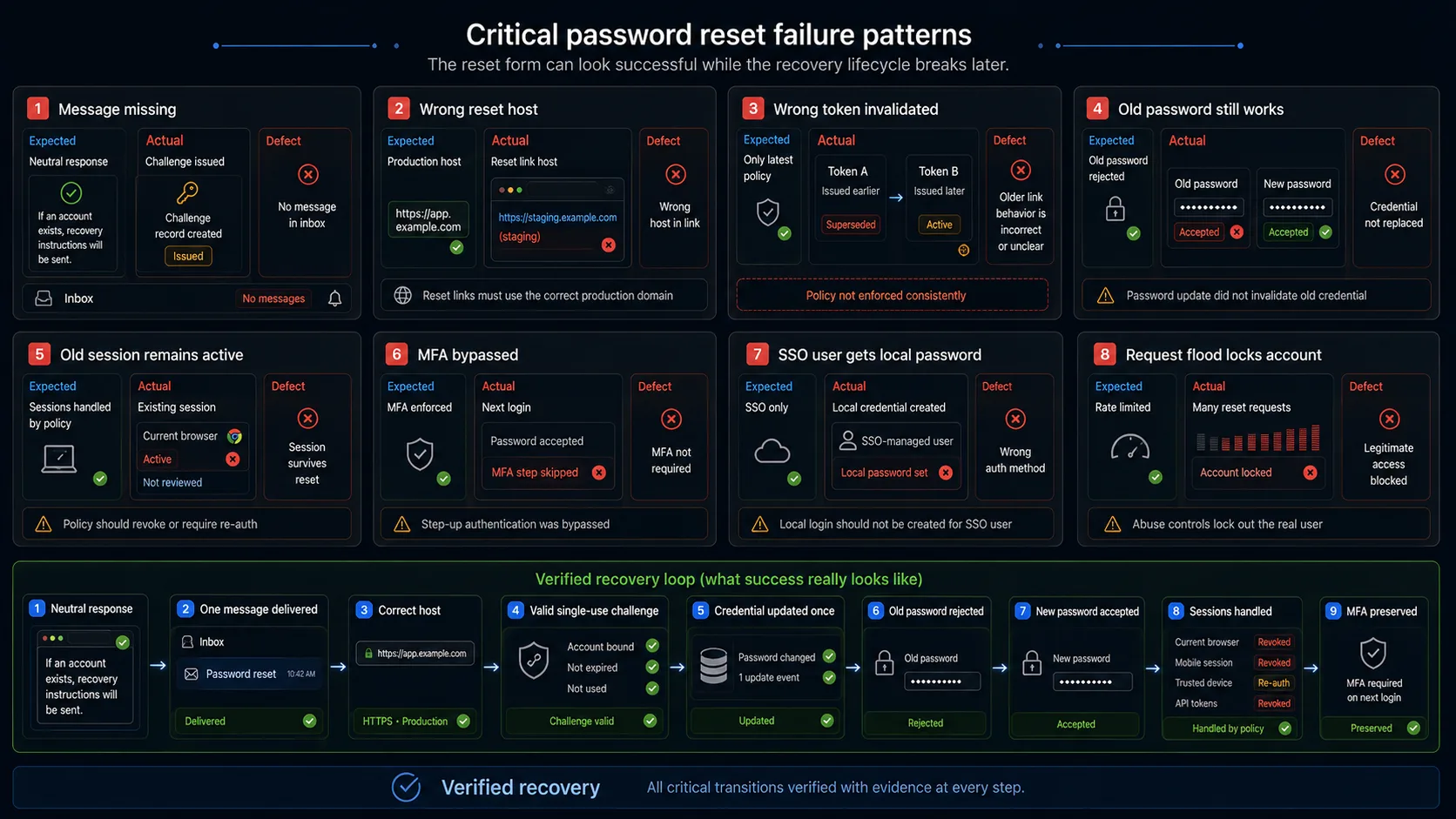
Neutral confirmation appears, but no message arrives
The request UI passes while the recovery channel is broken. Check the message queue, provider credentials, sender-domain configuration, recipient mapping, suppressed recipients, provider rejection and spam placement.
The email arrives, but the link points to the wrong environment
The form and mail provider pass, but the link still cannot recover the account. Common mistakes include localhost, staging domains, old application domains, HTTP links and truncated token parameters.
A second request invalidates the wrong token
The interface exposes Resend, but the multiple-request policy is undefined. Users receive unexplained errors or several challenges remain usable after one password change.
"Password updated" appears, but the old password still works
The UI may have received a successful response while the identity store was not updated, the wrong account was updated or authentication uses another credential store. Always verify both old and new credentials.
The new password works, but an attacker's session remains active
Changing the password does not necessarily terminate an already authenticated session. Test session consequences separately from password persistence.
Password recovery disables or bypasses MFA
The password changes successfully, but the next login no longer requires the enrolled factor, or recovery itself requires weaker proof than normal authentication.
An SSO account receives a local password
A federated user requests recovery and the application accidentally creates a local credential outside the intended identity provider.
Request flooding locks out the legitimate user
Repeated forgot-password requests should not become a denial-of-service mechanism. Apply controls to requests and delivery without disabling normal account access.
What Each Testing Layer Can Prove
| Testing layer | What it can verify | What it cannot prove alone |
|---|---|---|
| Browser test | Request form, visible validation, reset form, errors, redirects and normal login behavior | Real delivery, token entropy, secure password storage or complete session revocation |
| Recovery API test | Generic responses, validation, challenge issuance, rate limits and error contracts | Browser usability or inbox delivery |
| Email-provider check | Correct message, recipient, delivery status and reset URL | Token acceptance or password persistence |
| Challenge-store check | Account binding, status, expiration, supersession and consumption | User-facing recovery experience |
| Identity-store check | Correct account, credential update and unchanged roles or tenant | Normal login behavior across every client |
| Authentication test | Old-password rejection, new-password acceptance and session creation | Password hashing implementation |
| Session and token check | Existing web sessions, remembered devices and API tokens | Accessible browser feedback |
| Security review | Token generation, storage, leakage, enumeration and brute-force resistance | General usability |
| Accessibility evaluation | Labels, keyboard use, focus management and error announcements | Backend recovery integrity |
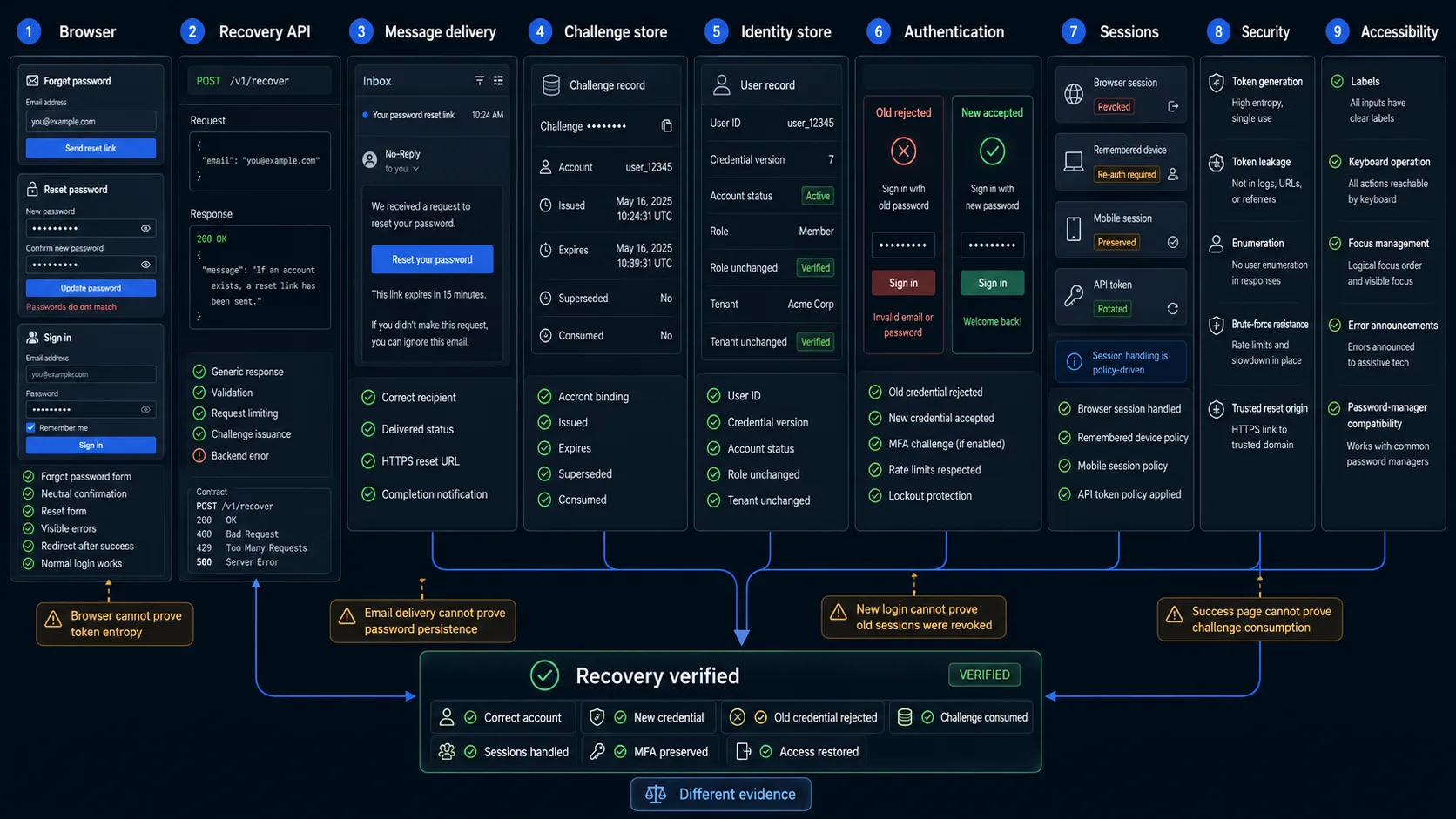
A browser can show that the new-password form submitted. It cannot independently prove token unpredictability, safe storage, complete session revocation or the absence of an enumeration side channel.
How to Select Password Reset Cases After a Change
| Changed component | Minimum regression scope |
|---|---|
| Reset request form | Known identity, unknown identity, validation, accessibility and repeated submission |
| Recovery API | Generic response, challenge creation, rate limits and failure behavior |
| Email provider or template | Delivery, recipient, URL integrity, encoding and completion notification |
| Token-generation logic | Valid, expired, modified, cross-account and brute-force cases |
| Resend logic | Multiple-request policy, supersession, expiry and delivery limits |
| New-password endpoint | Matching values, policy boundaries, transaction failure and challenge consumption |
| Identity store | Correct account update, old-password rejection and unchanged account metadata |
| Authentication service | New-password login, old-password rejection and MFA |
| Session management | Web sessions, remembered devices, mobile sessions and API tokens |
| SSO integration | Federated account recovery and absence of unexpected local credentials |
| Deployment configuration | Full minimum smoke set in the target environment |
A large checklist is not a regression strategy. Select the cases that cross the changed component and the recovery states it owns.
Automating Password Reset Test Cases
The browser-visible request cases can reuse one flow:
Open the login page
Click "Forgot password"
Fill {{ACCOUNT_IDENTIFIER}}
Click "Send reset link"
Assert {{EXPECTED_REQUEST_RESULT}}
Named cases can provide existing local accounts, unknown accounts, malformed emails, SSO-managed identities, suspended accounts, repeated requests and provider failures.
A second flow can cover challenge redemption:
Open {{RECOVERY_MESSAGE}}
Follow {{RESET_LINK}}
Fill {{NEW_PASSWORD}}
Fill {{CONFIRM_PASSWORD}}
Click "Reset password"
Assert {{EXPECTED_RESET_RESULT}}
A third flow should verify authentication consequences:
Open the login page
Fill {{EMAIL}}
Fill {{PASSWORD_TO_TEST}}
Click "Log in"
Assert {{EXPECTED_LOGIN_RESULT}}
Keeping the flows separate shows whether the failure occurred in the request, delivery, challenge acceptance, credential update or normal authentication.
For the reusable-flow method, read the Web Form Testing guide.
What Browser Automation Should Not Claim
Browser automation should not be presented as proof of cryptographically secure token generation, sufficient token entropy, safe token or password storage, absence of every timing side channel, deliverability across all email providers, complete session revocation without access to session state, resistance to distributed abuse, correct MFA recovery for every threat model, or protection against host-header injection, token leakage or account takeover.
These properties require API, backend, provider, security or infrastructure checks. Browser automation remains valuable because it proves that a real user can complete the visible recovery path and that observable frontend behavior matches the tested responses.
Safe Production Password Reset Monitoring
Production is where incorrect domains, message credentials, redirect origins and provider settings become visible.
Use a dedicated synthetic account, controlled recovery mailbox, low execution frequency, generated passwords tracked securely by the test system, an identifiable audit marker, no real customer data, explicit session-invalidation handling, and automatic cleanup of messages and expired challenges.
Do not reset a shared team account, use an administrator or high-value customer, flood the mailbox, trigger support or fraud workflows accidentally, expose reset links in logs or reports, leave a production test account with an unknown password, or let monitoring bypass MFA or SSO policy.
Frequently Asked Questions
Should the page say that an email address has no account?
Use an externally consistent response for existing and non-existing identities. Status codes, redirects and meaningful timing differences should also be reviewed.
Should a successful reset invalidate all sessions?
Define the policy explicitly. Test web sessions, remembered devices and every other credential class affected by the reset.
Should a new reset request invalidate the previous link?
There is no universal UI answer. Choose latest-token-only, multiple active challenges until one succeeds, or one underlying transaction, then test concurrency and consumption.
Can a browser test prove that the reset token is secure?
No. It can demonstrate valid, expired, modified and reused behavior from the outside. Randomness, entropy, generation and storage require an authorized security or backend review.
Is password reset the same as password change?
No. Password change starts in an authenticated session and may require the current password. Password reset is an alternate identity-recovery path with different abuse risks.
Password Reset Testing Checklist
Before approving password recovery, confirm that known and unknown identities receive an externally consistent response, malformed input creates no usable challenge, repeated requests are limited without locking the account, the account remains unchanged before valid recovery proof, the message reaches the correct recovery channel, the URL uses the correct trusted HTTPS origin, links survive supported email clients and redirects, expiration is enforced server-side, consumed challenges cannot be reused, modified challenges are rejected, one account's challenge cannot affect another, multiple requests follow a documented policy, concurrent redemption permits at most one update, the new password follows the current policy, transaction failure does not display false success, the old password is rejected, the new password is accepted, the challenge is consumed after success, completion creates one audit event and notification, existing sessions follow the documented policy, MFA remains enabled, role and tenant data remain correct, SSO identities do not receive unintended local credentials, accessibility and mobile recovery remain usable, and production configuration has been tested safely.
Final acceptance criterion. The final acceptance criterion is not: "The password-reset page displayed a success message." It is: "The correct account received a new credential, the old credential was rejected, the recovery challenge became unusable, and subsequent access followed the intended session and authentication policy."
Automate the Repeatable Browser Layer
WrightTest lets teams record reusable password-reset request, recovery-form and login flows, replace fixed values with named test-case variables, and inspect separate screenshots, errors, step results and Playwright traces.
The browser checks can be exported to native Playwright .spec.ts files when they need to move into an existing repository or CI pipeline.
Use WrightTest for the repeatable browser journey, then combine it with mailbox, challenge-store, identity, session and security checks for the complete recovery loop.