
Authentication Testing
Login Page Test Cases That Prove the Right User Reaches the Right Account
50 practical cases covering credentials, account states, redirects, sessions, protected routes and recovery.
A dashboard appearing after a user submits credentials does not prove that login works.
- the intended user was authenticated
- invalid credentials did not create a session
- the account was eligible to sign in
- a fresh authenticated session was created
- the correct role, organisation or tenant was loaded
- the user reached the intended destination
- protected routes now recognise the authenticated state
- previous anonymous or stale session state cannot override the new login
- errors do not reveal whether an account exists
- the user can recover from a failed attempt without restarting the journey
This guide contains 50 practical login page test cases covering credentials, account states, redirects, sessions, protected routes, error behaviour, accessibility and browser recovery.
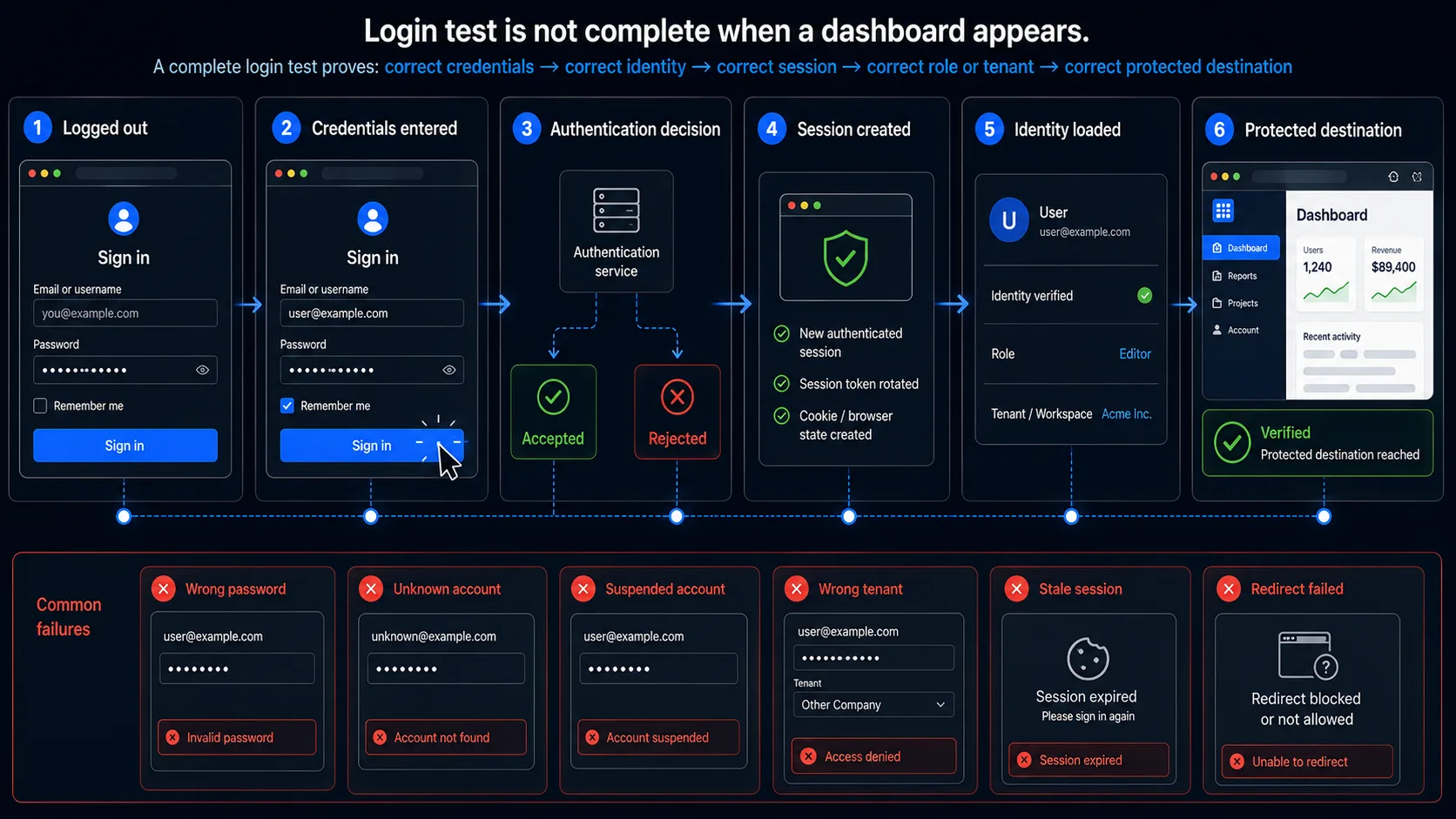
The Minimum Login Page Smoke Test
When release time is limited, begin with these ten cases.
| ID | Test | What it proves |
|---|---|---|
| LOG-01 | Sign in with valid credentials | A valid active user can complete the primary flow |
| LOG-09 | Submit a correct identifier with a wrong password | Invalid credentials do not create an authenticated state |
| LOG-10 | Submit an unknown identifier | The response does not reveal whether the account exists |
| LOG-19 | Attempt login with a disabled or suspended account | Correct credentials do not override account state |
| LOG-28 | Compare the session before and after successful login | Authentication creates or rotates the session correctly |
| LOG-30 | Open the originally requested protected route after login | Redirect-back behaviour preserves user intent |
| LOG-37 | Sign in as two users with different roles | The correct account and permissions are loaded |
| LOG-41 | Refresh and reopen the authenticated page | The session persists only according to policy |
| LOG-46 | Correct a failed login attempt and resubmit | The form recovers without stale errors or duplicate requests |
| LOG-50 | Bypass browser validation and call the login endpoint directly | Server-side authentication remains authoritative |
The smoke set verifies the login transaction. It does not replace specialist security testing, load testing, MFA testing or a full session-management review.
Define the Login Acceptance Contract First
A login test becomes unreliable when “successful login” has no precise definition.
Before writing cases, define the expected contract for each part of the transaction.
| Contract element | Question to answer |
|---|---|
| Identifier | Which email, username, phone number or external identity is accepted? |
| Credential | Which password or authentication proof is valid? |
| Account state | Can active, unverified, locked, suspended or deleted accounts sign in? |
| Authentication method | Password, SSO, OAuth, magic link or another method? |
| Destination | Where should the user arrive after login? |
| Session | Which cookie or browser state should be created or rotated? |
| Identity | Which user ID should the authenticated session represent? |
| Role | Which role or permission set should be loaded? |
| Tenant | Which organisation, workspace or account should be selected? |
| Error behaviour | Which visible error should appear, and what must remain undisclosed? |
| Recovery | Can the user correct the attempt without losing relevant state? |
| Evidence | Which browser, API and backend observations prove the result? |
Example login contract
| Input state | Expected browser result | Expected system result |
|---|---|---|
| Active user + correct password | Redirect to intended page | Fresh authenticated session for that user |
| Active user + wrong password | Generic login error | No authenticated session |
| Unknown email + any password | Same generic login error | No account information disclosed |
| Suspended user + correct password | Login refused according to policy | No active session |
| Authenticated user opens login page | Redirect or account-switch behaviour according to policy | Existing session handled predictably |
| Logged-out user opens protected page | Redirect to login with destination preserved | No protected content returned |
Model Login as a State Transition
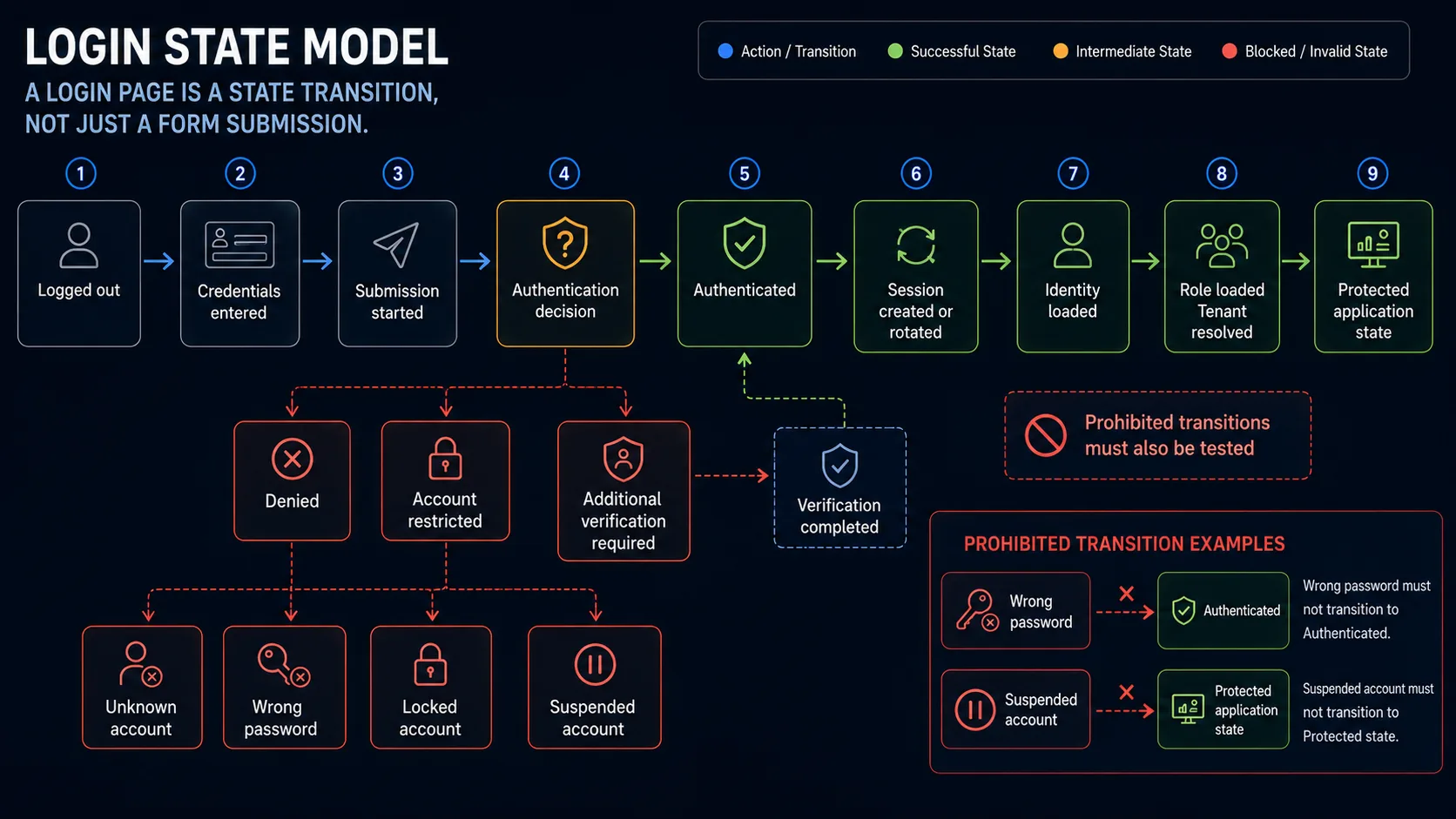
A login page is not just two fields and a button. It is a transition between security and application states.
- Logged out
- Credentials entered
- Submission started
- Authentication decision
- Denied
- Account restricted
- Additional verification required
- Authenticated
- Session created or rotated
- Identity loaded
- Role and tenant resolved
- Destination selected
- Protected application state
The test suite should cover both transitions and prohibited transitions.
| State | Must not transition to |
|---|---|
| Wrong password | Authenticated |
| Suspended account with correct password | Protected application state |
Login Page and Form Behaviour Test Cases
| ID | Scenario | Expected result | Evidence |
|---|---|---|---|
| LOG-01 | Open the login page while logged out | The login form loads and the expected authentication methods are available | Page state and visible controls |
| LOG-02 | Submit the form with both fields empty | Submission is blocked and both required fields are identified | Field errors and absence of request |
| LOG-03 | Submit with the identifier empty | The identifier error appears without clearing the password unnecessarily | Field state |
| LOG-04 | Submit with the password empty | The password requirement is identified | Field state |
| LOG-05 | Navigate through the form using only the keyboard | Focus order is logical and submission is possible without a mouse | Focus sequence |
| LOG-06 | Paste credentials from a password manager | Supported paste and autofill behaviour does not prevent login | Filled values and final result |
| LOG-07 | Toggle password visibility | The value is revealed and hidden without changing it | Input type and value |
| LOG-08 | Click the submit button repeatedly while the request is pending | Only one authentication transaction is created | Request count and button state |
Credential and Identity Test Cases
| ID | Scenario | Expected result | Evidence |
|---|---|---|---|
| LOG-09 | Valid identifier with wrong password | Login is rejected and no authenticated session is created | Error, cookies and protected-route check |
| LOG-10 | Unknown identifier with any password | The visible and HTTP response do not reveal whether the account exists | Response comparison |
| LOG-11 | Correct credentials with identifier case changed | Behaviour follows the documented identifier case policy | Browser and API result |
| LOG-12 | Correct password with one character’s case changed | Login fails because passwords remain case-sensitive | Error and session check |
| LOG-13 | Add leading or trailing spaces to the identifier | The documented identifier-normalisation policy is applied | Submitted and resolved identity |
| LOG-14 | Add leading or trailing spaces to the password | The password is not silently changed unless explicitly documented | Authentication decision |
| LOG-15 | Submit extremely long credential values | The request fails safely without truncation, crash or unintended login | Response and logs |
| LOG-16 | Submit valid credentials using browser autofill | The correct user is authenticated, not a stale previously saved account | User identity after login |
| LOG-17 | Change one credential after the browser autofills both fields | The final visible values, not stale autofill state, determine the request | Payload and authenticated user |
| LOG-18 | Submit credentials from another open login tab | The resulting authenticated state is deterministic and follows the latest accepted transaction | Both tabs and session state |
Account-State Test Cases
| ID | Scenario | Expected result | Evidence |
|---|---|---|---|
| LOG-19 | Active account with correct credentials | Login succeeds | Identity and session |
| LOG-20 | Unverified account with correct credentials | Application follows the documented verification policy | Error or verification route |
| LOG-21 | Disabled account with correct credentials | Login is refused and no session is created | Response and protected-route check |
| LOG-22 | Suspended account with correct credentials | Access is refused according to policy | Account state and response |
| LOG-23 | Temporarily locked account with correct credentials | Login remains blocked until the documented unlock condition is satisfied | Timed attempts |
| LOG-24 | Account immediately before the lockout threshold | Behaviour matches the defined threshold | Attempt count |
| LOG-25 | Account at the lockout threshold | The intended lockout or throttling state is applied | Account and response state |
| LOG-26 | Account after automatic or administrator unlock | Correct credentials work again without restoring an invalid stale session | New session and identity |
| LOG-27 | Deleted or deprovisioned account with previously valid credentials | Login fails and existing authenticated state follows the revocation policy | Login response and old session |
Redirect and Destination Test Cases
| ID | Scenario | Expected result | Evidence |
|---|---|---|---|
| LOG-28 | Compare session state before and after login | The authenticated session is newly created or rotated according to policy | Cookie or storage comparison |
| LOG-29 | Open the login page directly and sign in | The default authenticated destination opens | Final URL and page identity |
| LOG-30 | Open a protected deep link while logged out, then sign in | The user returns to the originally requested permitted destination | Redirect chain |
| LOG-31 | Open a protected URL containing query parameters | Safe query state is preserved where intended | Final URL and page result |
| LOG-32 | Supply an external or malformed redirect destination | The application does not redirect to an untrusted origin | Redirect result |
| LOG-33 | Sign in as a new user requiring onboarding | The user reaches onboarding rather than an existing-user dashboard | Account state and final URL |
| LOG-34 | Sign in as an existing user with unfinished setup | The documented resume or onboarding rule is applied | Final destination |
| LOG-35 | Sign in after the requested destination becomes unavailable | A safe fallback page and useful message are shown | Redirect and error |
| LOG-36 | Submit login twice during a slow redirect | Only one effective session and destination transition occur | Request and navigation count |
Role, Tenant and Protected-Route Test Cases
| ID | Scenario | Expected result | Evidence |
|---|---|---|---|
| LOG-37 | Sign in as a standard user | The standard-user identity and navigation are loaded | Profile, role and accessible routes |
| LOG-38 | Sign in as an administrator | The administrator identity is loaded without inheriting another user’s cached state | Role and protected page |
| LOG-39 | Sign out one user and sign in as another in the same browser | No profile, tenant or cached content from the previous user remains | UI, storage and API responses |
| LOG-40 | Sign in to a multi-tenant product | The correct organisation or workspace is selected according to policy | Tenant identifier and visible account |
| LOG-41 | Refresh the authenticated destination | The authenticated state remains valid only according to session policy | Reload result |
| LOG-42 | Open a protected route in a new tab after login | The new tab recognises the same permitted session | Route result |
| LOG-43 | Attempt to open the same route in an anonymous browser context | The anonymous context is redirected or denied | Separate browser context |
Error, Accessibility and Recovery Test Cases
| ID | Scenario | Expected result | Evidence |
|---|---|---|---|
| LOG-44 | Compare the response for unknown account and wrong password | Observable responses do not disclose which account exists | Text, status and timing review |
| LOG-45 | Receive a server-side authentication error | The error is mapped to a useful form-level message without exposing internals | UI and response |
| LOG-46 | Correct a failed password attempt and resubmit | Stale errors clear correctly and successful login becomes possible | Error state and final result |
| LOG-47 | Navigate the failed form with a screen reader or accessibility tree | Errors and controls have meaningful labels and associations | Accessibility inspection |
| LOG-48 | Use Back after a successful login | Sensitive logged-out content and stale form state are not restored incorrectly | Browser history behaviour |
| LOG-49 | Lose network connectivity during submission and retry | The form presents a recoverable state and does not create conflicting sessions | Network and retry result |
| LOG-50 | Bypass HTML and JavaScript validation and submit directly | The server remains authoritative and invalid credentials cannot create a session | API response and protected route |
The Most Important Login Failure Patterns
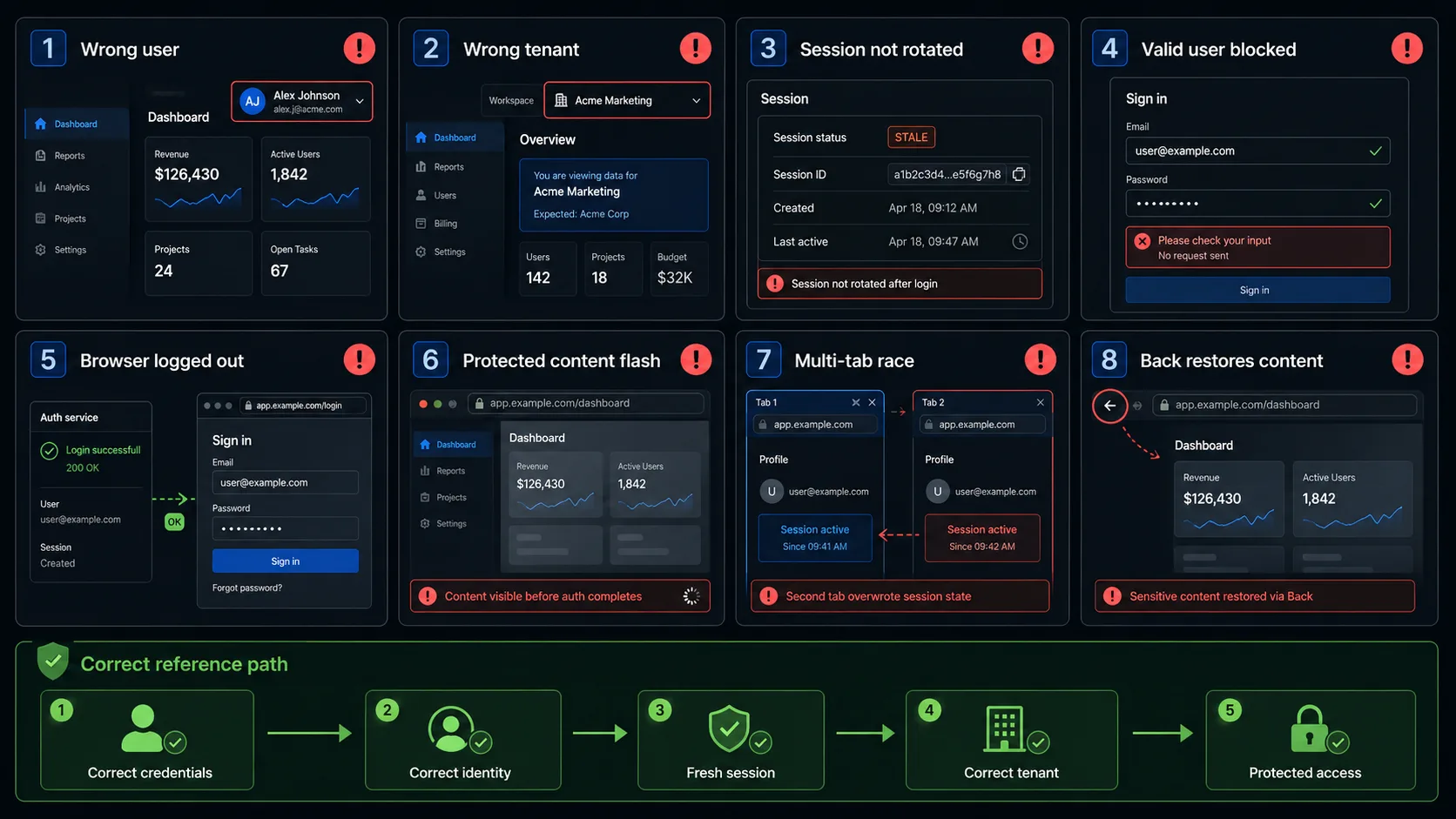
A dashboard appeared, but the wrong user is authenticated
Assert a stable account-specific indicator such as user ID, email, profile name, tenant, role or account-specific data.
The correct user is authenticated into the wrong tenant
Verify the resolved tenant separately from the authenticated user identity.
Login succeeds without rotating the session
Compare suitable session evidence before and after login when the architecture exposes it.
The login form rejects a valid user before the server sees the request
Check stale client validation, email patterns, password-manager input, autofill events and whitespace handling.
The server authenticates successfully, but the browser remains logged out
Inspect cookie storage, domain/path attributes, same-site behaviour, identity refresh and redirect timing.
Protected content becomes visible before authentication finishes
Capture screenshots or video during the transition, not only the final page.
A second tab overrides the first login
Define whether latest completed or latest submitted login wins, then test that policy.
The Back button restores sensitive authenticated content
Combine browser-history checks, network observation and server-side session verification.
What Each Testing Layer Can Prove
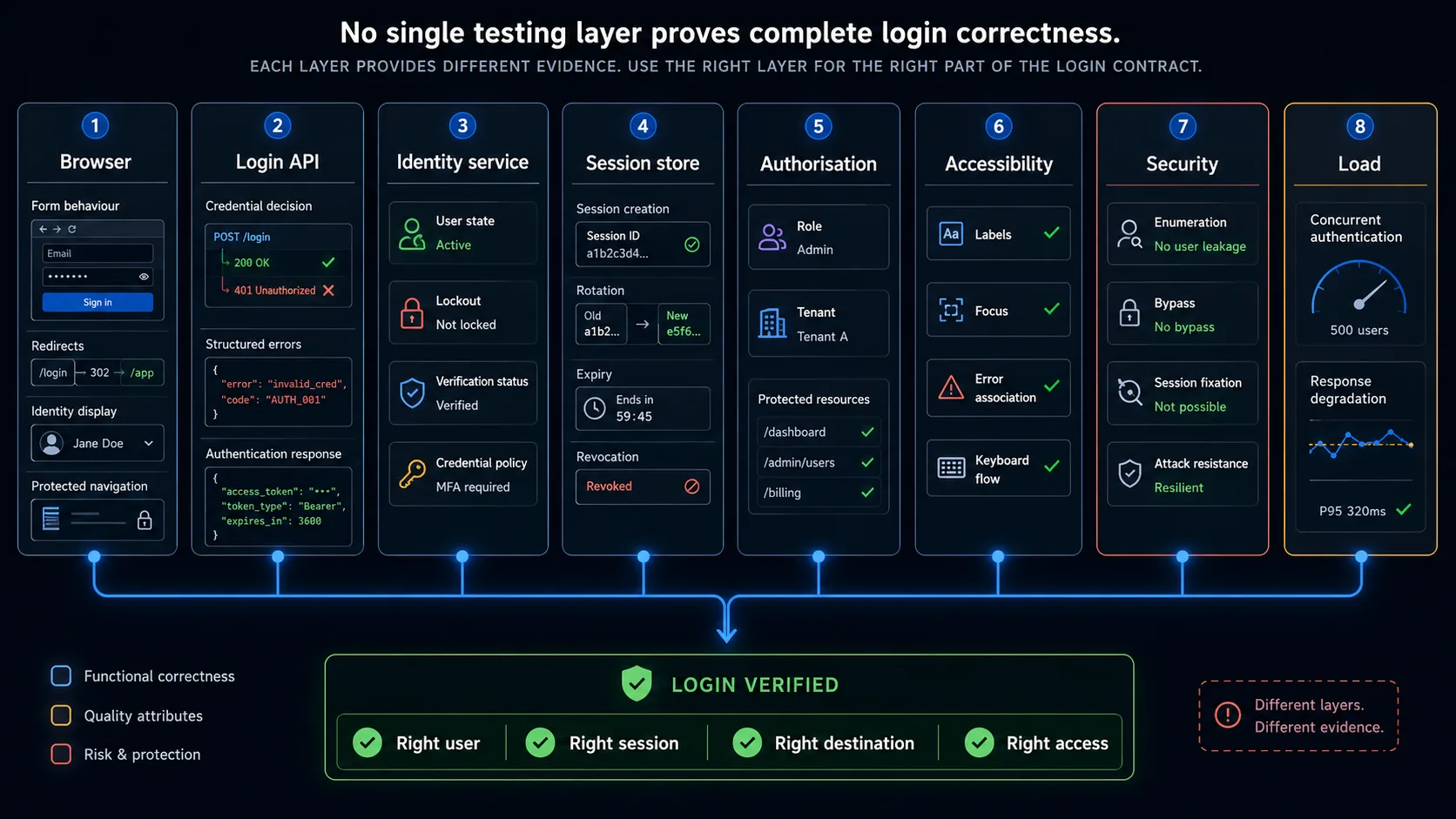
| Layer | What it can verify | What it cannot prove alone |
|---|---|---|
| Browser test | Form behaviour, redirects, identity display, browser session, protected navigation and recovery | Password storage, complete server enforcement or infrastructure security |
| Login API test | Credential decisions, structured errors, throttling responses and session issuance | Accessible presentation and real browser redirect behaviour |
| Identity-service test | User state, lockout, verification and credential policy | Correct rendering in the SaaS application |
| Session-store test | Session creation, rotation, expiry and revocation | Whether the browser applies the session correctly |
| Authorisation test | Role, tenant and resource access | Whether the original login UX works |
| Accessibility evaluation | Labels, focus, errors and keyboard completion | Server-side identity integrity |
| Security review | Enumeration, bypass, fixation and attack resistance | Everyday usability |
| Load test | Concurrent authentication capacity and degradation | Correct identity and UI recovery for an individual user |
When to Use the Browser and When to Use a Prepared Session
The login flow itself should be tested through the UI. Unrelated authenticated tests do not need to repeat login every time.
| Use real UI login when testing | Use prepared authenticated state when testing |
|---|---|
| the login page | an unrelated settings page |
| redirects | billing calculations |
| password-manager behaviour | content editing |
| error recovery | another protected workflow where login is only setup |
| account state | stable authenticated test setup |
| identity switching | repeatable role-specific environments |
Automating Login Page Test Cases
A reusable browser flow can separate actions from scenario data:
- Open
{{LOGIN_URL}} - Fill
{{IDENTIFIER}} - Fill
{{PASSWORD}} - Select
{{REMEMBER_ME}} - Submit
- Assert
{{EXPECTED_DESTINATION}} - Assert
{{EXPECTED_IDENTITY}} - Assert
{{EXPECTED_SESSION_STATE}} - Assert
{{EXPECTED_ERROR}}
Positive dataset
{
  "name": "active user reaches requested report",
  "accountState": "active",
  "credentials": {
    "identifier": "[email protected]",
    "password": "{{SECRET}}"
  },
  "startPath": "/reports/monthly",
  "expected": {
    "authenticated": true,
    "destination": "/reports/monthly",
    "identity": "qa-user",
    "role": "member",
    "tenant": "test-workspace"
  }
}
Negative dataset
{
  "name": "wrong password creates no session",
  "accountState": "active",
  "credentials": {
    "identifier": "[email protected]",
    "password": "{{WRONG_SECRET}}"
  },
  "expected": {
    "authenticated": false,
    "destination": "/login",
    "error": "generic-invalid-credentials",
    "protectedRouteAccessible": false
  }
}
Use names based on the business condition, not login_test_1 or negative_case_7.
What Browser Automation Should Not Claim
- passwords are hashed correctly
- database queries are parameterised
- all injection vulnerabilities are absent
- rate limiting works under production-scale distributed traffic
- TLS is configured securely across every endpoint
- session tokens cannot be forged
- every authorisation boundary is protected
- identity-provider signatures are validated correctly
- every account-enumeration timing difference is impossible
Login Page Testing Checklist
- the login form works with keyboard, paste, autofill and password managers
- one valid active user can sign in
- invalid credentials create no authenticated state
- unknown account and wrong password responses follow the enumeration policy
- identifier and password normalisation rules are explicit
- active, unverified, locked, suspended and deleted accounts follow defined policies
- repeated submission does not create competing transactions
- the session is created or rotated correctly
- the final identity is verified
- the correct role and tenant are loaded
- the original permitted destination is restored
- unsafe redirect destinations are rejected
- protected routes remain unavailable to anonymous contexts
- account switching removes previous-user state
- refresh, new tab and browser history follow session policy
- server-side errors map to useful browser messages
- failed attempts can be corrected without restarting the journey
- errors are accessible and do not rely only on colour
- network interruption produces a recoverable state
- UI and server decisions remain compatible
- browser tests are not used as proof of unrelated security controls
Final acceptance criterion. Do not accept: “The dashboard appeared.” Accept: “The intended identity received the correct session, role, tenant and destination, while invalid or restricted accounts remained outside the protected state.”
Frequently Asked Questions
What are the most important test cases for a login page?
Valid login, invalid credential rejection, generic errors, restricted account states, session creation or rotation, correct identity, intended redirect and protected-route access.
What is the difference between a login scenario and a login test case?
A scenario states the goal. A test case defines preconditions, exact actions, test data, expected identity, expected session and observable evidence.
Should login tests verify the dashboard?
They should verify more than the dashboard because the wrong identity, tenant, role or stale session may still be active.
Should unknown accounts and wrong passwords show the same error?
Where enumeration risk exists, generic responses are normally safer. Review visible text, HTTP response and timing behaviour.
Should every automated test log in through the UI?
No. Test login itself through the UI, then use prepared authenticated state for unrelated protected workflows when appropriate.
Does this article cover MFA, session timeout and logout completely?
No. Those are separate Child pages in the Authentication Testing cocoon.
Automate the Repeatable Login Journey
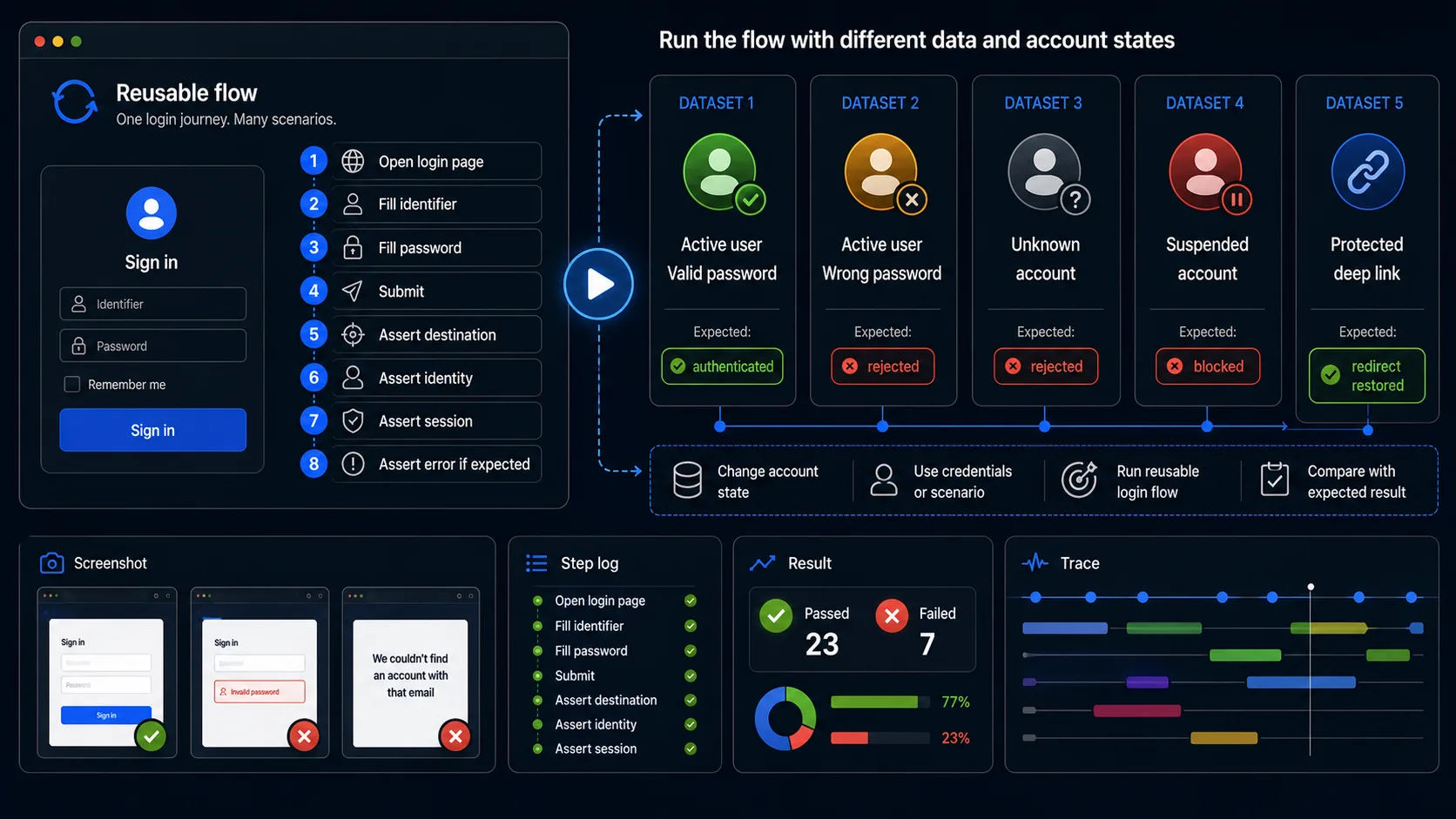
WrightTest lets teams record a login flow in a real browser, replace fixed credentials with named datasets, run cases independently and inspect screenshots, step results, errors and Playwright traces.
which account was used→ whether authentication was accepted→ which page opened→ which identity was loaded→ whether the protected route worked→ where a failed attempt stopped
The resulting browser checks can be exported to Playwright .spec.ts files when they need to move into an existing repository or CI pipeline.
Use WrightTest to verify the repeatable browser journey. Combine it with API, session-store, authorisation, accessibility and security checks to prove the complete authentication contract.
Continue with Authentication Testing
Login is one part of the complete authentication lifecycle. Use the Authentication Testing guide to plan coverage for MFA, session management and logout.