
Authentication Testing
Session Management Test Cases That Prove Expiry Across the Browser, Server and Every Active Context
60 practical cases proving that expired and revoked sessions stop working across the browser, APIs, tabs and devices.
A redirect to the login page does not prove that a session has expired.
A complete session-management test must verify that:
- authentication creates a fresh session bound to the intended identity
- the pre-authentication session identifier is replaced or safely transitioned
- idle and absolute lifetime rules are independently enforced
- only documented user activity resets the idle timer
- background traffic cannot silently keep an abandoned session alive
- renewal rotates session secrets without leaving old tokens reusable
- all protected APIs reject an expired or revoked session
- tabs, browser contexts and devices follow the documented sharing policy
- remember-me evidence does not replace required authentication or reauthentication
- reauthentication creates a fresh permitted state without restoring an invalid old session
This guide contains 60 practical session-management test cases covering creation, rotation, idle and absolute timeout, sliding expiration, remember me, browser tabs, background activity, concurrent devices, revocation and reauthentication.
Use the Login Page Test Cases guide for the authentication transaction that creates the session. Use the MFA Test Cases guide when reauthentication or a sensitive action requires an additional factor.
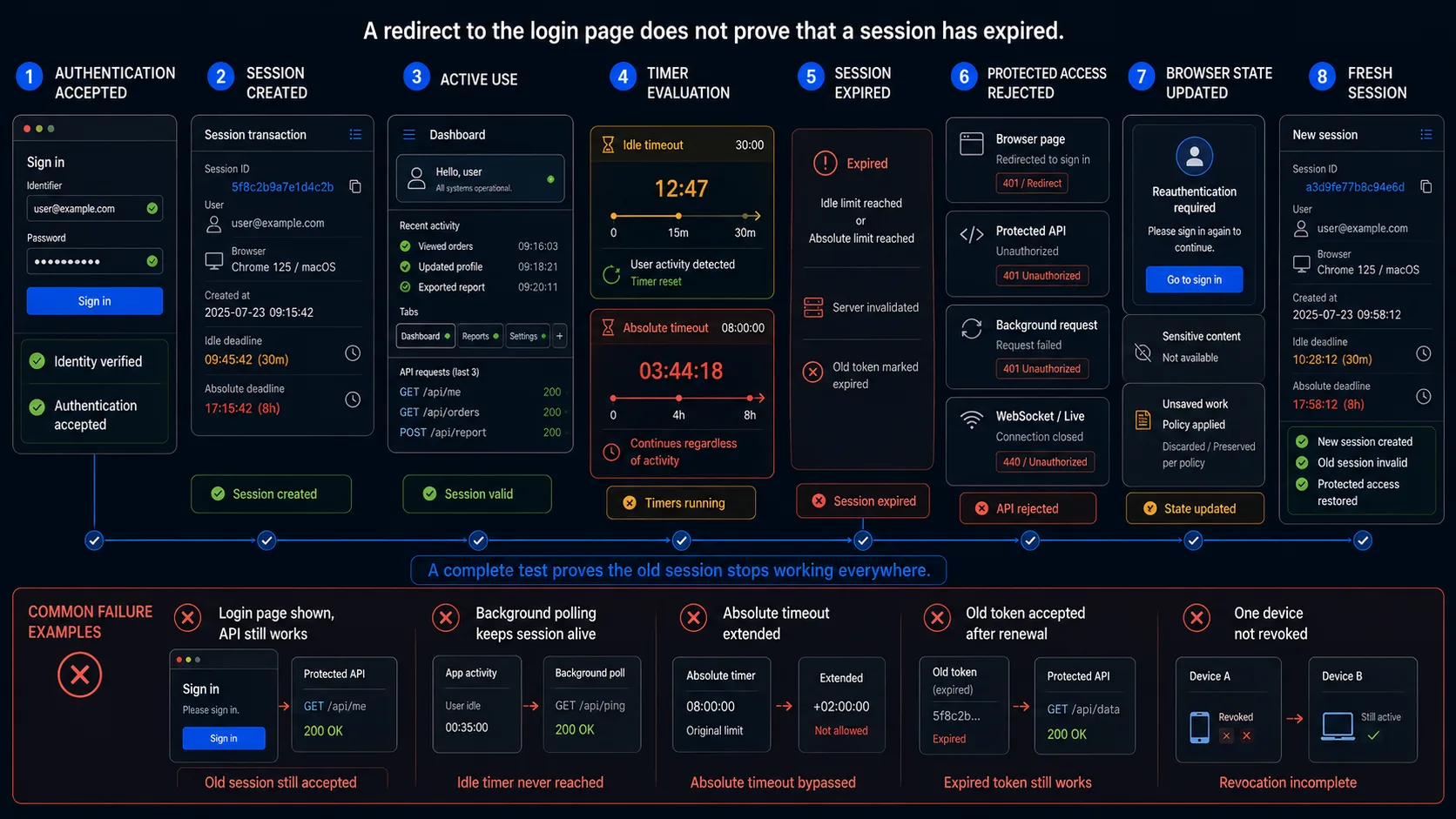
The Minimum Session Management Smoke Test
When release time is limited, begin with these ten cases.
| ID | Test | What it proves |
|---|---|---|
| SES-01 | Authenticate and compare the session before and after login | Authentication creates or rotates the session rather than preserving a known anonymous identifier. |
| SES-10 | Remain inactive until just before the idle threshold | The session does not expire earlier than the documented policy. |
| SES-11 | Cross the idle threshold and request a protected resource | The server invalidates the inactive session. |
| SES-16 | Replay the expired token directly against a protected API | The login redirect is not only a browser-side effect. |
| SES-20 | Keep sending valid activity beyond the absolute lifetime | Activity cannot defeat the maximum session age. |
| SES-27 | Trigger session renewal and replay the old token | Rotation does not leave an indefinite overlap window. |
| SES-39 | Leave one tab idle while another tab performs documented activity | Shared-tab behaviour matches the contract. |
| SES-47 | Open the same account on two devices | Concurrent-session policy is explicit and enforced. |
| SES-55 | Change the password and reuse an existing session | Security-relevant revocation follows the documented scope. |
| SES-60 | Reauthenticate after expiry and compare the new session | Recovery creates a fresh allowed session and the old one remains unusable. |
The smoke set verifies the primary lifecycle. It does not replace cookie-attribute testing, token cryptography review, penetration testing or a dedicated logout guide.
Define the Session Acceptance Contract First
Session test cases cannot have reliable expected results until the product policy is explicit.
| Contract element | Question to answer |
|---|---|
| Session creation | Which authentication event creates the session, and must the identifier rotate? |
| Binding | Which identity, role, tenant, device or assurance level belongs to the session? |
| Idle timeout | Which user actions reset inactivity, and which background events do not? |
| Absolute timeout | What is the maximum age regardless of activity? |
| Renewal | When is the session identifier rotated, and how long may old and new values overlap? |
| Warning | Is the user warned before expiration, and can activity or reauthentication extend the session? |
| Expired state | What should the browser, API and session store each report? |
| Remember me | Does it preserve a session, preserve only a reauthentication hint, or issue a new limited session? |
| Tabs and contexts | Which contexts share one session and which remain independent? |
| Concurrent devices | How many active sessions are allowed, and which session is removed when the limit is reached? |
| Revocation | Which events revoke the current session, all sessions or selected sessions? |
| Reauthentication | Which credential or factor is required, and which timers reset after success? |
| Federation | How do application and identity-provider sessions interact? |
| Evidence | Which browser, API, cache, token and session-store observations prove the result? |
Example session acceptance contract
| Input state | Expected browser result | Expected system result |
|---|---|---|
| Active session below idle limit | Protected page remains usable | Server accepts the current session |
| Inactive session at or beyond idle limit | Warning, redirect or reauthentication UI follows policy | Old session is no longer accepted |
| Active session reaches absolute limit | Reauthentication is required | Activity does not extend the old session |
| Renewal threshold reached | User remains in the permitted workflow | New session secret is issued and the old one becomes unusable after the allowed overlap |
| Remember-me evidence exists after session expiry | Product follows the documented convenience flow | No expired authenticated session is resurrected |
| Password changes in another device | Current browser reacts according to revocation policy | Intended sessions are invalidated |
| Reauthentication succeeds | User resumes the permitted destination or operation | A fresh session or assurance state is created |
Model the Complete Session Lifecycle
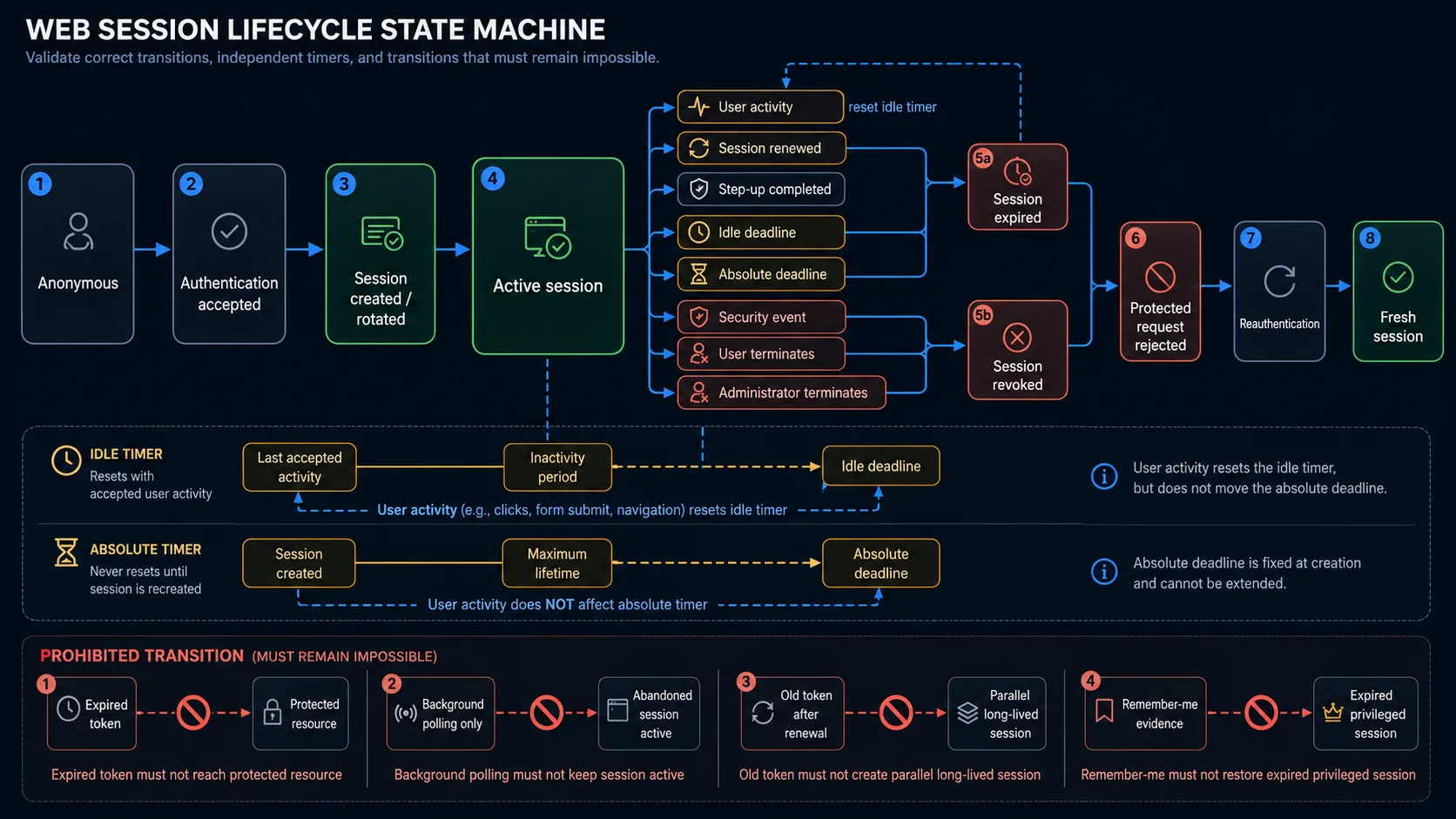
A session is a state machine with several independent timers and termination paths.
- Anonymous or pre-authentication state
- Authentication accepted
- Authenticated session created or rotated
- Active use
- Inactivity timer reset by documented user activity
- Session secret renewed
- Step-up or reauthentication performed
- Idle timeout reached
- Absolute timeout reached
- Security event revokes session
- User or administrator terminates session
- Expired or revoked state
- Protected requests rejected
- Browser state cleared or ignored
- Safe public or reauthentication state
- Fresh authentication creates a new session
Define prohibited transitions:
| State | Must not transition to |
|---|---|
| Expired token | Protected resource |
| Background polling only | Indefinitely active user session |
| Old token after renewal | Long-lived parallel session |
| Remember-me cookie | Privileged authenticated state without the documented authentication step |
Session Creation, Binding and Rotation Test Cases
| ID | Scenario | Expected result | Evidence |
|---|---|---|---|
| SES-01 | Authenticate and compare the anonymous and authenticated session identifiers | The authenticated session is newly created or safely rotated according to policy | Cookie/token comparison and session-store record |
| SES-02 | Authenticate as User A after an anonymous browsing or cart session | Anonymous state is preserved only where intended and becomes bound to User A without fixation | Old/new identifiers, cart state and final identity |
| SES-03 | Sign out one user and authenticate as another in the same browser | No identity, tenant, permissions or cached data from the previous user remains | UI, API responses, storage and final identity |
| SES-04 | Authenticate in two browser contexts using different users | Each context remains isolated and maps to its intended identity | Context cookies, session IDs and protected data |
| SES-05 | Authenticate through password and federated entry points | Every supported authentication method establishes the documented application session | Redirect chain, assertion time and RP session state |
| SES-06 | Refresh immediately after session creation | The session remains valid without duplicate creation or identity loss | Request count, token and final page |
| SES-07 | Open a protected route in a new tab after authentication | The tab recognises the intended shared browser session | Protected response and identity |
| SES-08 | Attempt to force a known pre-authentication session identifier | Authentication does not preserve an attacker-controlled session as the authenticated session | Pre/post identifier and replay result |
| SES-09 | Upgrade role, tenant or assurance level within an active session | The session is rotated or updated according to policy and stale privilege state is not retained | Token claims, session store and resource access |
Idle Session Timeout Test Cases
| ID | Scenario | Expected result | Evidence |
|---|---|---|---|
| SES-10 | Remain inactive until immediately before the idle limit | The session remains valid and does not expire early | Controlled server time and protected response |
| SES-11 | Remain inactive until the exact configured idle boundary | Boundary behaviour follows one documented inclusive or exclusive rule | Server timestamp and response |
| SES-12 | Remain inactive just beyond the idle limit | The session is rejected and cannot access protected resources | Protected response and session-store status |
| SES-13 | Perform a documented user action before the idle limit | The inactivity timer resets from the accepted activity event | Last-activity value and later boundary result |
| SES-14 | Move the mouse or press a key without sending a server request | The timer resets only if the product explicitly treats and reports this as activity | Network log, client event and server last-activity time |
| SES-15 | Modify client clock, cookie expiry or local timeout data | Client manipulation does not extend a server-enforced session | Server response and session-store expiry |
| SES-16 | Reuse the expired token in a direct protected API request | The server rejects it and returns no protected data | HTTP response, session-store state and audit event |
| SES-17 | Restore an old browser cookie or local-storage value after timeout | The previous session remains unusable | Restored value and protected request |
| SES-18 | Use Back after idle timeout | Cached protected content is not treated as a live authenticated state and sensitive actions cannot be submitted | History view, reload, network and form submission |
| SES-19 | Receive a pre-timeout warning and choose continue or reauthenticate | The warning timing, focus, countdown and extension behaviour match policy | Timer, accessibility tree and final expiry |
OWASP requires timeout enforcement on the server and recommends testing that old session values cannot be restored or replayed after expiration.
Absolute Timeout Test Cases
| ID | Scenario | Expected result | Evidence |
|---|---|---|---|
| SES-20 | Continuously perform accepted activity until the absolute lifetime | The session expires or requires reauthentication despite activity | Creation time, current time and protected response |
| SES-21 | Test immediately before, at and after the absolute boundary | One precise maximum-age rule is applied consistently | Controlled clock and three responses |
| SES-22 | Renew the idle timer repeatedly near the absolute limit | Idle resets do not move the absolute deadline | Last-activity and absolute-expiry values |
| SES-23 | Open a long-running workflow before the absolute limit and submit after it | The operation follows the documented reauthentication or safe-failure policy | Submission response, stored result and session state |
| SES-24 | Complete successful reauthentication before the absolute limit | The permitted timers reset according to policy and a fresh assurance event is recorded | Authentication time, session values and audit event |
NIST distinguishes overall and inactivity timeout. Activity resets inactivity, while successful reauthentication may reset both; when either applicable timeout expires, the session must terminate.
Renewal and Sliding-Expiration Test Cases
| ID | Scenario | Expected result | Evidence |
|---|---|---|---|
| SES-25 | Reach the configured renewal threshold while actively using the application | A new session secret is issued without losing identity or permitted workflow | Old/new tokens and current page |
| SES-26 | Send simultaneous requests while renewal occurs | Requests resolve deterministically without losing updates or creating several uncontrolled sessions | Parallel responses and session records |
| SES-27 | Replay the old token after the allowed renewal overlap | The old token is rejected | Old-token protected request and session-store state |
| SES-28 | Replay the new token before and after renewal completion | The new token becomes authoritative according to one documented transition rule | Responses and rotation timestamps |
| SES-29 | Trigger repeated renewal thresholds | The session rotates as configured without unbounded token accumulation | Active token count and issue history |
| SES-30 | Remain inactive after a renewal event | Renewal does not incorrectly reset idle or absolute time unless policy says it does | Timer values and timeout result |
| SES-31 | Use a refresh token or silent renewal after the server session is expired or revoked | Token refresh cannot resurrect an invalid session | Refresh response and protected API result |
| SES-32 | Interrupt the network during rotation and reconnect with old client state | The client recovers safely or requires authentication; it does not create a split-brain session | Stored tokens, retry requests and final identity |
Remember Me and Persistent Session Test Cases
| ID | Scenario | Expected result | Evidence |
|---|---|---|---|
| SES-33 | Authenticate without selecting remember me and restart the browser | Persistence follows the non-remembered policy | Cookie persistence and next launch |
| SES-34 | Authenticate with remember me and restart the browser | The product follows the documented convenience flow without reviving an expired session | Persistent token, reauthentication and final assurance |
| SES-35 | Allow the normal authenticated session to expire while remember-me evidence remains | The expired session is rejected; any new access uses the documented fresh-session flow | Old-token response and new session creation |
| SES-36 | Use remember-me evidence on another account in the same browser | Evidence remains account-specific and cannot attach to the wrong identity | Stored values and final identity |
| SES-37 | Copy remember-me data to another browser context or device | Binding and risk policy are enforced; privileged access is not granted silently | Copied value, device context and authentication result |
| SES-38 | Change password, replace MFA, revoke devices or report compromise | Remember-me evidence is revoked where the security policy requires it | Old persistent token and next visit |
Multiple Tabs, Background Activity and Offline Test Cases
| ID | Scenario | Expected result | Evidence |
|---|---|---|---|
| SES-39 | Leave Tab A idle while Tab B performs documented user activity | Shared-session idle behaviour matches the contract across both tabs | Requests, shared session and both tab states |
| SES-40 | Generate only automatic polling, analytics, heartbeat or WebSocket traffic | Background traffic does not reset user inactivity unless explicitly defined as user activity | Network events and server last-activity value |
| SES-41 | Enter data in a form without a server request until timeout | The session expires according to server activity rules and the form has a safe recovery path | Network log, warning and saved/unsaved data |
| SES-42 | Let a multi-step workflow time out at each server-interacting step | Every step handles the expired state without unhandled errors, duplicate records or partial privilege | Step responses and persisted records |
| SES-43 | Begin an upload or long request before expiry and complete after expiry | The operation is accepted, cancelled or requires reauthentication according to one documented atomicity rule | Request timing, final record and session status |
| SES-44 | Disconnect the network before timeout and reconnect after it | Queued or retried requests do not use the expired session successfully | Offline queue, retry responses and final page |
| SES-45 | Let the session expire while an SPA remains open | Protected data stops refreshing, errors are mapped safely and cached state is not presented as current access | API/WebSocket responses and rendered state |
| SES-46 | Close and restore tabs or restore the browser session after server expiry | Restored pages cannot re-establish the invalid session | Restored storage and protected requests |
Concurrent Session and Device Test Cases
| ID | Scenario | Expected result | Evidence |
|---|---|---|---|
| SES-47 | Authenticate the same account on two permitted devices | Both sessions remain independent and visible according to policy | Session list, identifiers and device metadata |
| SES-48 | Exceed the configured maximum number of sessions | The intended oldest, newest or selected session is rejected according to policy | Session list and each device result |
| SES-49 | Perform activity on Device A while Device B remains idle | Only the intended session's idle timer resets unless policy explicitly links them | Per-session last-activity values |
| SES-50 | Reach the absolute timeout on one device before another | Each session expires according to its own creation and reauthentication time | Per-session timestamps and results |
| SES-51 | Use active-session management to terminate one selected device | Only the selected session is revoked and cannot be replayed | Session list, old token and remaining devices |
| SES-52 | Authenticate from a new location, network or device | Notification, risk response and concurrent-session behaviour follow documented policy | Audit event, notification and active sessions |
| SES-53 | Create application and identity-provider sessions with different lifetimes | The relying party remains authoritative for its own protected session and handles silent IdP assertions according to policy | RP/IdP timestamps and redirect result |
| SES-54 | Terminate the identity-provider session while the application session remains active, and vice versa | The independent-session policy is explicit and no false assumption of global termination is made | Both session states and re-entry flow |
Concurrent sessions are not automatically a defect. The defect is an undocumented or unenforced policy, missing user visibility, or failed termination of selected sessions.
Session Revocation and Reauthentication Test Cases
| ID | Scenario | Expected result | Evidence |
|---|---|---|---|
| SES-55 | Change the password from the current or another session | Current, all or selected sessions are revoked exactly as documented | Old tokens across devices and audit event |
| SES-56 | Disable, suspend or deprovision the account | Protected requests stop working across the intended active sessions | Account state, API responses and session store |
| SES-57 | Replace MFA, revoke trusted devices or report account compromise | Session and remember-me revocation follows the security-event policy | Old tokens, persistent evidence and notifications |
| SES-58 | Administrator revokes all sessions | Every active session becomes unusable and cannot refresh itself | Session list, old tokens and refresh attempts |
| SES-59 | Attempt reauthentication with wrong, expired or insufficient proof | The protected action remains blocked and the base session follows policy | Challenge response, assurance level and action result |
| SES-60 | Successfully reauthenticate after timeout or for a sensitive action | A fresh permitted session or assurance state is created; the invalid old session remains unusable | Old/new identifiers, authentication time and protected result |
The Most Important Session Failure Patterns
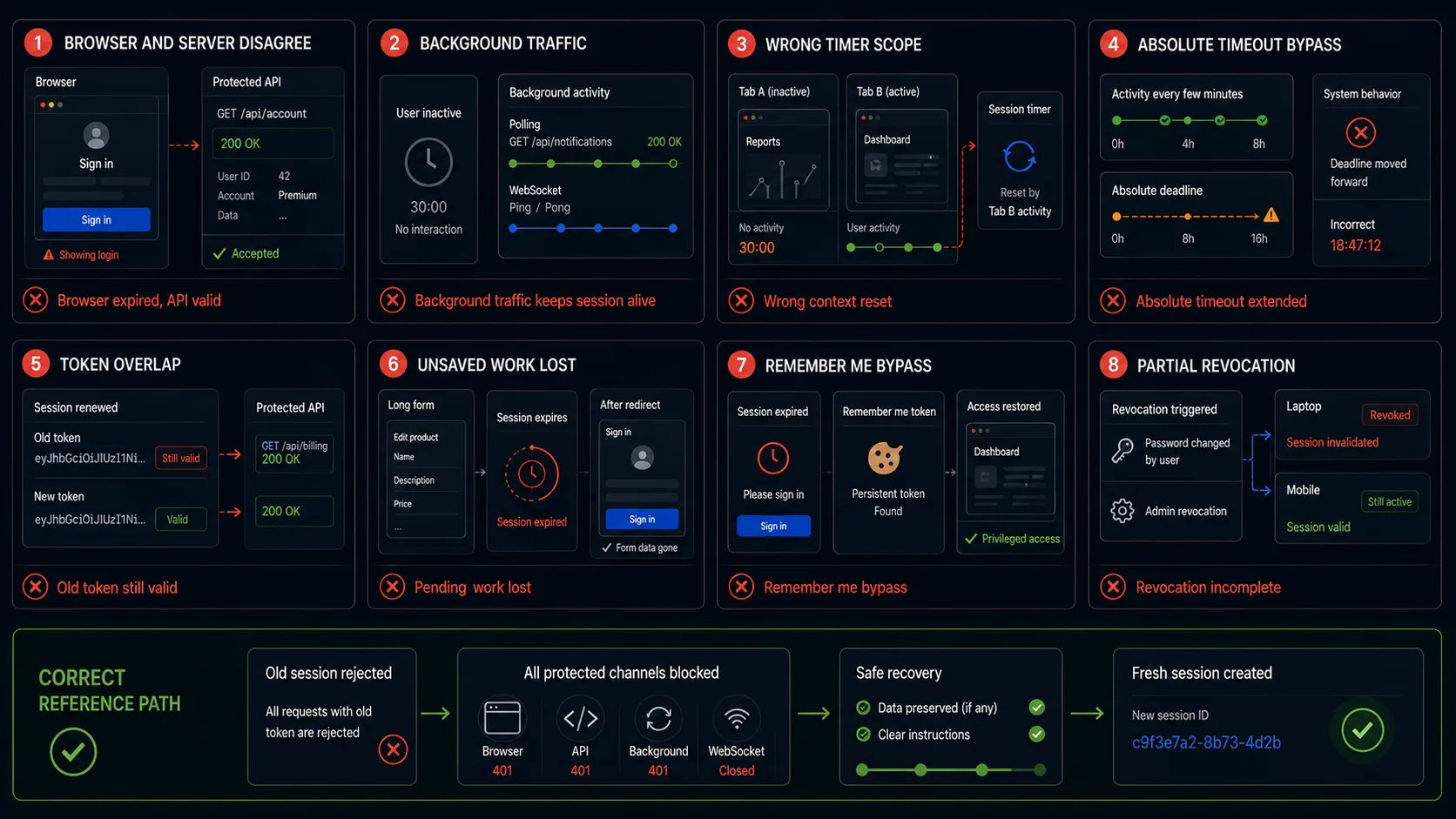
The browser says expired, but the API still accepts the token
A client-side timer or redirect can create a false sense of security. Replay the token against representative protected APIs and inspect the server-side session record.
Background polling prevents idle expiration
Analytics, heartbeats, WebSocket messages, autosave and data refresh can look like activity to the server even when the user has left. Define user activity separately from application traffic.
One tab resets the timer for unrelated contexts
Tabs may share one browser session, but devices and independent contexts usually require separate timers. Verify the intended scope of each activity event.
Frequent activity defeats the absolute timeout
A rolling inactivity timer is not an absolute lifetime. Persist the session through repeated activity and confirm the maximum age still ends or reauthenticates it.
Old and new tokens remain valid after renewal
A short overlap may be necessary for concurrent requests, but unlimited overlap turns rotation into session duplication. Test the exact transition window.
The user loses unsaved work without a safe recovery path
Security does not require silent data loss. Long forms and multi-step workflows need warning, draft preservation, reauthentication or an explicit safe failure.
Remember me silently recreates a privileged session
Persistent evidence should follow a documented authentication policy. It must not convert an expired or revoked session into indefinite privileged access.
Revocation reaches one device but not the others
Password changes, account compromise and administrator actions require an explicit scope. Test every active session, refresh path and persistent token in that scope.
How to Automate Long Session Timeouts Without Waiting in Every Test
A one-hour production timeout does not require every regression test to wait for one hour. Separate mechanism testing from configuration-integrity testing.
| Test layer | Technique | What it proves |
|---|---|---|
| Fast mechanism tests | Run the application in an isolated test environment with short but real idle, absolute and renewal values | Timer transitions, browser behaviour, server invalidation and recovery mechanics |
| Controlled-time tests | Use an application clock abstraction or test-controlled session-store timestamps | Precise before/at/after boundaries without wall-clock delays |
| Direct invalidation tests | Expire or revoke the current test session through an explicit isolated test fixture | Browser/API behaviour after the server has invalidated the session |
| Configuration-integrity test | Read or verify the deployed timeout configuration against the approved environment policy | The environment uses the intended duration rather than only a short test value |
| Scheduled real-duration check | Run a small number of production-like duration tests outside the main regression path | Wall-clock integration and infrastructure behaviour |
Do not create a production bypass. A test-only clock, short policy or session fixture must be isolated and unavailable in production. Do not add a query parameter, magic header, browser-only function or hard-coded user that bypasses session enforcement.
For every accelerated case, preserve the same state transition:
- Active session
- Controlled passage of idle or absolute time
- Server marks session expired
- Protected request is rejected
- Browser maps the expired state
- Reauthentication creates a fresh session
What Each Testing Layer Can Prove
| Layer | What it can verify | What it cannot prove alone |
|---|---|---|
| Browser test | Warnings, redirects, forms, Back behaviour, tabs, persistence, recovery and visible identity | Server invalidation, all APIs or session-store truth |
| Protected API test | Expired-token rejection, refresh behaviour, status codes and protected-data absence | Complete browser UX and cache behaviour |
| Session-store or identity-service test | Creation, last activity, absolute expiry, renewal, revocation and concurrent-session records | That the browser applies the state correctly |
| Gateway and background-channel test | WebSocket, SSE, polling, upload and long-request behaviour at expiry | User-facing recovery |
| Cache and storage inspection | Sensitive browser cache, cookie and local-storage transitions | That the server rejects replay |
| Federation test | RP/IdP session independence, authentication age and silent assertion behaviour | Local application state outside the federation flow |
| Accessibility evaluation | Warning announcements, focus, countdown, reauthentication and preserved form context | Server-side policy |
| Security review | Fixation, replay, tampering, hijacking and revocation weaknesses | Everyday usability and workflow correctness |
Automating Session Management Test Cases
Separate the reusable browser journey from the timer policy and expected server state.
- Authenticate as
{{USER}} - Capture
{{SESSION_ID}} - Record
{{SESSION_CREATED_AT}} - Set or wait for
{{SESSION_CONDITION}} - Perform
{{ACTIVITY_OR_REQUEST}} - Assert
{{BROWSER_STATE}} - Assert
{{API_RESULT}} - Assert
{{SESSION_STORE_STATE}} - Assert
{{OLD_TOKEN_REPLAY}} - If required, reauthenticate
- Assert
{{NEW_SESSION_ID}} - Assert
{{RESTORED_DESTINATION}}
Idle-timeout dataset
{
  "name": "idle_timeout_rejects_browser_and_api",
  "policy": {
    "idleSeconds": 60,
    "absoluteSeconds": 600
  },
  "activity": "none",
  "advanceSeconds": 61,
  "expected": {
    "browserState": "reauthentication-required",
    "apiStatus": 401,
    "oldSessionState": "expired",
    "oldTokenReplayAccepted": false
  }
}
Absolute-timeout dataset
{
  "name": "user_activity_cannot_extend_absolute_lifetime",
  "policy": {
    "idleSeconds": 60,
    "absoluteSeconds": 180
  },
  "activity": {
    "type": "accepted-user-request",
    "everySeconds": 30
  },
  "advanceSeconds": 181,
  "expected": {
    "sessionState": "expired",
    "protectedRouteAccessible": false,
    "reauthenticationRequired": true
  }
}
Renewal dataset
{
  "name": "old_token_rejected_after_rotation_overlap",
  "policy": {
    "renewAfterSeconds": 90,
    "overlapSeconds": 5
  },
  "expected": {
    "newTokenIssued": true,
    "oldTokenAcceptedDuringOverlap": true,
    "oldTokenAcceptedAfterOverlap": false
  }
}
Use names based on the session condition and protected outcome, not session_test_4 or timeout_negative_2.
What Browser Automation Should Not Claim
- session identifiers have sufficient entropy
- cookies and tokens are cryptographically protected against every attack
- all token-signing and validation implementations are secure
- distributed session stores remain consistent under every infrastructure failure
- all session hijacking techniques are prevented
- revocation propagates within every production latency objective
- identity-provider and relying-party protocol conformance is complete
- mobile native secure storage is correctly implemented
- all browser-cache and service-worker edge cases are absent
- production timeout values are correct unless configuration integrity is checked separately
Browser automation is still essential because it proves the real user journey and detects disagreements between visible state, protected requests, tabs, storage and reauthentication.
Session Management Testing Checklist
- authentication creates or safely rotates the session identifier
- the session resolves to the correct user, tenant, role and assurance level
- idle and absolute timeout values are documented separately
- before, at and after boundary cases are tested with server time
- only documented activity resets inactivity
- mouse movement or typing without a request follows the intended policy
- polling, analytics, heartbeat and WebSocket traffic cannot silently simulate user presence
- client clock, cookie expiry or local storage cannot extend server lifetime
- expired tokens fail in representative protected APIs
- restored old tokens and browser history cannot revive the session
- warnings are timed correctly, accessible and consistent across pages
- continuous activity cannot defeat the absolute timeout
- long forms, uploads and multi-step workflows have deterministic expiry behaviour
- session renewal rotates secrets and limits old/new overlap
- refresh mechanisms cannot resurrect an expired or revoked session
- remember-me evidence remains separate from the expired authenticated session
- remember-me state is account-specific and revocable
- tabs and independent browser contexts follow the documented sharing policy
- offline queued requests fail safely after server expiry
- restored tabs and SPA caches do not present stale protected state as live access
- concurrent sessions follow the documented count and eviction policy
- activity and timeout are tracked per intended session or device
- users can view and terminate selected active sessions when the product provides that control
- password change, account disablement, factor replacement and compromise events revoke the intended sessions
- reauthentication failure leaves protected actions blocked
- successful reauthentication creates a fresh permitted session or assurance state
- accelerated tests are isolated from production
- a separate configuration check verifies the deployed timeout values
Final acceptance criterion. Do not accept: “After 15 minutes, the login page appeared.” Accept: “At the documented boundary, the server rejected the old session across protected APIs and relevant contexts, background traffic could not keep it alive, pending work followed policy, and restored access required a fresh permitted authentication event.”
Frequently Asked Questions
What are the most important session timeout test cases?
Test immediately before, at and after the idle limit; replay the expired token against protected APIs; test activity classification, absolute lifetime, multiple tabs, background requests, pending forms, revocation and fresh reauthentication.
What is the difference between idle and absolute timeout?
Idle timeout is based on the time since accepted activity. Absolute timeout limits the total session age regardless of activity. They require separate timers, boundary cases and expected results.
Should activity in another tab reset the timeout?
It depends on whether the tabs share one browser session and whether that request qualifies as user activity. The product must define the scope; the test should not assume either outcome.
How can a one-hour timeout be automated?
Use short real values or controlled server time for frequent mechanism tests, verify deployed configuration separately, and reserve a small scheduled set for real-duration production-like checks.
Does clearing the cookie prove that the session expired?
No. The server must reject the old identifier. Restoring or replaying it against protected APIs is the stronger proof.
Is remember me the same as a long session?
Not necessarily. A safer design may store limited persistent reauthentication evidence and create a new session later. Test the actual policy rather than assuming the old authenticated session remains alive.
Automate the Repeatable Session Journey
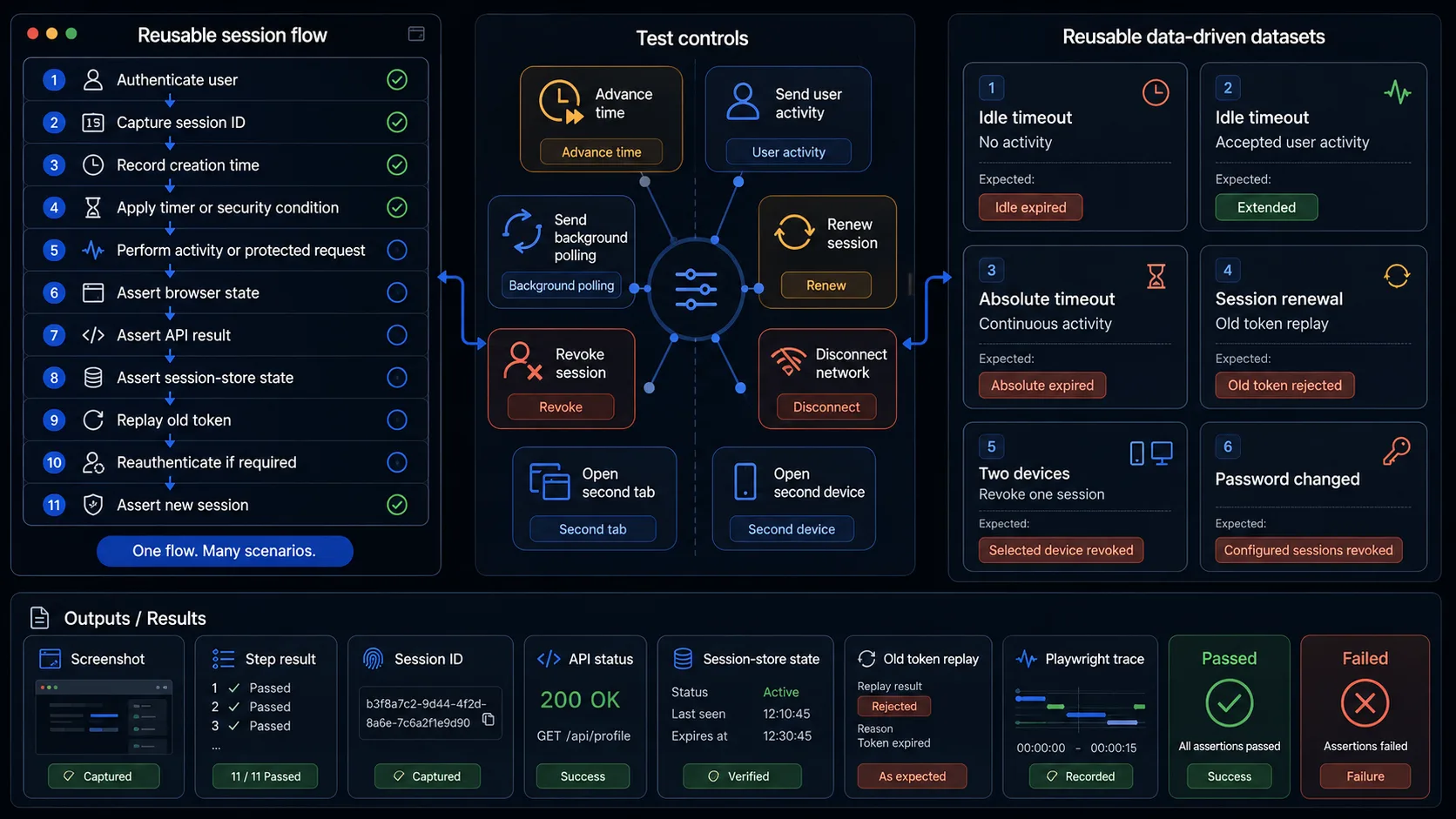
WrightTest lets teams record the browser part of a session flow, replace fixed users and timing policies with named datasets, run scenarios independently, and inspect screenshots, step results, errors and Playwright traces.
- Which user and session started the test
- Which timer or security event changed the state
- Which browser action crossed the boundary
- Whether the protected request was accepted or rejected
- Whether other tabs or devices agreed
- Whether the old token remained reusable
- Whether reauthentication created a fresh session
- Where a failed journey stopped
Use controlled time, isolated session fixtures and API assertions for states that should not require long wall-clock waits. Keep at least one configuration-integrity check and a small production-like duration suite.
Browser checks can be exported to Playwright .spec.ts files when they need to move into an existing repository or CI pipeline.
Continue with Authentication Testing
Session management is one part of the complete authentication lifecycle. Use the Authentication Testing guide to plan coverage across primary login, additional factors, session state and termination.