
Authentication Testing
MFA and 2FA Test Cases That Prove the Challenge Belongs to the Right User and Session
60 practical cases for challenge binding, OTP/TOTP, replay prevention, trusted devices, recovery and step-up access.
Accepting a correct verification code does not prove that multi-factor authentication works.
A complete MFA or two-factor authentication test must verify that:
- the application requires the additional factor at every intended entry point
- the challenge belongs to the intended identity, session and protected operation
- the user cannot reach the protected state after primary credentials alone
- valid proof is accepted only within its permitted window
- expired, malformed, replayed and cross-user proof is rejected
- resend and concurrent challenges follow one explicit validity policy
- successful proof is consumed and cannot elevate another session
- trusted-device state expires and can be revoked
- recovery and factor replacement do not create a weaker authentication path
- step-up verification elevates only the intended session or sensitive action
This guide contains 60 practical MFA and 2FA test cases covering trigger rules, enrollment, OTP and TOTP, push approval, backup codes, remembered browsers, recovery, factor replacement and session elevation.
This guide starts after primary credentials are evaluated. Use the Login Page Test Cases guide for the first-stage credential, identity and redirect flow.
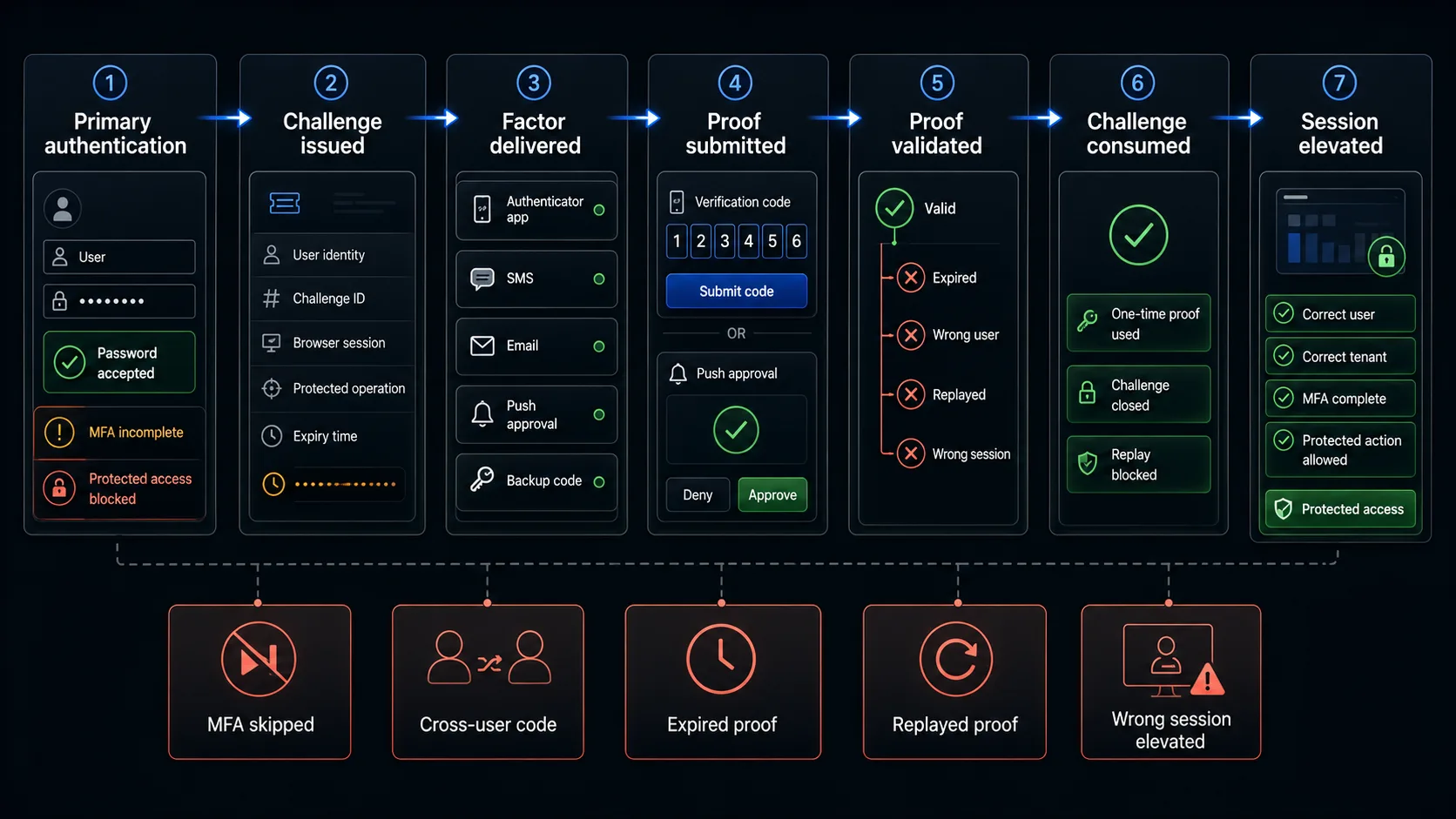
The Minimum MFA Smoke Test
When release time is limited, begin with these ten cases.
| ID | Test | What it proves |
|---|---|---|
| MFA-01 | Complete the required MFA flow with an enrolled active account | The primary supported journey reaches the protected state. |
| MFA-03 | Open a protected route after primary credentials but before the second factor | The pre-MFA session is not treated as fully authenticated. |
| MFA-05 | Complete the challenge in a different browser session | The challenge is bound to the intended authentication transaction. |
| MFA-13 | Finish enrollment with the first valid factor proof | A factor is not active until its possession is verified. |
| MFA-25 | Submit a valid current OTP or TOTP | The expected factor proof is accepted. |
| MFA-30 | Submit an expired proof | Time-limited proof is rejected. |
| MFA-33 | Reuse a proof after successful verification | Successful proof is one-time and replay-resistant according to policy. |
| MFA-34 | Use User A's code during User B's challenge | Proof is bound to the intended account. |
| MFA-50 | Change a security-sensitive account setting after trusting a browser | Remembered-device state can be revoked. |
| MFA-58 | Complete step-up verification for one sensitive action | Only the intended session or operation receives elevated access. |
The smoke set verifies the transaction boundary. It does not replace provider integration tests, protocol conformance, penetration testing or full session-management coverage.
Define the MFA Acceptance Contract First
The phrase “MFA succeeded” is too vague to produce reliable tests. Define the contract before writing cases.
| Contract element | Question to answer |
|---|---|
| Entry point | Which login methods, devices, recovery paths and sensitive actions require MFA? |
| Primary state | What may the user access after the first factor but before the next factor? |
| Challenge identity | Which user account owns the challenge? |
| Challenge transaction | Which browser session, device, tenant or protected operation owns it? |
| Factor | Which enrolled authenticator is being verified? |
| Validity | When does the proof start and stop being acceptable? |
| Competition | What happens after resend, a second tab or a newly issued challenge? |
| Attempts | Which retry, cooldown and notification rules apply? |
| Consumption | When is the proof permanently marked used? |
| Session elevation | What authenticated level, action or resource becomes available after success? |
| Trusted device | How is remembered-browser state created, expired and revoked? |
| Recovery | How can a lost factor be replaced without lowering assurance? |
| Evidence | Which browser, API, provider, identity and session observations prove the outcome? |
Example MFA acceptance contract
| Input state | Expected browser result | Expected system result |
|---|---|---|
| Valid password + enrolled TOTP | TOTP challenge is shown | Pre-MFA session exists but protected access is not granted |
| Valid current TOTP for the same challenge | User reaches the permitted destination | Proof is consumed and the intended session is elevated |
| Expired TOTP | Challenge remains unresolved with a recoverable error | No protected session elevation |
| Valid code issued to another account | Generic rejection | No cross-account authentication |
| Resend requested | A new delivery state is shown | Old/new challenge validity follows the documented policy |
| Trusted browser still within policy | MFA may be skipped only where policy permits | Remembered-device evidence is valid for this account and device |
| Sensitive action requires step-up | Verification is requested before execution | Only that session or action receives elevated authority |
Model MFA as a Challenge Lifecycle
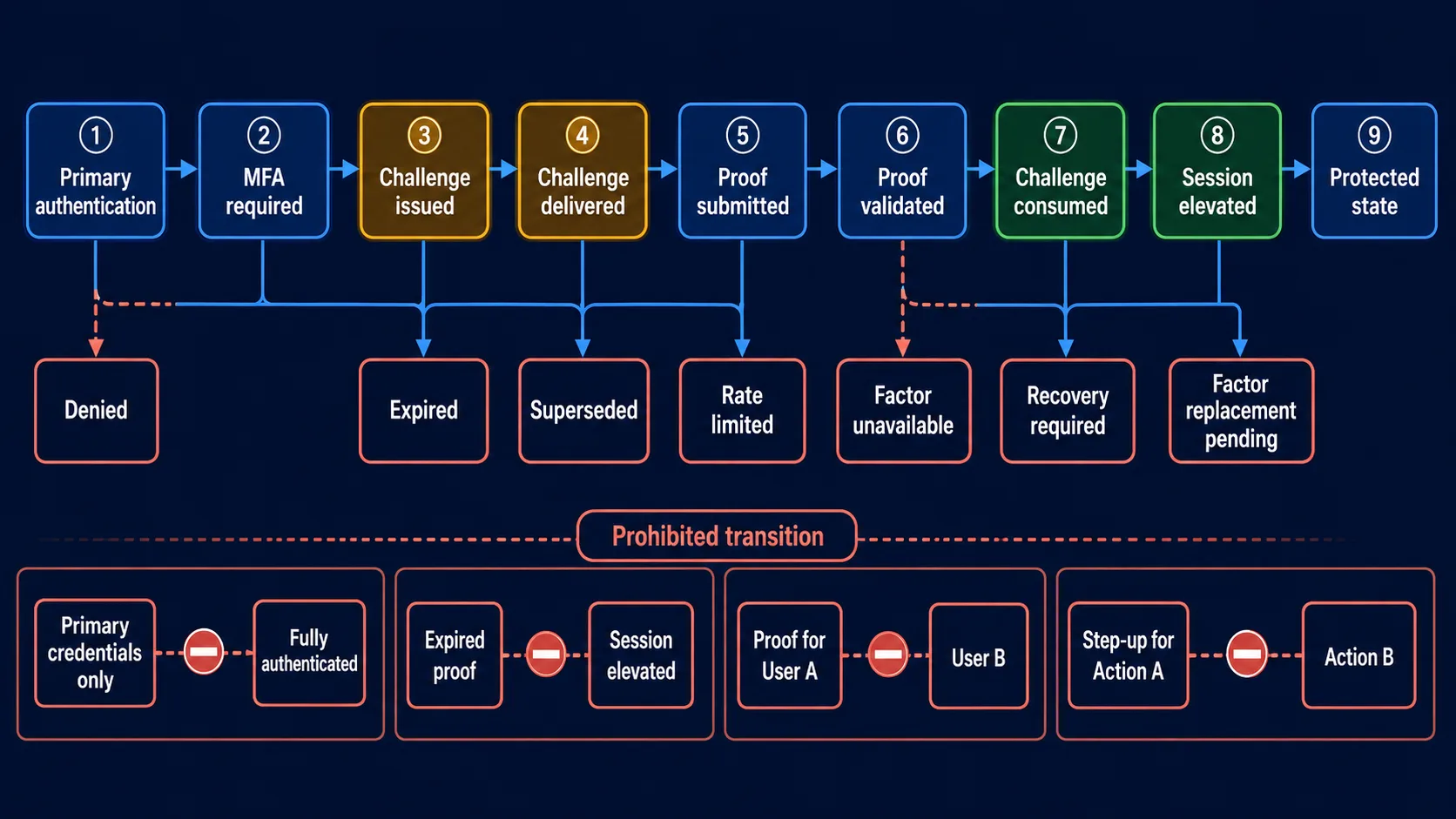
MFA is a stateful transaction. Model its transitions before selecting test data.
- Primary authentication evaluated
- MFA required
- Challenge issued
- Challenge delivered or presented
- Proof submitted
- Proof validated
- Challenge consumed
- Intended session or action elevated
- Protected state reached
Alternative outcomes
- Challenge denied
- Challenge expired
- Challenge superseded
- Challenge rate-limited
- Factor unavailable
- Recovery required
- Factor replacement pending
Prohibited transitions
| State | Must not transition to |
|---|---|
| Primary credentials only | Fully authenticated |
| Expired or consumed proof | Session elevated |
| Proof for User A | User B authenticated |
| Successful step-up for Action A | Unrelated Action B authorised |
MFA Trigger and Pre-Challenge State Test Cases
| ID | Scenario | Expected result | Evidence |
|---|---|---|---|
| MFA-01 | Complete the required MFA flow with an enrolled active account | The user reaches the intended protected state only after all required factors pass | Redirect chain, identity, challenge and session state |
| MFA-02 | Submit invalid primary credentials | No MFA challenge is issued and no pre-authenticated transaction is created | Request count, challenge store and browser state |
| MFA-03 | Open a protected route after valid primary credentials but before MFA | Access is denied or redirected to the unresolved challenge | Protected-route response and session level |
| MFA-04 | Start primary authentication as User A and attempt to finish as User B | The second stage remains bound to User A or the transaction is invalidated | Challenge owner and final identity |
| MFA-05 | Open the challenge in another browser context or session | The proof cannot complete an unrelated transaction unless the product explicitly supports a safe cross-device flow | Session IDs and verification result |
| MFA-06 | Submit primary credentials repeatedly while the first challenge is pending | Challenge creation follows a deterministic duplicate policy | Challenge count and active challenge state |
| MFA-07 | Refresh, use Back, or reopen the pending challenge URL | The page restores or rejects the pending state according to policy without granting access | History, URL and protected-route result |
| MFA-08 | Use each supported authentication entry point: local login, federated login, mobile web, deep link or API | MFA is enforced consistently wherever policy requires it | Entry-point matrix and final session level |
OWASP recommends reviewing every authentication method and checking that the second stage cannot be skipped through force-browsing or direct API requests.
Enrollment and Factor Binding Test Cases
| ID | Scenario | Expected result | Evidence |
|---|---|---|---|
| MFA-09 | Start enrollment from an authenticated account | Enrollment requires the configured reauthentication or step-up condition | Session age, reauthentication prompt and API result |
| MFA-10 | Scan the QR code or enter the displayed secret | The authenticator is provisioned for the intended account and issuer | Provisioning data and generated proof |
| MFA-11 | Enroll two accounts or factors | Each receives a distinct factor record and secret or credential | Factor identifiers and verification output |
| MFA-12 | Leave enrollment before verifying the first proof | The unverified factor does not become active | Account factor list and next login |
| MFA-13 | Submit the first valid proof during enrollment | The factor becomes active only after possession is confirmed | Enrollment response and factor status |
| MFA-14 | Cancel enrollment or fail the confirmation step | Existing factors remain unchanged and partial setup is cleaned up or expires | Old factor login and pending record |
| MFA-15 | Add a second factor to an account that already has MFA | Both factors follow the documented selection, fallback and recovery policy | Factor list and challenge choices |
| MFA-16 | Remove or replace a factor | The change requires appropriate reauthentication, affects only the intended factor and generates the configured notification | Factor status, audit event and notification |
Challenge Issuance and Delivery Test Cases
| ID | Scenario | Expected result | Evidence |
|---|---|---|---|
| MFA-17 | Issue an email, SMS, voice or push challenge | The challenge is sent to the enrolled destination for the intended account | Masked destination, provider event and challenge owner |
| MFA-18 | Inspect the challenge screen and delivery message | Sensitive contact details are masked and no factor secret is exposed | Rendered UI and response payload |
| MFA-19 | Trigger one authentication request | One intended challenge transaction is created without duplicate messages | Challenge and provider message counts |
| MFA-20 | Request resend while the first proof is pending | The UI and backend apply the documented resend cooldown and challenge policy | Countdown, response and active challenge list |
| MFA-21 | Submit the old and new proofs after resend | Only the proof or proofs permitted by the explicit policy are accepted | Both verification responses and challenge state |
| MFA-22 | Delay provider delivery until near or beyond expiry | Late proof is accepted or rejected according to challenge validity, not delivery timestamp alone | Issue time, delivery time and verification result |
| MFA-23 | Simulate provider failure, blocked email, unavailable phone or push error | The user receives a recoverable state without premature access or endless spinner | Provider error, UI message and session level |
| MFA-24 | Generate repeated resend and failed-verification requests | Rate limits and cooldowns apply; generating a new proof does not silently reset the failed-attempt policy | Attempt counters, provider events and responses |
OTP and TOTP Verification Test Cases
| ID | Scenario | Expected result | Evidence |
|---|---|---|---|
| MFA-25 | Submit the valid current OTP or TOTP | The intended challenge is satisfied and the proof is consumed | Verification response, challenge state and session level |
| MFA-26 | Submit an incorrect code of the expected format | Verification fails without elevating the session | Error and protected-route result |
| MFA-27 | Submit a code with wrong length, characters or separators | Input is rejected consistently by browser and server rules | UI validation and direct API response |
| MFA-28 | Submit a valid code beginning with zero | The value is treated as a string and retains leading zeroes | Submitted payload and verification result |
| MFA-29 | Submit an empty proof or whitespace | The challenge remains unresolved and the required error is accessible | Field state and absence of elevation |
| MFA-30 | Submit a proof after its validity window | The proof is rejected and cannot elevate the session | Issue time, server time and response |
| MFA-31 | Submit a TOTP at the current/previous time-step boundary | Acceptance follows the configured clock-skew window | Controlled clock, step number and response |
| MFA-32 | Submit a proof from a future or out-of-policy time step | The proof is rejected outside the configured drift policy | Controlled clock and verification result |
| MFA-33 | Reuse a proof after successful verification | The duplicate proof is rejected and cannot elevate another transaction | Second response, challenge consumption and session state |
| MFA-34 | Use User A's valid proof for User B's challenge | Verification fails because the proof is bound to the intended account | Challenge owner and final identity |
| MFA-35 | Use a valid proof in another tab, browser session or protected operation | Verification fails unless the product explicitly binds and permits that transaction | Challenge/session IDs and target operation |
| MFA-36 | Submit the same proof concurrently from two requests | At most one transaction succeeds; consumption is atomic | Parallel responses and final challenge state |
The validity window must be an explicit system policy. RFC 6238 recommends a 30-second TOTP step as a security/usability balance and requires a verifier not to accept a successfully used OTP again. NIST also requires one-time acceptance during the validity period and rate limiting for short authentication secrets.
Push Approval and Transaction-Binding Test Cases
| ID | Scenario | Expected result | Evidence |
|---|---|---|---|
| MFA-37 | Approve the correct current push prompt | The intended challenge succeeds and the intended session or action is elevated | Push event, challenge ID and protected result |
| MFA-38 | Deny the push prompt | The transaction remains unauthenticated and the browser receives the correct denial state | Push decision and browser result |
| MFA-39 | Ignore the prompt until timeout | The challenge expires without silent approval or indefinite pending state | Timeout event and session level |
| MFA-40 | Approve a stale prompt after a newer challenge exists | The stale prompt is rejected or handled according to one explicit challenge policy | Prompt IDs and verification result |
| MFA-41 | Generate repeated push prompts | Notification count and frequency are limited to reduce accidental approval and abuse | Provider events, cooldown and responses |
| MFA-42 | Verify a push or number-matching prompt for a sensitive transaction | Displayed account, amount, destination or number matches the operation being authorised | Prompt details and final operation record |
Backup Code and Trusted-Device Test Cases
| ID | Scenario | Expected result | Evidence |
|---|---|---|---|
| MFA-43 | Use one valid unused backup code | The intended account is authenticated and that code becomes consumed | Code status and final identity |
| MFA-44 | Reuse the consumed backup code | Verification is rejected | Second response and code status |
| MFA-45 | Generate a replacement set of backup codes | Old unused codes are invalidated if that is the documented policy | Old/new code verification and generation event |
| MFA-46 | Consume the final backup code | The product shows the configured exhausted-code warning or recovery route without exposing codes | Remaining count and UI state |
| MFA-47 | Choose to trust or remember the browser after successful MFA | Remembered-device state is created only after completed MFA and for the intended account | Cookie/storage attributes and next login |
| MFA-48 | Sign in from a new browser profile or device | MFA is required when trusted-device evidence is absent | Separate context and challenge trigger |
| MFA-49 | Use the remembered browser after its validity period | MFA is required again according to policy | Controlled time and challenge trigger |
| MFA-50 | Change password, replace factor, revoke devices, report compromise or perform another configured security event | Trusted-device state is revoked where policy requires it | Old trust token and next authentication |
Recovery and Factor-Replacement Test Cases
| ID | Scenario | Expected result | Evidence |
|---|---|---|---|
| MFA-51 | Start recovery after losing the enrolled device | Recovery begins without treating the active browser session as sufficient proof by itself | Recovery entry, session level and required evidence |
| MFA-52 | Complete the approved identity-recovery path | Only the intended account can regain factor-management access | Identity evidence, recovery decision and audit event |
| MFA-53 | Attempt to replace MFA using a weaker alternative such as generic security questions alone | The weak fallback is rejected or augmented according to policy | Recovery response and factor status |
| MFA-54 | Replace a factor while another enrolled factor remains available | The user reauthenticates with an existing approved factor before replacement | Reauthentication and change response |
| MFA-55 | Complete factor replacement and try the old factor | The old factor is invalid, the new factor works, and the account receives the configured notification | Both verification results and notification |
| MFA-56 | Perform an administrator-assisted MFA reset | Pending challenges and relevant remembered-device/session state are revoked according to policy and the action is audited | Admin event, factor list, sessions and next login |
OWASP treats MFA recovery and factor replacement as high-risk flows. Recovery should not become an easier bypass, and changing a factor should require suitable reauthentication rather than relying only on an active session.
Step-Up Authentication and Session-Elevation Test Cases
| ID | Scenario | Expected result | Evidence |
|---|---|---|---|
| MFA-57 | Open a sensitive action that requires recent or stronger authentication | The action is paused and the configured step-up challenge appears | Action state and challenge context |
| MFA-58 | Complete step-up verification for the sensitive action | Only the intended session, tenant and operation receive the configured elevation | Session assurance, operation result and audit event |
| MFA-59 | Wait until the step-up assurance window expires | The sensitive action requires verification again while the base session follows its own policy | Controlled time and assurance state |
| MFA-60 | Cancel or fail step-up verification | The protected action remains blocked and the base session is preserved or terminated exactly as documented | Action result, base session and error state |
The Most Important MFA Failure Patterns
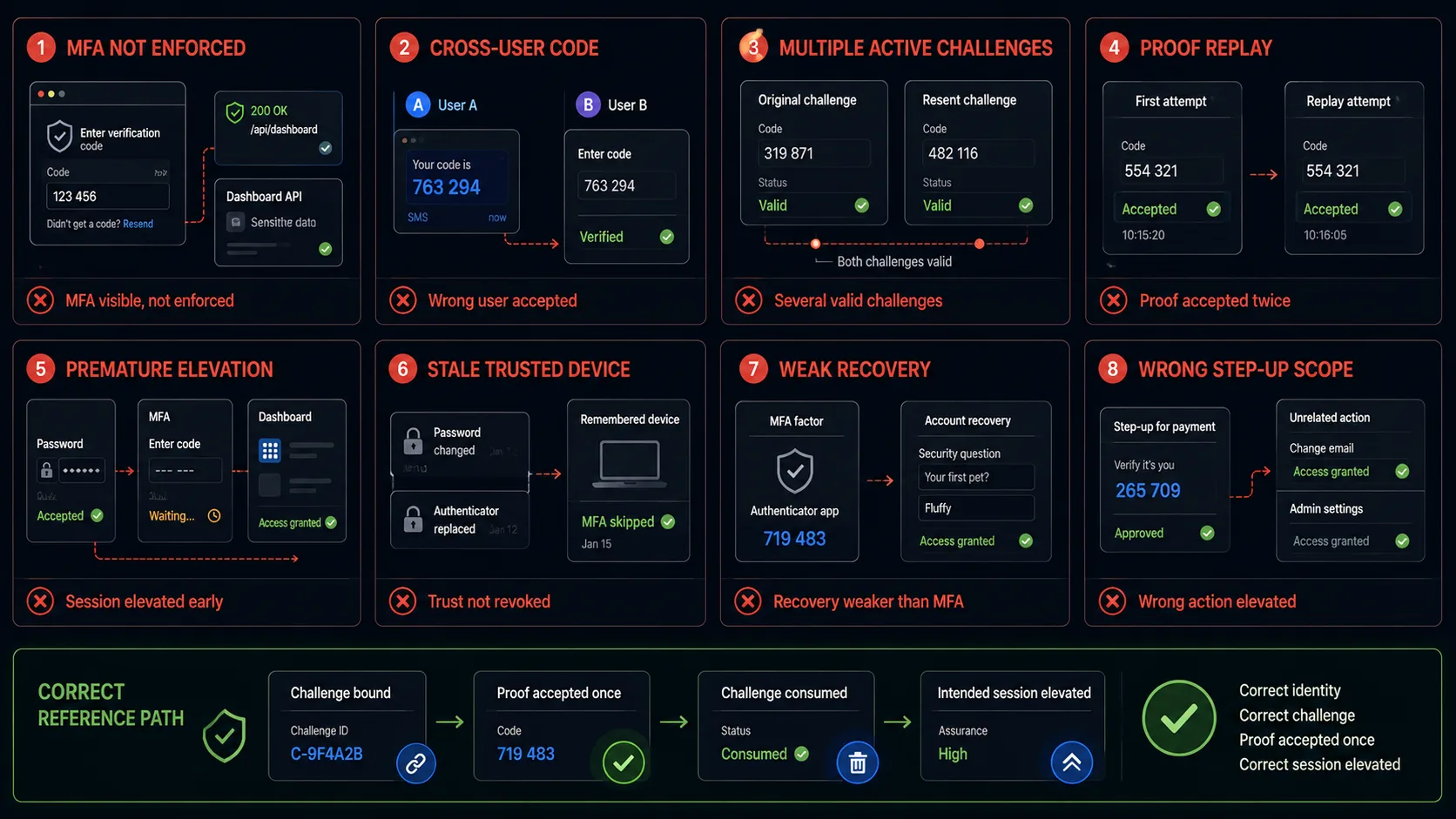
The second step is visible but not enforced
A browser may show an MFA screen while a direct protected URL, API endpoint, alternative login flow or backend route accepts the pre-MFA session. Verify enforcement at the resource boundary, not only the visible navigation.
A code for User A verifies User B
This is a challenge-binding failure. Record the account and challenge identifiers before submission and assert the final identity after verification.
Resend creates several valid challenges
Multiple simultaneously valid proofs enlarge the attack and race-condition surface. Define whether resend supersedes the old challenge or whether a bounded set remains valid, then test both orders.
The proof is accepted twice
A one-time proof must be consumed atomically. Parallel or repeated submissions should not elevate two sessions or operations.
The session is elevated before verification
Primary credentials may create a restricted transaction, but protected routes and privileged APIs must still recognise that MFA is unresolved.
A trusted-device cookie survives a security change
Remembered-browser state can become a durable bypass after password changes, factor replacement, device revocation or suspected compromise unless explicit invalidation rules exist.
Recovery is weaker than the factor it replaces
A simple email link, generic security question or support shortcut can nullify stronger MFA. Test recovery as an authentication flow, not as an account-settings convenience.
Step-up verification elevates the wrong action or session
Successful verification for one transfer, tenant, browser tab or admin operation must not authorise unrelated actions.
Choose the Right MFA Test Environment
The correct automation method depends on what the test needs to prove. Do not use one bypass for every case.
| Environment pattern | Use it to prove | Do not claim |
|---|---|---|
| Real provider and real device | End-to-end delivery, device prompts, carrier/provider delay, platform behaviour | Deterministic CI stability for every regression test |
| Provider sandbox or controlled test inbox/number | Delivery integration, message parsing and known failure modes | Production carrier or spam-filter behaviour |
| Seeded TOTP factor in a test account | Deterministic current, boundary, drift and replay cases | Secure production secret storage or device compromise resistance |
| Explicit test-only authenticator adapter | Application state transitions and negative outcomes without external latency | That the real provider integration works |
| Prepared post-MFA browser state | Unrelated authenticated workflows where MFA is setup only | That the MFA journey itself still works |
| Manual checkpoint or device-assisted run | Hardware keys, biometric prompts or approvals that cannot be safely simulated | Fully unattended coverage |
Do not build a hidden MFA bypass. Use explicit test-only providers, isolated fixtures or prepared states that cannot exist in production. A query parameter, magic header, hard-coded account or undocumented endpoint that skips MFA is a security defect, not a testing strategy.
What Each Testing Layer Can Prove
| Layer | What it can verify | What it cannot prove alone |
|---|---|---|
| Browser test | Trigger rules, challenge UI, resend, accessible errors, redirects, trusted-device behaviour and protected navigation | Secret generation, provider delivery internals or complete server enforcement |
| Authentication API test | Challenge ownership, proof validation, expiry, replay, attempts and structured errors | Real browser cookies, accessibility or external delivery |
| Provider integration test | SMS, email, push or identity-provider request/response behaviour | The application applies the result to the correct user session |
| Identity/factor store test | Enrollment status, factor replacement, backup-code state and revocation | Correct end-user presentation |
| Session/authorisation test | Pre-MFA restrictions, assurance level, step-up scope and protected resources | Factor delivery and user recovery experience |
| Accessibility evaluation | Labels, focus, error association, timers, copy/paste and keyboard completion | Cryptographic or server-side controls |
| Security review | Bypass paths, cross-user binding, brute force, replay and recovery weaknesses | Everyday reliability and usability |
| Load/resilience test | Provider queues, rate limits, challenge storage and concurrent verification | Correctness of one user's visible journey |
Automating MFA and 2FA Test Cases
Separate the reusable browser journey from the factor source and expected security state.
- Open
{{AUTH_ENTRY_URL}} - Complete primary authentication as
{{USER}} - Assert
{{MFA_REQUIRED}} - Assert
{{PRE_MFA_ACCESS}} - Capture
{{CHALLENGE_ID}} - Acquire proof from
{{FACTOR_SOURCE}} - Submit
{{FACTOR_PROOF}} - Assert
{{MFA_RESULT}} - Assert
{{CHALLENGE_STATE}} - Assert
{{SESSION_ASSURANCE}} - Assert
{{PROTECTED_RESULT}}
Positive dataset
{
  "name": "current_totp_elevates_only_intended_session",
  "user": "[email protected]",
  "factor": "totp",
  "challengeContext": {
    "tenant": "test-workspace",
    "operation": "login"
  },
  "proof": {
    "source": "seeded-totp",
    "timeOffsetSeconds": 0
  },
  "expected": {
    "mfaResult": "accepted",
    "challengeState": "consumed",
    "sessionAssurance": "mfa-complete",
    "protectedRouteAccessible": true
  }
}
Replay dataset
{
  "name": "consumed_totp_cannot_elevate_second_session",
  "user": "[email protected]",
  "factor": "totp",
  "proof": {
    "source": "previously-consumed-proof"
  },
  "expected": {
    "mfaResult": "rejected",
    "secondSessionElevated": false,
    "protectedRouteAccessible": false
  }
}
Cross-user binding dataset
{
  "name": "user_a_code_rejected_for_user_b_challenge",
  "challengeUser": "[email protected]",
  "proofOwner": "[email protected]",
  "expected": {
    "mfaResult": "rejected",
    "authenticatedIdentity": null,
    "challengeState": "pending-or-failed"
  }
}
Use scenario names that state the business and security condition. Avoid names such as mfa_test_3, otp_negative_7 or 2fa_case.
What Browser Automation Should Not Claim
- TOTP or OTP secrets are generated with sufficient entropy and stored securely
- the SMS carrier, email provider or push infrastructure is secure against every attack
- hardware-backed private keys cannot be extracted
- biometric false-accept and false-reject rates meet platform requirements
- WebAuthn attestation and authenticator conformance are correct
- all MFA bypass paths are absent across the complete architecture
- rate limiting remains effective under distributed production-scale attacks
- support agents follow identity-recovery procedures correctly
- trusted-device tokens cannot be forged
- all phishing and social-engineering attacks are prevented
Browser automation remains valuable because it can prove the user-visible and session-visible transaction: the correct challenge appeared, the selected proof produced the expected decision, and only the intended protected state became available.
MFA Testing Checklist
- every intended authentication entry point enforces MFA consistently
- primary credentials alone do not create fully protected access
- the challenge is bound to the intended user, session, factor and operation
- enrollment is inactive until the first proof confirms possession
- partial or cancelled enrollment does not leave a usable factor
- delivery destinations are correct and masked
- resend and concurrent challenge rules are explicit and tested
- new proof generation does not silently reset failed-attempt policy
- valid OTP and TOTP values are accepted within the configured window
- leading zeroes and exact formatting are preserved
- expired, out-of-window, malformed and incorrect proofs are rejected
- successful proof is consumed and cannot be replayed
- cross-user and cross-session proof is rejected
- parallel submissions cannot create two successful consumptions
- push deny, timeout, stale prompt and notification-spam cases are covered
- transaction details or number matching correspond to the intended action
- backup codes are single-use and old sets follow the regeneration policy
- trusted-device state is account-specific, expires and can be revoked
- recovery is not weaker than the MFA control it replaces
- factor replacement requires suitable reauthentication and creates an audit event
- the old factor stops working after replacement
- administrator reset follows explicit revocation and notification rules
- step-up success elevates only the intended session, tenant or operation
- failed or cancelled step-up leaves the protected action blocked
- browser, API, provider, identity and session evidence are used where appropriate
- test fixtures are isolated from production and do not create a hidden bypass
Final acceptance criterion. Do not accept: “The correct OTP opened the dashboard.” Accept: “The intended factor satisfied the intended challenge once, invalid and cross-context proof remained outside the protected state, and only the intended session or action received elevated access.”
Frequently Asked Questions
What are the most important MFA test cases?
Verify consistent triggering, pre-MFA access restrictions, account and session binding, valid proof, expiry, replay rejection, cross-user rejection, recovery strength, trusted-device revocation and correct session elevation.
What is the difference between MFA and 2FA testing?
2FA uses exactly two different factors. MFA is the broader category and may use two or more factors. One page can cover both search intents when the tested lifecycle and expected evidence are the same.
How should OTP expiry and replay be tested?
Control issue time and server time, test the configured boundary and drift window, consume one valid proof, then repeat it in the same and another transaction. The duplicate must not elevate access.
Can MFA testing be automated?
Yes. TOTP can be generated from a test secret, email/SMS can use controlled providers, and challenge APIs can expose test fixtures. Real-device or manual runs are still needed for some push, biometric and hardware-backed paths.
Should automated tests bypass MFA?
Unrelated authenticated tests may reuse prepared post-MFA state. Tests of MFA itself must exercise the real application decision. Never create a hidden production-capable bypass to make automation easier.
Does this guide completely test passkeys and hardware keys?
No. It covers their place in the MFA lifecycle and browser-visible outcomes, but complete WebAuthn, authenticator and hardware conformance requires dedicated protocol and device testing.
Automate the Repeatable MFA Journey
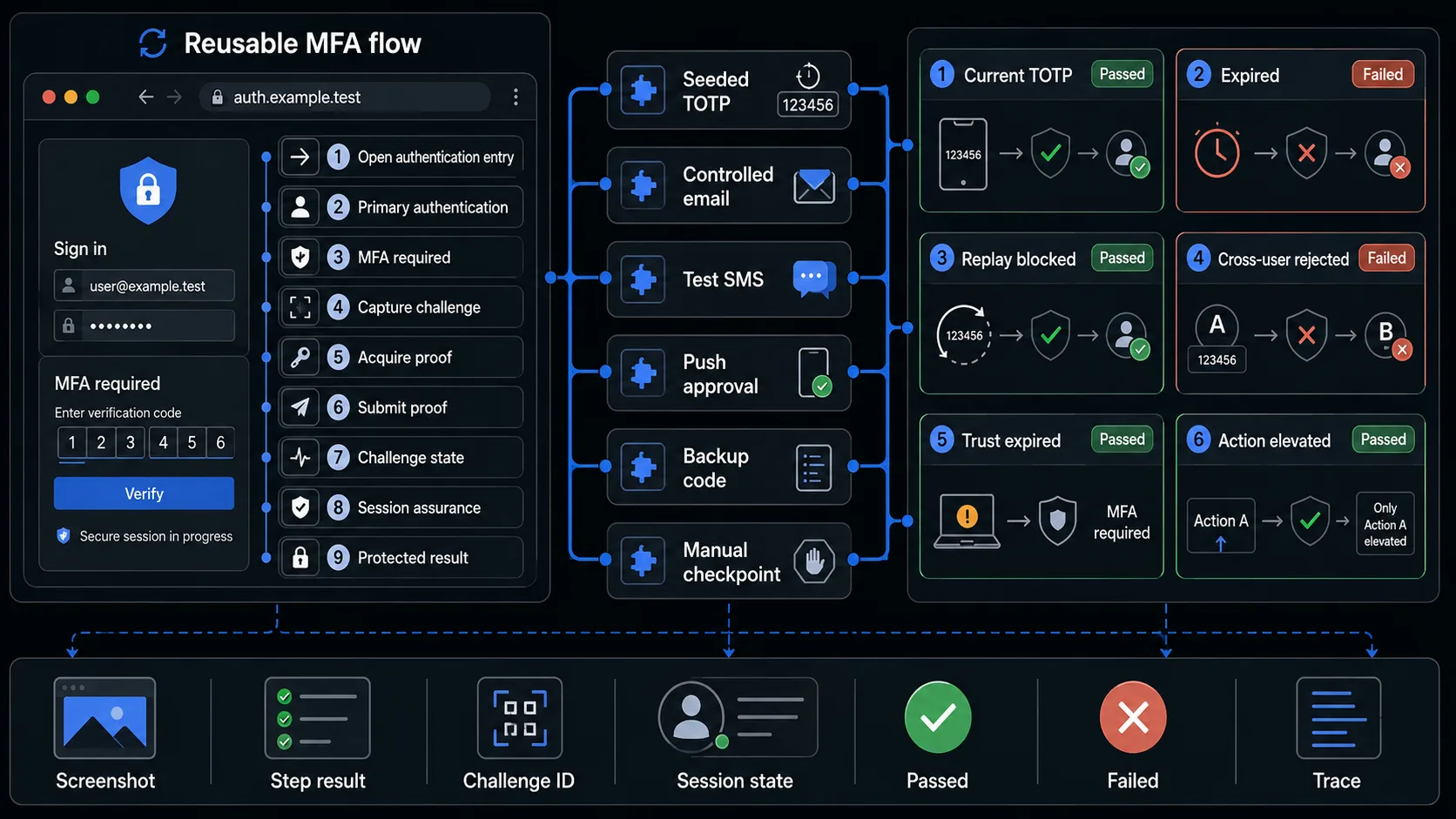
WrightTest lets teams record the browser part of an MFA flow, replace fixed accounts and proofs with named datasets, run scenarios independently, and inspect screenshots, step results, errors and Playwright traces.
- Which user started the transaction
- Which challenge appeared
- Which factor proof was supplied
- Whether the proof was accepted or rejected
- Whether the challenge was consumed
- Which session or action was elevated
- Where a failed journey stopped
The browser checks can be exported to Playwright .spec.ts files when they need to move into an existing repository or CI pipeline.
Use controlled factor sources, provider sandboxes or explicit manual checkpoints for the parts that a browser cannot safely reproduce. Combine browser results with API, provider, factor-store, session and security evidence for the complete MFA contract.
Continue with Authentication Testing
MFA is one part of the complete authentication lifecycle. Use the Authentication Testing guide to plan coverage across primary login, additional factors, session management and logout.