
Authentication Testing
Logout Test Cases That Prove the Old Session Cannot Be Reused
A practical set of 50 logout test cases covering session invalidation, old-token replay, refresh tokens, browser history, tabs, devices, SSO and accessibility.
A complete logout test must verify that:
- the intended current, selected or global session scope is terminated
- the server rejects the old session identifier and bearer token
- refresh and remember-me mechanisms cannot silently recreate the terminated access
- protected pages and APIs stop returning authenticated data
- Back, restored tabs, browser cache and service workers do not restore live access
- other tabs, devices and federated applications follow the documented termination policy
- pending forms, uploads and transactions cross the logout boundary safely
- a later login creates a fresh session while the old state remains unusable
This guide contains 50 practical logout test cases covering user interface, server invalidation, cookies and tokens, browser history, tabs, devices, remember me, refresh races, SSO, resilience and accessibility.
Use the Session Management Test Cases guide for timeout and revocation behaviour. Use the Login Page Test Cases guide for the fresh authentication journey after logout.
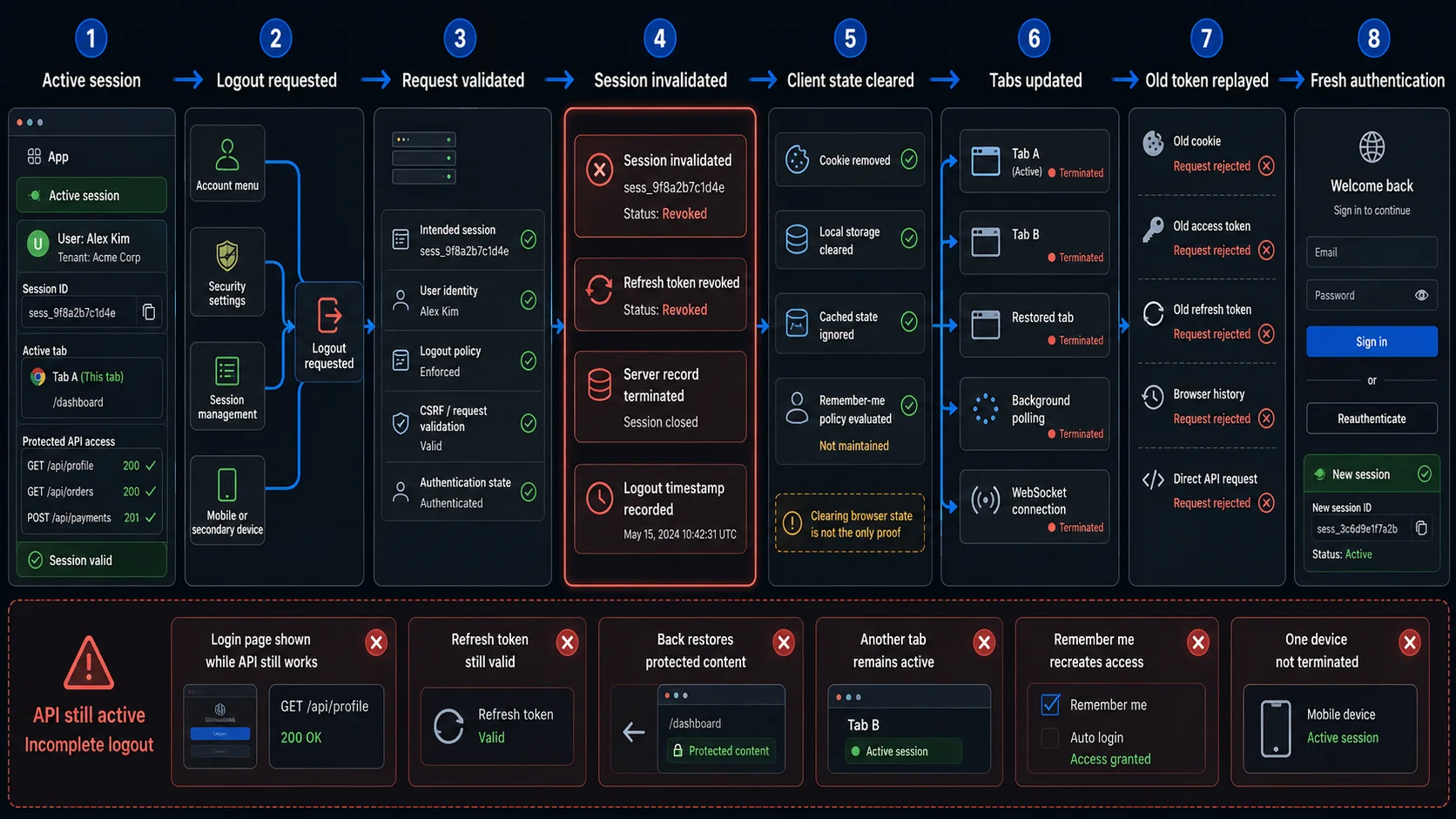
The Minimum Logout Smoke Test
When release time is limited, begin with these ten cases.
| ID | Test | What it proves |
|---|---|---|
| LOG-01 | Activate logout from a protected page | The user can intentionally start termination. |
| LOG-07 | Verify the post-logout destination | The browser reaches a safe public or login state. |
| LOG-08 | Inspect the server-side session after logout | The intended session is terminated, not only hidden in the UI. |
| LOG-09 | Replay the old session cookie against a protected page | The server rejects the previous browser session. |
| LOG-10 | Replay the old bearer token against a protected API | API access does not survive browser logout. |
| LOG-20 | Attempt refresh with the old refresh token | A background refresh cannot recreate access. |
| LOG-23 | Use Back and reload after logout | Cached pages do not become live authenticated access. |
| LOG-27 | Logout in one tab and use another tab | Shared browser contexts converge on the terminated state. |
| LOG-32 | Use log out all devices | Every session in the requested scope becomes unusable. |
| LOG-46 | Replay a copied SSO artifact after logout | Federated logout revokes the trusted authentication artifact. |
The smoke set proves the primary transition. It does not replace timeout testing, token cryptography review, provider-specific protocol conformance or complete accessibility testing.
Define the Logout Acceptance Contract First
Logout expected results are unreliable until the termination policy is explicit.
| Contract element | Question to answer |
|---|---|
| Scope | Does the action terminate the current session, selected device, all sessions or the federated ecosystem? |
| Initiator | Can the user, administrator, application, IdP or security event initiate termination? |
| Artifacts | Which cookies, access tokens, refresh tokens, WebSocket credentials and SSO artifacts represent the session? |
| Server state | How is the session marked destroyed, revoked or no longer accepted? |
| Browser state | Which cookies, local storage, IndexedDB, cache and service-worker data are cleared or ignored? |
| Tabs | How do other tabs learn that the shared session ended? |
| Devices | Which other sessions remain active after current-session logout? |
| Remember me | Is persistent account convenience preserved, revoked or converted into a limited reauthentication path? |
| Refresh | Can an in-flight or stored refresh token issue new access after logout? |
| Federation | Does local logout also end the IdP session or sessions at other relying parties? |
| Pending work | What happens to unsaved forms, uploads, payments and queued requests? |
| Failure | What does the UI show when server-side termination fails? |
| Evidence | Which browser, network, store and audit observations prove the result? |
Example logout acceptance contract
| Input state | Expected browser result | Expected system result |
|---|---|---|
| Current-session logout | Safe destination and authenticated UI removed | Only the current server session is invalidated |
| Log out all devices | Current browser ends and session list empties | Every active session in scope is revoked |
| Old cookie restored after logout | Protected page remains unavailable | Server rejects the old identifier |
| Old refresh token used after logout | No silent return to authenticated UI | Refresh request is rejected |
| Remember-me evidence remains | Product follows documented convenience or reauthentication flow | Terminated privileged session is not resurrected |
| SSO local logout | Application session ends | IdP session follows explicit local/global policy |
| Logout server failure | UI reports failure or retries safely | No false claim that termination succeeded |
Model Logout as a State Transition
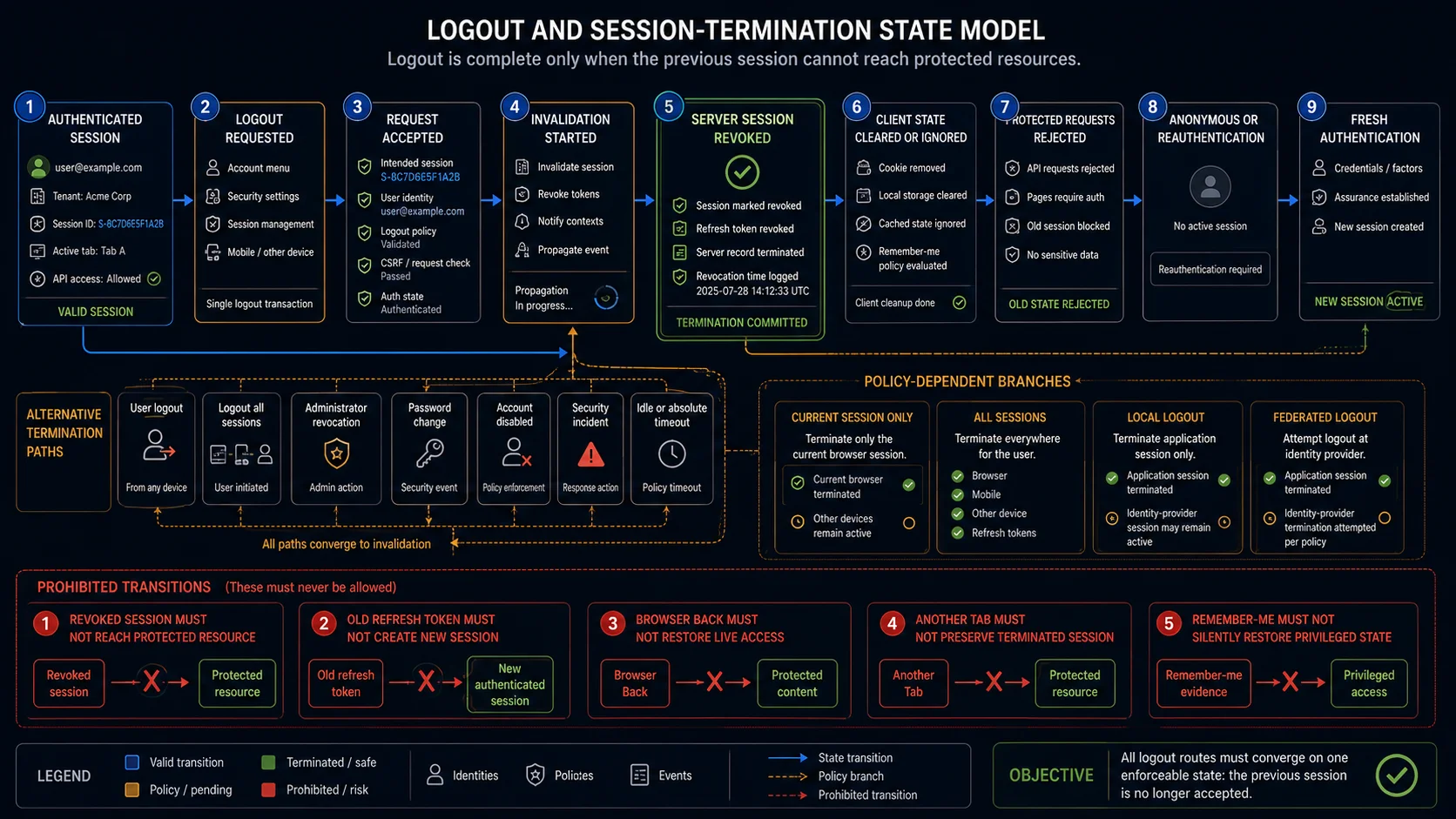
Logout transforms an authenticated system state into a terminated state with explicit scope.
- Authenticated session
- Logout requested
- Scope resolved
- Server session invalidated
- Access and refresh artifacts revoked
- Background channels closed or rejected
- Browser state cleared or ignored
- Protected requests rejected
- Safe public or reauthentication state
- Fresh login creates a new session
Prohibited transitions
| State | Must not transition to |
|---|---|
| Logout UI shown | Old protected API still accepted |
| Old refresh token | New access token |
| Remember-me evidence | Restored terminated privileged session |
| Local SSO logout marked global | Other trusted applications authenticated |
Logout Entry and User Interface Test Cases
| ID | Scenario | Expected result | Evidence |
|---|---|---|---|
| LOG-01 | Activate logout from every protected area where the control is expected | The control is visible, recognisable and reaches the same termination contract | UI inventory and resulting request |
| LOG-02 | Reach and activate logout using keyboard and assistive technology | The control has an accessible name, keyboard focus and operable semantics | Accessibility tree and keyboard path |
| LOG-03 | Activate logout once under normal network conditions | One termination request is sent and the final state is stable | Network log and final browser state |
| LOG-04 | Double-click or rapidly activate logout several times | The operation is idempotent and does not create an error or inconsistent state | Request sequence and final server state |
| LOG-05 | Call the logout endpoint directly with a valid authenticated session | The documented endpoint terminates the intended scope without relying on page navigation | HTTP response and session-store state |
| LOG-06 | Open the logout route while already anonymous | The application returns a safe idempotent public result without creating a session | Response, cookies and destination |
| LOG-07 | Verify the configured post-logout destination and return URL handling | The user reaches an allowed public or login destination and cannot be redirected to an untrusted location | Redirect chain and final origin |
Server-Side Session Invalidation Test Cases
| ID | Scenario | Expected result | Evidence |
|---|---|---|---|
| LOG-08 | Inspect the current session record after logout | The intended server-side session is destroyed, revoked or no longer accepted | Session-store state and timestamp |
| LOG-09 | Restore and replay the old session cookie against a protected page | The server rejects it and returns no protected content | Protected response and session-store lookup |
| LOG-10 | Replay the old bearer token against representative protected APIs | Every tested API rejects the token and returns no protected data | HTTP status, body and audit event |
| LOG-11 | Use the old session on a high-risk route not visited during logout | Security-critical routes recognise termination consistently | Protected route response |
| LOG-12 | Attempt a state-changing request with the old session | The operation is rejected and creates no business record | API response and persisted state |
| LOG-13 | Log in again after logout and compare session identifiers | Fresh authentication creates a new session; the old identifier remains invalid | Old/new identifiers and replay result |
| LOG-14 | Logout from one role or tenant and authenticate as another in the same browser | No identity, tenant, role or cached protected data crosses the account switch | Final identity, storage and protected responses |
| LOG-15 | Use a current-session logout when several independent sessions exist | Only the current session is invalidated unless the contract says otherwise | Session list and results from each context |
OWASP recommends capturing the original session cookies, invoking logout, restoring the old values and testing several protected pages to prove server-side invalidation.
Back, Cache, Restored Tab and Browser History Test Cases
| ID | Scenario | Expected result | Evidence |
|---|---|---|---|
| LOG-23 | Use Back immediately after logout, then reload | Cached protected content is not treated as live access and the server rejects the page request | History view, reload and network response |
| LOG-24 | Open a protected URL from browser history after logout | The application requires authentication and returns no sensitive data | Navigation response and final page |
| LOG-25 | Close and restore a protected tab after logout | Restored state cannot re-establish the old session | Restored storage and protected requests |
| LOG-26 | Open a bookmark or copied deep link to a protected page after logout | The route follows the unauthenticated-entry contract | Redirect and protected API response |
Multiple Tabs, Background Requests and Offline Test Cases
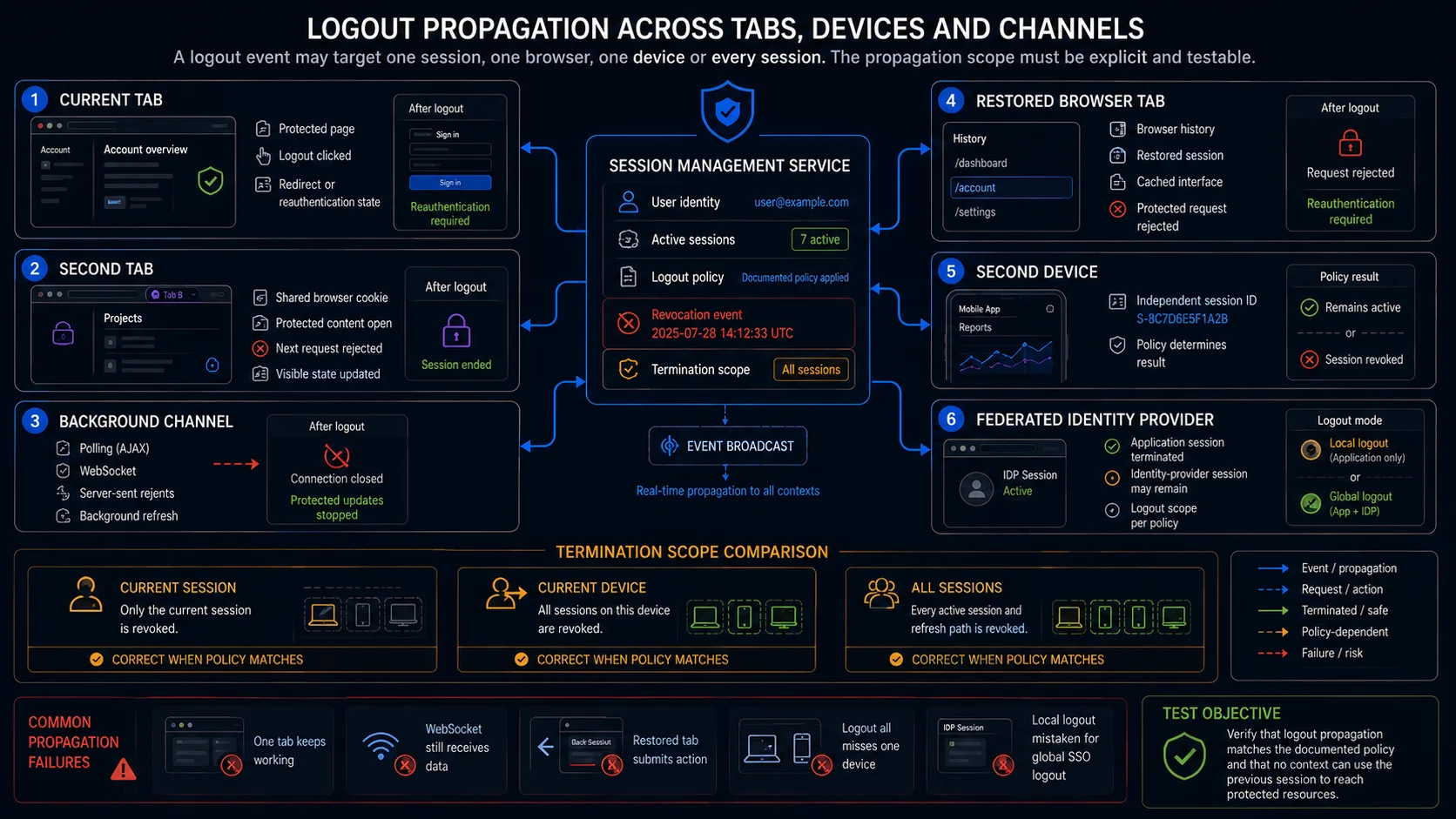
| ID | Scenario | Expected result | Evidence |
|---|---|---|---|
| LOG-27 | Logout in Tab A while Tab B remains open | Tab B detects the ended shared session on the next relevant event and cannot act as authenticated | Both tab states and requests |
| LOG-28 | Logout while polling, WebSocket or server-sent events are active | Background channels close or stop receiving protected data | Channel status and messages after logout |
| LOG-29 | Submit a protected form from another tab after logout | The request is rejected safely and creates no duplicate or partial record | Submission response and persisted data |
| LOG-30 | Queue a request offline, logout elsewhere, then reconnect | The queued request cannot succeed with the terminated session | Offline queue and retry response |
Device and Concurrent Session Logout Test Cases
| ID | Scenario | Expected result | Evidence |
|---|---|---|---|
| LOG-31 | Logout the current session while the same account is active on another permitted device | The other device follows the current-session policy and remains or ends intentionally | Per-device session results |
| LOG-32 | Use log out all devices | Every active session in scope is revoked and old tokens fail | Session list and replay from each device |
| LOG-33 | Terminate one selected device from an active-session management screen | Only the selected session is revoked | Session list and both device results |
| LOG-34 | Refresh the active-session list after local or remote logout | The list reflects the final server state without stale entries | Session inventory and timestamps |
| LOG-35 | Use the same copied authentication artifact in two browser contexts, then logout one | Revocation follows artifact and session scope; undocumented shared access does not survive | Artifact replay across contexts |
| LOG-36 | Logout after step-up or high-assurance authentication on one device | The intended base and elevated session state are terminated according to policy | Assurance state and protected-action result |
Remember Me, Refresh Token and Reauthentication Test Cases
| ID | Scenario | Expected result | Evidence |
|---|---|---|---|
| LOG-37 | Logout while remember-me evidence exists | The terminated authenticated session is not silently restored | Next visit, persistent token and session creation |
| LOG-38 | Preserve a remembered username when policy allows it | Convenience data remains separate from authenticated access | Displayed identifier and protected-state check |
| LOG-39 | Authenticate again with remember me after logout | A new session is created and the old session remains invalid | Old/new identifiers and token records |
| LOG-40 | Use a stored refresh token from another tab or process after logout | The refresh path remains revoked across contexts | Refresh response and resulting session list |
| LOG-41 | Attempt a sensitive action after logout and then reauthenticate | The old state cannot authorise the action; fresh authentication creates the permitted state | Action result, authentication time and new session |
SSO and Federated Logout Test Cases
| ID | Scenario | Expected result | Evidence |
|---|---|---|---|
| LOG-42 | Logout only from the relying-party application while the IdP session remains active | Local session termination and subsequent silent or prompted re-entry follow the documented policy | RP and IdP session states |
| LOG-43 | Logout from the identity provider while the application session remains open | The application detects or handles upstream termination according to its federation contract | IdP state and RP protected requests |
| LOG-44 | Use a global logout action across several relying parties | Every participating application in scope terminates its trusted session | Results from each relying party |
| LOG-45 | Test registered and unregistered post-logout redirect destinations | Only permitted destinations are accepted | Logout request and redirect result |
| LOG-46 | Copy an authentication-critical SSO artifact to another device, then logout | The copied artifact is rejected across all trusting applications after server-side revocation | Cross-device replay and relying-party responses |
Federated logout must distinguish the relying-party session from the identity-provider session and any sessions at other relying parties.
Pending Work, Resilience and Accessibility Test Cases
| ID | Scenario | Expected result | Evidence |
|---|---|---|---|
| LOG-47 | Lose the network after logout is requested but before the response completes | The UI reports uncertain or failed termination honestly and recovers to a deterministic state | Request status, retry and final session state |
| LOG-48 | Make the logout service return an error | The interface does not claim success while the session remains valid | Error UI and old-token replay |
| LOG-49 | Logout during an upload, payment, long request or multi-step transaction | The operation commits, cancels or requires recovery according to one documented atomicity rule | Business record, response and session state |
| LOG-50 | Complete logout with keyboard and screen reader, then verify focus and announcement | Termination result is perceivable, focus moves predictably and the next action is accessible | Accessibility tree, announcement and focus order |
The Most Important Logout Failure Patterns
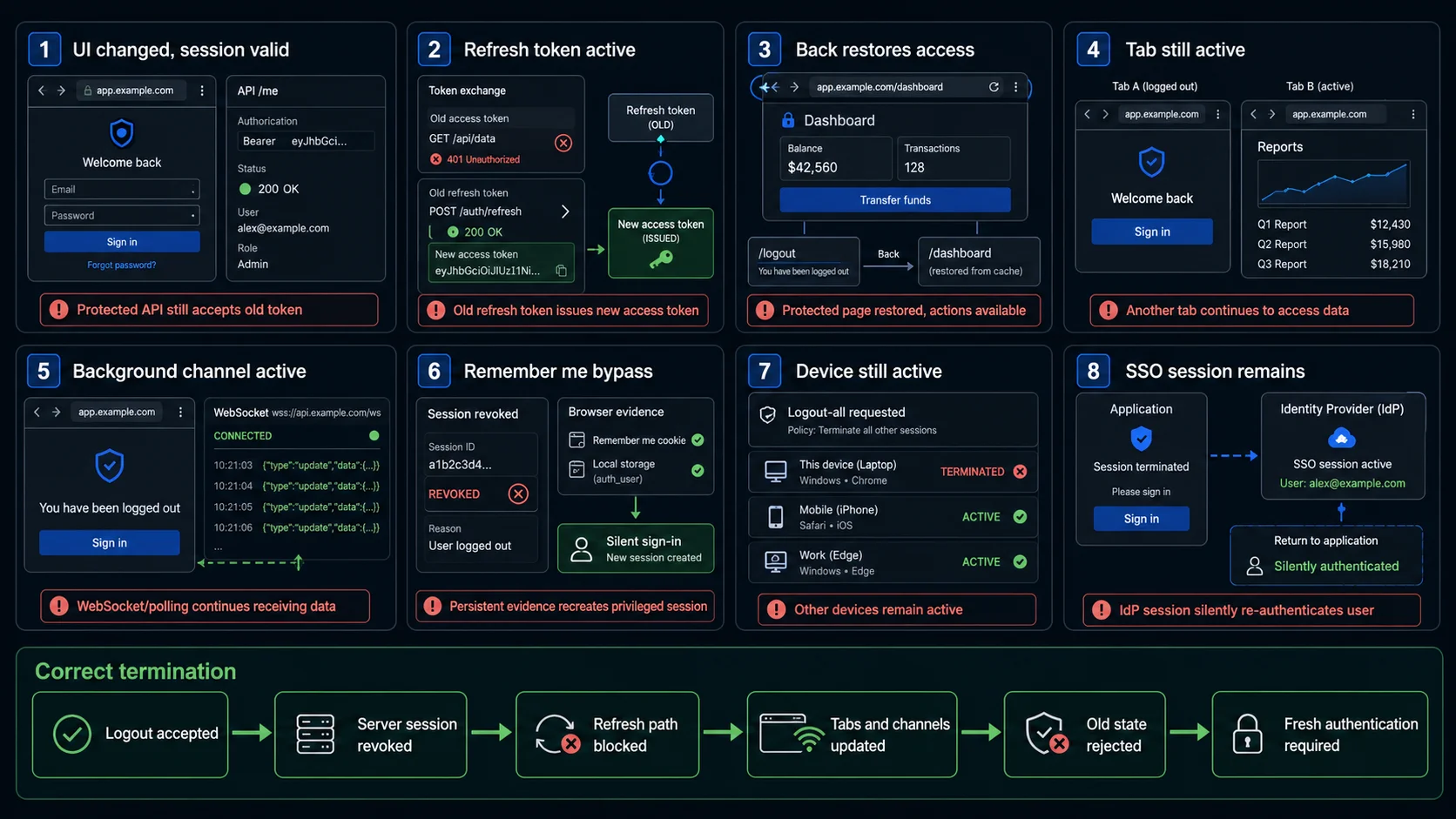
The browser says logged out, but the API still works
A redirect or removed navigation can hide a still-valid token. Replay the old cookie and bearer token against representative protected resources.
The cookie is cleared, but the server session remains valid
Deleting a browser cookie prevents that browser from presenting the token, but it does not invalidate copied or stolen values. Inspect the session store and replay the original value.
One tab logs out while another remains authenticated
Tabs sharing one session need a deterministic propagation rule. The second tab must not continue performing protected actions with stale state.
Remember me restores the terminated session
Persistent convenience evidence must not recreate the exact privileged state that the user explicitly terminated.
A refresh request recreates access during logout
An in-flight refresh can issue a new token after the logout request unless revocation and token issuance have an atomic ordering rule.
Local logout leaves the identity-provider session active
This may be correct, but it must be explicit. A user can appear logged out and immediately return through silent SSO if the IdP session remains valid.
The interface reports success after server failure
A success page is dangerous when the old token still works. Treat logout failure as a state that must be surfaced or retried honestly.
A pending operation crosses the logout boundary incorrectly
A transaction can commit after the user believes the session ended, or fail after partial persistence. Define the atomicity boundary and verify the stored result.
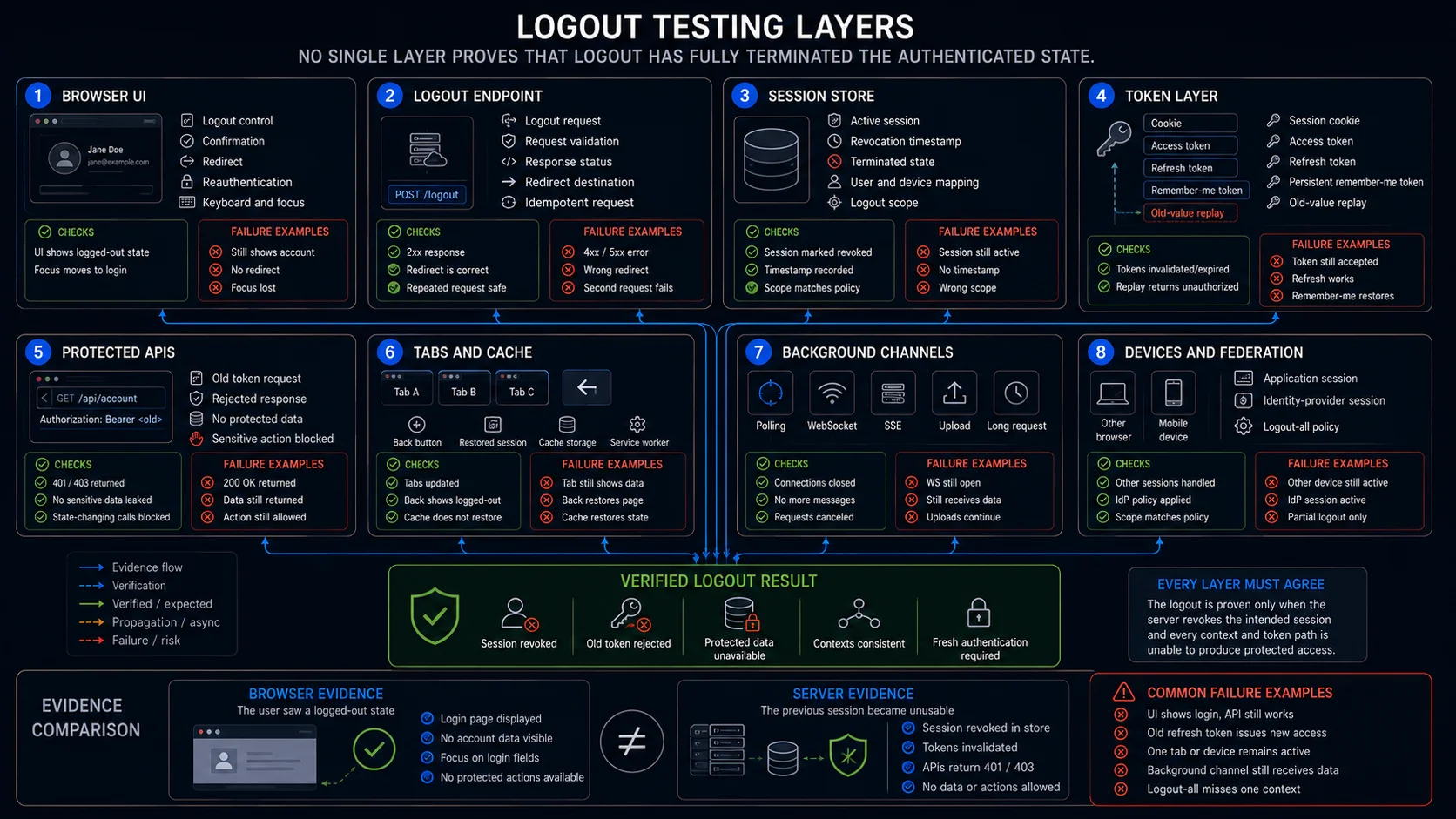
What Each Testing Layer Can Prove
| Layer | What it can verify | What it cannot prove alone |
|---|---|---|
| Browser test | Control visibility, redirect, Back, cache, tabs, focus, storage and visible account state | Server invalidation across every API and device |
| Protected API test | Old-cookie, bearer-token and refresh-token rejection | User-facing recovery and accessibility |
| Session-store test | Destroyed, revoked or selected-session scope and timestamps | That cached browser content is handled safely |
| Token-service test | Access and refresh revocation, race ordering and token issuance | Complete browser and SSO experience |
| Background-channel test | Polling, WebSocket, SSE, upload and offline-queue behaviour | Full page navigation and assistive technology |
| Device/session inventory test | Current, selected and all-device termination | Federated provider state unless integrated |
| Federation test | RP, IdP and other relying-party session termination | Local application storage and pending work |
| Audit test | Actor, scope, time, affected session and suspicious replay events | That access was actually blocked |
| Accessibility evaluation | Control name, keyboard operation, result announcement and focus | Server-side token revocation |
Automating Logout Test Cases
A reusable logout journey should capture the authenticated artifacts before termination, perform the requested scope and prove rejection afterwards.
- Authenticate as {{USER}}
- Capture {{SESSION_COOKIE}}
- Capture {{ACCESS_TOKEN}}
- Capture {{REFRESH_TOKEN}}
- Open {{CONTEXTS_OR_DEVICES}}
- Start {{BACKGROUND_OR_PENDING_OPERATION}}
- Invoke logout with {{SCOPE}}
- Assert {{LOGOUT_RESPONSE}}
- Assert {{SESSION_STORE_STATE}}
- Replay old cookie
- Replay old access token
- Attempt refresh
- Assert protected requests rejected
- Assert browser contexts updated
- Authenticate again
- Assert new session differs from old session
Current-session dataset
{
  "name": "current_session_logout_rejects_old_artifacts",
  "scope": "current-session",
  "contexts": [
    "tab-a",
    "tab-b"
  ],
  "expected": {
    "currentSession": "revoked",
    "otherDeviceSession": "unchanged",
    "oldCookieAccepted": false,
    "oldAccessTokenAccepted": false,
    "oldRefreshTokenAccepted": false
  }
}
Global logout dataset
{
  "name": "logout_all_devices_revokes_every_session",
  "scope": "all-sessions",
  "devices": [
    "desktop",
    "mobile",
    "secondary-browser"
  ],
  "expected": {
    "activeSessionCount": 0,
    "allOldTokensAccepted": false,
    "freshAuthenticationRequired": true
  }
}
Federated logout dataset
{
  "name": "global_sso_logout_reaches_trusting_apps",
  "scope": "federated-global",
  "relyingParties": [
    "app-a",
    "app-b"
  ],
  "expected": {
    "idpSession": "terminated",
    "appASession": "terminated",
    "appBSession": "terminated",
    "copiedArtifactAccepted": false
  }
}What Browser Automation Should Not Claim
- session identifiers and tokens have sufficient entropy
- every token-signing and validation implementation is cryptographically secure
- distributed revocation reaches every production node within its latency objective
- all stolen-token and session-hijacking techniques are prevented
- every identity-provider logout protocol is conformant
- native mobile secure storage is correctly cleared
- every service worker and browser-cache implementation is secure
- audit logs are complete across all infrastructure components
- logout succeeded merely because the browser reached a login page
Browser automation remains essential because it proves the real user action, context propagation, Back and cache behaviour, pending work, accessibility and fresh reauthentication.
Logout Testing Checklist
- logout scope is defined as current, selected, all-session or federated global
- the logout control is visible, recognisable and accessible on intended protected pages
- duplicate logout requests are idempotent
- the post-logout destination is safe and rejects untrusted return URLs
- the intended server-side session is destroyed or revoked
- old cookies and bearer tokens fail on representative protected resources
- state-changing requests with old artifacts create no business record
- fresh login creates a new session and the old identifier remains invalid
- all authentication-relevant cookie domains and paths are covered
- restored local storage and IndexedDB cannot recreate access
- service workers and cached shells return no live protected data
- old refresh tokens cannot issue new access after logout
- refresh and logout races end in a terminated state
- logout audit events record actor, scope and affected session safely
- Back, reload, history, bookmarks and restored tabs require authentication
- other tabs cannot continue protected activity with stale state
- polling, WebSocket, SSE and background channels stop receiving protected data
- offline queued requests fail safely after termination
- current-session logout does not unintentionally revoke other devices
- log out all devices revokes every session in scope
- selected-device termination affects only the selected session
- session inventory reflects local and remote logout accurately
- remember-me data does not restore the terminated privileged session
- remembered identifiers remain separate from authenticated access
- sensitive actions after logout require fresh authentication
- local and global SSO logout policies are distinguished
- registered post-logout redirect destinations are enforced
- copied SSO artifacts fail after server-side revocation
- network and server failures do not create false logout success
- uploads, payments and long operations have a deterministic logout boundary
- screen-reader announcement, focus and next action remain accessible
Frequently Asked Questions
What are the most important logout test cases?
Verify server-side session invalidation, replay of old cookies and access tokens, refresh-token rejection, Back and cache behaviour, multiple tabs, device scope, remember me, SSO and fresh authentication.
Does redirecting to the login page prove logout?
No. The browser may have changed while the server still accepts the old session. Replay the original authentication artifacts against protected resources.
Should logout terminate every device?
Only if the product defines the action as global logout. Current-session, selected-device and all-device logout need separate contracts and test cases.
What should happen to remember me after logout?
The documented convenience behaviour may remain, but it must not resurrect the terminated authenticated session or bypass required authentication.
How should SSO logout be tested?
Test the relying-party session, identity-provider session, other relying parties, post-logout redirect rules and replay of the authentication-critical artifact as separate states.
Can logout test cases be automated?
Yes. Browser automation can capture session artifacts, invoke logout, replay cookies and tokens through APIs, verify tabs and devices, and confirm that fresh login creates a new session.
Automate the Repeatable Logout Journey
WrightTest lets teams record the visible logout flow, replace fixed users and termination scopes with named datasets, and inspect screenshots, step results, errors and Playwright traces.
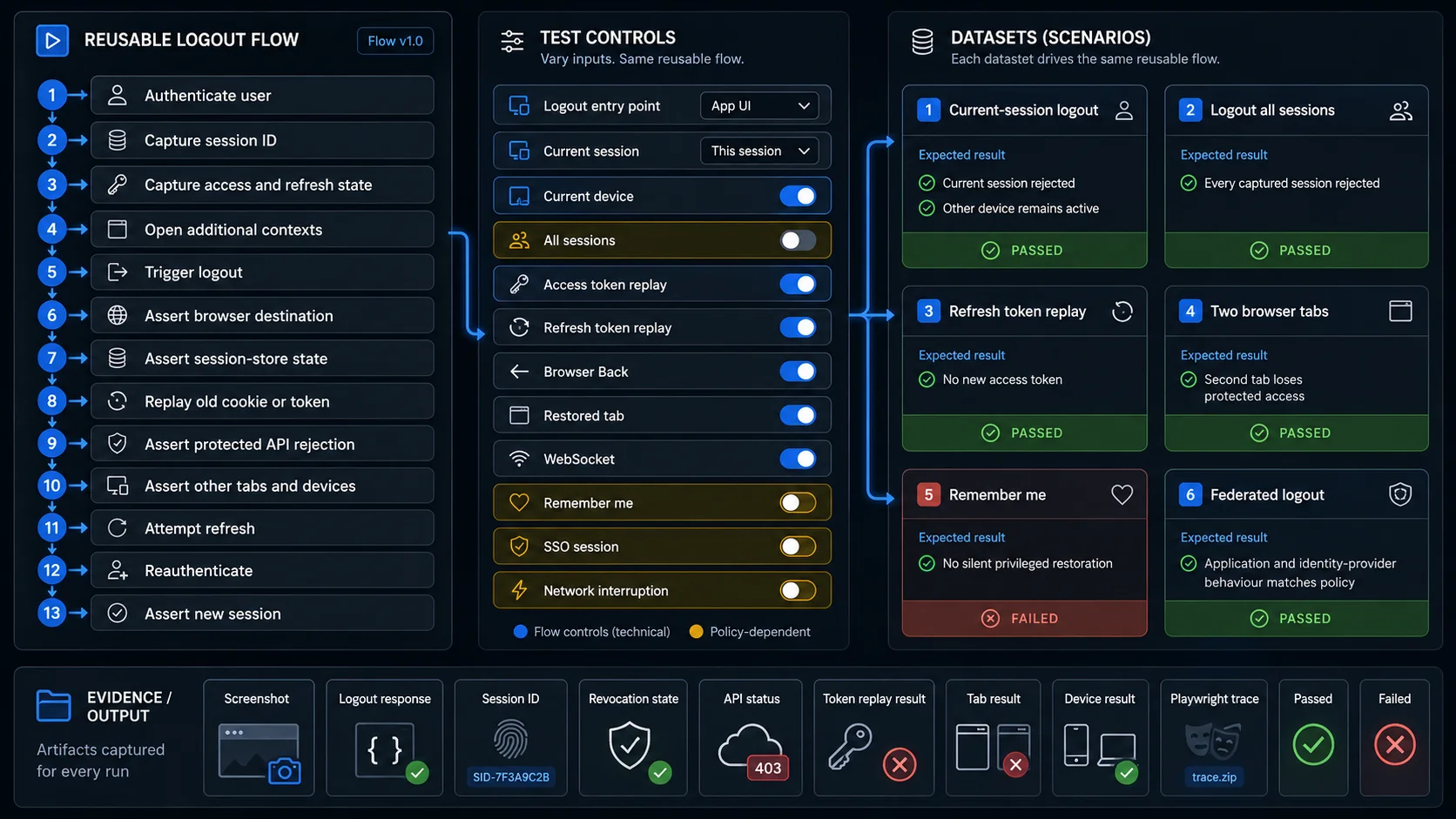
- Which session and device started the test
- Which logout scope was requested
- Which artifacts existed before termination
- Whether the server revoked the session
- Whether old cookie, access token and refresh token failed
- Whether tabs and background channels agreed
- Whether SSO applications followed the expected scope
- Whether fresh authentication created a new session
Combine the browser journey with API replay and isolated session fixtures so the suite proves server invalidation without depending only on visible navigation.
Browser checks can be exported to Playwright .spec.ts files when they need to move into an existing repository or CI pipeline.
Continue with Authentication Testing
Logout completes the authentication lifecycle. Use the Authentication Testing guide to plan coverage across login, MFA, session state and termination.