
Ecommerce Test Cases
Ecommerce Test Cases: 70 Scenarios for a Complete Purchase Journey
Use 70 ecommerce test cases plus a downloadable XLSX workbook to verify discovery, search, variants, cart, checkout, payment, orders, inventory, access, refunds and recovery.
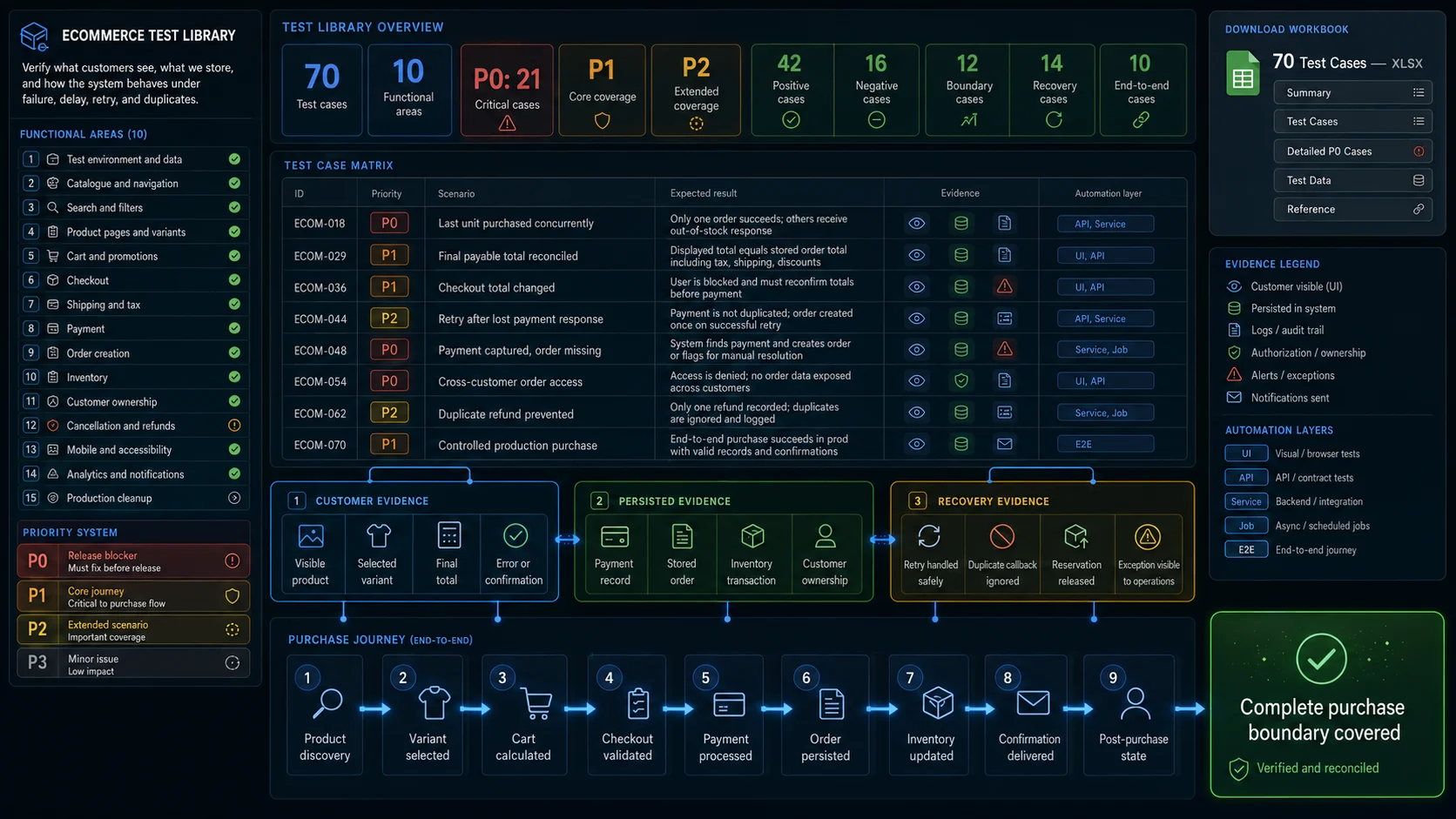
A customer clicks Place order. The payment provider captures $81.75, but the browser times out before confirmation appears. No order is visible in the account, so the customer tries again.
Now the system may contain:
Two payment attempts
One incomplete inventory reservation
No visible order
An uncertain customer
A test that checks only for an Order confirmed heading cannot explain this failure.
Useful ecommerce test cases should examine three things:
- What the customer saw and submitted.
- What the application persisted.
- What happened after delay, failure, retry, or duplicate delivery.
The complete purchase boundary is:
Product discovery
→ product selection
→ cart
→ checkout
→ payment
→ order creation
→ inventory update
→ confirmation
→ post-purchase state
This guide contains 70 positive, negative, boundary, end-to-end, and recovery test cases for ecommerce applications.
For release-level checks without detailed scenarios, use the Ecommerce Website Testing Checklist.
For the strategy behind purchase states, business invariants, and evidence layers, see Ecommerce Testing.
Download the Ecommerce Test Cases Spreadsheet
The complete test-case library is also available as a downloadable XLSX workbook.
It includes all 70 scenarios from this guide, together with editable fields for:
- priority and functional area;
- expected result and required evidence;
- suggested automation layer;
- automation and execution status;
- owner and last execution date;
- defect reference and test notes.
The workbook also contains controlled product and customer fixtures, payment outcomes, priority definitions, and detailed versions of four critical P0 scenarios.
Use it as a starting point for Excel, Google Sheets, TestRail, Zephyr, Xray, or another test-management workflow.
Download the Ecommerce Test Cases XLSX
What an Ecommerce Test Case Should Contain
A title such as Verify successful checkout is rarely enough to reproduce a transaction defect.
Critical cases should record:
| Field | Purpose |
|---|---|
| Test case ID | Stable reference for reports and automation |
| Area | Search, cart, checkout, payment, order, inventory, or another boundary |
| Priority | Release impact |
| Preconditions | Required customer, product, service, and business state |
| Test data | SKU, quantity, price, address, promotion, payment outcome |
| Steps | Customer or system actions |
| Expected result | Visible and persisted outcome |
| Evidence | Screenshot, trace, API response, provider state, order, inventory |
| Automation candidate | Browser, API, integration, service, or manual |
Use consistent priorities:
| Priority | Meaning |
|---|---|
| P0 | Payment, order integrity, ownership, or checkout availability |
| P1 | Core discovery, pricing, inventory, fulfilment, or account path |
| P2 | Recoverable secondary behaviour or limited edge case |
| P3 | Minor presentation or preference issue |
A failed P0 case should normally block release.
Not every store reserves stock at the same stage. Some reserve it when checkout begins; others wait until payment authorisation. The expected result should enforce the product’s actual policy rather than assume one universal ecommerce flow.
Recommended Test Data
A reusable test suite needs controlled business states rather than random products from a shared catalogue.
Prepare:
- one standard in-stock product;
- one product with several variants;
- one last-unit product;
- one out-of-stock product;
- one promotion-eligible product;
- one promotion-excluded product;
- taxable and non-taxable products;
- supported and unsupported shipping addresses;
- guest and registered customers;
- different customer groups or tenants where applicable;
- controlled payment success, decline, pending, and required-action outcomes;
- a safe way to cancel orders, release reservations, and reset inventory.
Example product fixture:
{
  "sku": "SHOES-BLUE-42",
  "slug": "running-shoes",
  "currency": "USD",
  "unitPrice": 8000,
  "availableQuantity": 3,
  "promotionEligible": true,
  "shippingClass": "standard",
  "expectedTaxRegion": "US-CA"
}
Example purchase fixture:
{
  "customer": "[email protected]",
  "sku": "SHOES-BLUE-42",
  "quantity": 1,
  "coupon": "SAVE10",
  "subtotal": 8000,
  "discount": 1000,
  "shipping": 500,
  "tax": 675,
  "expectedTotal": 8175,
  "paymentOutcome": "success"
}
Represent money in minor units where the application contract uses them. This avoids accidental comparisons against values such as 81.749999.
70 Test Cases for an Ecommerce Website
Test Environment and Data
| ID | Pri. | Test scenario | Expected result | Primary evidence |
|---|---|---|---|---|
| ECOM-001 | P1 | Open the storefront in the intended release environment | UI, APIs, payment configuration, and supporting services use the expected environment and version | Build identifier and service configuration |
| ECOM-002 | P1 | Load the controlled product fixtures | Each product has the documented SKU, price, stock, variant, tax, and promotion state | Catalogue and inventory responses |
| ECOM-003 | P1 | Trigger each supported payment test outcome | Success, decline, pending, and required-action states can be reproduced without real customer payment data | Provider sandbox state |
| ECOM-004 | P1 | Clean a completed synthetic purchase | Order, reservation, notification, and test inventory are cancelled or reset according to policy | Cleanup report and final records |
| ECOM-005 | P1 | Run two tests against isolated data | One test does not consume, modify, or invalidate another test’s fixture | Independent run IDs and final state |
Catalogue, Navigation, Search, and Filters
| ID | Pri. | Test scenario | Expected result | Primary evidence |
|---|---|---|---|---|
| ECOM-006 | P1 | Open a category containing a controlled product | The intended published product appears in the correct category | Returned product IDs |
| ECOM-007 | P1 | Request an unpublished or restricted product | The product remains hidden or access is rejected according to policy | UI state and API response |
| ECOM-008 | P1 | Open a direct product URL for a region-restricted item | Direct navigation enforces the same visibility rules as catalogue navigation | HTTP and product response |
| ECOM-009 | P1 | Search by exact product name | The expected product appears in a relevant position | Search result identifiers |
| ECOM-010 | P2 | Search using a meaningful partial query | Relevant products appear without unrelated catalogue noise dominating the result | Search result set |
| ECOM-011 | P1 | Apply two compatible filters | Every returned product satisfies both selected constraints | Product attributes and active filters |
| ECOM-012 | P2 | Sort products by price | Results follow the documented price basis and remain stable across pagination | Ordered comparable prices |
| ECOM-013 | P2 | Navigate through pagination or infinite scroll | Products are not unexpectedly omitted, duplicated, or reordered during the session | Accumulated product IDs |
Search relevance, autocomplete, facets, and index freshness require deeper coverage in a dedicated search and filter testing guide.
Product Pages, Variants, and Availability
| ID | Pri. | Test scenario | Expected result | Primary evidence |
|---|---|---|---|---|
| ECOM-014 | P1 | Open the controlled product page | Name, SKU, price, currency, and availability match the catalogue state | Product response and visible values |
| ECOM-015 | P1 | Select a non-default product variant | Price, SKU, stock, images, and option state update for the selected variant | Variant response and cart request |
| ECOM-016 | P1 | Select an unavailable variant combination | Purchase controls remain disabled or the combination is rejected clearly | UI state and server validation |
| ECOM-017 | P1 | Enter quantities below, at, and above the supported boundaries | Valid quantities are accepted; invalid quantities are rejected without silently changing the order | Cart line and validation message |
| ECOM-018 | P0 | Attempt to purchase the final unit from two customer sessions | Only the transaction permitted by the reservation rule completes; inventory does not become negative | Reservation and order records |
| ECOM-019 | P1 | Open the same product as two customer groups or regions | Each customer receives the correct catalogue visibility and price | Pricing and identity context |
| ECOM-020 | P1 | Add the selected product to the cart | The cart receives the exact SKU, variant, quantity, and current unit price displayed to the customer | Add-to-cart request and cart line |
Last-unit concurrency should not be proven through browser automation alone. The browser can show each customer’s journey, but the decisive evidence belongs to the inventory reservation and order records.
Cart, Pricing, and Promotions
| ID | Pri. | Test scenario | Expected result | Primary evidence |
|---|---|---|---|---|
| ECOM-021 | P1 | Add a product to an empty cart | One line is created with the intended SKU, quantity, and price | Cart API response |
| ECOM-022 | P2 | Add the same product twice | The application follows its documented merge or separate-line policy without losing quantity | Final cart lines |
| ECOM-023 | P1 | Increase and decrease the quantity | Line total, subtotal, discounts, tax estimate, and item count recalculate correctly | Calculation components |
| ECOM-024 | P1 | Remove one product from a multi-line cart | Only the selected line is removed and totals are recalculated | Cart before and after |
| ECOM-025 | P2 | Navigate away and return to the cart | The cart persists for the intended customer and session duration | Cart identity and lines |
| ECOM-026 | P1 | Log in with an existing authenticated cart | Guest and account carts follow the documented merge rule without silent product loss | Cart merge result |
| ECOM-027 | P1 | Apply a valid eligible promotion | The discount uses the correct products, threshold, amount, and stacking rule | Promotion decision and total |
| ECOM-028 | P1 | Apply an expired or ineligible coupon | The code is rejected with a truthful reason and does not alter the payable total | Promotion response |
| ECOM-029 | P0 | Calculate the complete payable total | Subtotal, discounts, credits, shipping, tax, rounding, and final total reconcile exactly | Cart and checkout calculations |
Use the following calculation as an explicit contract:
Subtotal
− item discounts
− order discounts
− credits
+ shipping
+ tax
=
final payable total
Detailed cart scenarios belong in Shopping Cart Testing.
Checkout, Address, Shipping, and Tax
| ID | Pri. | Test scenario | Expected result | Primary evidence |
|---|---|---|---|---|
| ECOM-030 | P0 | Start checkout from a populated cart | Checkout contains the same SKUs, variants, quantities, and accepted cart total | Cart and checkout comparison |
| ECOM-031 | P1 | Authenticate or continue as guest during checkout | The intended customer path continues without losing or duplicating cart lines | Session and checkout state |
| ECOM-032 | P1 | Submit missing or invalid address fields | Errors identify the affected fields, explain recovery, and preserve valid values | Visible errors and field values |
| ECOM-033 | P1 | Enter an unsupported delivery address | Unsupported delivery is rejected before payment with a clear reason | Address and shipping response |
| ECOM-034 | P1 | Choose a shipping method that is valid for the product and destination | The method remains selectable and its price and estimate match the fulfilment rule | Shipping selection |
| ECOM-035 | P1 | Change the shipping or billing address | Tax and eligible shipping methods recalculate using the new address | Before-and-after calculation |
| ECOM-036 | P0 | Change price, stock, promotion, or tax before final submission | The customer sees the authoritative change and accepts the new total before payment | Final review and checkout request |
| ECOM-037 | P1 | Allow the checkout session or reservation to expire | The application recovers safely without confirming a stale transaction | Session, reservation, and browser state |
| ECOM-038 | P0 | Click the final order action repeatedly or replay the request | One purchase intent is created and repeated submission does not create extra transactions | Purchase intent identifiers |
Detailed form and recovery coverage belongs in a dedicated checkout testing guide.
Payment, Order Creation, and Inventory
| ID | Pri. | Test scenario | Expected result | Primary evidence |
|---|---|---|---|---|
| ECOM-039 | P0 | Submit a successful payment | The provider receives the authoritative checkout amount and currency | Provider request and state |
| ECOM-040 | P0 | Complete a successful payment | One logical order is persisted and linked to the payment and purchase intent | Payment and order records |
| ECOM-041 | P0 | Trigger a payment decline | The customer sees a recoverable decline; no confirmed paid order is created | Provider and order state |
| ECOM-042 | P0 | Trigger payment that requires customer action | Checkout remains in the correct intermediate state until authentication succeeds, fails, or expires | Provider lifecycle |
| ECOM-043 | P0 | Leave a payment in a pending state | The browser, internal payment, and order state describe the transaction as pending rather than completed | Reconciled state |
| ECOM-044 | P0 | Retry after a timeout or lost response | The repeated operation returns or reconciles the original transaction instead of charging again | Idempotency key and provider records |
| ECOM-045 | P0 | Deliver the same payment webhook twice | The second event does not create another order, inventory deduction, notification, or purchase event | Event and business-operation IDs |
| ECOM-046 | P0 | Deliver payment events in an unexpected order | A completed transaction does not regress to an earlier or contradictory state | Event log and final state |
| ECOM-047 | P0 | Close the browser after provider success but before confirmation loads | Reopening the order or checkout reveals the authoritative outcome without repeating payment | Provider and internal state |
| ECOM-048 | P0 | Complete payment while order persistence temporarily fails | The captured payment is visible to recovery logic and eventually produces one correct order or an explicit operational exception | Recovery queue and order |
| ECOM-049 | P0 | Inspect the created order | Customer, tenant, lines, variants, quantities, prices, discounts, tax, shipping, and total match the accepted checkout | Persisted order |
| ECOM-050 | P0 | Compare inventory before and after one completed purchase | The documented quantity is reserved or deducted once | Inventory history |
| ECOM-051 | P0 | Fail or cancel payment after stock reservation | The reservation is released according to policy and cannot remain orphaned indefinitely | Reservation lifecycle |
| ECOM-052 | P1 | Compare the confirmation page with the stored order | Order ID, products, quantities, total, address, and status match persisted values | Browser and order comparison |
Detailed provider and callback scenarios belong in a dedicated payment gateway testing guide.
Customer Account and Order Access
| ID | Pri. | Test scenario | Expected result | Primary evidence |
|---|---|---|---|---|
| ECOM-053 | P1 | Open order history after purchase | The order appears for the correct customer with its current persisted status and total | Account UI and order API |
| ECOM-054 | P0 | Change the order identifier in a direct URL or API request | Another customer’s order remains inaccessible and no sensitive data is disclosed | Authorisation response |
| ECOM-055 | P0 | Access the order from another tenant or organisation | Tenant boundaries are enforced consistently across UI, API, invoices, and attachments | Cross-tenant response |
| ECOM-056 | P1 | Open a guest-order link with valid and invalid verification data | Only the intended verified guest can access the order | Verification and order response |
| ECOM-057 | P1 | Log out and revisit a protected order page | The session no longer grants access and the recovery path is safe | Session and HTTP response |
| ECOM-058 | P1 | Modify an order using an administrative role | The action requires the intended permission and records the responsible actor | Role response and audit event |
Cancellation, Returns, and Refunds
| ID | Pri. | Test scenario | Expected result | Primary evidence |
|---|---|---|---|---|
| ECOM-059 | P1 | Cancel an order in an eligible and ineligible state | Eligible cancellation completes once; ineligible cancellation is rejected without corrupting state | Order history |
| ECOM-060 | P1 | Cancel or return quantity that should re-enter inventory | Inventory follows the documented release, inspection, and restock policy | Inventory transaction |
| ECOM-061 | P0 | Refund one line or part of an order | Provider refund, internal transaction, order balance, and customer message use the correct partial amount | Refund and order records |
| ECOM-062 | P0 | Repeat or retry the refund request | One logical refund is created and the customer is not refunded twice | Refund identifier and provider records |
| ECOM-063 | P1 | Cancel or refund a digital product or subscription | Access, licence, entitlement, or subscription state changes according to the business contract | Entitlement and billing state |
Mobile, Accessibility, and Resilience
| ID | Pri. | Test scenario | Expected result | Primary evidence |
|---|---|---|---|---|
| ECOM-064 | P1 | Complete the purchase on the main supported mobile viewport | Product selection, cart, checkout, payment return, and confirmation remain operable without hidden controls | Mobile trace and screenshots |
| ECOM-065 | P1 | Complete checkout using keyboard navigation | Focus order is logical, controls are operable, and no dialog or widget traps focus | Keyboard run and focus state |
| ECOM-066 | P1 | Submit checkout with validation errors using assistive-technology semantics | Errors are identified in text, associated with fields, and announced or focused appropriately | Accessibility tree and manual review |
| ECOM-067 | P1 | Delay or fail a non-critical and a critical dependency | Non-critical failure degrades safely; critical failure produces a truthful recoverable state without duplicate submission | Network trace and service state |
Analytics, Notifications, and Production Cleanup
| ID | Pri. | Test scenario | Expected result | Primary evidence |
|---|---|---|---|---|
| ECOM-068 | P1 | Refresh confirmation or replay callbacks | One purchase analytics event remains associated with the persisted logical order | Analytics event IDs |
| ECOM-069 | P1 | Deliver confirmation, cancellation, or refund communication | Recipient, order ID, products, amount, address, and transaction state match persisted data | Delivered message and order |
| ECOM-070 | P1 | Run a controlled synthetic purchase in production | The test is labelled, fulfilment and business reporting remain protected, monitoring detects the result, and cleanup completes | Synthetic run and cleanup evidence |
Detailed Critical Test Cases
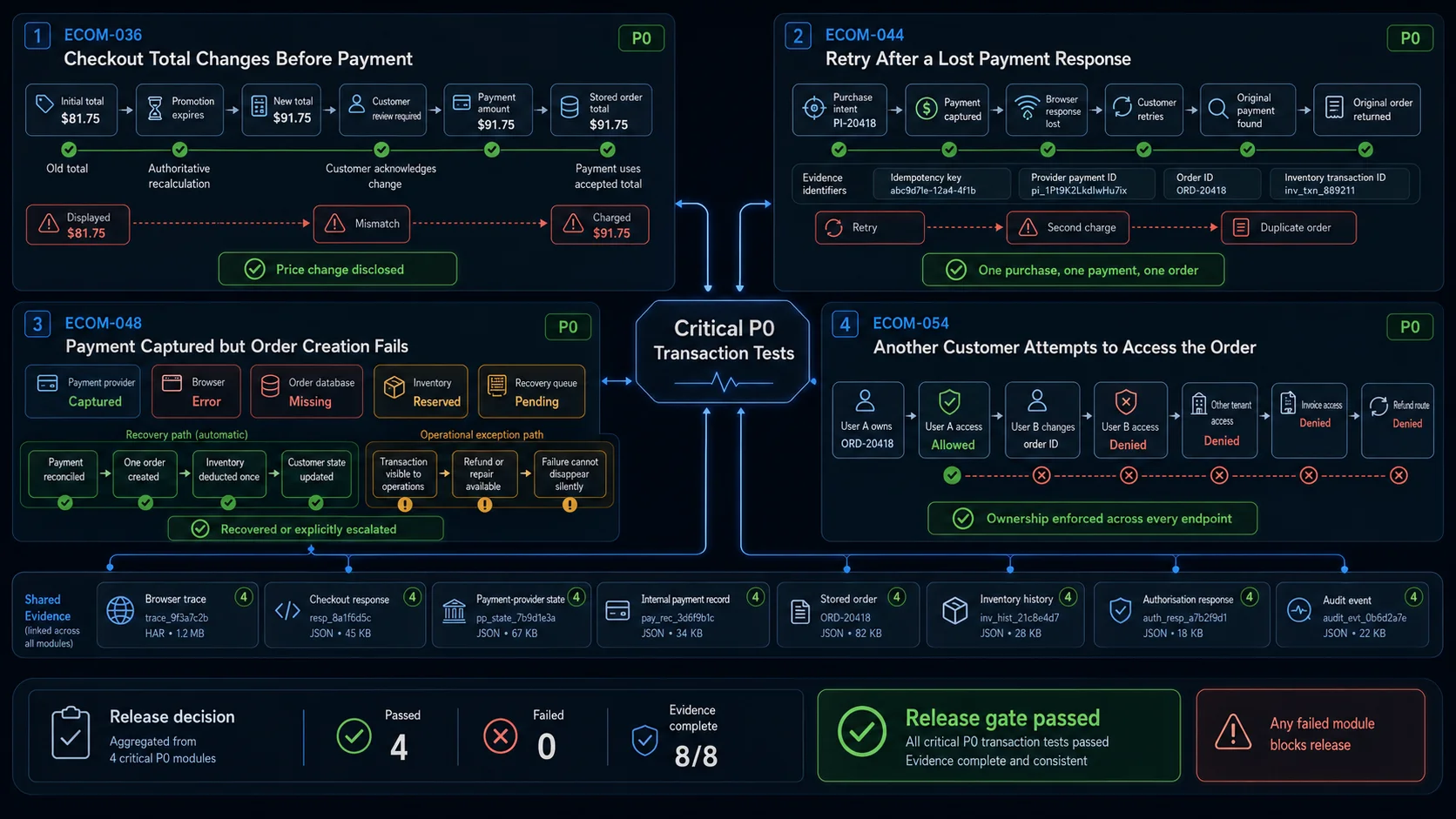
The matrix works well for coverage planning and importing into a test-management system. The following four cases show how to document the highest-risk transaction boundaries in a reproducible form.
ECOM-036: Checkout Total Changes Before Payment
Priority: P0 Area: Checkout, pricing, inventory
Preconditions
- Product
SHOES-BLUE-42is in the cart. - Initial checkout total is
$81.75. - The test can change price, promotion, tax, or inventory after checkout begins.
- No payment has been submitted.
Test data
{
  "initialTotal": 8175,
  "changedTotal": 9175,
  "changeReason": "promotion expired"
}
Steps
- Add the controlled product to the cart.
- Start checkout and record the displayed calculation.
- Expire the promotion or update the authoritative price.
- Continue to the final order review.
- Inspect the total and customer message.
- Attempt to submit payment without accepting the changed result where acknowledgement is required.
- Accept the new total and continue.
Expected result
- Checkout detects the authoritative change.
- The old total is not sent silently to payment.
- The customer sees the new amount and the affected calculation component.
- Payment uses only the final accepted total.
- The stored order matches the amount accepted by the customer.
Evidence
- Initial and final checkout responses.
- Visible change message.
- Payment-provider amount.
- Persisted order total.
Automation
Browser journey with pricing or checkout API control.
ECOM-044: Retry After a Lost Payment Response
Priority: P0 Area: Payment and idempotency
Preconditions
- A controlled payment method can complete successfully.
- The browser response or application connection can be interrupted.
- Payment, purchase intent, and order records expose correlation identifiers.
Steps
- Create a checkout and record the purchase intent ID.
- Submit payment.
- Allow the provider to complete the payment.
- Interrupt the browser or application response before confirmation loads.
- Repeat the final action or reopen the checkout.
- Inspect provider charges, internal payment records, orders, inventory, notifications, and analytics.
Expected result
- The customer is not charged again.
- One logical payment remains associated with the purchase intent.
- One order is created.
- Inventory changes once.
- Reopening or retrying reveals the authoritative transaction state.
- Notifications and analytics are not duplicated unexpectedly.
Evidence
Purchase intent ID
Idempotency key
Provider payment ID
Order ID
Inventory transaction ID
Purchase event ID
Automation
Browser journey with provider sandbox and internal API verification.
ECOM-048: Payment Captured but Order Creation Fails
Priority: P0 Area: Payment-to-order recovery
Preconditions
- Payment can complete successfully.
- Order persistence or the order-processing worker can be made temporarily unavailable.
- The application has a recovery queue, reconciliation process, or operational exception state.
Steps
- Prepare a controlled product and checkout.
- Make the order persistence boundary unavailable.
- Complete payment successfully.
- Observe the browser result.
- Restore the order service.
- Run or wait for the documented recovery mechanism.
- Search by payment ID and purchase intent.
- Compare payment, order, inventory, notification, and analytics state.
Expected result
One of two documented outcomes should occur.
Recoverable path
- Payment remains linked to a pending order transaction.
- Recovery creates one correct order.
- Inventory is reconciled once.
- The customer receives an updated, truthful result.
Operational exception path
- The captured payment is visible to operations.
- No false confirmed order is shown.
- The transaction can be repaired or refunded without another charge.
- The exception cannot disappear silently.
Evidence
- Provider capture.
- Internal payment state.
- Recovery job or operational exception.
- Final order.
- Inventory history.
- Customer message.
Automation
Integration test supported by a browser journey.
ECOM-054: Another Customer Attempts to Access the Order
Priority: P0 Area: Ownership and authorisation
Preconditions
- User A owns
ORD-20418. - User B is authenticated but does not own the order.
- Browser and API order routes are known.
Steps
- Confirm that User A can view the order.
- Authenticate as User B.
- Request the order through the visible order route.
- Change an accessible order identifier to
ORD-20418. - Request the order through the API.
- Try related invoice, receipt, shipment, cancellation, and refund routes.
- Repeat the checks from another tenant where the application is multi-tenant.
Expected result
- User B cannot read or modify the order.
- Sensitive information is not returned in the error response.
- Related endpoints enforce the same ownership boundary.
- Another tenant receives no order data.
- The attempt is recorded when required by the security policy.
Evidence
- HTTP responses.
- Browser state.
- Response body inspection.
- Audit or security event.
Automation
API authorisation coverage with one browser access check.
Automating Ecommerce Test Cases with Playwright
Browser automation should reproduce the customer journey. Backend assertions should confirm the business result.
Playwright locators are most stable when they follow user-facing roles, labels, and explicit test contracts rather than fragile DOM structure.
A representative flow can:
Prepare controlled product
→ discover it through the storefront
→ select the intended variant
→ add it to the cart
→ validate the final total
→ complete a controlled payment
→ wait for the terminal order state
→ inspect the order
→ reconcile inventory
→ clean generated data
Example:
import { test, expect } from '@playwright/test';

test('successful purchase creates one order and updates stock once', async ({
  page,
  request,
}) => {
  const fixtureResponse = await request.post('/test-support/products', {
    data: {
      fixture: 'standard-in-stock',
      price: 8000,
      quantity: 3,
    },
  });

  expect(fixtureResponse.ok()).toBeTruthy();

  const product = await fixtureResponse.json();

  await page.goto(`/products/${product.slug}`);

  await page
    .getByRole('button', { name: 'Blue, size 42' })
    .click();

  await page
    .getByRole('button', { name: 'Add to cart' })
    .click();

  await page
    .getByRole('link', { name: 'Cart' })
    .click();

  await expect(page.getByTestId('cart-sku'))
    .toHaveText(product.sku);

  await expect(page.getByTestId('cart-total'))
    .toHaveText('$80.00');

  await page
    .getByRole('button', { name: 'Checkout' })
    .click();

  await page
    .getByLabel('Email')
    .fill('[email protected]');

  await page
    .getByLabel('Address')
    .fill('100 Test Street');

  await page
    .getByLabel('City')
    .fill('San Francisco');

  await page
    .getByLabel('Postal code')
    .fill('94105');

  await page
    .getByRole('button', { name: 'Continue to payment' })
    .click();

  await page
    .getByTestId('test-payment-method')
    .selectOption('success');

  await page
    .getByRole('button', { name: 'Place order' })
    .click();

  await expect(
    page.getByRole('heading', { name: 'Order confirmed' }),
  ).toBeVisible();

  const orderId = await page
    .getByTestId('order-id')
    .textContent();

  expect(orderId).toBeTruthy();

  await expect
    .poll(
      async () => {
        const response = await request.get(`/api/orders/${orderId}`);

        if (!response.ok()) {
          return `http-${response.status()}`;
        }

        return (await response.json()).status;
      },
      {
        message: 'order should reach the paid state',
        timeout: 30_000,
      },
    )
    .toBe('paid');

  const orderResponse = await request.get(`/api/orders/${orderId}`);

  expect(orderResponse.ok()).toBeTruthy();

  const order = await orderResponse.json();

  expect(order.total).toBe(8000);

  expect(order.lines).toEqual([
    expect.objectContaining({
      sku: product.sku,
      quantity: 1,
      unitPrice: 8000,
    }),
  ]);

  const inventoryResponse = await request.get(
    `/api/inventory/${product.sku}`,
  );

  expect(inventoryResponse.ok()).toBeTruthy();

  const inventory = await inventoryResponse.json();

  expect(inventory.availableQuantity).toBe(2);
});
Endpoints, selectors, currency representation, and payment controls are application-specific. The evidence pattern is not:
Browser action
→ visible assertion
→ test passed
It is:
Browser action
→ authoritative terminal state
→ persisted order
→ reconciled inventory
Enable traces for failed CI runs so actions, DOM snapshots, requests, timing, and visible state can be inspected together.
Organising and Automating the Test Library
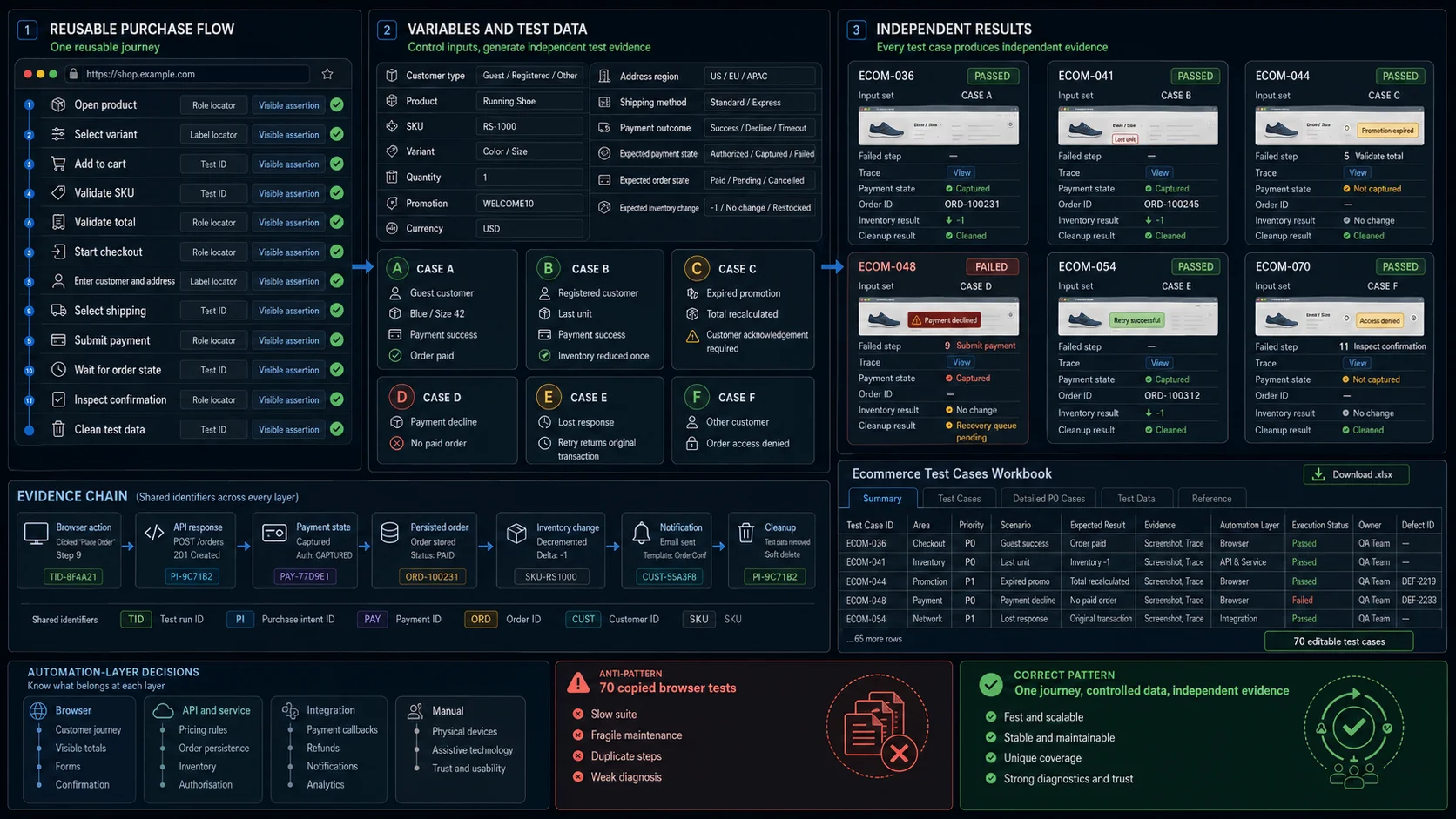
Do not push every case into the browser suite.
Good browser automation candidates include:
- product discovery;
- variant selection;
- cart behaviour;
- checkout forms;
- visible totals;
- payment interaction;
- confirmation;
- order access;
- responsive behaviour.
Prefer API, service, or integration tests for:
- promotion formulas;
- tax calculation;
- callback deduplication;
- inventory concurrency;
- order persistence;
- refund reconciliation;
- analytics events;
- queue processing.
Keep manual or exploratory coverage for:
- confusing product information;
- unexpected combinations;
- physical devices;
- assistive technologies;
- provider-specific customer experiences;
- visual merchandising;
- trust and usability.
The relevant question is not simply whether a case can be automated. It is whether automation at that layer produces reliable evidence at a reasonable maintenance cost.
The 70 cases can be transferred into an XLSX file or test-management system using these columns:
Test Case ID
Area
Title
Priority
Preconditions
Test Data
Steps
Expected Result
Evidence Required
Automation Layer
Automation Status
Owner
Last Result
Defect ID
Notes
For data-driven automation, add:
Customer Type
SKU
Variant
Quantity
Promotion
Currency
Address Region
Shipping Method
Payment Outcome
Expected Payment State
Expected Order State
Expected Inventory Change
One reusable purchase flow can then run several data combinations without duplicating browser steps.
Where WrightTest Fits
WrightTest provides a visual interface around Playwright for recording, editing, running, scheduling, and debugging browser checks.
One recorded purchase journey can use variables for:
Customer type
Product
Variant
Quantity
Promotion
Address
Shipping method
Payment result
Expected visible result
The same journey can cover guest purchases, returning customers, last-unit products, expired promotions, declined payments, required-action payments, unsupported delivery regions, and mobile checkout.
Each run can retain its inputs, failed step, screenshots, and Playwright trace.
WrightTest covers the repeatable browser layer. Payment settlement, persisted orders, inventory, notifications, analytics, and concurrency still need appropriate API, integration, administrative, or database evidence.
Final Acceptance Rule
A successful ecommerce test case should not end with:
The customer saw an order confirmation.
For a completed purchase, the stronger expected result is:
The intended customer accepted the authoritative total, completed the required payment state, created one accurate order, changed inventory once, received a truthful confirmation, and could not repeat or access the transaction outside the documented rules.
That is the boundary these test cases are designed to verify.