
Ecommerce Testing
Ecommerce Testing: Verify the Complete Purchase Journey
Verify ecommerce beyond storefront clicks by testing product discovery, pricing, cart state, checkout, payment, order creation, inventory, confirmation, recovery and production evidence.
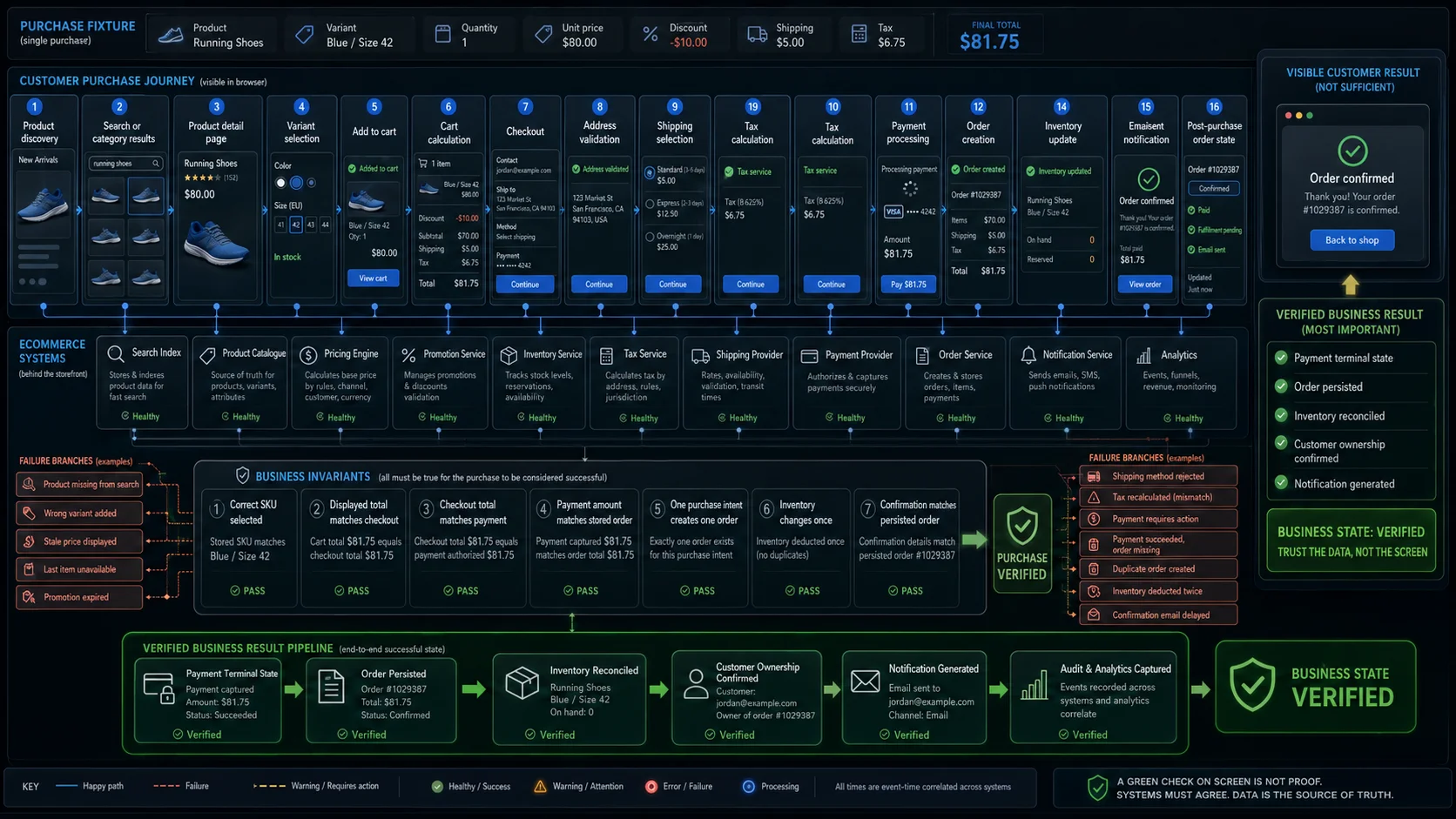
An ecommerce website can display the right product, accept a payment, and still create the wrong order.
The storefront is only the visible part of the system. A completed purchase may depend on a catalogue service, search index, pricing engine, promotion rules, inventory reservations, tax calculation, shipping providers, payment processing, order management, notifications, analytics, and fraud controls.
The expensive failures usually appear between those components:
- the product page says an item is available, but the warehouse cannot reserve it;
- the cart shows one total while the payment provider receives another;
- payment succeeds, but the order is never stored;
- a retry creates two orders;
- inventory is deducted twice;
- the order exists, but the customer sees an error;
- the confirmation email contains a stale price or address.
A useful ecommerce acceptance path therefore looks like this:
Product discovered
→ correct variant selected
→ current price confirmed
→ stock reserved
→ cart calculated
→ checkout validated
→ payment reaches a terminal state
→ one order is persisted
→ inventory changes once
→ confirmation reflects the stored order
The final result is not merely a successful page. It is one consistent purchase across every system involved.
This guide explains how to define that business outcome, model the purchase as states and invariants, choose the right evidence layer, prepare deterministic data, and automate a small release-gating journey.
For a compact pre-release audit, see Ecommerce Website Testing Checklist.
For detailed positive, negative, boundary, and recovery scenarios, see Ecommerce Test Cases.
Define the Ecommerce Business Outcome
Ecommerce testing verifies that customers can discover, evaluate, purchase, receive, and manage products without the application producing contradictory business states.
The browser journey matters, but the contract extends beyond the browser:
| Customer sees | Systems that may determine the result |
|---|---|
| Search results | Search index, catalogue, inventory, merchandising rules |
| Product price | Price lists, customer groups, currency, promotion engine |
| Available stock | Warehouses, reservations, safety stock, marketplace sellers |
| Cart total | Quantity, discounts, credits, shipping, tax, rounding |
| Delivery options | Address rules, fulfilment zones, carriers, pickup locations |
| Payment result | Payment provider, authentication, fraud checks, callbacks |
| Order confirmation | Order service, transaction, queue, inventory update |
| Confirmation email | Notification service, template data, mail provider |
| Order status | Warehouse, carrier, cancellation, return and refund systems |
A complete strategy should answer three questions:
- Can the customer complete the interaction?
- Did the application create the correct business state?
- Can the system recover safely when one component fails, responds late, or retries?
Many test suites answer the first question well. Production incidents often come from the other two.
A useful acceptance criterion is:
One authorised customer selected the intended product, accepted the final price, completed the required payment state, created one accurate order, changed inventory once, and received a confirmation that matched the stored result.
That statement is the centre of the test strategy. Individual page checks should support or challenge it.
Why Ecommerce Testing Is Hard
One Purchase Crosses Multiple Systems
A browser does not usually approve the authoritative price, reserve warehouse stock, capture a payment, or persist the final order by itself.
One customer action may trigger a chain such as:
Browser
→ storefront API
→ catalogue
→ pricing
→ promotion engine
→ inventory
→ tax
→ shipping
→ payment provider
→ order service
→ notification service
Each component can succeed, fail, time out, retry, or return stale data independently.
The awkward case is not always a clean failure. It is a payment that succeeds externally while the order service times out internally. The customer may retry because the page looks broken, even though money has already moved.
The test strategy must identify the authoritative source for each decision:
| Decision | Typical authoritative source |
|---|---|
| Sellable product | Catalogue or product service |
| Final price | Checkout or pricing service |
| Available quantity | Inventory service |
| Payment outcome | Payment provider plus internal payment record |
| Order status | Order service |
| Customer ownership | Identity and order records |
| Delivery status | Fulfilment or carrier integration |
A browser assertion alone cannot settle every one of those questions.
Prices, Stock, and External States Change
Product data may change while the customer is shopping.
Price, promotion eligibility, tax, delivery options, and stock can differ between the product page and checkout. A change is not automatically a defect. The problem is usually that the application changes a value silently, applies inconsistent values, or allows payment without showing the final amount.
There is no universal moment when stock must be reserved. Some stores reserve it when checkout begins, others after payment authorisation. The test should enforce the product’s chosen rule, not an imagined generic rule.
Questions worth settling before automation include:
- when the price becomes authoritative;
- when inventory is reserved;
- how long a reservation lasts;
- what happens when the last item is purchased elsewhere;
- whether the customer must acknowledge a changed total;
- how expired promotions are removed;
- which amount is persisted in the order;
- when failed payment releases stock.
The business model also changes the critical path:
| Commerce model | Additional risks |
|---|---|
| B2C retail | Guest checkout, promotions, delivery, returns |
| B2B wholesale | Contract pricing, minimum quantities, approval, credit limits |
| Marketplace | Sellers, commissions, split orders, seller inventory |
| Subscription | Recurring billing, renewal, pause, proration |
| Digital goods | Licence assignment, download access, instant fulfilment |
| Omnichannel retail | Store stock, pickup windows, POS synchronisation |
| International store | Currency, tax, locale, address and shipping restrictions |
The same purchase model can support all of them, but the expected states and evidence must reflect the actual product.
Retries and Delayed Events Create Duplicate Risk
Customers retry when a button appears frozen. Browsers, gateways, queues, and workers may retry automatically.
A safe retry should not create:
- two charges;
- two orders;
- two stock deductions;
- two confirmation emails;
- two purchase analytics events.
Payment systems also use intermediate states. A transaction may be created, pending, require customer action, become authorised, fail, expire, or later be refunded.
Stripe documents Payment Intents as a stateful payment lifecycle rather than a single synchronous success response. Its webhook guidance also notes that events may be retried and are not guaranteed to arrive in generation order.
This produces several high-value recovery tests:
- payment succeeds but the browser loses the response;
- payment succeeds but order creation initially fails;
- the callback arrives twice;
- a later event arrives before an earlier one;
- the customer refreshes the return URL;
- the browser closes during payment authentication;
- the same checkout request is submitted twice;
- payment remains pending longer than the browser session.
A return URL is not proof that the order is paid. The application should reconcile the authoritative payment state and create one logical purchase.
Model the Purchase with States and Invariants
Page-by-page coverage is useful for navigation and presentation. State-based coverage is better at exposing transaction defects.
A simplified purchase model may look like this:
Browsing
  ↓
Product selected
  ↓
Cart active
  ↓
Checkout started
  ↓
Inventory reservation attempted
  ├── Unavailable
  ↓
Payment pending
  ├── Requires action
  ├── Failed
  ├── Cancelled
  ↓
Payment authorised
  ↓
Order creation pending
  ├── Recoverable failure
  ↓
Order confirmed
  ↓
Fulfilment pending
  ↓
Shipped, collected, cancelled, refunded, or returned
The exact names differ between products. What matters is making intermediate and terminal states explicit.
Then define invariants: rules that must remain true regardless of the path.
| Invariant | Required relationship |
|---|---|
| Pricing | Displayed total = authoritative checkout total = payment amount = stored order total |
| Order | One successful purchase intent creates one logical order |
| Payment | Failed or cancelled payment does not create a confirmed paid order |
| Inventory | Confirmed quantity is reserved or deducted once |
| Ownership | The order belongs to the correct customer, guest identity, and tenant |
| Communication | Customer messages reflect the persisted business state |
| Retry | Repeated requests do not repeat the business operation |
| Refund | Provider, internal transaction, order balance and customer message agree |
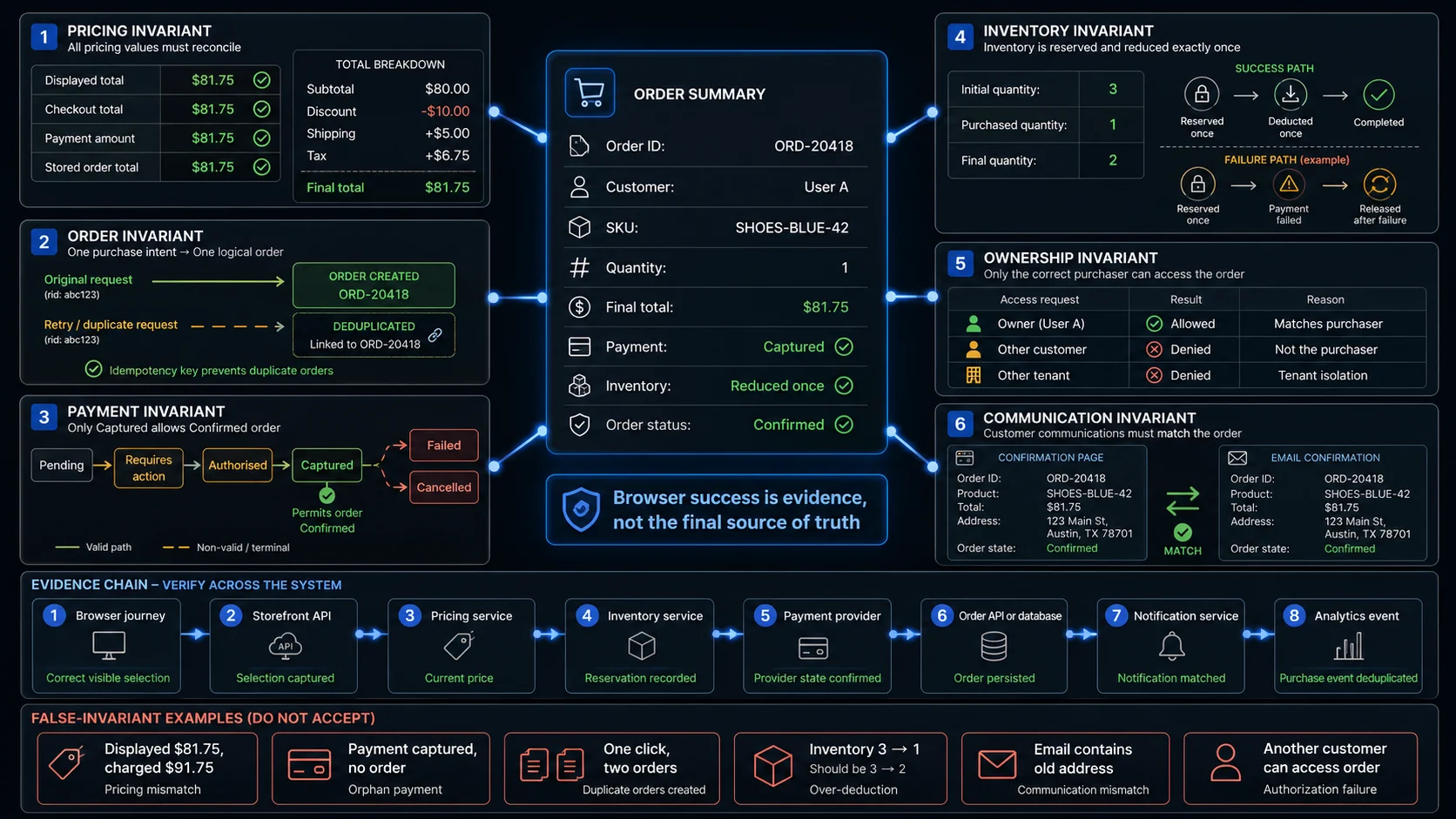
A few product-specific exceptions may be legitimate. Currency conversion, tips, later shipping adjustments, or marketplace settlement can produce different amounts. Those differences need an explicit contract.
Without one, “the values are slightly different” is not an acceptable expected result.
Test the Complete Customer Journey
The Pillar Page should not contain hundreds of individual cases. Its job is to identify which business contracts deserve detailed coverage.
Discovery, Catalogue, and Product Selection
Customers must be able to reach a product that is currently eligible for sale.
Cover:
- category visibility;
- search relevance;
- filters and sorting;
- pagination or infinite scroll;
- product publication state;
- direct product URLs;
- price and availability consistency;
- locale and customer-group rules;
- selected variant identity;
- quantity boundaries;
- images and variant-specific information.
A result list changing after a filter click proves very little. The returned products must actually satisfy the selected filter, remain complete across pages, avoid duplicates, and follow a stable ordering rule.
Search and filtering deserve a separate cluster because relevance, index freshness, facets, sorting, pagination, autocomplete, and zero-result recovery each have their own failure patterns.
Product variants need similar care. The interface may highlight a blue medium shirt while the cart receives the default red small SKU. The visible selection and the stored cart line must describe the same sellable unit.
For the last available item, compare the visible availability with the reservation result. Two customers may both see “In stock”; only one may be allowed to complete the purchase.
Cart, Checkout, Shipping, and Tax
The cart is both a calculation engine and temporary business state.
Test:
- add, remove and quantity changes;
- exact SKU and variant identity;
- cart persistence;
- anonymous-to-authenticated cart merge;
- per-line totals;
- order-level discounts;
- coupons, gift cards and credits;
- tax and shipping estimates;
- rounding;
- minimum and maximum order values;
- changed stock or price;
- recovery after a failed request.
Break the total into components:
Subtotal
− item discounts
− order discounts
− credits
+ shipping
+ tax
=
final payable total
An assertion against only the final number may detect a defect but still leave the failure difficult to diagnose.
Checkout converts a reversible cart into a transaction. Cover guest and authenticated flows where supported, together with:
- customer information;
- saved and new addresses;
- regional address formats;
- unsupported delivery regions;
- shipping method eligibility;
- pickup locations and windows;
- recalculated tax;
- changed totals;
- consent and policy controls;
- expired sessions;
- browser refresh;
- Back navigation;
- external payment return;
- duplicate submission.
A recoverable error should normally preserve valid customer input. Requiring the customer to re-enter an entire address after a temporary provider failure increases both abandonment and duplicate-submission risk.
Accessibility belongs in the same critical journey. The customer must be able to understand validation, move focus to errors, operate checkout with a keyboard, and perceive changing totals and payment states. Automated checks help, but they do not replace keyboard, screen-reader, zoom, and human evaluation.
Payment, Order Creation, and Post-Purchase State
Payment should be tested as a lifecycle:
Created
Pending
Requires action
Authorised
Captured
Failed
Cancelled
Expired
Refunded
Partially refunded
Use the states supported by the product instead of reducing every outcome to success or failure.
For each terminal path, reconcile:
- payment-provider state;
- internal payment record;
- order status;
- order total;
- inventory;
- customer-facing message;
- email or notification;
- analytics event.
A delayed email is usually not a reason to roll back a paid order. A missing order after a captured payment is.
Post-purchase testing may include:
- order history;
- order-detail ownership;
- shipment and pickup status;
- cancellation;
- returns;
- full and partial refunds;
- replacement orders;
- invoices and receipts;
- digital fulfilment;
- subscription renewal;
- customer-service adjustments.
The same invariants still apply. A refund should agree across the payment provider, internal transaction, order balance, customer message, and any inventory return.
Choose the Right Evidence and Automation Layer
The browser is strongest when the question concerns visible user behaviour. It cannot independently prove every downstream result.
| Testing layer | Best evidence |
|---|---|
| Browser journey | Navigation, forms, visible totals, errors, focus, redirects, confirmation UI |
| Storefront API | Request validation, product data, cart state, response contracts |
| Pricing service | Discounts, tax, currency and rounding |
| Inventory service | Reservation, release, deduction and concurrency |
| Payment integration | Provider state, authentication, callbacks and idempotency |
| Order API or database | Lines, totals, owner, status and persistence |
| Notification integration | Recipient, template and stored order values |
| Analytics verification | Event names, values and deduplication |
| Accessibility evaluation | Names, roles, states, focus, keyboard and announcements |
| Performance test | Capacity, latency and degradation |
| Security assessment | Authorisation, abuse resistance and data protection |
One practical compromise is to keep large pricing combinations below the browser layer and reserve the full browser journey for a small number of representative purchases.
Examples:
| Rule | Efficient primary layer |
|---|---|
| Promotion formula | Unit or pricing-service test |
| Cart validation | API test |
| Payment callback deduplication | Integration test |
| Inventory reservation concurrency | Service test |
| Customer can complete checkout | Browser test |
| Order exists after purchase | Browser plus API postcondition |
| Email matches the order | Notification integration |
| Production checkout is reachable | Synthetic browser monitor |
Playwright supports API requests alongside browser interactions. A combined test can:
Create controlled product through API
→ purchase through browser
→ read order through API
→ compare inventory
→ clean test data
This provides stronger evidence than trying to infer the entire transaction from the confirmation page.
Prioritise Coverage by Release Risk
A broken wishlist and a duplicate payment are both defects, but they should not receive the same release treatment.
| Priority | Typical failure | Release treatment |
|---|---|---|
| P0 | Duplicate charge, wrong order total, cross-customer access, checkout unavailable | Block release |
| P1 | Missing major products, stock contradiction, invalid tax or shipping, missing order | Block or require explicit risk acceptance |
| P2 | Cart persistence issue, promotion edge case, notification defect | Decide by scope and affected users |
| P3 | Minor layout, copy or non-critical preference issue | Schedule by impact |
Consider:
Business impact
× probability
× change exposure
× detectability
A stable wishlist may need little regression coverage in a payment-only release. A small checkout configuration change may require the full purchase gate because the defect is difficult to detect after deployment without affecting customers.
A practical execution split is:
Pull request
- changed-component checks;
- one fast critical journey;
- API and contract tests;
- pricing and validation checks.
Pre-release
- full purchase journey;
- guest and registered customer;
- main mobile viewport;
- primary payment methods;
- representative shipping and tax regions;
- failure recovery;
- accessibility regression.
Scheduled regression
- wider browser and device coverage;
- more product types;
- promotion combinations;
- localisation;
- secondary providers;
- long-running asynchronous paths.
Production verification
- controlled synthetic discovery and checkout;
- isolated test accounts and products;
- fulfilment suppression;
- cleanup;
- monitoring separated from business reporting.
Prepare Deterministic Ecommerce Data
Uncontrolled catalogue data makes failures hard to interpret.
Another test may buy the last item. A promotion may expire during execution. A product may disappear from search because indexing is delayed. A tax result may change because the address fixture was incomplete.
Build a small test catalogue with explicit purpose:
| Fixture | Purpose |
|---|---|
| Standard in-stock product | Main successful journey |
| Last-unit product | Reservation and concurrency |
| Out-of-stock product | Availability handling |
| Multi-variant product | SKU and selection identity |
| Discount-eligible product | Promotion calculation |
| Discount-excluded product | Eligibility boundary |
| Taxable and non-taxable products | Tax rules |
| Digital product | Fulfilment without shipping |
| Heavy or restricted product | Shipping restrictions |
| Marketplace product | Seller and split-order rules |
Also prepare:
- guest and registered customers;
- customer groups;
- saved and new addresses;
- delivery regions;
- currencies and locales;
- promotion states;
- controlled payment outcomes;
- inventory reset;
- order and reservation cleanup.
Describe the business state in the fixture:
{
  "sku": "TEST-LAST-UNIT",
  "currency": "USD",
  "unitPrice": 5000,
  "availableQuantity": 1,
  "promotionEligible": false,
  "shippingClass": "standard",
  "expectedTaxRegion": "US-CA"
}
The fixture should make the expected result obvious before the test starts.
Payment sandboxes and service stubs are useful, but they prove the configured test behaviour. They do not reproduce every live banking, authentication, routing, and provider condition.
Keep a small production-verification plan for configuration and connectivity that staging cannot fully reproduce.
Automate the Release-Gating Journey
Do not begin with every page, market, product type and payment method.
Start with one representative purchase that crosses the important boundaries:
- create or reset a controlled product;
- discover it through the storefront;
- confirm current product data;
- add the intended variant;
- validate the cart calculation;
- complete address, shipping and tax;
- submit a controlled payment;
- wait for the authoritative terminal state;
- confirm that one order exists;
- compare order lines and total;
- compare inventory before and after;
- retry the final action and confirm no duplicate;
- check ownership;
- clean the generated data.
A Playwright test may combine the browser journey with API postconditions:
import { test, expect } from '@playwright/test';

test('one checkout creates one paid order and updates stock once', async ({
  page,
  request,
}) => {
  const fixtureResponse = await request.post('/test-support/products', {
    data: {
      fixture: 'standard-in-stock',
      price: 5000,
      quantity: 3,
    },
  });

  expect(fixtureResponse.ok()).toBeTruthy();

  const product = await fixtureResponse.json();

  await page.goto(`/products/${product.slug}`);

  await page.getByRole('button', { name: 'Add to cart' }).click();
  await page.getByRole('link', { name: 'Cart' }).click();

  await expect(page.getByTestId('cart-total')).toHaveText('$50.00');

  await page.getByRole('button', { name: 'Checkout' }).click();

  await page.getByLabel('Email').fill('[email protected]');
  await page.getByLabel('Address').fill('100 Test Street');
  await page.getByLabel('City').fill('San Francisco');
  await page.getByLabel('Postal code').fill('94105');

  await page
    .getByRole('button', { name: 'Continue to payment' })
    .click();

  await page
    .getByTestId('test-payment-method')
    .selectOption('success');

  await page.getByRole('button', { name: 'Place order' }).click();

  await expect(
    page.getByRole('heading', { name: 'Order confirmed' }),
  ).toBeVisible();

  const orderId = await page.getByTestId('order-id').textContent();

  expect(orderId).toBeTruthy();

  await expect
    .poll(
      async () => {
        const response = await request.get(`/api/orders/${orderId}`);

        if (!response.ok()) {
          return `http-${response.status()}`;
        }

        return (await response.json()).status;
      },
      {
        message: 'order should reach the paid state',
        timeout: 30_000,
      },
    )
    .toBe('paid');

  const orderResponse = await request.get(`/api/orders/${orderId}`);
  expect(orderResponse.ok()).toBeTruthy();

  const order = await orderResponse.json();

  expect(order.total).toBe(5000);
  expect(order.lines).toEqual([
    expect.objectContaining({
      sku: product.sku,
      quantity: 1,
      unitPrice: 5000,
    }),
  ]);

  const inventoryResponse = await request.get(
    `/api/inventory/${product.sku}`,
  );

  expect(inventoryResponse.ok()).toBeTruthy();

  const inventory = await inventoryResponse.json();

  expect(inventory.availableQuantity).toBe(2);
});
The endpoints, selectors, payment control and currency representation are product-specific.
The reusable pattern is:
Prepare known state
→ perform real browser purchase
→ wait for terminal state
→ inspect persisted order
→ reconcile inventory
Do not use fixed sleeps for asynchronous processing. Poll the authoritative state with a clear timeout.
Once this journey is stable, vary the data rather than copying the whole test:
- guest or registered customer;
- product type;
- variant;
- stock state;
- promotion;
- shipping region;
- currency;
- payment result;
- locale;
- device;
- fulfilment method.
Failures That Look Like Successful Purchases
| Apparent success | Hidden failure | Stronger evidence |
|---|---|---|
| Search results appeared | Expected products are missing | Compare returned IDs with the controlled catalogue |
| Add to cart succeeded | Wrong variant or SKU was stored | Inspect the cart line identity |
| Cart total looks correct | Payment used another amount | Compare checkout, provider and order totals |
| Provider returned success | Internal order was not persisted | Poll the order API |
| Confirmation page appeared | Payment is still pending or failed | Check the authoritative terminal state |
| One order appears in the browser | Retry created another order | Search by purchase intent or idempotency key |
| Stock decreased | It decreased twice | Compare initial and final quantity |
| Email arrived | It contains stale order data | Compare it with the stored order |
| Test passed in staging | Production configuration differs | Run controlled production verification |
| Mobile emulation passed | Physical-device behaviour differs | Targeted real-device testing |
| Screenshot matches | Backend state is wrong | Add API or integration assertions |
| Gateway was mocked | Real callback contract is broken | Run provider sandbox integration |
| Database row was removed | Downstream or cached copies remain | Check retrieval and cleanup boundaries |
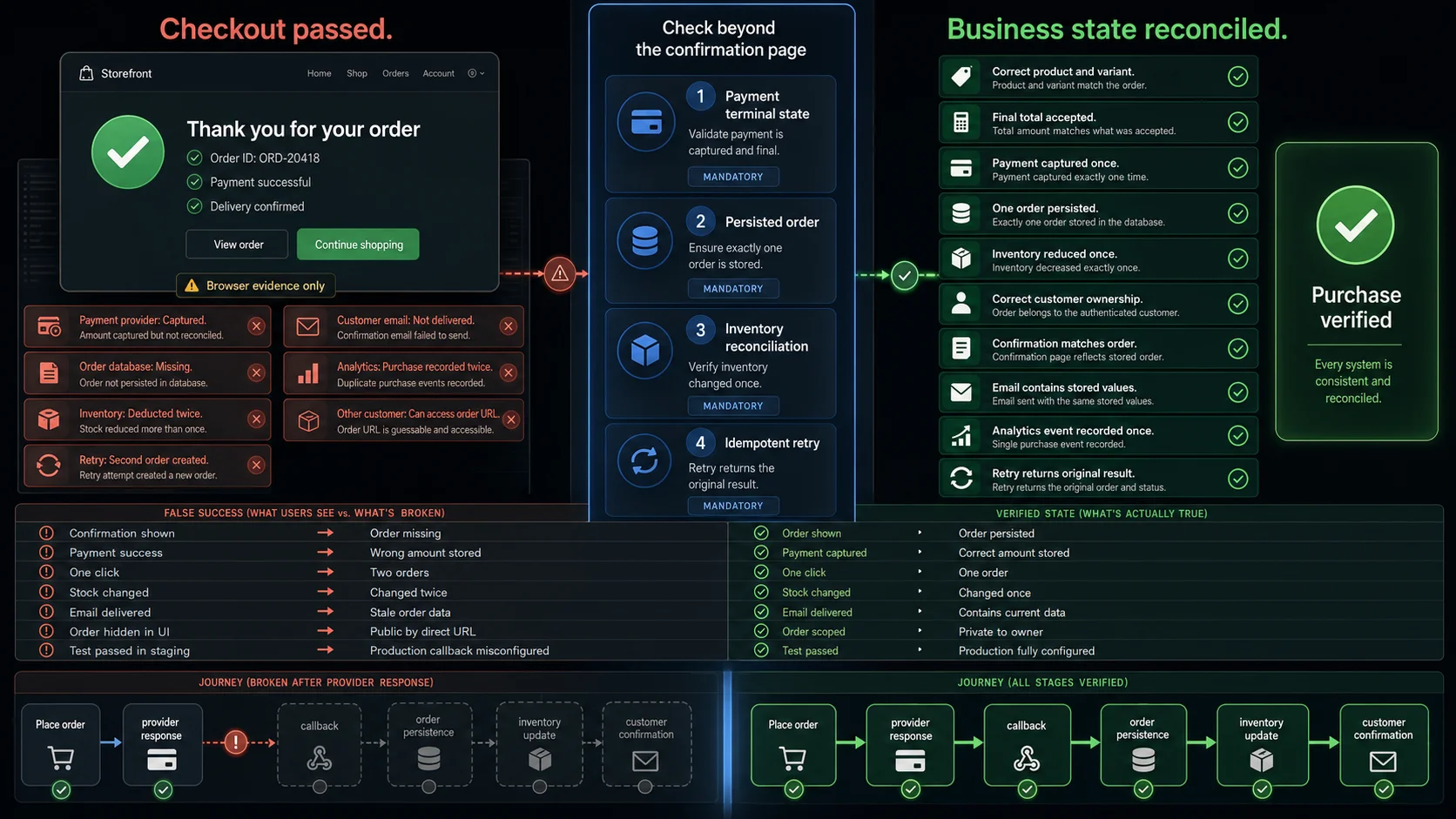
These patterns matter because they target false confidence.
A visible control may behave correctly while another system has already produced the wrong business outcome.
Performance and Production Verification
Performance testing should cover both browser experience and transaction capacity.
Google’s Core Web Vitals currently focus on loading, responsiveness and visual stability through LCP, INP and CLS. Measure them by page type:
- category and search;
- product detail;
- cart;
- checkout;
- account and order history.
Backend capacity needs separate coverage:
- search queries;
- pricing and promotions;
- inventory reservations;
- checkout creation;
- payment callbacks;
- order persistence;
- queue backlogs;
- cache misses;
- flash-sale traffic.
A fast homepage does not prove that checkout remains usable under load.
Test graceful degradation as well. A failed recommendation widget or analytics request should not prevent product discovery, cart updates, or payment.
Some problems appear only in production because of DNS, CDN, environment variables, provider credentials, shipping configuration, email routing, and real caches.
A safe production monitor uses:
- dedicated synthetic accounts;
- clearly marked products;
- controlled payment behaviour;
- test-order labels;
- fulfilment suppression;
- controlled recipients;
- analytics exclusion;
- automatic cancellation and cleanup;
- low execution frequency.
Synthetic traffic must not consume scarce stock, trigger shipment, distort revenue reports, create support tickets, or affect recommendation and fraud systems.
Where WrightTest Fits
WrightTest provides a visual interface around Playwright for recording, editing, running, scheduling, and debugging browser checks.
The platform can:
- record a browser journey through a live Chromium session;
- capture role-, label- and test-ID-based locators;
- replace fixed values with environment and test-case variables;
- run checks manually, in suites, on schedules, or through a webhook;
- emulate supported mobile device profiles;
- retain per-step screenshots;
- store Playwright traces;
- export checks as native Playwright
.spec.tsfiles.
For ecommerce testing, one recorded purchase flow can support cases such as:
Guest purchase
Returning customer
Last item in stock
Expired promotion
Payment declined
Payment requires action
Unsupported delivery region
Mobile checkout
Each run can retain its own inputs, failed step, screenshots and trace.
WrightTest is strongest at the repeatable browser layer. A visible success assertion does not independently prove payment settlement, order persistence, inventory mutation, notification delivery, or analytics correctness.
Connect the browser run to API, integration, admin, or database evidence whenever the business outcome crosses those systems.
Chromium-based execution and device emulation are not substitutes for every physical-device, contract, load, security, or provider-specific test.
Complete Ecommerce Testing Acceptance Criterion
The final criterion is not:
The customer clicked Place order and saw a confirmation page.
It is:
One authorised customer selected the intended product, accepted the final price, completed the required payment state, created one accurate order, changed inventory once, received a truthful confirmation, and could recover safely from delay, retry, or failure.
That criterion connects the storefront to the business result.
Everything else in the ecommerce testing strategy should support or challenge it.