
Ecommerce Testing Checklist
Ecommerce Website Testing Checklist: Verify Every Purchase Boundary
Use a release-focused ecommerce checklist to verify catalogue, search, cart, checkout, payment, order creation, inventory, accessibility, performance, notifications and recovery evidence.
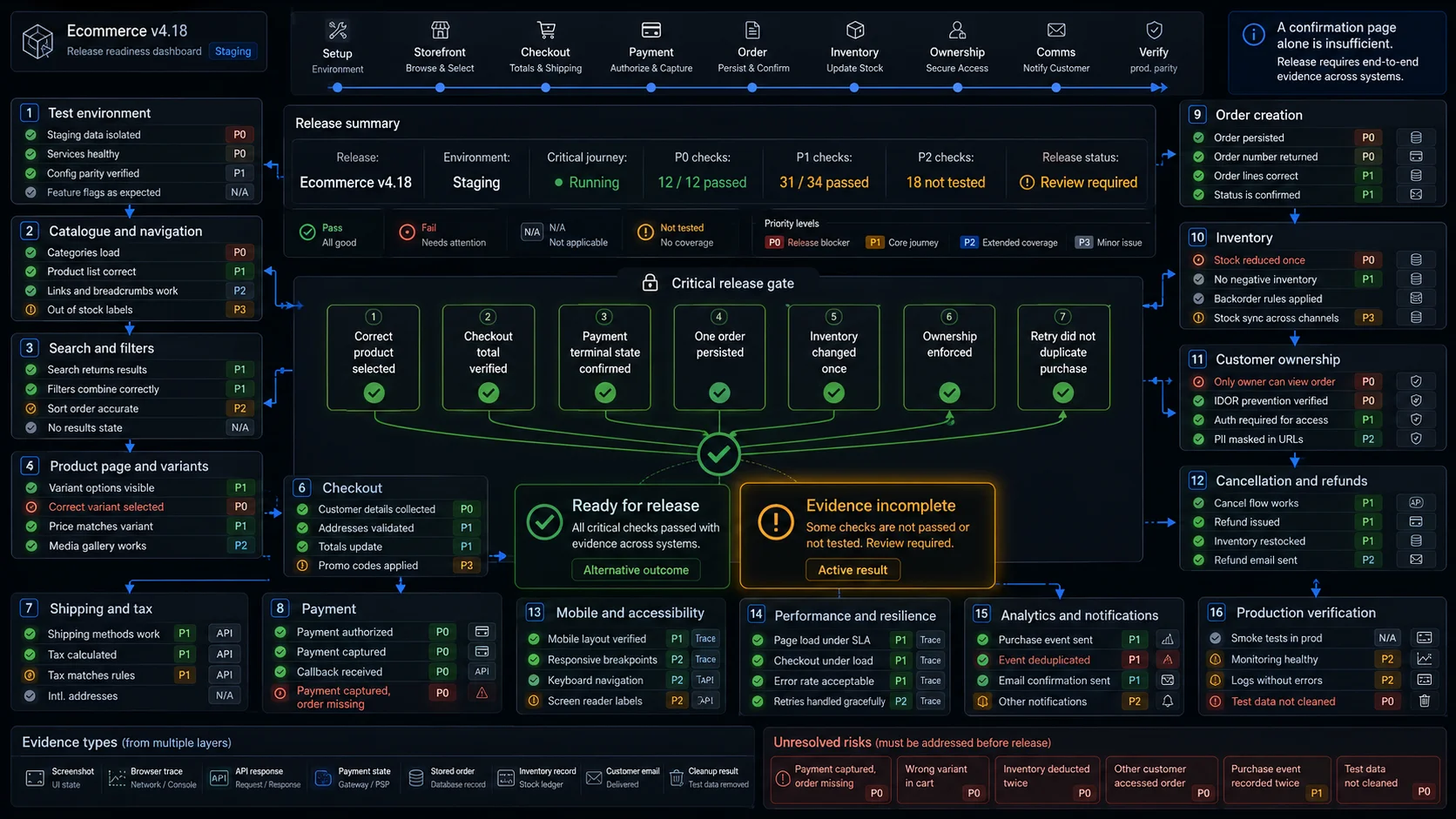
A useful ecommerce website testing checklist does more than confirm that pages load and buttons respond.
It should answer a harder release question:
Can a customer complete a purchase without the storefront, pricing engine, payment provider, order system, inventory, and customer communication disagreeing about what happened?
A checkout may look successful while the business transaction remains broken. Payment can be captured without an order. A retry can create two orders. Inventory may be reduced twice. The confirmation email may contain an old address or total.
This checklist covers the complete purchase boundary:
Product discovery
→ product selection
→ cart
→ checkout
→ payment
→ order creation
→ inventory update
→ customer confirmation
→ post-purchase state
Use it before a release, after changing checkout or payment configuration, or while reviewing an unfamiliar ecommerce application.
For the strategy behind these checks, see Ecommerce Testing.
For detailed prerequisites, steps, test data, and expected results, see Ecommerce Test Cases.
How to Use the Checklist
Do not give every row the same release weight.
Start by assigning a priority:
| Priority | Meaning | Typical decision |
|---|---|---|
| P0 | Money, order integrity, ownership, or checkout availability | Block release |
| P1 | Core discovery, pricing, stock, delivery, or account behaviour | Block or require explicit risk acceptance |
| P2 | Recoverable secondary behaviour or limited edge case | Decide according to affected users |
| P3 | Minor presentation, copy, or preference issue | Schedule separately |
Record one of four outcomes:
Pass
Fail
Not applicable
Not tested
Not applicable means the product does not support that function.
Not tested means the function exists, but no evidence was collected. Hiding an untested area under Not applicable creates false confidence.
For critical checks, retain evidence such as:
- screenshot or browser trace;
- cart and checkout response;
- payment-provider state;
- persisted order;
- inventory record;
- delivered message;
- analytics or audit event;
- cleanup result.
A confirmation page is evidence of what the browser displayed. It is not final proof of payment, order persistence, inventory, or ownership.
Critical Release Gate
Before reviewing secondary areas, run one controlled purchase from product discovery to stored order.
The release gate should prove that:
- A customer can discover a purchasable product.
- The intended product and variant enter the cart.
- The cart and checkout calculate the expected final total.
- The payment reaches the intended terminal state.
- One successful purchase creates one logical order.
- The order contains the correct owner, lines, quantities, and total.
- Inventory changes according to the chosen reservation rule.
- Retry does not create another charge or order.
- Another customer cannot access the order.
- The confirmation shown to the customer matches the persisted order.
- Test orders and reservations can be cleaned safely.
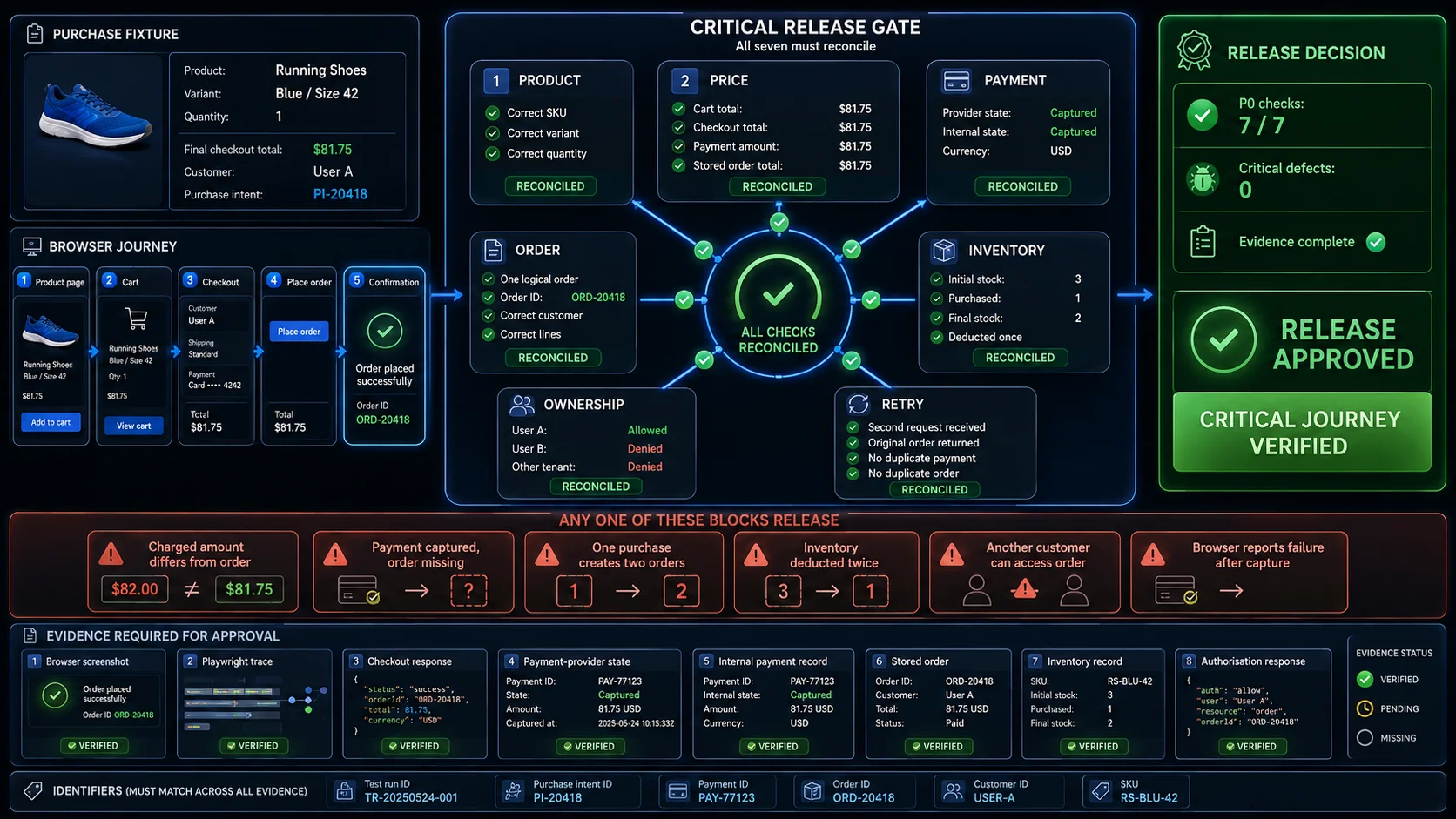
Release blockers include:
- charged amount differs from the stored order total;
- payment is captured but no recoverable order exists;
- one purchase intent creates multiple orders;
- inventory is deducted more than once;
- another customer can view or modify the order;
- the browser reports failure after money has already been captured without offering a recovery path.
A green checkout screen does not override those failures.
Prepare the Environment and Test Data
Uncontrolled data creates ambiguous results.
A test may fail because another suite purchased the last unit. A promotion may expire during execution. A new product may not have reached the search index yet. Before testing the storefront, establish a small catalogue whose business state is known.
Recommended fixtures include:
| Fixture | Purpose |
|---|---|
| Standard in-stock product | Main successful purchase |
| Last-unit product | Reservation and concurrency |
| Out-of-stock product | Availability handling |
| Multi-variant product | SKU and option selection |
| Discount-eligible product | Promotion calculation |
| Discount-excluded product | Eligibility boundary |
| Taxable and non-taxable products | Tax rules |
| Digital product | Fulfilment without shipping |
| Restricted or heavy product | Shipping restrictions |
| Marketplace product | Seller and split-order behaviour |
Also prepare:
- guest and registered customers;
- different customer groups;
- supported and unsupported addresses;
- shipping regions;
- currencies and locales;
- valid, expired, and ineligible promotions;
- controlled payment outcomes;
- test notification recipients;
- order and inventory cleanup procedures.
A useful fixture describes business state, not only a display name:
{
  "sku": "TEST-LAST-UNIT",
  "currency": "USD",
  "unitPrice": 5000,
  "availableQuantity": 1,
  "promotionEligible": false,
  "shippingClass": "standard",
  "expectedTaxRegion": "US-CA"
}
Before execution, confirm that:
- all services point to the intended environment;
- test accounts cannot access production privileges;
- test products are clearly identifiable;
- payment success, decline, pending, and required-action states can be reproduced;
- search indexing delay is understood;
- time-dependent promotions and reservations remain predictable;
- test data is not shared with unrelated suites;
- mocks, sandboxes, and real integrations are clearly distinguished.
A mocked payment success proves how the application reacts to the mock. It does not prove that the real provider callback is configured correctly.
Storefront and Product Discovery
Catalogue and Navigation
Customers must be able to reach products that are currently eligible for sale.
Check that:
- main navigation exposes the intended categories;
- category links open the correct listing;
- published products appear where expected;
- deleted, restricted, or unpublished products remain hidden;
- direct product URLs follow the same visibility rules;
- product cards link to the correct product;
- card price and availability match the product page;
- pagination does not omit or duplicate products;
- infinite scroll remains stable after additional loads;
- customer group, region, and locale expose the correct catalogue;
- secondary widgets cannot block product discovery.
Do not stop at “the category rendered.” Where practical, compare the returned product identifiers with the controlled catalogue.
Search, Filters, and Sorting
Search succeeds only when the expected products can be found and the result set remains correct after refinement.
Verify that:
- an exact product name returns the intended item;
- supported SKU searches return the correct product;
- partial queries produce relevant results;
- whitespace, case, and supported punctuation are handled consistently;
- unpublished products do not appear;
- newly published products appear within the expected indexing window;
- suggestions lead to relevant result pages;
- zero-result queries provide a useful recovery path;
- each filter changes the actual product set correctly;
- combined filters apply all selected constraints;
- filter counts agree with available results;
- removing one filter preserves the others;
- filtering survives pagination or infinite scroll where expected;
- Back navigation restores the previous search state;
- price sorting uses comparable current prices;
- alphabetical sorting follows the intended locale;
- products do not move unpredictably between pages during one session.
The failure to watch for is false refinement: the interface shows a selected filter, but the returned products do not actually satisfy it.
Product Pages and Variants
The product page should describe the exact sellable unit that the cart receives.
Confirm:
- product name, SKU, price, and availability are current;
- selected variants update product identity correctly;
- variant-specific price and stock change together;
- unavailable combinations cannot be purchased;
- required options are validated before adding to cart;
- optional customisation survives in the cart;
- minimum and maximum quantities are enforced;
- direct requests cannot bypass stock or quantity limits;
- customer group and region apply the correct price;
- product recommendations and reviews cannot block purchase controls;
- Add to cart uses the product state currently shown to the customer.
A common defect is subtle: the interface highlights one size or colour while the cart stores the default variant.
For the last unit, compare visible availability with the actual reservation result. Two customers may both see In stock; only one should be allowed to complete the purchase.
Cart and Checkout
Cart, Pricing, and Promotions
The cart is both a state container and a calculation engine.
The core checks are:
- the correct SKU, variant, quantity, and unit price are stored;
- adding the same item follows the chosen merge rule;
- quantity changes update line and order totals;
- removing a product updates totals and item count;
- cart state survives ordinary navigation;
- guest and authenticated carts merge according to policy;
- current price and stock are revalidated at the intended point;
- item and order discounts apply only to eligible products;
- expired or ineligible coupons are rejected clearly;
- promotions do not stack unless stacking is allowed;
- removing a discount restores the correct total;
- credits and gift cards respect balance and minimum-payment rules;
- tax and shipping estimates use current cart data;
- currency rounding remains consistent;
- repeated clicks do not add unintended quantities;
- direct API requests cannot bypass pricing or eligibility rules.
Record the total by component:
Subtotal
− item discounts
− order discounts
− credits
+ shipping
+ tax
=
final payable total
A final-total assertion can reveal a mismatch. Component-level values explain why it happened.
Address, Shipping, and Tax
Checkout converts a reversible cart into a business transaction. The customer should see the exact items and amount that will be submitted.
Confirm:
- checkout opens with the current cart lines and total;
- guest and authenticated flows preserve the cart;
- required fields are identified and validated;
- errors explain how to recover;
- valid values remain after a temporary failure;
- saved addresses belong to the current customer;
- unsupported regions are rejected clearly;
- shipping methods reflect the product and destination;
- unavailable shipping methods cannot be forced through the API;
- pickup locations and windows are eligible;
- shipping price matches the chosen method;
- tax recalculates after address or cart changes;
- tax exemptions follow the intended rule;
- currency remains stable throughout checkout;
- any material total change is displayed before payment;
- refresh and Back navigation do not corrupt checkout state;
- expired sessions recover safely;
- repeated submission does not create multiple purchase intents;
- external payment return restores the correct state;
- payment data remains inside the intended payment boundary.
There is no universal correct behaviour for every checkout timeout. The expected result depends on whether payment, stock reservation, and order creation have already occurred.
Payment, Order, and Inventory
This is the section that should receive the strictest release treatment.
Payment is not one Boolean value. A transaction may be:
Created
Pending
Requires action
Authorised
Captured
Failed
Cancelled
Expired
Refunded
Partially refunded
For every supported path, compare the provider state with the internal payment, order, and inventory records.
### Release blockers
- provider receives the wrong amount or currency;
- successful payment creates no recoverable order;
- failed payment produces a confirmed paid order;
- duplicate submission creates another charge;
- repeated callback creates another order;
- out-of-order events regress a completed transaction;
- refreshing the return URL repeats the purchase;
- order total differs from the captured amount;
- order lines differ from the accepted cart;
- inventory changes once per retry rather than once per purchase;
- customer-facing failure hides a captured payment.
The key reconciliation should look like this:
| System | Expected evidence |
|---|---|
| Payment provider | Final state, amount, currency, provider ID |
| Internal payment record | Purchase intent, provider ID, current state |
| Order | Owner, lines, quantities, total, status |
| Inventory | Initial quantity, reservation, deduction or release |
| Browser | Truthful success, pending, or recovery message |
| Notification | Current order ID, products, total, address |
| Analytics | One purchase event for the logical order |
The most dangerous state is disagreement:
Payment: Captured
Order: Missing
Inventory: Reserved
Browser: Error
That state needs a documented recovery path. It should not be left for customer support to discover manually.
A delayed confirmation email usually does not justify rolling back a valid paid order. A missing order after a captured payment does.
Customer and Post-Purchase State
Account and Order Access
After purchase, the order must remain attached to the correct identity.
Check that:
- the new order appears in the correct account;
- order history shows the persisted status and total;
- order details match the stored transaction;
- changing an order identifier does not expose another customer’s data;
- another customer cannot download the invoice or receipt;
- another tenant cannot access the order;
- guest-order access uses the intended verification mechanism;
- logout prevents access to protected order pages;
- profile changes do not rewrite historical order data unexpectedly;
- administrative changes record the responsible actor.
A page being absent from the account menu does not make its direct URL private.
Cancellation, Returns, and Refunds
The transaction remains testable after confirmation.
Review:
- cancellation eligibility by order state;
- repeated cancellation requests;
- release or return of reserved inventory;
- eligible return lines and quantities;
- full and partial refund calculation;
- duplicate refund prevention;
- provider refund state;
- internal transaction and order balance;
- customer notification;
- invoice or credit-note adjustment;
- digital access after cancellation or refund;
- subscription renewal, pause, and cancellation;
- audit trail for customer-service actions.
A refund is not complete merely because one service reports success. The provider, internal payment, order balance, customer message, and inventory policy should agree.
Experience and Resilience
Mobile and Accessibility
A responsive layout may still produce an unusable mobile checkout.
On supported mobile sizes, confirm that:
- navigation, search, filters, and sorting remain operable;
- product options can be selected;
- cart lines and totals remain understandable;
- primary actions are not hidden behind sticky elements;
- address fields behave correctly with the on-screen keyboard;
- validation remains visible;
- external payment return works;
- orientation changes do not corrupt the transaction;
- slow or unstable connections lead to a recoverable state.
Device emulation is useful for repeatable regression. It does not reproduce every physical keyboard, browser prompt, wallet, operating system, or network condition.
Accessibility checks should cover the actual purchase path:
- meaningful headings and landmarks;
- accessible control names;
- persistent form labels;
- selected and unavailable product states;
- keyboard operation;
- predictable focus;
- error identification and recovery guidance;
- announcements for changing totals and payment states;
- sufficient reflow and zoom behaviour;
- no reliance on colour alone;
- manual keyboard and assistive-technology review.
Automated accessibility findings are a regression signal. They are not complete proof of conformance.
Performance and Failure Recovery
A fast homepage does not prove that checkout will survive real transaction load.
Measure separate budgets for:
- product listings and search;
- product pages;
- cart updates;
- checkout creation;
- pricing and promotion calculation;
- inventory reservation;
- payment callback processing;
- order persistence.
Check resilience when one dependency slows down or fails:
- recommendations or analytics should not block purchase;
- slow inventory should produce a controlled result;
- tax or shipping failure should not silently submit a stale total;
- callback retry should remain idempotent;
- queue delays should not produce a false confirmation;
- cache invalidation should not leave stale price or stock indefinitely;
- campaign traffic should not oversell controlled inventory;
- loading states should distinguish active processing from a frozen interface.
Fixed sleeps do not test asynchronous reliability. Poll the authoritative state using a clear timeout and an actionable failure message.
Analytics, Notifications, and Production Monitoring
Analytics should describe the order that actually exists.
Confirm that:
- product and cart events use the correct identifiers;
- checkout-start events are not duplicated by repeated clicks;
- purchase events reference the persisted order;
- value and currency match the order;
- callback replay and refresh do not create duplicate purchase events;
- refund and cancellation events reference the original transaction;
- synthetic orders are excluded or clearly labelled;
- analytics failure cannot block checkout.
Customer communication needs the same reconciliation.
Check that:
- the intended recipient receives the message;
- order ID, products, quantities, total, address, and delivery method are current;
- a pending payment is not described as completed;
- a failed payment does not generate a paid-order confirmation;
- duplicate callbacks do not send repeated messages unexpectedly;
- cancellation and refund messages match persisted state;
- links lead to authorised destinations;
- delivery failure is visible to operations.
Some failures only appear in production because of DNS, CDN, credentials, caches, provider routing, or environment variables.
A safe production monitor should use:
- synthetic accounts;
- clearly marked products;
- controlled payment behaviour;
- fulfilment suppression;
- test-order labels;
- controlled notification recipients;
- analytics exclusion;
- automatic cancellation and cleanup;
- a deliberate low frequency.
It must not consume scarce stock, trigger shipment, distort revenue reports, generate support work, or affect fraud and recommendation systems.
Evidence and Automation
For the critical purchase path, keep enough evidence to reconstruct the transaction.
| Evidence | What it helps prove |
|---|---|
| Screenshot | What the customer saw |
| Playwright trace | Actions, DOM state, requests, timing |
| Cart response | SKU, quantity, price, discounts |
| Checkout response | Final amount, shipping, tax |
| Provider state | Payment lifecycle and amount |
| Internal payment | Correlation and application state |
| Stored order | Owner, lines, total, status |
| Inventory record | Reservation, deduction, release |
| Notification | Recipient and displayed data |
| Analytics event | Value and deduplication |
| Audit event | Actor and administrative action |
| Cleanup result | Test-state removal or cancellation |
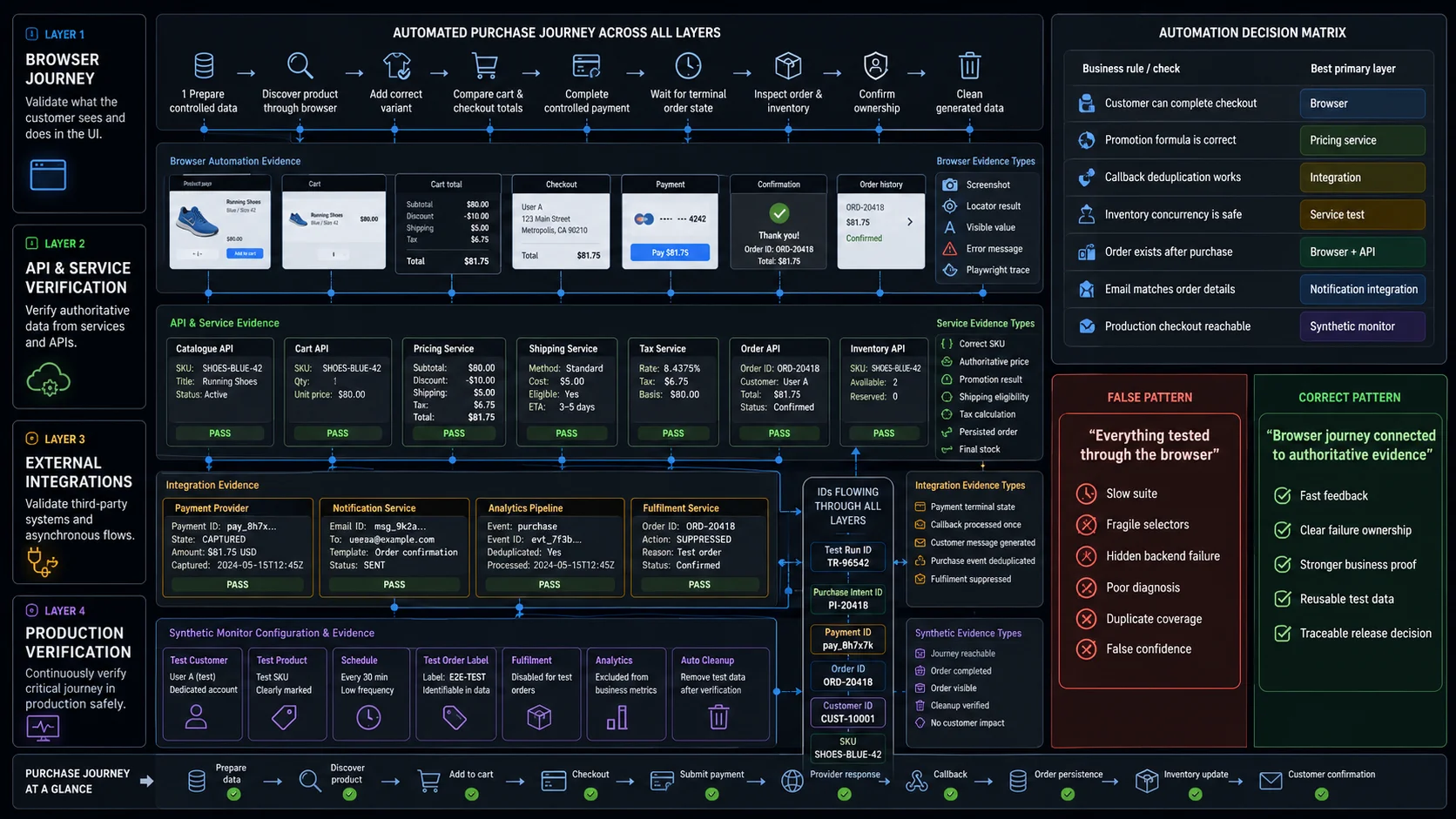
Correlate those records with shared identifiers:
Test run ID
Purchase intent ID
Payment ID
Order ID
Customer ID
SKU
Do not convert every checklist row into a browser test.
Browser automation is appropriate for:
- product discovery;
- variant selection;
- visible cart behaviour;
- checkout forms;
- payment interaction;
- confirmation;
- order access;
- responsive and keyboard behaviour.
Use lower or specialised layers for:
- promotion formulas;
- callback deduplication;
- inventory concurrency;
- order persistence;
- queue processing;
- notifications;
- analytics reconciliation;
- load and security testing.
A useful automated flow is:
Prepare controlled data
→ discover product through browser
→ add the correct variant
→ compare cart and checkout totals
→ complete controlled payment
→ wait for terminal order state
→ inspect order and inventory
→ confirm ownership
→ clean generated data
Playwright can combine browser actions with API requests, allowing one test to verify both the customer journey and backend postconditions.
Where WrightTest Fits
WrightTest provides a visual interface around Playwright for recording, editing, executing, scheduling, and debugging browser checks.
One recorded purchase journey can be reused with variables such as:
Customer type
Product
Variant
Quantity
Promotion
Address
Shipping method
Payment result
Expected order state
Representative cases include:
- guest purchase;
- returning customer;
- last item in stock;
- expired promotion;
- unsupported delivery region;
- declined payment;
- payment requiring additional action;
- mobile checkout.
Each run can retain its own inputs, screenshots, failed step, and Playwright trace.
WrightTest covers the repeatable browser layer. Payment settlement, stored orders, inventory, notifications, and analytics still require the appropriate API, integration, administrative, or database evidence.
Final Release Decision
Do not approve a release simply because most rows are green.
Start with failed and untested P0 and P1 checks. Then consider the affected customers, markets, payment methods, products, and integrations.
A defensible release decision states:
The critical purchase journey passed for the supported customer, product, payment, shipping, and device combinations. The accepted total matched the payment and persisted order, one logical order was created, inventory changed once, ownership was enforced, and retry did not duplicate the transaction.
A weak decision states:
Checkout looked fine.
The difference is evidence.