
Ecommerce Testing
Product Page Testing: Verify Product Data, Variants, Price, and Stock
Verify ecommerce product pages by testing product data, selected variants, SKU resolution, current price, availability, quantity rules, media, accessibility and add-to-cart evidence.
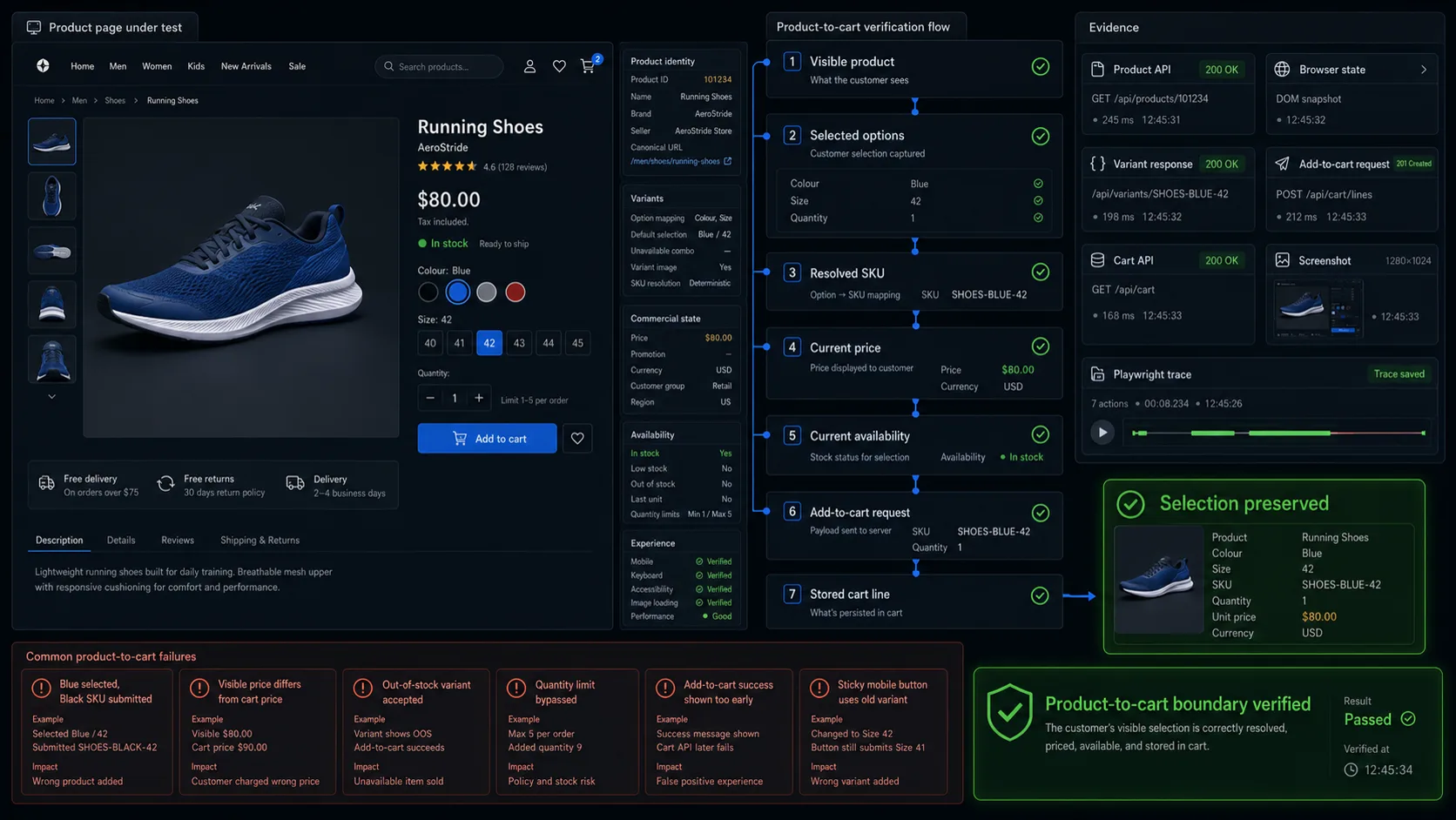
A customer opens a product page for running shoes, selects Blue / Size 42, and clicks Add to cart.
The page shows:
Colour: Blue
Size: 42
Price: $80.00
Availability: In stock
The cart receives:
SKU: SHOES-BLACK-40
Colour: Black
Size: 40
Price: $75.00
Nothing crashed. The Add-to-cart request returned successfully. The cart even contains a product.
The transaction is still wrong.
Product page testing must prove that the item presented to the customer is the same sellable item accepted by the cart:
Visible product
→ selected options
→ resolved SKU
→ current price
→ current availability
→ cart request
→ stored cart line
This is the boundary covered by this article. Checkout, payment, order creation, and post-purchase processing belong to later stages of the ecommerce journey.
For the wider testing strategy, see Ecommerce Testing.
For release-level coverage across the complete purchase flow, use the Ecommerce Website Testing Checklist.
For the broader test library, see Ecommerce Test Cases.
What Product Page Testing Must Prove
A catalogue page usually identifies a product family. The product page resolves the exact item the customer intends to buy.
For a simple product, this may mean one SKU and one price.
For a configurable product, the final item may depend on:
- colour;
- size;
- material;
- capacity;
- subscription plan;
- licence type;
- seller;
- customer group;
- region;
- bundle composition.
A useful product-page test connects five states:
| State | Example |
|---|---|
| Product family | Running Shoes |
| Selected options | Blue, size 42 |
| Resolved identity | SHOES-BLUE-42 |
| Commercial state | $80.00, available |
| Accepted cart line | SHOES-BLUE-42, quantity 1, $80.00 |
The core invariant is:
The product identity, selected options, price, availability, and quantity accepted by the customer must match the item submitted to and stored in the cart.
In practice, four checks provide most of the value:
- Selected options resolve to the correct SKU.
- Visible price matches the authoritative cart price.
- Stale or unavailable stock is handled truthfully.
- The stored cart line matches the customer’s final selection.
A broken review carousel is worth fixing. It is not equivalent to adding the wrong SKU.
Define the Product Contract and Test Data
Before writing automated tests, document which systems own product identity, price, and inventory.
A controlled product contract might look like this:
{
  "productId": "PROD-20418",
  "slug": "running-shoes",
  "name": "Running Shoes",
  "selectedOptions": {
    "colour": "Blue",
    "size": "42"
  },
  "sku": "SHOES-BLUE-42",
  "currency": "USD",
  "unitPrice": 8000,
  "availableQuantity": 3,
  "minimumQuantity": 1,
  "maximumQuantity": 3,
  "customerGroup": "retail",
  "region": "US",
  "purchasable": true
}
Representing money in minor units can make comparisons explicit and avoid accidental floating-point values such as 79.999999.
The contract should answer:
- Which service owns the product and variant identifiers?
- Which service calculates the current price?
- Which service owns available inventory?
- At what stage is stock reserved?
- Can price or stock change after the page loads?
- Does Add to cart revalidate the product state?
- Can region or customer group change the offer?
- Are unavailable combinations hidden, disabled, or shown as unavailable?
- How are bundles and customisations represented in the cart?
Without these rules, a test can detect a mismatch without knowing which state is authoritative.
Controlled product fixtures
Avoid using random products from a shared catalogue for the core regression suite.
A product can change because of imports, merchandising, another test, or an administrator. Controlled fixtures make failures reproducible.
Prepare at least:
| Fixture | Purpose |
|---|---|
| Simple product | Basic identity, price, and Add-to-cart flow |
| Multi-variant product | Option selection and SKU resolution |
| Unavailable variant | Disabled and server-rejected combinations |
| Last-unit variant | Stock boundary and concurrency |
| Out-of-stock product | Purchase prevention |
| Promotion-eligible product | Discount presentation |
| Promotion-excluded product | Eligibility boundary |
| Customer-group product | Segmented visibility or pricing |
| Region-restricted product | Location-based purchasing rules |
| Product with media gallery | Image and variant-media behaviour |
A multi-variant fixture should describe each supported combination:
{
  "product": "Running Shoes",
  "variants": [
    {
      "colour": "Blue",
      "size": "41",
      "sku": "SHOES-BLUE-41",
      "price": 8000,
      "stock": 4
    },
    {
      "colour": "Blue",
      "size": "42",
      "sku": "SHOES-BLUE-42",
      "price": 8000,
      "stock": 3
    },
    {
      "colour": "Black",
      "size": "42",
      "sku": "SHOES-BLACK-42",
      "price": 8500,
      "stock": 0
    }
  ]
}
This lets the test verify the actual option-to-SKU mapping instead of checking only whether a button appears selected.
Product Identity and Content
The product page should describe the same product returned by the authoritative catalogue source.
For commercially important fields, compare the product API, visible page, and cart request.
| Layer | Example |
|---|---|
| Product API | SHOES-BLUE-42 |
| Visible page | Blue, size 42 |
| Cart request | SHOES-BLUE-42 |
Verify the fields relevant to the product:
- product name;
- product ID;
- SKU or model number;
- brand;
- seller;
- description;
- specifications;
- price and currency;
- availability;
- fulfilment type;
- return or delivery information;
- canonical URL.
Do not assert a visible SKU merely to create another UI check. When SKU is not customer-facing, compare the selected options with the cart request or cart API instead.
Incomplete content
Optional content should fail without disabling the purchase path.
Test products with:
- no secondary image;
- missing variant image;
- empty optional specification;
- unavailable reviews;
- unavailable recommendations;
- missing compare-at price;
- delayed delivery estimate.
A recommendation outage should not prevent a customer from selecting and buying a valid product.
Required commercial data needs stricter handling. The page should not invent a price, stock state, or product identity when the authoritative value is unavailable.
Variant and SKU Resolution
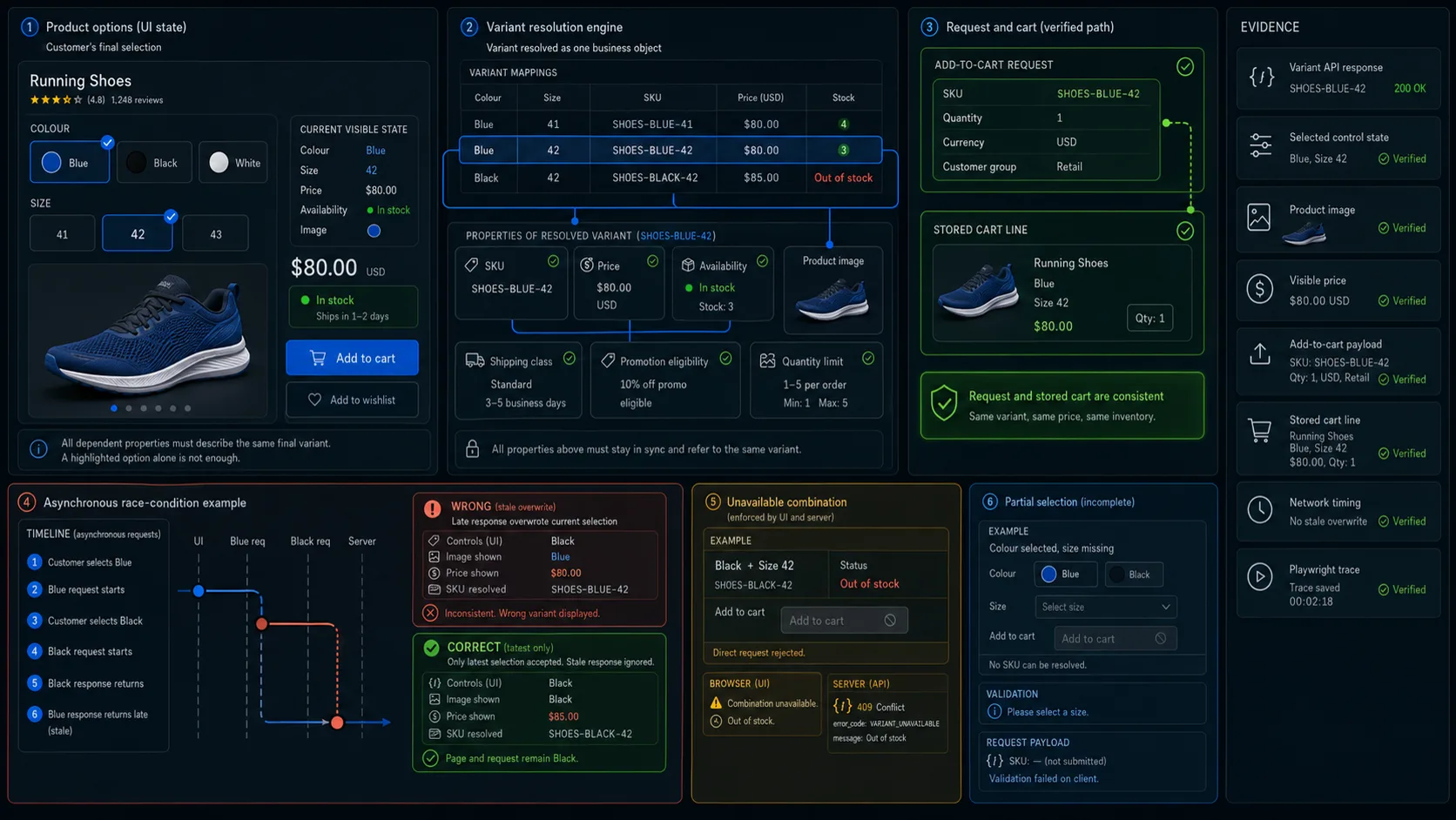
Variant selection is usually the highest-risk part of a configurable product page.
Changing an option may affect:
SKU
Price
Availability
Image
Shipping class
Promotion eligibility
Purchase limit
Seller
Delivery estimate
Treat the variant as a resolved business object, not merely a highlighted colour or size button.
Initial and partial selection
Determine whether the page:
- starts with no selection;
- preselects a documented default;
- restores a selection from the URL;
- restores a previous customer choice;
- automatically selects the only available combination.
The behaviour must be visible and deliberate.
A hidden default is dangerous. When Blue appears selected but the request submits Black, the customer has little chance to notice the error.
For a product requiring both colour and size, selecting only colour should not silently resolve an unrelated default size unless this is an explicit product rule.
Check that:
- incomplete selection is communicated;
- Add to cart remains unavailable or shows a specific validation error;
- no unintended SKU is submitted;
- completing the selection updates all dependent fields.
Unavailable combinations
A product can handle an unavailable combination in several valid ways:
- hide it;
- disable it;
- show it as unavailable;
- offer a back-in-stock action;
- keep it visible but unavailable in the current region.
The server must enforce the same restriction.
A disabled browser control does not prevent a modified request from submitting an unavailable SKU.
Race conditions during rapid selection
Variant responses can arrive in a different order from the customer’s clicks:
Customer selects Blue
→ Blue request starts

Customer selects Black
→ Black request starts

Black response returns
→ page shows Black

Blue response returns late
→ page incorrectly returns to Blue data
Delay variant responses and switch options rapidly.
The final SKU, price, stock, image, and cart request must belong to the customer’s latest accepted selection.
This race condition is easy to miss in a normal happy-path test because every response usually returns quickly and in order.
Price, Availability, and Quantity
A product page may display:
- regular price;
- sale price;
- customer-group price;
- subscription price;
- quantity-tier price;
- tax-inclusive or tax-exclusive price;
- marketplace seller price;
- minimum bundle price.
A currency symbol alone proves very little.
Verify the amount together with:
- selected variant;
- currency;
- customer group;
- region;
- seller;
- tax presentation;
- promotion eligibility;
- quantity conditions.
Variant and promotion pricing
When selecting another variant:
- The displayed price should update.
- The resolved SKU should update where required.
- Add to cart should submit the selected item.
- The cart should apply the authoritative price.
- Returning to the original variant should restore its price.
The browser should not be trusted as the owner of the final price. Compare what the customer saw with what the cart accepted.
For promotions, check that:
- expired discounts are removed;
- excluded variants do not inherit the offer;
- percentage labels match the real calculation;
- customer-specific discounts are not exposed to ineligible users;
- minimum quantity requirements are visible;
- campaign text does not promise a price the cart rejects.
The product page may display an estimate. The cart still needs to reconcile the authoritative commercial result.
Availability changes
Availability is not always a single inStock flag.
Common states include:
In stock
Low stock
Backorder
Preorder
Out of stock
Region unavailable
Customer restricted
Temporarily unavailable
A page can load with one unit available, then lose that unit before the customer clicks Add to cart.
The expected result depends on the reservation policy:
- reject the addition;
- add the line but reject later;
- create a temporary reservation;
- offer a backorder;
- choose another fulfilment source.
The important point is that the application returns a truthful state. It should not confirm availability that no longer exists.
Quantity boundaries
Test the values that can cross the business boundary:
- zero;
- negative quantity;
- minimum minus one;
- exact minimum;
- exact maximum;
- maximum plus one;
- available stock;
- available stock plus one;
- decimal quantity;
- pasted text;
- non-numeric input;
- repeated increment clicks.
The server should enforce the same rule as the browser.
Silently changing 11 to 10 is usually weaker than rejecting the value and explaining the limit.
Last-unit concurrency
Open the same last-unit variant in two independent customer sessions.
Allow both customers to see the item, then perform the action that triggers reservation according to the product’s actual policy.
Verify:
- inventory does not become negative;
- only the permitted transaction succeeds;
- no duplicate reservation remains;
- the losing customer receives a truthful result;
- stale availability eventually updates;
- the successful transaction can be identified in inventory records.
The browser can reproduce the two customer journeys. Inventory and order records provide the decisive evidence.
The Add-to-Cart Boundary
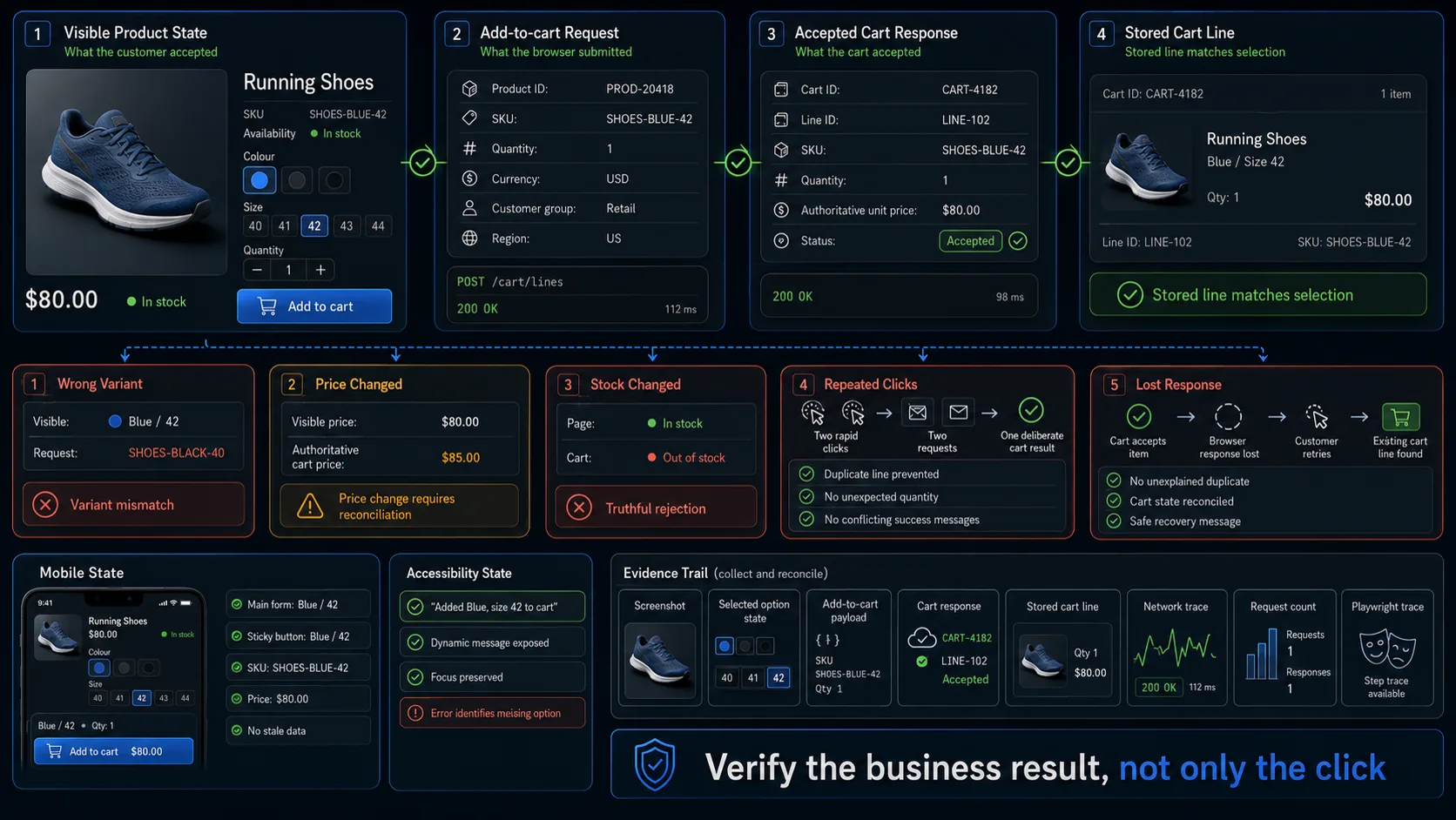
The most important product-page assertion happens after the customer clicks Add to cart.
The accepted cart line should match:
Product ID
SKU
Selected options
Seller
Quantity
Unit price
Currency
Customisation
Subscription choice
Bundle components
A direct comparison makes the expected result clear:
| Product page | Cart |
|---|---|
| Blue | Blue |
| Size 42 | Size 42 |
SHOES-BLUE-42 | SHOES-BLUE-42 |
| Quantity 1 | Quantity 1 |
$80.00 | $80.00 |
| Retail customer | Retail price |
A success toast is not enough. Verify the accepted request or resulting cart state.
Repeated clicks and delayed requests
Rapid clicks during a slow request can create:
- duplicate lines;
- unintended quantity;
- conflicting messages;
- multiple requests;
- a button that never recovers.
The correct outcome depends on the cart policy. It may be one line with quantity 1, one merged line with a deliberate quantity, or one accepted request while duplicate submissions are ignored.
The outcome should not depend on how many times a frustrated customer clicked during a delayed response.
Failures and lost responses
Simulate:
- cart service unavailable;
- stale product version;
- changed price;
- changed stock;
- invalid variant;
- expired session;
- lost network response.
The message shown to the customer should match the actual cart state.
Do not display Added to cart before the cart has accepted and stored the line.
A difficult case occurs when the cart accepts the item but the browser loses the response. Retrying should reconcile the existing cart rather than creating an unexplained duplicate.
The recovery message should answer practical questions:
- Was the item added?
- Was the selected variant preserved?
- Did the price change?
- Is another attempt safe?
- What should the customer do next?
Customer and Regional Restrictions
The same product may have different commercial states for different customers.
Relevant context can include:
- authenticated or guest state;
- customer group;
- organisation or tenant;
- subscription status;
- country;
- delivery region;
- sales channel;
- marketplace seller.
Test the controlled product under each supported context.
Compare:
- visibility;
- price;
- currency;
- stock source;
- quantity limit;
- promotion eligibility;
- delivery eligibility;
- purchase controls.
A restricted product should not become purchasable through a copied URL or modified Add-to-cart request.
Client-side visibility is not an authorisation boundary.
Product Page Experience
Images, responsive layout, accessibility, and performance matter because they affect whether customers can understand and configure the product.
They should not overshadow the commercial contract, but they should not be treated as decoration either.
Images and media
Test the primary image, thumbnails, gallery navigation, zoom, video, and variant-specific media where supported.
Focus on commercially meaningful behaviour:
- the selected colour shows the intended product;
- changing size does not unexpectedly reset colour media;
- a late image response does not replace the current variant;
- the cart thumbnail matches the selected item;
- missing secondary media does not block purchase;
- image loading does not create disruptive layout movement;
- responsive images are sized for the rendered device.
A failed image should not remove the product title, price, options, or Add-to-cart control.
Accessibility and keyboard use
Product pages often contain custom controls such as colour swatches, size selectors, quantity steppers, galleries, accordions, and sticky purchase panels.
Check that:
- each option has an accessible name;
- option groups have descriptive labels;
- selected state is exposed;
- unavailable state is exposed;
- colour is not the only identifier;
- focus remains visible;
- keyboard users can configure the product;
- validation identifies the missing selection;
- important price, stock, and cart updates are perceivable;
- variant images retain meaningful alternative text.
A blue circle without an accessible name does not communicate the option to every customer.
Complete the main product flow using only the keyboard:
Open product
→ inspect options
→ select variant
→ change quantity
→ add to cart
→ inspect confirmation or mini-cart
Focus should not disappear or return to an unrelated element when a mini-cart or dialog closes.
Mobile behaviour
On mobile, images, product options, price, stock, and Add to cart may be separated by long content and sticky controls.
Check that:
- variant selectors remain usable;
- sticky controls do not cover options;
- the sticky Add-to-cart button uses the current selection;
- price and stock remain visible at the decision point;
- validation messages are not hidden;
- orientation changes preserve the product state;
- image zoom can be closed normally;
- the on-screen keyboard does not block customisation or quantity input.
A common mobile defect is a sticky button holding an older SKU or price than the main product form.
Performance and dependency failures
Product pages often combine large media, pricing, inventory, recommendations, reviews, personalisation, and analytics.
Measure the page as a purchasing surface, not only as a URL that eventually finishes loading.
Verify:
- product identity and price appear without waiting for secondary widgets;
- Add to cart is enabled only when the required state is ready;
- variant selection remains responsive;
- recommendations or reviews cannot block purchase;
- slow inventory produces a controlled state;
- delayed variant responses cannot overwrite the latest choice;
- image loading does not cause disruptive movement;
- repeated requests are cancelled or reconciled safely.
A fast initial render is not enough when selecting a size freezes the page or leaves the purchase button using stale data.
Product Structured Data
Where the page publishes Product structured data, compare it with the visible and authoritative product state.
Relevant fields can include:
- name;
- image;
- SKU;
- brand;
- price;
- currency;
- availability;
- rating;
- shipping information;
- return information.
Check that:
- structured product identity matches the page;
- price and currency describe the intended offer;
- availability is not stale;
- review values use the correct source;
- canonical and structured URLs agree;
- restricted or unpublished products do not expose misleading offers;
- variant representation follows the site’s chosen search strategy.
Structured data is another representation of the product. It should not contradict what the application is actually selling.
Core Product Page Test Cases
The following 20 cases provide focused product-page coverage without repeating the complete ecommerce test library.
Identity and Variants
| ID | Pri. | Scenario | Expected result | Evidence |
|---|---|---|---|---|
| PDP-001 | P1 | Open a controlled product from its catalogue card | Product identity, price, and availability match the linked catalogue item | Catalogue and product responses |
| PDP-002 | P1 | Open a direct product URL | The intended product loads without bypassing visibility rules | HTTP and product state |
| PDP-003 | P1 | Select a non-default variant | Options resolve the correct SKU, price, stock, and media | Variant response and page state |
| PDP-004 | P1 | Leave one required option unselected | No unintended default SKU is submitted | Validation and cart request |
| PDP-005 | P1 | Select an unavailable combination | UI and server both prevent purchase | UI state and server response |
| PDP-006 | P1 | Change variants rapidly under delayed responses | Final state belongs to the latest selection | Network order and page state |
| PDP-007 | P1 | Restore a variant from a URL | URL, selected controls, SKU, and price agree | URL and resolved product state |
Price, Stock, and Quantity
| ID | Pri. | Scenario | Expected result | Evidence |
|---|---|---|---|---|
| PDP-008 | P1 | Select a higher-priced variant | Page and cart use the selected variant price | Product and cart comparison |
| PDP-009 | P1 | Open an expired promotion | Expired pricing is removed or rejected truthfully | Pricing response |
| PDP-010 | P1 | Change currency or customer context | Page and cart stay in the same commercial context | Price, identity, and cart line |
| PDP-011 | P1 | Enter quantity boundaries | Valid values pass; invalid values are rejected without silent corruption | Validation and cart state |
| PDP-012 | P0 | Attempt to purchase the final unit from two sessions | The reservation policy allows only the documented valid outcome | Inventory and order records |
| PDP-013 | P1 | Change stock after the page loads | Add to cart revalidates and returns a truthful result | Inventory and cart response |
Add to Cart and Restrictions
| ID | Pri. | Scenario | Expected result | Evidence |
|---|---|---|---|---|
| PDP-014 | P0 | Add the selected variant | Cart line matches SKU, options, quantity, price, and currency | Add-to-cart response and cart |
| PDP-015 | P1 | Click Add to cart repeatedly during a delayed response | One deliberate cart result is produced according to policy | Requests and final cart state |
| PDP-016 | P1 | Lose the response after the cart accepts the item | Reopening or retrying reconciles the existing cart state | Cart ID and line state |
| PDP-017 | P1 | Submit a restricted product through a modified request | Server rejects the purchase under the same eligibility rules | Authorisation and cart response |
Experience
| ID | Pri. | Scenario | Expected result | Evidence |
|---|---|---|---|---|
| PDP-018 | P1 | Configure and add the product using keyboard only | Controls remain labelled, operable, and correctly focused | Keyboard run |
| PDP-019 | P1 | Complete the flow on the main mobile viewport | Media, options, price, quantity, and Add to cart remain usable | Mobile trace and screenshots |
| PDP-020 | P2 | Load the page with slow images and failed recommendations | Core product data and purchase controls remain stable | Network and performance trace |
Automating Product Page Tests with Playwright
Product pages are strong candidates for browser automation because their critical state is visible and interactive.
The browser test should still inspect the resulting cart state.
A useful automated flow is:
Prepare controlled product
→ open product page
→ select options
→ verify resolved state
→ submit Add to cart
→ inspect the accepted response
→ compare the stored cart line
Example:
import { test, expect } from '@playwright/test';

test('selected product variant reaches the cart unchanged', async ({
  page,
  request,
}) => {
  const fixtureResponse = await request.post('/test-support/products', {
    data: {
      fixture: 'multi-variant-product',
      variants: [
        {
          colour: 'Blue',
          size: '42',
          sku: 'SHOES-BLUE-42',
          price: 8000,
          stock: 3,
        },
      ],
    },
  });

  expect(fixtureResponse.ok()).toBeTruthy();

  const product = await fixtureResponse.json();

  await page.goto(`/products/${product.slug}`);

  await expect(
    page.getByRole('heading', { name: product.name }),
  ).toBeVisible();

  await page
    .getByRole('group', { name: 'Colour' })
    .getByRole('radio', { name: 'Blue' })
    .check();

  await page
    .getByRole('group', { name: 'Size' })
    .getByRole('radio', { name: '42' })
    .check();

  await expect(page.getByTestId('product-sku'))
    .toHaveText('SHOES-BLUE-42');

  await expect(page.getByTestId('product-price'))
    .toHaveText('$80.00');

  const [cartResponse] = await Promise.all([
    page.waitForResponse((response) =>
      response.url().includes('/api/cart') &&
      response.request().method() === 'POST',
    ),
    page
      .getByRole('button', { name: 'Add to cart' })
      .click(),
  ]);

  expect(cartResponse.ok()).toBeTruthy();

  const acceptedLine = await cartResponse.json();

  expect(acceptedLine).toEqual(
    expect.objectContaining({
      sku: 'SHOES-BLUE-42',
      quantity: 1,
      unitPrice: 8000,
      currency: 'USD',
    }),
  );

  await page
    .getByRole('link', { name: 'Cart' })
    .click();

  const cartLine = page
    .getByRole('listitem')
    .filter({ hasText: product.name });

  await expect(cartLine.getByText('Blue')).toBeVisible();
  await expect(cartLine.getByText('Size 42')).toBeVisible();
  await expect(cartLine.getByText('$80.00')).toBeVisible();
});
The endpoint, controls, and response structure are application-specific.
The evidence pattern is not:
Select option
→ highlighted control
→ test passed
It is:
Visible selection
→ resolved product state
→ accepted cart request
→ stored cart line
Avoid fixed sleeps for variant and price updates. Wait for the relevant response or observable state.
Data-driven variant coverage
Keep one stable journey and vary the product data:
const cases = [
  {
    colour: 'Blue',
    size: '41',
    expectedSku: 'SHOES-BLUE-41',
    expectedPrice: '$80.00',
    expectedAvailability: 'In stock',
  },
  {
    colour: 'Blue',
    size: '42',
    expectedSku: 'SHOES-BLUE-42',
    expectedPrice: '$80.00',
    expectedAvailability: 'In stock',
  },
  {
    colour: 'Black',
    size: '42',
    expectedSku: 'SHOES-BLACK-42',
    expectedPrice: '$85.00',
    expectedAvailability: 'Out of stock',
  },
];
Useful variables include:
- product;
- colour;
- size;
- expected SKU;
- expected price;
- quantity;
- customer group;
- region;
- expected stock state;
- expected cart result.
Duplicating the complete browser journey for each variant increases maintenance without improving the evidence.
Where WrightTest Fits
WrightTest provides a visual interface around Playwright for recording, editing, running, scheduling, and debugging browser checks.
A team can record one product-page journey:
Open product
→ select variant
→ validate product state
→ add to cart
→ inspect cart line
Fixed values can then be replaced with variables:
Product
Colour
Size
Expected SKU
Expected price
Expected availability
Quantity
Customer group
Region
Expected cart result
The same journey can cover valid variants, unavailable combinations, customer-specific prices, last-unit products, quantity limits, slow responses, failed additions, and mobile layouts.
Each run can retain its inputs, failed step, screenshots, and Playwright trace.
WrightTest covers the repeatable browser journey. Authoritative price rules, inventory concurrency, eligibility enforcement, and cart persistence still require the appropriate API, integration, service, or database evidence.
Final Acceptance Rule
A product page should not pass because:
The page looked correct and the Add-to-cart button worked.
A stronger acceptance result is:
The page presented the intended product, resolved the customer’s selected options to the correct sellable item, displayed the current price and availability, enforced quantity and eligibility rules, submitted the same item to the cart, and stored a matching cart line.
That is the boundary product page testing must verify.