
Ecommerce Testing
Shopping Cart Testing: Verify Items, Pricing, Promotions, and Persistence
Verify shopping carts by testing cart lines, quantities, totals, promotions, guest persistence, account-cart merging, stale stock, ownership and checkout handoff.
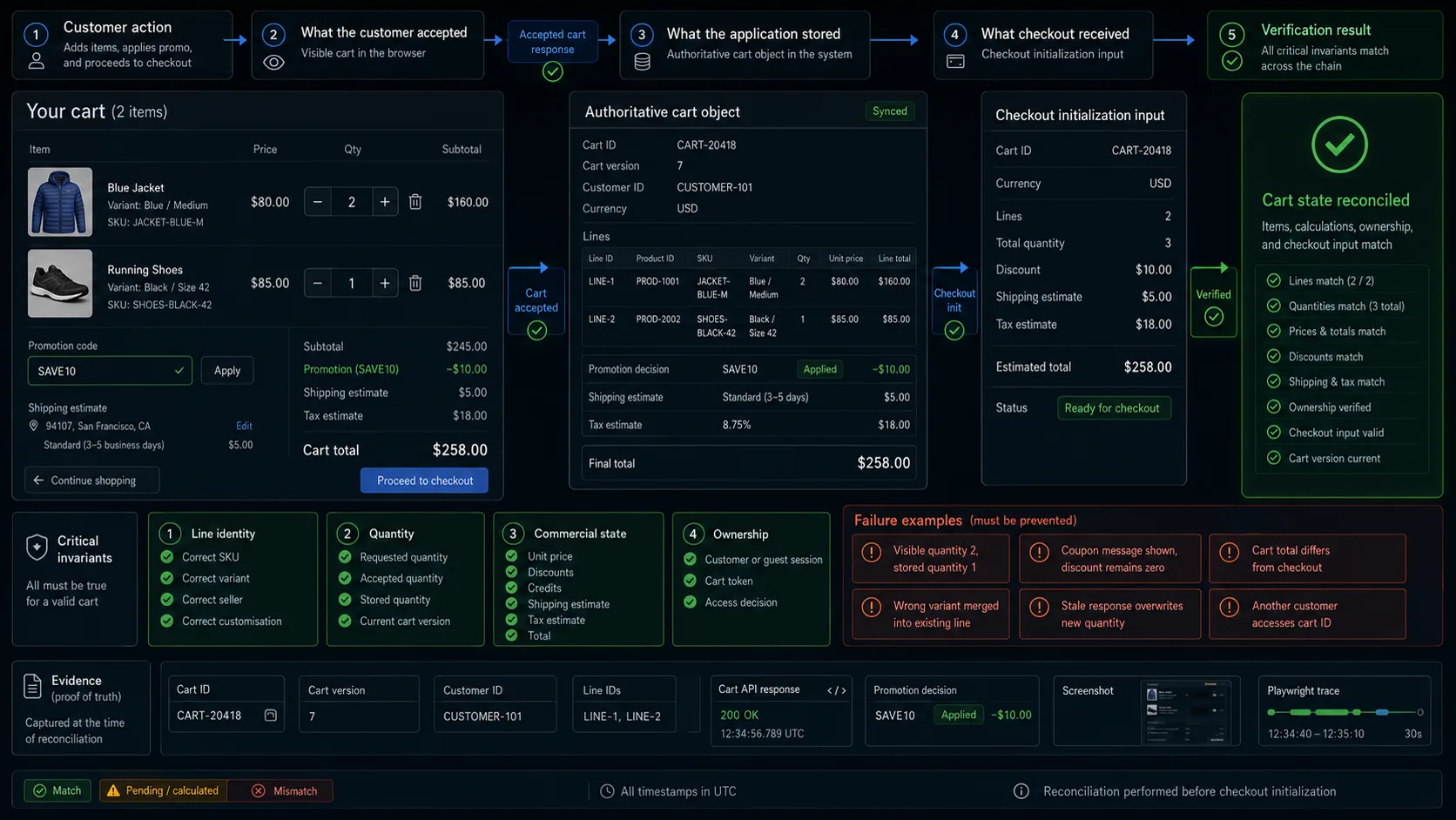
A customer adds one jacket priced at $80.00, changes the quantity to two, and applies a $10.00 discount.
The cart displays:
Quantity: 2
Subtotal: $160.00
Discount: −$10.00
Total: $150.00
The customer clicks Checkout.
Checkout receives:
Quantity: 1
Subtotal: $80.00
Discount: $0.00
Total: $80.00
Every cart control appeared to work. The quantity changed. The coupon produced a success message. The total looked correct.
None of those changes reached the authoritative cart.
Shopping cart testing must connect the customer-visible state with the business object stored by the application:
Selected product
→ cart line
→ quantity
→ price
→ promotions
→ estimated charges
→ stored cart
→ checkout input
The purpose of cart testing is not to confirm that a list of products appears on screen. It is to prove that the application preserves the intended products, configurations, quantities, commercial rules, ownership, and totals until checkout begins.
For the wider strategy, see Ecommerce Testing.
For the product-to-cart boundary, see Product Page Testing.
For release-level coverage across the full purchase flow, use the Ecommerce Website Testing Checklist.
For a broader test library, see Ecommerce Test Cases.
What Shopping Cart Testing Must Prove
A shopping cart is not only a visual list. It is a server-side business object that may contain:
- a cart identifier;
- a customer or anonymous session;
- product and variant identifiers;
- quantities;
- unit prices;
- discounts and credits;
- estimated shipping and tax;
- currency;
- seller or fulfilment source;
- a version or update timestamp;
- eligibility decisions;
- expiration rules.
A useful test compares four representations:
| Representation | Example |
|---|---|
| Customer action | Change quantity from 1 to 2 |
| Visible cart | Quantity 2, subtotal $160.00 |
| Stored cart | SKU JACKET-BLUE-M, quantity 2, subtotal 16000 |
| Checkout input | The same line and accepted calculation |
The central invariant is:
The products, variants, quantities, prices, discounts, and customer context shown in the cart must match the authoritative cart state and the data handed to checkout.
In most cart regression suites, the highest-value checks are:
- Cart lines preserve the intended SKU and configuration.
- Quantity and removal actions persist.
- Totals can be reconstructed from their components.
- Promotions follow their real eligibility and stacking rules.
- Guest and account carts merge without silent loss or duplication.
- Stale price and stock are reconciled before checkout.
- Another customer cannot access or modify the cart.
- Checkout receives the same authoritative cart the customer accepted.
Separate UI assertions for every subtotal label add limited value when the same calculation can be verified against one authoritative cart response.
Define the Cart Contract and Controlled Data
Before writing browser tests, document what the cart stores and which system owns each value.
A simplified cart contract might look like this:
{
  "cartId": "CART-20418",
  "version": 7,
  "customerId": "CUSTOMER-101",
  "currency": "USD",
  "lines": [
    {
      "lineId": "LINE-1",
      "productId": "PROD-20418",
      "sku": "JACKET-BLUE-M",
      "quantity": 2,
      "unitPrice": 8000,
      "lineSubtotal": 16000,
      "discount": 1000,
      "lineTotal": 15000
    }
  ],
  "subtotal": 16000,
  "discountTotal": 1000,
  "shippingEstimate": 0,
  "taxEstimate": 0,
  "total": 15000
}
The contract should answer:
- How is a guest cart identified?
- Can a customer have more than one active cart?
- Does adding the same SKU merge an existing line?
- Are two customised products allowed to share one line?
- Is price stored or recalculated on each request?
- When are promotions evaluated?
- Can promotions stack?
- Are shipping and tax final or estimated?
- How are gift cards and credits represented?
- What happens when price or inventory changes?
- How are guest and account carts merged?
- Can an expired cart be restored?
- Does the application use cart versioning?
- Which exact state is passed to checkout?
Without those rules, phrases such as “correct total” and “correct merge” remain ambiguous.
Controlled fixtures
The core suite should not depend on random products from a shared catalogue.
Prepare fixtures for the business states you need to reproduce:
| Fixture | Purpose |
|---|---|
| Standard in-stock product | Basic cart operations |
| Multi-variant product | SKU and option preservation |
| Product with quantity limits | Boundary validation |
| Last-unit product | Stock reconciliation |
| Promotion-eligible product | Discount calculation |
| Promotion-excluded product | Eligibility boundary |
| Products from different sellers | Fulfilment grouping |
| Taxable and non-taxable products | Tax estimation |
| Guest customer | Anonymous persistence |
| Registered customer with a saved cart | Cart merging |
| Customer in another region | Currency and availability changes |
| Expiring promotion | Stale calculation recovery |
Example purchase data:
{
  "customerType": "guest",
  "currency": "USD",
  "items": [
    {
      "sku": "JACKET-BLUE-M",
      "quantity": 2,
      "unitPrice": 8000
    }
  ],
  "coupon": "SAVE10",
  "expectedSubtotal": 16000,
  "expectedDiscount": 1000,
  "expectedTotal": 15000
}
Browser contexts isolate cookies and local storage. They do not automatically isolate product inventory, promotions, customer accounts, or server-side cart records.
Tests that modify shared commercial data still need independent fixtures and cleanup.
Cart Lines and Quantity
The first group of tests should prove that each line represents the sellable item the customer intended to add.
A cart line can depend on more than a product ID:
Product ID
+ SKU
+ selected options
+ customisation
+ seller
+ purchase mode
+ fulfilment method
=
cart line identity
Two products with the same title do not necessarily belong in the same line.
Line identity
After Add to cart, compare:
- product ID;
- SKU;
- selected options;
- seller;
- quantity;
- unit price;
- currency;
- customisation;
- subscription or one-time purchase mode.
A success toast or an increased cart badge proves only that the interface reacted.
The stronger assertion is that the accepted response and stored cart contain the intended line.
Applications use different rules when the same product is added twice:
- merge into one line;
- retain separate lines;
- reject the second addition;
- merge only identical configurations;
- separate products from different sellers;
- separate subscription and one-time purchases.
The test should follow the product’s real policy.
For example, a jacket customised with ALICE should not automatically merge with the same SKU customised with BOB.
Quantity and removal
After changing quantity, inspect:
- requested quantity;
- accepted quantity;
- unit price;
- line subtotal;
- discounts;
- cart count;
- estimated charges;
- final total;
- updated cart version.
Test meaningful boundaries:
0
−1
minimum − 1
minimum
maximum
maximum + 1
available stock
available stock + 1
decimal quantity
non-numeric input
very large value
The browser and server should enforce compatible rules.
Silently changing quantity 11 to 10 may hide what the application accepted. Where automatic adjustment is intentional, the new value should be communicated clearly.
When removing one line from a multi-line cart, confirm that:
- the intended line is removed;
- other lines remain unchanged;
- promotions are re-evaluated;
- shipping and tax estimates update where required;
- totals are recalculated;
- the change persists after refresh.
Removing the final line should produce a deliberate empty-cart state rather than a broken layout.
Concurrent updates
Quantity controls often fail when requests overlap.
A customer may click + three times before the first request finishes.
One failure pattern is:
Visible quantity: 4
Stored quantity: 2
Another appears when responses return out of order:
Request 1: quantity 2
Request 2: quantity 3

Response 2 returns
→ page shows 3

Response 1 returns late
→ page incorrectly returns to 2
Delay update responses and perform rapid interactions.
The final visible line and stored cart should represent the latest accepted action according to the application’s concurrency policy.
A cart may use:
- version checking;
- last-write-wins;
- line-level reconciliation;
- request cancellation;
- conflict responses.
The important point is that a stale response must not silently overwrite newer cart state.
Pricing and Promotions
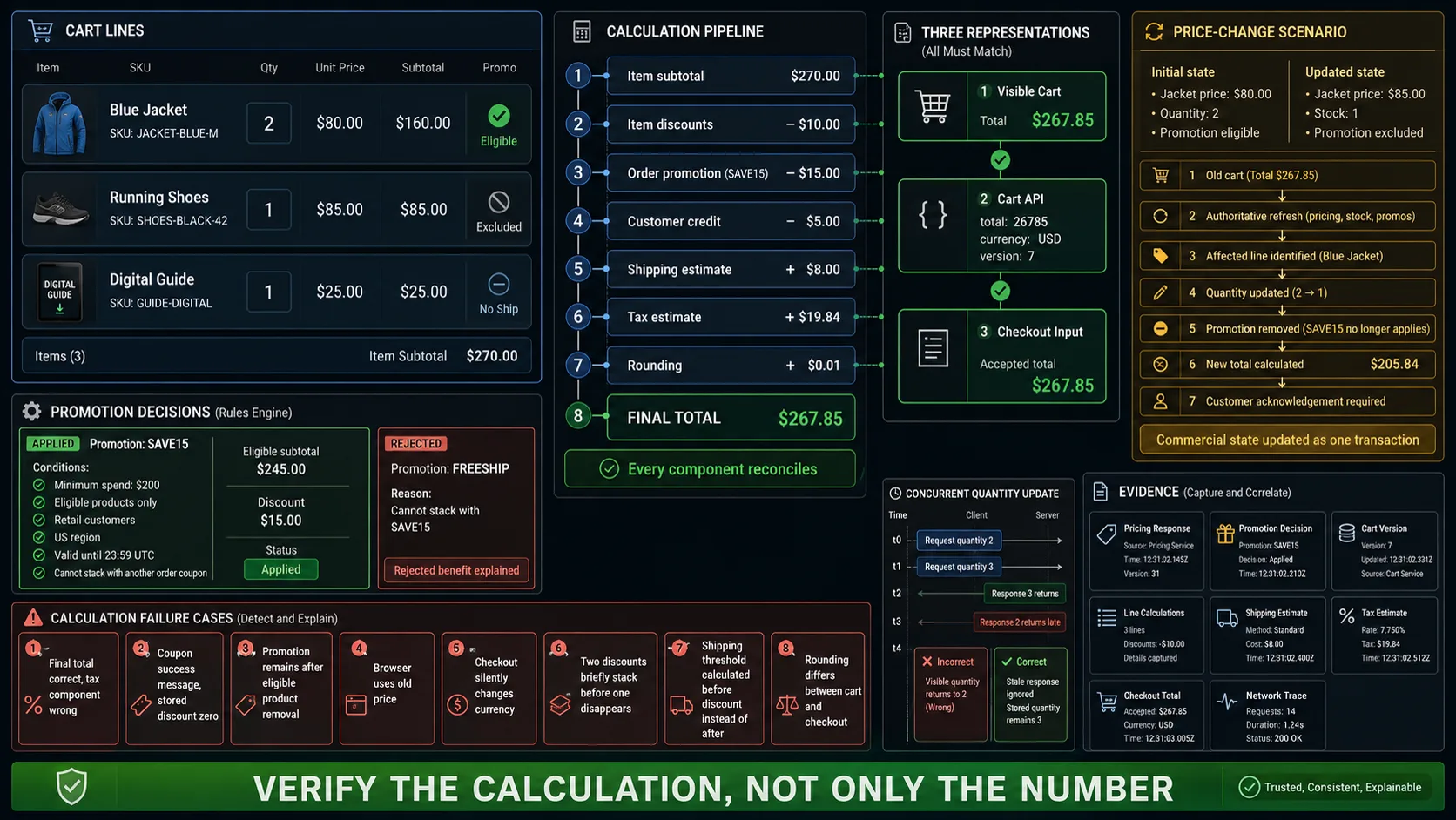
A cart total should be explainable.
A common formula is:
Item subtotal
− item discounts
− order discounts
− credits
+ estimated shipping
+ estimated tax
=
cart total
The exact order of operations is application-specific. Tax, discounts, rounding, and shipping thresholds may depend on it.
Reconstruct the total
Do not assert only the final number.
Capture each component:
{
  "subtotal": 16000,
  "itemDiscounts": 0,
  "orderDiscounts": 1000,
  "credits": 0,
  "shippingEstimate": 500,
  "taxEstimate": 1235,
  "total": 16735
}
Then verify that the visible and stored total follow the documented formula.
This makes failures diagnosable. A $5.00 difference could originate from shipping, tax, promotion eligibility, rounding, or credit application.
A final-total assertion alone cannot show which component is wrong.
Price changes
A product may remain in the cart long enough for its price to change.
Test the full transition:
- Add the product at the initial price.
- Change the authoritative price.
- Refresh or update the cart.
- Continue toward checkout.
The product may:
- retain its original price for a documented period;
- update immediately;
- update only before checkout;
- require customer acknowledgement;
- become unavailable under the old offer.
Any of those policies can be valid.
What should not happen is a cart displaying one amount while checkout silently uses another.
Test combined commercial changes as well:
Price: $80 → $85
Stock: 3 → 1
Promotion: eligible → excluded
The cart should reconcile the complete state rather than fixing one field and preserving two stale ones.
Promotion eligibility and stacking
A promotion decision can depend on:
- eligible products;
- minimum spend;
- quantity;
- customer group;
- region;
- currency;
- start and end time;
- usage limits;
- previous customer use;
- maximum discount;
- stacking policy.
A visible Coupon applied message is not enough when the stored discount remains zero.
Test representative browser journeys for:
- valid coupon;
- expired coupon;
- not-yet-active coupon;
- excluded product;
- ineligible customer;
- minimum spend not reached;
- maximum uses reached;
- wrong region or currency;
- promotion removed after quantity decreases.
Do not run every possible promotion combination through the browser.
The full rule matrix usually belongs closer to the pricing or promotion service. Keep a smaller set of browser tests that prove the customer journey and visible recovery.
Where stacking exists, verify combinations of:
- item discount;
- order discount;
- coupon;
- free shipping;
- loyalty credit;
- gift card.
When stacking is rejected, the cart should explain which benefit remained and which one was removed.
Persistence, Merging, and Ownership
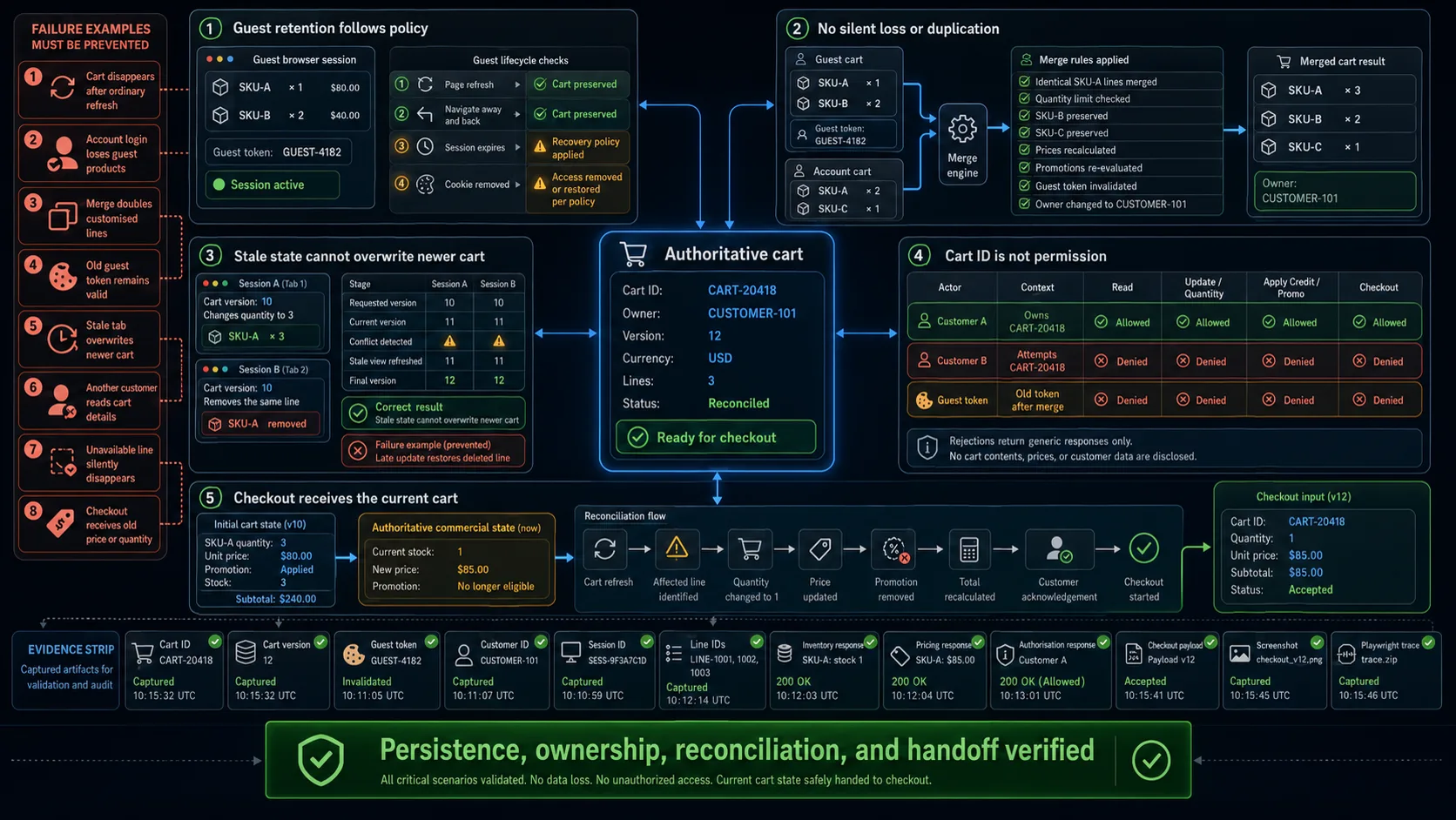
Cart persistence involves identity, session state, and server-side ownership.
A cart may survive through:
- a session cookie;
- local storage;
- an anonymous server record;
- login;
- another device;
- a saved-cart link;
- an account-level cart.
The expected duration should be documented.
Longer persistence is not always better. On a shared device, an indefinitely retained cart can expose another customer’s activity.
Guest persistence and account merge
For a guest cart, test:
- page refresh;
- navigation away and back;
- browser restart where supported;
- session expiration;
- cookie removal;
- local-storage removal;
- expired cart tokens.
Then test login with products on both sides.
Example:
Guest cart:
- SKU-A × 1
- SKU-B × 2

Account cart:
- SKU-A × 2
- SKU-C × 1
A merge policy might produce:
- SKU-A × 3
- SKU-B × 2
- SKU-C × 1
Another product may keep the account cart, keep the guest cart, or ask the customer to choose.
Whichever policy applies, verify:
- no silent product loss;
- no unintended duplication;
- quantity limits;
- current prices;
- current stock;
- promotion re-evaluation;
- currency compatibility;
- seller and customisation identity;
- ownership of the resulting cart;
- invalidation of obsolete guest tokens.
The visible merge and the server-side owner should both be checked.
Multiple sessions and stale carts
Open the same cart in two tabs or sessions.
Then:
- Change quantity in the first view.
- Remove or update the same line in the second.
- Return to the first.
- Perform another action or start checkout.
A stale view should not overwrite a newer cart without following the documented conflict policy.
Useful evidence includes:
Cart ID
Cart version
Line ID
Requested version
Accepted version
Conflict response
Final stored state
This scenario deserves integration or API coverage in addition to a representative browser journey. Browser-only assertions can show the symptom but may not explain the version conflict.
Cart ownership
A cart identifier must not grant access by itself.
Authenticate as another customer and attempt to:
- read the cart;
- add a line;
- change quantity;
- remove a line;
- apply a credit;
- start checkout;
- access a saved-cart link;
- attach the cart to another account.
Every operation should verify ownership or authorised access.
Do not rely only on unpredictable identifiers. A long random cart ID is not a substitute for object-level authorisation.
Also verify that failure responses do not expose product lines, customer data, discounts, saved addresses, or internal identifiers.
Stale Inventory and Checkout Handoff
Adding an item to a cart does not always reserve stock.
A cart line may later become:
- low stock;
- out of stock;
- discontinued;
- restricted in the customer’s region;
- unavailable from the selected seller;
- limited to a smaller quantity;
- available only through another fulfilment source.
The application needs a deliberate reconciliation policy.
Inventory changes
Consider this transition:
Cart quantity: 3
Current stock: 1
The cart may:
- reduce the quantity after acknowledgement;
- block checkout;
- mark the line unavailable;
- split fulfilment;
- offer backorder.
It should not continue presenting quantity 3 as immediately purchasable when only one unit remains.
When a line becomes invalid:
- identify the affected product;
- preserve unaffected lines;
- remove invalid discounts;
- recalculate totals;
- explain the next action;
- stop stale data from reaching checkout.
Automatically deleting a line without explanation can make the customer believe it was never added.
Last-unit concurrency should not be proven through browser automation alone. The browser can reproduce competing customer journeys, but inventory and order records determine whether the business invariant held.
Checkout handoff
Cart testing ends when the authoritative cart is handed to checkout.
It does not need to prove payment or order creation. It must prove that checkout starts from the cart the customer accepted.
Compare:
| Cart | Checkout input |
|---|---|
| Cart ID | Same logical cart or purchase intent |
| Product lines | Same SKUs and configurations |
| Quantities | Same accepted values |
| Currency | Same commercial context |
| Discounts | Same eligibility or explicit recalculation |
| Estimated charges | Retained or clearly recalculated |
| Total | Same value or disclosed change |
Test the handoff after:
- quantity updates;
- promotion application;
- guest-to-account merge;
- price changes;
- stock reconciliation;
- currency changes;
- stale-session recovery.
A route change to /checkout proves navigation. It does not prove that checkout received the correct cart.
Checkout may legitimately recalculate shipping, tax, stock, or price. Any authoritative change should be visible before payment.
Cart Experience
The cart is a highly interactive page. Quantity controls, remove actions, coupon forms, estimates, and totals often update without a full reload.
These interactions need clear feedback and predictable behaviour.
Accessibility and mobile behaviour
Status changes should be communicated explicitly:
Quantity updated to 2
Jacket removed from cart
SAVE10 applied
Coupon expired
Only 1 item remains in stock
Cart total updated to $150.00
Check that:
- success does not rely only on colour;
- quantity errors identify the affected line;
- promotion errors explain the rejected input;
- dynamic updates are exposed as status messages;
- focus remains predictable after removal;
- keyboard users can reach every action;
- disabled controls expose their state;
- the product variant remains identifiable.
After removing a line, focus should move to a meaningful nearby control or cart heading rather than disappearing.
On mobile, verify that:
- product and variant details remain readable;
- quantity controls remain operable;
- remove actions do not overlap other controls;
- totals remain visible;
- the sticky checkout control uses the current total;
- promotion input is not hidden by the keyboard;
- horizontal scrolling is unnecessary;
- validation appears near the affected line;
- orientation changes preserve the cart.
A common defect is a sticky checkout button displaying an old total after quantity or promotion updates.
Interaction feedback and performance
The cart should distinguish between:
Update pending
Update accepted
Update rejected
Test under delayed:
- pricing;
- promotions;
- inventory;
- shipping estimates;
- tax estimates.
Disabling the entire cart for every request can prevent conflicts but create poor usability.
Keeping every control active without request coordination may corrupt the cart.
The expected solution depends on the cart’s concurrency model, but the customer should always understand whether the last action succeeded.
Interaction responsiveness matters more here than initial rendering alone. A quickly loaded cart can still be unusable when quantity updates take several seconds without feedback.
Core Shopping Cart Test Cases
The following 20 scenarios provide focused coverage without repeating the complete ecommerce test-case library.
Cart Lines and Quantities
| ID | Pri. | Scenario | Expected result | Evidence |
|---|---|---|---|---|
| CART-001 | P0 | Add the selected product variant | Stored line matches product ID, SKU, options, quantity, price, and currency | Add-to-cart response and cart API |
| CART-002 | P1 | Add the same configuration twice | Lines merge or remain separate according to policy | Final cart lines |
| CART-003 | P1 | Add the same SKU with different customisation | Distinct configurations are not merged incorrectly | Line IDs and selected options |
| CART-004 | P1 | Increase and decrease quantity | Accepted quantity and dependent totals update correctly | Cart response and calculation |
| CART-005 | P1 | Submit invalid quantity boundaries | Invalid values are rejected without corrupting the stored line | Validation and cart state |
| CART-006 | P1 | Remove one line from a multi-line cart | Only the intended line is removed and totals are recalculated | Cart before and after |
| CART-007 | P2 | Remove the final product | A deliberate empty-cart state appears and persists | Browser and cart API |
Pricing and Promotions
| ID | Pri. | Scenario | Expected result | Evidence |
|---|---|---|---|---|
| CART-008 | P0 | Reconstruct the complete cart total | Subtotal, discounts, credits, estimates, rounding, and total reconcile | Calculation components |
| CART-009 | P1 | Apply a valid promotion | Correct lines, thresholds, amount, and stacking rule are used | Promotion decision and cart |
| CART-010 | P1 | Apply an expired or ineligible promotion | Promotion is rejected truthfully and does not alter the stored total | Error and cart response |
| CART-011 | P1 | Remove a line that made the cart eligible | Promotion and totals are re-evaluated | Cart before and after |
| CART-012 | P0 | Change the authoritative price after addition | The documented price policy is applied before checkout | Pricing and cart state |
Persistence, Ownership, and Inventory
| ID | Pri. | Scenario | Expected result | Evidence |
|---|---|---|---|---|
| CART-013 | P1 | Refresh and restore a guest cart | Lines persist for the documented duration | Cart ID, session, and stored lines |
| CART-014 | P0 | Log in with guest and account carts | Merge follows policy without silent loss or duplication | Pre-merge and final carts |
| CART-015 | P0 | Access or modify another customer’s cart | Every operation is denied without exposing cart data | Authorisation responses |
| CART-016 | P1 | Modify the same cart from stale sessions | Conflict or reconciliation follows the version policy | Cart versions and final state |
| CART-017 | P0 | Reduce stock below cart quantity | The customer sees a truthful adjustment or blocking state | Inventory and cart response |
| CART-018 | P1 | Make one line unavailable | Unaffected lines remain and totals are recalculated | Final cart state |
Handoff and Experience
| ID | Pri. | Scenario | Expected result | Evidence |
|---|---|---|---|---|
| CART-019 | P0 | Start checkout after quantity, promotion, and stock changes | Checkout receives the accepted lines and commercial context | Cart and checkout comparison |
| CART-020 | P1 | Complete key cart actions on mobile and by keyboard | Controls, messages, totals, and focus remain usable and accurate | Mobile trace and accessibility review |
Automating Shopping Cart Tests with Playwright
Cart tests usually need browser and API evidence.
The browser reproduces the customer journey:
Add product
→ open cart
→ change quantity
→ apply promotion
→ inspect total
→ start checkout
The API confirms the business state:
Cart owner
→ stored lines
→ accepted quantities
→ calculation components
→ cart version
→ checkout input
Example:
import { test, expect } from '@playwright/test';

test('quantity, promotion, and total persist before checkout', async ({
  page,
  request,
}) => {
  const fixtureResponse = await request.post('/test-support/products', {
    data: {
      fixture: 'promotion-eligible-product',
      sku: 'JACKET-BLUE-M',
      unitPrice: 8000,
      availableQuantity: 5,
    },
  });

  expect(fixtureResponse.ok()).toBeTruthy();

  const product = await fixtureResponse.json();

  await page.goto(`/products/${product.slug}`);

  await page.getByRole('button', { name: 'Blue' }).click();
  await page.getByRole('button', { name: 'Medium' }).click();
  await page.getByRole('button', { name: 'Add to cart' }).click();
  await page.getByRole('link', { name: 'Cart' }).click();

  const cartLine = page
    .getByRole('listitem')
    .filter({ hasText: product.name });

  await expect(cartLine.getByText('Blue')).toBeVisible();
  await expect(cartLine.getByText('Medium')).toBeVisible();

  const quantity = cartLine.getByLabel('Quantity');

  const [quantityResponse] = await Promise.all([
    page.waitForResponse((response) =>
      response.url().includes('/api/cart') &&
      response.request().method() === 'PATCH',
    ),
    quantity.fill('2'),
  ]);

  expect(quantityResponse.ok()).toBeTruthy();

  await expect(quantity).toHaveValue('2');

  await page
    .getByLabel('Promotion code')
    .fill('SAVE10');

  const [promotionResponse] = await Promise.all([
    page.waitForResponse((response) =>
      response.url().includes('/api/cart/promotions') &&
      response.request().method() === 'POST',
    ),
    page
      .getByRole('button', { name: 'Apply promotion' })
      .click(),
  ]);

  expect(promotionResponse.ok()).toBeTruthy();

  await expect(page.getByTestId('cart-subtotal'))
    .toHaveText('$160.00');

  await expect(page.getByTestId('cart-discount'))
    .toHaveText('−$10.00');

  await expect(page.getByTestId('cart-total'))
    .toHaveText('$150.00');

  const cartResponse = await request.get('/api/cart/current');

  expect(cartResponse.ok()).toBeTruthy();

  const cart = await cartResponse.json();

  expect(cart.lines).toEqual([
    expect.objectContaining({
      sku: 'JACKET-BLUE-M',
      quantity: 2,
      unitPrice: 8000,
      lineSubtotal: 16000,
    }),
  ]);

  expect(cart.subtotal).toBe(16000);
  expect(cart.discountTotal).toBe(1000);
  expect(cart.total).toBe(15000);

  await page
    .getByRole('button', { name: 'Checkout' })
    .click();

  await expect(page.getByTestId('checkout-cart-total'))
    .toHaveText('$150.00');
});
The routes, selectors, and promotion rules are application-specific.
The verification pattern remains:
Customer action
→ accepted response
→ persisted cart
→ reconciled calculation
→ matching checkout input
Avoid fixed sleeps for quantity, promotion, and estimate updates. Wait for the relevant response or observable state.
For guest merging, ownership, and stale-session scenarios, use independent browser contexts with independent server-side identities.
A useful failure report should retain:
Cart ID
Cart version
Customer or session ID
Line IDs
SKU
Promotion decision
Request and response
Visible totals
Checkout input
Screenshot
Playwright trace
Without those identifiers, an assertion such as Expected $150.00, received $160.00 reveals little about the failed calculation.
Where WrightTest Fits
WrightTest provides a visual interface around Playwright for recording, editing, running, scheduling, and debugging browser tests.
A team can record one cart journey:
Add product
→ open cart
→ change quantity
→ apply promotion
→ validate totals
→ start checkout
Fixed values can then be replaced with variables:
Customer type
Product
SKU
Initial quantity
Updated quantity
Promotion
Currency
Expected subtotal
Expected discount
Expected total
Expected merge result
Expected stock result
The same journey can cover:
- empty and populated carts;
- duplicate additions;
- quantity boundaries;
- valid and expired promotions;
- guest persistence;
- account-cart merging;
- stale price and stock;
- mobile layouts;
- checkout handoff.
Each run can retain its inputs, failed step, screenshots, and Playwright trace.
WrightTest covers the repeatable browser journey. Pricing rules, promotion decisions, cart ownership, inventory reconciliation, and persistence still require the appropriate API, service, integration, or database evidence.
Final Acceptance Rule
A cart should not pass because:
The products were visible and the total looked correct.
A stronger result is:
The cart stored the intended products and configurations, persisted every accepted quantity change, applied the documented price and promotion rules, protected ownership, reconciled stale stock, exposed an explainable total, and passed the same authoritative state to checkout.
That is the boundary shopping cart testing must verify.
Technical References
- Playwright: Locators
- Playwright: API Testing
- Playwright: Test Isolation
- Playwright: Best Practices
- Playwright: Tracing
- W3C: Error Identification
- W3C: User Notifications in Forms
- W3C: Status Messages
- OWASP API Security: Broken Object Level Authorization
- OWASP: Session Management Cheat Sheet
- web.dev: Interaction to Next Paint